
Introduction
The Watson Pro 14.4V 98Wh Micro V-Mount Battery is designed for professional cameras and LED lights, offering a compact and lightweight power solution. This battery delivers up to 10A of continuous power and features multiple output ports, including USB Type-C, USB Type-A, Micro-USB, and D-Tap, for versatile device charging and powering. Its integrated backlit LCD screen provides real-time battery status, and a built-in intelligent control circuit ensures safe operation.
Key Features
- Compact and Lightweight Design: Weighs only 1.1 lb, making it suitable for mobile and gimbal applications.
- High Power Output: Supports up to 10A continuous draw for professional cameras and lights.
- Multiple USB Ports: Includes USB Type-A, Micro-USB, and USB Type-C for charging smartphones, tablets, and laptops.
- D-Tap Connector: Provides an additional port for powering accessories like monitors or lights.
- Backlit LCD Status Display: Shows remaining battery capacity and output voltage.
- Intelligent Control Circuit: Protects against overcurrent, overvoltage, overtemperature, and short-circuiting.
Setup
1. Initial Charging
Before first use, fully charge the battery. The battery can be charged using an optional V-mount charger, or via the D-Tap, USB Type-C, or Micro-USB ports. Refer to the "Charging Options" section for detailed instructions.
2. Mounting the Battery
Align the V-mount plate on the back of the battery with the V-mount receiver on your camera rig or device. Slide the battery down until it clicks securely into place. Ensure a firm connection to prevent accidental disengagement.

Image: Back view of the Watson Pro Micro V-Mount Battery, illustrating the V-mount plate for attachment to compatible devices.
3. Connecting Devices
Connect your professional camera, LED lights, or other compatible devices to the battery's output ports as needed. Ensure all connections are secure.
Operating Instructions
1. Powering On/Off
The battery typically powers on automatically when connected to a device and mounted. To check the battery status, press the check button located on the front of the battery.

Image: Front view of the Watson Pro Micro V-Mount Battery, displaying the backlit LCD screen with battery voltage and USB output status.
2. Using the LCD Status Display
Press the button on the front of the battery to activate the backlit LCD screen. The display will show the remaining battery capacity (graphical and percentage), current output voltage, and status of connected USB devices.
3. USB Output Ports
The battery features multiple USB ports for charging and powering external devices:
- USB Type-C: Supports 5V/2.4A, 9V/2A, 12V/2A, 15V/2A, 20V/2.2A. Ideal for charging laptops, smartphones, and tablets.
- Micro-USB: Supports 5V/3A. Suitable for various smaller electronic devices.
- USB Type-A: Supports 5V/2.4A, 9V/2A, 12V/1.5A. For general USB device charging.
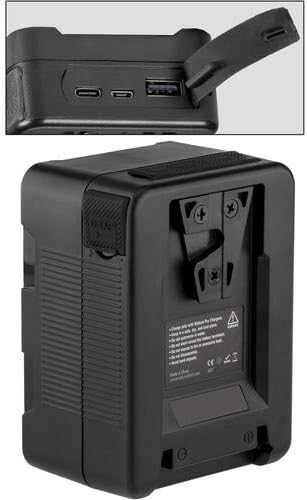
Image: Top view of the Watson Pro Micro V-Mount Battery, highlighting the USB Type-A, USB Type-C, and Micro-USB output ports.
4. D-Tap Output/Charging Port
The D-Tap port provides power for accessories (e.g., monitors, lights) and can also be used as an input for charging the battery. Ensure the connected device or charger is compatible with D-Tap specifications.
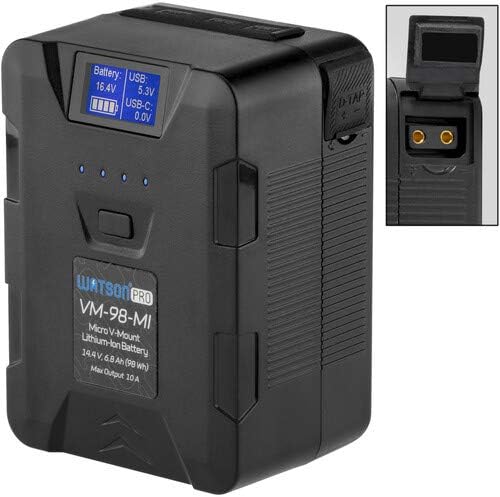
Image: Side view of the Watson Pro Micro V-Mount Battery, showing the D-Tap port with its protective cover open.
5. Charging Options
The battery can be recharged using one of the following methods:
- V-Mount Charger: Connect to an optional V-mount battery charger.
- D-Tap Charger: Use a compatible D-Tap charger connected to the D-Tap port.
- USB Type-C Charger: Connect a USB Type-C power adapter to the USB Type-C port.
- Micro-USB Charger: Connect a Micro-USB power adapter to the Micro-USB port.
The LCD display will indicate charging status. Always use chargers compatible with the battery's voltage and current requirements.
Maintenance
1. Cleaning
Wipe the battery's exterior with a soft, dry cloth. Do not use liquid cleaners or solvents. Ensure all ports are free from dust and debris.
2. Storage
For long-term storage, charge the battery to approximately 50-70% capacity. Store in a cool, dry place away from direct sunlight and extreme temperatures. Avoid fully discharging the battery for extended periods, as this can reduce its lifespan.
3. Battery Care
Avoid dropping the battery or subjecting it to strong impacts. Do not disassemble the battery. If the battery shows signs of damage or malfunction, discontinue use and contact support.
Troubleshooting
- Battery Not Charging:
- Ensure the charger is properly connected and functioning.
- Verify the charging port (V-mount, D-Tap, USB-C, Micro-USB) is clean and undamaged.
- Confirm the charger is compatible with the battery's specifications.
- Device Not Powering On:
- Check if the battery is securely mounted to the device.
- Verify the battery has sufficient charge using the LCD display.
- Ensure the connecting cables are functional and properly inserted.
- Confirm the device's power requirements do not exceed the battery's 10A continuous output.
- LCD Display Not Working:
- Press the check button firmly.
- If the battery is completely discharged, the display may not activate. Attempt to charge the battery.
- Overheating:
- If the battery feels excessively hot, disconnect it immediately and allow it to cool down in a well-ventilated area.
- The intelligent control circuit is designed to prevent overheating, but continuous high-load operation in hot environments can still cause elevated temperatures.
If issues persist, contact Watson customer support for further assistance.
Specifications
| Feature | Detail |
|---|---|
| Model Number | VM-98-MI |
| Battery Type | Lithium-Ion |
| Nominal Voltage | 14.4V |
| Capacity | 98Wh |
| Max Continuous Output | 10A |
| USB Type-C Output | 5V/2.4A, 9V/2A, 12V/2A, 15V/2A, 20V/2.2A |
| Micro-USB Output | 5V/3A |
| USB Type-A Output | 5V/2.4A, 9V/2A, 12V/1.5A |
| D-Tap Port | Output/Input (Charging) |
| Weight | 1.14 pounds (approx. 0.52 kg) |
| Dimensions | 4.8 x 3.3 x 2.8 inches (approx. 12.2 x 8.4 x 7.1 cm) |
| Protection Features | Overcurrent, Overvoltage, Overtemperature, Short-circuit |
Warranty and Support
For information regarding warranty coverage, please refer to the warranty card included with your product or visit the official Watson website. If you encounter any issues or require technical assistance, please contact Watson customer support. Keep your purchase receipt and product model number (VM-98-MI) available when contacting support.
Manufacturer: WATSON


