
1. Introduction
This manual provides essential instructions for the safe and effective use of your AUTOGEN MJS70W Car Jump Starter. Please read this manual thoroughly before operation and retain it for future reference. This device is designed to jump-start 12V vehicles with up to 8.0L gasoline or 8.0L diesel engines, and also functions as a portable power bank with wireless charging, QC3.0 USB outputs, and an integrated LED flashlight.
2. Safety Information
Always observe the following safety precautions to prevent injury or damage to the device and vehicle:
- Do not attempt to jump-start a frozen battery.
- Ensure the jump starter is fully charged before use.
- Connect the clamps correctly: Red to positive (+), Black to negative (-). Reverse polarity can cause damage.
- Do not touch the red and black clamps together.
- Keep the device away from children.
- Do not expose the device to extreme temperatures or direct sunlight for prolonged periods.
- If the device becomes excessively hot during use, discontinue operation immediately.
- The device is IP68 waterproof; however, avoid intentional submersion.
The AUTOGEN MJS70W features an intelligent protection system against reverse polarity, overcharge, reverse charge, overcurrent, over-discharge, high temperature, short circuit, and overvoltage.

Image: The AUTOGEN MJS70W Car Jump Starter is designed with IP68 waterproofing, making it resistant to water and dust, suitable for outdoor use in various weather conditions.
3. Package Contents
Verify that all items are present in your package:
- AUTOGEN MJS70W Jump Starter Unit
- Intelligent Jumper Cable with Clamps
- Type-C USB Cable
- User Manual (this document)
- Tool Case
- DC 12V Cigarette Light Socket Adapter
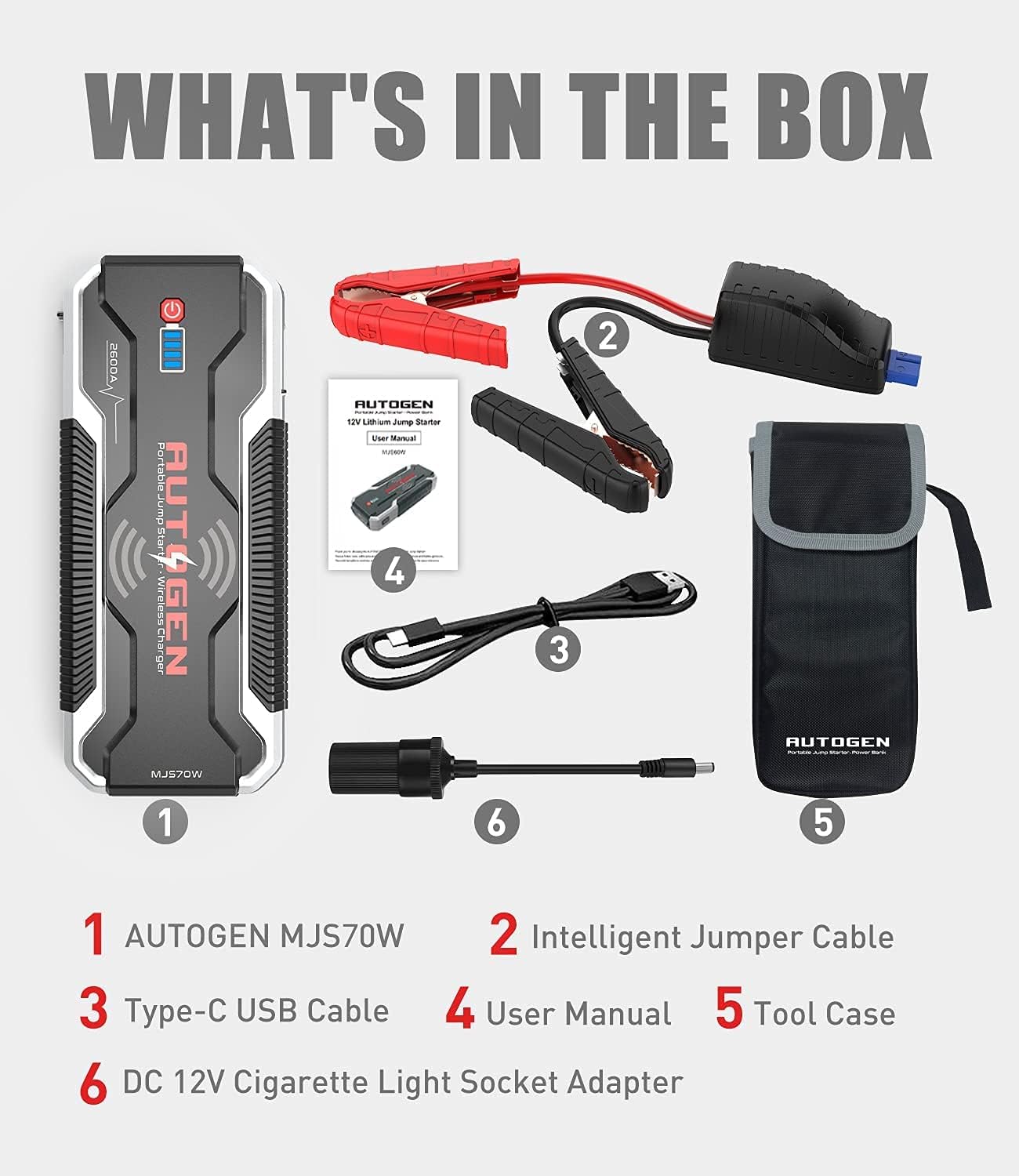
Image: A visual representation of all components included in the AUTOGEN MJS70W Car Jump Starter package.
4. Product Features and Components
Familiarize yourself with the key features and ports of your jump starter:
- Jump Starter Socket: Port for connecting the intelligent jumper cables.
- Power Button: Activates the device and cycles through LED flashlight modes.
- USB-C IN/OUT Port: For charging the jump starter and charging other devices.
- USB 5V 2.4A Output Port: Standard USB output for charging devices.
- Quick Charge 3.0 Output Port: Fast charging USB output.
- DC 15V 10A Output Port: For powering 12V accessories via the cigarette lighter adapter.
- 10W Wireless Charger: Integrated wireless charging pad for compatible devices.
- LED Flashlight: Multi-mode emergency light (Strong, SOS, Strobe).

Image: Labeled diagram of the AUTOGEN MJS70W unit, highlighting its functional components.

Image: The jump starter's multiple charging ports and wireless charging capability in use.

Image: The intelligent jumper cables, designed for safety with spark-proof and smart battery system features.
5. Setup and Initial Charging
Before first use, fully charge the AUTOGEN MJS70W jump starter.
- Connect the provided USB-C cable to the USB-C IN/OUT port on the jump starter.
- Connect the other end of the USB-C cable to a suitable USB wall adapter (not included) or the provided DC 12V cigarette light socket adapter.
- The battery indicator lights on the jump starter will illuminate, showing the charging progress. All lights will be solid when fully charged.
- A full charge typically takes 4-5 hours using a Quick Charge 3.0 compatible adapter.
6. Operating Instructions
6.1. Jump Starting a Vehicle
Follow these steps to safely jump-start your vehicle:
- Ensure the jump starter is at least 75% charged.
- Turn off the vehicle's ignition and all accessories.
- Insert the intelligent jumper cable plug into the jump starter's jump starter socket. Ensure a firm connection.
- Connect the red (+) clamp to the positive terminal of the vehicle's battery.
- Connect the black (-) clamp to the negative terminal of the vehicle's battery.
- Once connected, the indicator on the intelligent jumper cable should show a solid green light, indicating a safe connection. If it shows a red light or flashes, check the connections.
- Start the vehicle's engine.
- Once the engine starts, immediately remove the jumper cables from the jump starter, then disconnect the black (-) clamp, followed by the red (+) clamp from the vehicle battery.

Image: Step-by-step guide for jump-starting a vehicle.
6.2. Charging Electronic Devices
The AUTOGEN MJS70W can charge various electronic devices:
- USB Charging: Connect your device's USB charging cable to either the USB 5V 2.4A output port or the Quick Charge 3.0 output port.
- Wireless Charging: Place your Qi-compatible device on the wireless charging pad on top of the jump starter. Ensure the device is centered for optimal charging.
- 12V DC Output: Use the provided DC 12V cigarette light socket adapter to power 12V accessories.
6.3. Using the LED Flashlight
The integrated LED flashlight has multiple modes for various situations:
- Press and hold the Power Button for 3 seconds to turn on the flashlight in Strong mode.
- Press the Power Button again to cycle to SOS mode.
- Press the Power Button a third time to cycle to Strobe mode.
- Press the Power Button a fourth time to turn off the flashlight.

Image: The LED flashlight providing illumination in Strong, SOS, and Strobe modes.
7. Charging the Jump Starter
To recharge the AUTOGEN MJS70W:
- Use the provided USB-C cable and connect it to the USB-C IN/OUT port.
- Connect the other end to a USB wall charger (5V/2A minimum, QC3.0 recommended for faster charging) or a 12V car charger.
- The battery indicator lights will show charging status. All four lights will be solid when fully charged.
- It is recommended to recharge the unit every 3-6 months, even if not used, to maintain battery health.
8. Maintenance
Proper maintenance ensures the longevity of your jump starter:
- Store the device in a cool, dry place, away from direct sunlight and moisture.
- Keep the unit clean. Wipe with a dry, soft cloth. Do not use harsh chemicals or abrasive cleaners.
- Ensure the ports are free from dust and debris.
- Periodically check the jumper cables and clamps for any signs of damage or wear. Replace if necessary.
9. Troubleshooting
If you encounter issues, refer to the following common problems and solutions:
| Problem | Possible Cause | Solution |
|---|---|---|
| Jump starter does not turn on. | Battery is depleted. | Charge the jump starter fully. |
| Vehicle does not start after connecting. | Incorrect clamp connection; Jump starter battery too low; Vehicle battery severely damaged. | Check clamp polarity and ensure firm connection. Recharge jump starter. Consult a mechanic for vehicle battery issues. |
| Intelligent jumper cable indicator shows red/flashing. | Reverse polarity; Short circuit; Over-temperature. | Disconnect immediately and recheck connections. Allow unit to cool down if hot. |
| Devices not charging via USB/Wireless. | Jump starter is off; Device incompatible; Cable faulty. | Ensure jump starter is on. Verify device compatibility. Try a different cable. |
10. Specifications
| Feature | Specification |
|---|---|
| Model Number | MJS70W |
| Peak Current | 3000 Amperes |
| Battery Capacity | 24000 mAh |
| Battery Cell Composition | Lithium Ion Polymer |
| Voltage | 12 Volts |
| Engine Compatibility | Up to 8.0L Gasoline / 8.0L Diesel |
| Wireless Charging Output | 10W |
| USB Output 1 | Quick Charge 3.0 |
| USB Output 2 | 5V 2.4A |
| DC Output | 15V 10A |
| Dimensions | 25.5 x 12.8 x 10.8 cm |
| Weight | 1.4 kg |
| Waterproof Rating | IP68 |
11. Warranty and Support
AUTOGEN products are manufactured to high-quality standards. For warranty information and customer support, please refer to the warranty card included in your package or visit the official AUTOGEN website. Keep your purchase receipt as proof of purchase for any warranty claims.