
Introduction
Thank you for choosing the Lokmat Ocean Smartwatch. This device is designed to enhance your daily activities and provide valuable health insights. It features a 2-inch touchscreen display, IP68 water resistance, Bluetooth 4.0 connectivity, and a robust design suitable for various sports and daily wear. This manual provides essential information on how to set up, operate, and maintain your smartwatch.

Figure 1: Lokmat Ocean Smartwatch. This image displays the smartwatch from an angled perspective, highlighting its digital interface and rugged design. The screen shows various metrics including time, date, steps, and heart rate.
1. Setup
1.1 Charging the Smartwatch
Before initial use, fully charge your Lokmat Ocean Smartwatch. A full charge typically takes 4-5 hours and provides over 10 days of standby time with its 180mAh polymer battery.
- Connect the magnetic charging cable to the charging contacts on the back of the smartwatch.
- Plug the USB end of the cable into a standard USB power adapter (5V/1A recommended) or a computer's USB port.
- The watch display will indicate charging status.

Figure 2: Smartwatch charging. The image shows the Lokmat Ocean Smartwatch connected to its charging cable, illustrating the charging process and highlighting its battery efficiency.
1.2 App Installation (DayBand APP)
To unlock the full functionality of your smartwatch, download and install the 'DayBand' application on your smartphone.
- Scan the QR code below corresponding to your phone's operating system (iOS or Android) or search for 'DayBand' in your app store.
- Follow the on-screen instructions to complete the installation.

Figure 3: DayBand App installation. This image displays a smartphone running the DayBand application, with QR codes provided for both iOS and Android users to download the app.
Download for iOS: http://qr24.cn/EJ4UxY
Download for Android: http://qr24.cn/F6eT3D
1.3 Pairing with Your Smartphone
After installing the DayBand app, pair your smartwatch with your smartphone via Bluetooth 4.0.
- Ensure Bluetooth is enabled on your smartphone.
- Open the DayBand app and navigate to the 'Device' or 'My Device' section.
- Tap 'Add Device' or 'Search for Device'. The app will scan for available smartwatches.
- Select 'OCEAN' from the list of found devices.
- Confirm the pairing request on both your smartphone and smartwatch if prompted.
2. Operating Instructions
2.1 Basic Navigation
The Lokmat Ocean Smartwatch features a 2-inch touchscreen and four mechanical buttons for navigation.
- Touchscreen: Swipe left/right, up/down to navigate through menus and functions. Tap to select.
- Buttons: Use the physical buttons for quick access to specific functions or to return to the previous screen. Refer to the on-screen prompts for button-specific actions.
2.2 Health Monitoring Features
The smartwatch includes built-in sensors for health tracking.
- Heart Rate Monitor: Access the heart rate function on the watch or through the app to measure your heart rate. Ensure the watch is snug on your wrist for accurate readings.
- Blood Pressure Monitor: The device can estimate blood pressure. For accurate medical readings, consult a professional medical device.
- Pedometer: Automatically tracks your steps, distance, and calorie consumption throughout the day.
- Sleep Monitoring: Wear the smartwatch to bed to monitor your sleep patterns, including deep sleep, light sleep, and awake times. View detailed reports in the DayBand app.
2.3 Multi-Sport Modes
The Lokmat Ocean Smartwatch supports over six multi-sport modes, providing detailed data for activities such as running, cycling, and climbing.
- Navigate to the 'Sport' or 'Workout' section on your smartwatch.
- Select your desired activity.
- The watch will begin tracking relevant metrics like duration, distance, calories burned, and heart rate.
- End the workout session on the watch to save the data, which will then sync with the DayBand app.
2.4 Notifications
Receive real-time notifications from your smartphone directly on your smartwatch.
- Ensure your smartwatch is paired with your smartphone and the DayBand app is running in the background.
- In the DayBand app settings, enable notifications for desired applications (e.g., calls, SMS, WhatsApp, Facebook, Instagram, WeChat).
- Incoming calls, messages, and app alerts will be displayed on your smartwatch screen.
2.5 Remote Control Photography
Use your smartwatch to remotely control your smartphone's camera.
- Open the camera interface within the DayBand app on your smartphone.
- On your smartwatch, navigate to the remote camera function.
- Shake your arm or tap the screen on your smartwatch to trigger the camera shutter on your phone.
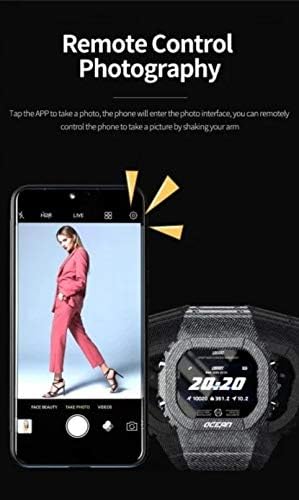
Figure 4: Remote control photography. This image illustrates how the smartwatch can be used to remotely control a smartphone's camera, allowing users to take photos by shaking their arm.
3. Maintenance
3.1 Cleaning
Regular cleaning helps maintain the appearance and functionality of your smartwatch.
- Wipe the watch screen and strap with a soft, damp cloth.
- Avoid using harsh chemicals, abrasive cleaners, or solvents.
- Ensure the charging contacts are clean and dry before charging.
3.2 Water Resistance (IP68)
The Lokmat Ocean Smartwatch is IP68 rated, meaning it is protected against dust ingress and can withstand immersion in water up to 1.5 meters for up to 30 minutes.
- It is suitable for daily use, hand washing, and light rain.
- Avoid prolonged immersion, hot water, or exposure to high-pressure water jets (e.g., showering, diving, sauna).
- After exposure to water, wipe the watch dry before charging or operating buttons.
3.3 Battery Care
To prolong battery life:
- Avoid extreme temperatures.
- Do not fully discharge the battery frequently.
- Charge the device regularly, even if not in constant use.
4. Troubleshooting
4.1 Smartwatch Not Turning On
- Ensure the device is fully charged. Connect it to the charger for at least 30 minutes.
- Press and hold the power button for several seconds.
4.2 Unable to Pair with Smartphone
- Make sure Bluetooth is enabled on your smartphone and the smartwatch is within range.
- Restart both your smartphone and the smartwatch.
- Ensure the DayBand app has necessary permissions (e.g., location, Bluetooth).
- If previously paired, try unpairing the device from your phone's Bluetooth settings and then re-pairing through the DayBand app.
4.3 Inaccurate Health Data
- Ensure the smartwatch is worn snugly on your wrist, not too tight or too loose.
- Clean the sensor on the back of the watch.
- Avoid excessive movement during measurements.
- Note that the blood pressure monitor is for reference only and not a medical device.
4.4 Notifications Not Appearing
- Verify that the smartwatch is successfully paired with your phone.
- Check notification settings within the DayBand app to ensure desired apps are enabled.
- Ensure your phone's notification settings allow the DayBand app to display alerts.
- Keep the DayBand app running in the background.
5. Specifications
| Feature | Description |
|---|---|
| Brand | LOKMAT |
| Model | Ocean |
| Connectivity Technology | Bluetooth 4.0 |
| Screen Size | 2 Inches |
| Input Interface | Touchscreen, Buttons |
| Water Resistance | IP68 (Waterproof) |
| Special Features | Blood Pressure Monitor, Heart Rate Monitor, Pedometer, Multi-Sport Modes, Sleep Monitor, Notification Alerts, Remote Camera Control |
| Battery | 180mAh Polymer Battery |
| Charging Time | Approx. 4-5 hours |
| Dimensions (Watch Face) | 50mm (Width) x 16mm (Thickness) |
| Compatible Devices | Smartphones (iOS & Android) |
| Clasp Type | Tang Buckle |
| Color (Variant) | Red (as per product title) |

Figure 5: Smartwatch dimensions. This image provides a visual representation of the smartwatch's width (50mm) and thickness (16mm).
6. Warranty Information
The Lokmat Ocean Smartwatch comes with a standard manufacturer's warranty. Please refer to the warranty card included in your product packaging for specific terms, conditions, and duration. The warranty typically covers manufacturing defects but does not cover damage caused by misuse, accidents, unauthorized modifications, or normal wear and tear.
7. Customer Support
For further assistance, technical support, or warranty claims, please contact your retailer or the manufacturer's customer service. Contact details can usually be found on the product packaging or the official LOKMAT website.
- Online Support: Visit the official LOKMAT website for FAQs, troubleshooting guides, and contact forms.
- Email Support: Refer to your product documentation for the customer service email address.

