
Radwag XA 220.4Y.A
Radwag XA 220.4Y.A NTEP Analytical Balance User Manual
Model: XA 220.4Y.A | Brand: Radwag
Introduction
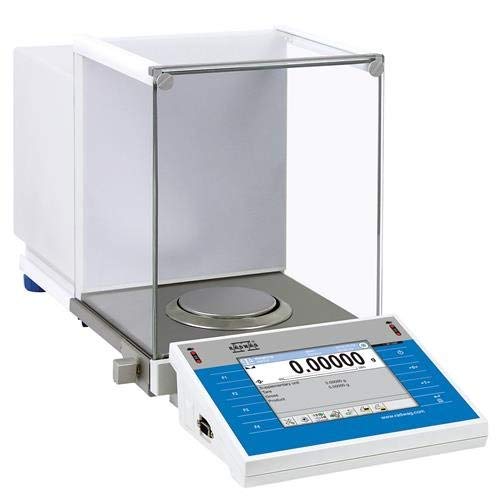
This manual provides essential information for the proper installation, operation, and maintenance of your Radwag XA 220.4Y.A NTEP Analytical Balance. This precision instrument is designed for highly accurate weighing in laboratory environments, featuring advanced functionalities such as a 5.7-inch resistive color touch screen, automatic weighing chamber, and an integrated antistatic ionizer.
The XA 220.4Y.A balance offers a maximum capacity of 220g with a readability of 0.001g, and is Class I NTEP certified, making it suitable for legal-for-trade applications. It incorporates a 2-point adjustment system for optimal accuracy and compliance with USP requirements (Chapter 41 and 1251).
Safety Information
Always read and understand all safety warnings and instructions before operating the balance. Failure to do so may result in injury or damage to the instrument. Ensure the balance is used in a stable, level environment, free from excessive vibrations, drafts, and extreme temperature fluctuations.
Setup
1. Unpacking
Carefully remove the balance and all accessories from the packaging. Retain the original packaging for future transport or storage.
2. Placement
Place the balance on a sturdy, level, and vibration-free surface. Avoid locations near air vents, windows, or equipment that generates heat or electromagnetic interference. Ensure sufficient space around the balance for operation and maintenance.
3. Leveling
The XA 220.4Y.A features an automatic control of the level system. Adjust the leveling feet until the bubble in the spirit level (typically located on the front or side of the balance) is centered. The system will continuously monitor the level and inform you of any deviations.
4. Power Connection
Connect the power adapter to the balance and then to a suitable power outlet. Use only the power adapter supplied with the instrument.
5. Initial Warm-up and Calibration
Allow the balance to warm up for at least 30 minutes after connecting power before performing any measurements. This ensures thermal stability. Perform an initial calibration as per the on-screen instructions or the balance's internal menu. The unique 2-point adjustment system ensures optimal accuracy.
Operating Instructions
1. Powering On/Off
Press the power button (usually located on the front panel or display unit) to turn the balance on. To turn off, press and hold the power button, then follow the on-screen prompts.
2. Using the Touch Screen
The 5.7-inch color touch screen provides intuitive access to all functions and applications. Navigate through menus by tapping icons and options. Refer to the on-screen help or the detailed software manual for specific application instructions.
3. Basic Weighing Procedure
- Ensure the weighing pan is clean and empty.
- Press the TARE button to zero the display.
- Carefully place the sample onto the center of the weighing pan.
- Wait for the reading to stabilize. The stability indicator on the display will confirm a stable measurement.
- Record the measurement.
- Remove the sample.
4. Automatic Weighing Chamber
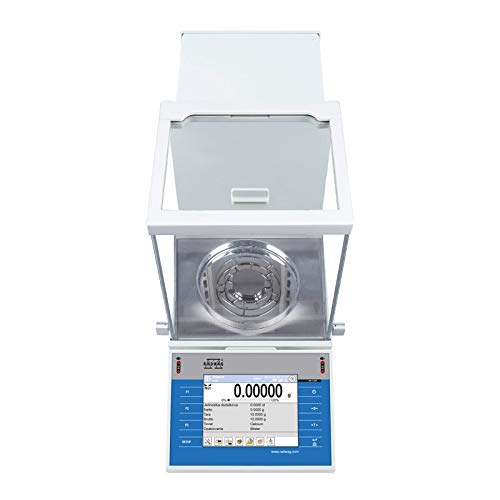
The spacious weighing chamber features automatic doors for comfortable operation and quick access to the weighing pan. Proximity sensors allow for touch-free opening and closing of the chamber doors, minimizing external disturbances during weighing.
5. Integrated Antistatic Ionizer
The integrated antistatic ionizer neutralizes electrostatic charges within the weighing chamber. This feature is crucial for accurate weighing of samples prone to static electricity, as it prevents measurement errors caused by electrostatic forces.
6. Connectivity
The balance is equipped with multiple connectivity options: 2x RS232, 2x USB-A, Ethernet, 4 IN / 4 OUT, and Wi-Fi. These interfaces allow for data transfer, peripheral device connection, and integration into laboratory networks. Refer to the advanced user manual for detailed instructions on configuring and using these connections.
Maintenance
1. Cleaning
Regularly clean the weighing pan, weighing chamber, and exterior surfaces of the balance. Use a soft, lint-free cloth dampened with a mild cleaning agent (e.g., isopropyl alcohol or a mild soap solution). Do not use abrasive cleaners or solvents that could damage the balance's surfaces. Ensure no liquids enter the internal components.
2. Calibration
Periodic calibration is essential to maintain measurement accuracy. The frequency of calibration depends on usage, environmental conditions, and regulatory requirements. Refer to the balance's menu for internal calibration procedures or consult a qualified service technician for external calibration.
3. Storage
When not in use for extended periods, disconnect the balance from power and store it in a clean, dry, and temperature-controlled environment. Cover the balance to protect it from dust.
Troubleshooting
- Unstable Readings:
- Check for drafts or air currents in the weighing area.
- Ensure the balance is level.
- Verify the balance is on a stable, vibration-free surface.
- Allow sufficient warm-up time.
- Check for electrostatic charges on the sample or weighing pan; use the antistatic ionizer if necessary.
- Display Errors:
- Refer to the balance's error code list in the detailed software manual.
- Try restarting the balance.
- Ensure all cables are securely connected.
- Balance Not Powering On:
- Check the power cable connection to both the balance and the outlet.
- Verify the power outlet is functional.
- Ensure the correct power adapter is being used.
For issues not resolved by these steps, contact Radwag customer support or a certified service technician.
Specifications
| Feature | Detail |
|---|---|
| Max Capacity | 220g |
| Readability [e] | 0.001g |
| Display | 5.7" Resistive Color Touch Screen |
| Weighing Chamber | Automatic Opening & Closing |
| Certification | Class I NTEP - Legal For Trade |
| Connectivity | 2x RS232, 2x USB-A, Ethernet, 4 IN / 4 OUT, Wi-Fi |
| Product Dimensions | 22 x 10 x 12 inches |
| Manufacturer | Radwag |
| Weight Limit | 220 Pounds |
| Form Factor | Mini |
| UPC | 810000396412 |
Note: The "Weight Limit" specification of "220 Pounds" appears to be a data entry discrepancy, as the "Max Capacity" is stated as "220g". Please refer to the "Max Capacity" for accurate weighing limits.
Warranty and Support
Warranty Information
Specific warranty terms and conditions for the Radwag XA 220.4Y.A Analytical Balance are typically provided with the product documentation at the time of purchase. Please refer to your warranty card or contact your authorized Radwag dealer for details regarding coverage and duration.
Customer Support
For technical assistance, service, or spare parts, please contact your local Radwag representative or visit the official Radwag website for support contact information. When contacting support, please have your balance model number (XA 220.4Y.A) and serial number ready.
Ask a question about this manual
Ask about setup, troubleshooting, compatibility, parts, safety, or missing instructions. Manuals+ will review the question and use this page’s manual context to help answer it.