
1. Introduction
The FiiO FD5 are high-resolution dynamic in-ear monitors designed to deliver exceptional audio fidelity. Featuring a large 12mm beryllium-coated DLC dynamic driver, an innovative front acoustic prism, and a semi-open volcanic field system, these earphones provide a balanced, detailed, and immersive listening experience. The FD5 offers versatility with interchangeable sound tubes and a twist-lock swappable plug system, allowing users to customize their sound and connectivity options.

Figure 1: FiiO FD5 High-Resolution In-Ear Monitors.
2. Package Contents
Upon opening your FiiO FD5 package, you should find the following items:
- FiiO FD5 In-Ear Monitors (Left and Right)
- High-purity monocrystalline silver-plated copper cable
- Interchangeable audio plugs: 2.5mm balanced, 3.5mm single-ended, 4.4mm balanced
- Interchangeable sound tubes: Large (balanced), Small (bass-focused)
- Storage case (HB5)
- Various ear tips (balanced, vocal, bass, bi-flange, foam)
- MMCX clip tool
- Cleaning brush
- User manual
- Instruction card
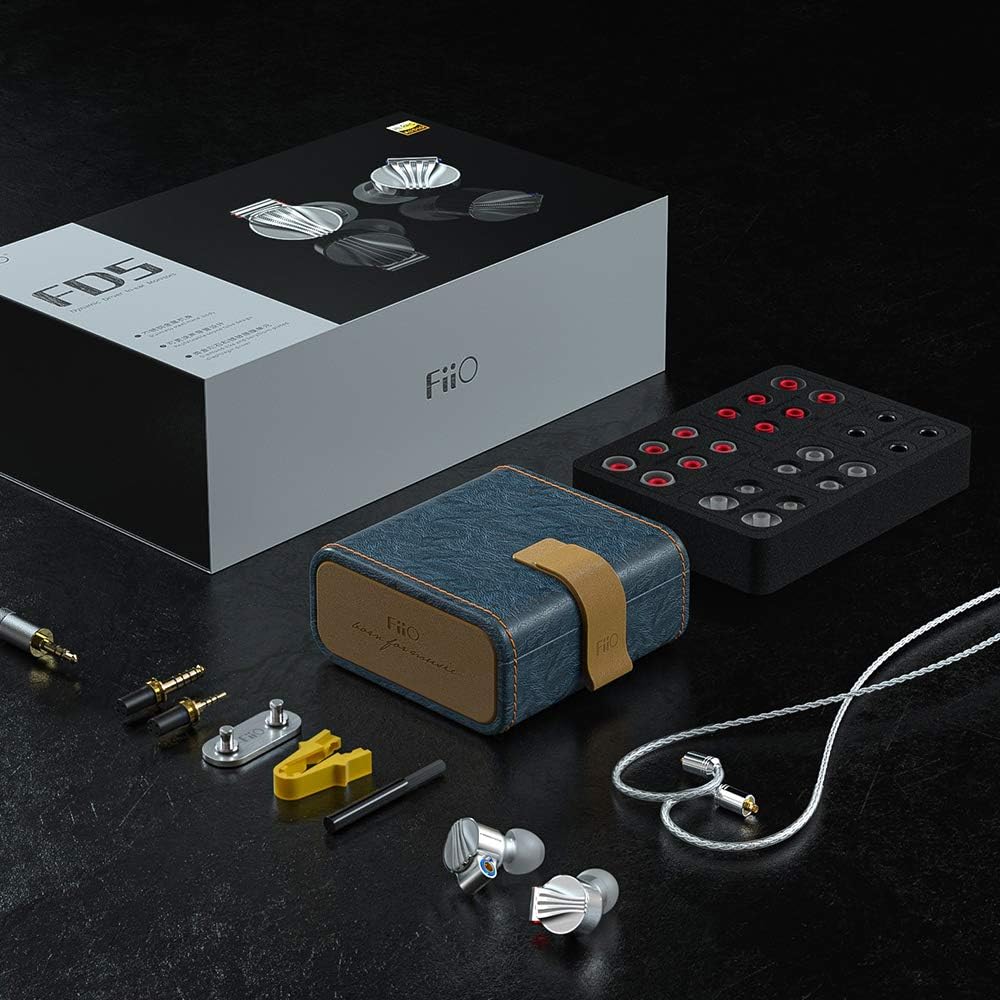
Figure 2: Contents of the FiiO FD5 package.
Unboxing Video
Video 1: Unboxing video for the FiiO FD5, showcasing the earphones and included accessories.
3. Product Overview
The FiiO FD5 features a robust and aesthetically pleasing design, crafted from 3D-embossed stainless steel. Key acoustic technologies include:
- 12mm Beryllium-Coated DLC Dynamic Driver: Utilizes N52 magnets with a high magnetic flux of 1.5 Tesla for powerful bass and high-resolution treble.
- Front Acoustic Prism: Precisely controls sound wave travel within the sound tube, eliminating high-frequency standing waves and enhancing sound diffusion.
- Rear Volcanic Field System + Semi-Open Acoustic Design: Reduces low-frequency standing waves and distortion, improving bass wave diffusion and providing a balanced, comfortable sound.

Figure 3: Close-up view of the FiiO FD5 earphone design.
4. Setup
4.1 Connecting the Cable to Earphones (MMCX)
The FiiO FD5 uses standard MMCX connectors for the detachable cable. To connect, align the cable connector with the earphone's MMCX port and push firmly until it clicks into place. Ensure the correct orientation (left earphone to left cable, right to right).
4.2 Changing Audio Plugs
The FD5 cable features a twist-lock swappable plug system, allowing you to switch between 2.5mm, 3.5mm, and 4.4mm connectors.
- To detach a plug: Rotate the female end of the cable connector counter-clockwise until it loosens. Pull the male end of the plug to detach it. Using a tissue or cloth can provide better grip.
- To attach a plug: Align the notch on the male end of the desired plug with the inside raised dot of the female end on the cable. Push the plug in until it is fully seated.
- To lock the plug: Rotate the female end clockwise until it is tight and secure.

Figure 4: Swappable audio plugs for the FiiO FD5 cable.
Video: How to Attach/Detach the Cable's Plug
Video 2: Demonstrates the process of attaching and detaching the swappable audio plugs.
4.3 Changing Sound Tubes
The FD5 includes two types of interchangeable sound tubes: a large one for a balanced sound and a small one for a more bass-focused sound. To change them, gently unscrew the current sound tube from the earphone nozzle and screw on the desired alternative.
4.4 Selecting Ear Tips
Choose the ear tips that provide the best seal and comfort for your ears. A proper seal is crucial for optimal sound quality, especially bass response. Experiment with the various included ear tips (balanced, vocal, bass, bi-flange, foam) to find your preferred fit.
5. Operating Instructions
5.1 Wearing the Earphones
The FiiO FD5 earphones are designed for over-the-ear wearing. This method helps secure the earphones, reduces microphonics (cable noise), and provides a comfortable fit.
- Identify the left (blue ring) and right (red ring) earphones.
- Gently insert the earphone into your ear canal.
- Loop the cable over the top of your ear, guiding it downwards behind your ear.
- Adjust the earphone and cable for a secure and comfortable fit.

Figure 5: FiiO FD5 earphones ready for wearing.
6. Maintenance
6.1 Cleaning the Earphones and Ear Tips
Regular cleaning helps maintain sound quality and hygiene.
- Use the provided cleaning brush to gently remove earwax or debris from the ear tips and sound tubes.
- Wipe the earphone bodies and cable with a soft, dry cloth.
- For ear tips, they can be removed and washed with mild soap and water, then thoroughly dried before reattaching.
6.2 Detaching MMCX Connectors with the Clip Tool
To prevent damage when detaching the MMCX cable, use the included MMCX clip tool:
- Align the rounded indentation of the yellow MMCX clip tool with the gap between the earphone's male connector and the cable's female component.
- Apply gentle, even pressure to the clip to detach the connector. Avoid pulling directly on the cable.
Video: How to Use the Final MMCX Assist
Video 3: Tutorial on using the MMCX clip tool for safe cable detachment.
7. Troubleshooting
If you encounter issues with your FiiO FD5, consider the following common solutions:
- No Sound or Intermittent Sound:
- Ensure the cable's audio plug is fully inserted into your audio source.
- Check that the MMCX connectors are securely attached to the earphones. Detach and reattach them using the MMCX clip tool if necessary.
- Verify that the correct audio plug (2.5mm, 3.5mm, or 4.4mm) is being used for your audio source.
- Test with a different audio source or cable to isolate the problem.
- Poor Sound Quality (e.g., weak bass, harsh treble):
- Ensure a proper seal with the ear tips. Try different sizes or types of ear tips.
- Check for any debris in the earphone nozzles or ear tips and clean them.
- Confirm that the sound tubes are securely screwed in and not loose.
- Earphones Uncomfortable or Falling Out:
- Experiment with different ear tip sizes and materials to find the most comfortable and secure fit.
- Ensure the cable is properly looped over your ears for stability.
8. Specifications
| Feature | Specification |
|---|---|
| Model Name | FD5 |
| Driver Type | 12mm Dynamic Driver (Beryllium-Coated DLC) |
| Frequency Response | 10 Hz - 40 kHz |
| Impedance | 32 Ohms |
| Ear Placement | In Ear |
| Connectivity Technology | Wired (Detachable Cable) |
| Headphones Jack | Swappable 2.5mm, 3.5mm, 4.4mm |
| Item Weight | 22 Grams (0.776 ounces) |
| Color | Silver |
| Noise Control | None (Passive Isolation) |
| Water Resistance Level | Water Resistant |
9. Warranty and Support
FiiO products are covered by a limited warranty. For specific warranty terms, duration, and conditions, please refer to the warranty card included in your product packaging or visit the official FiiO website. For technical support, troubleshooting assistance beyond this manual, or service inquiries, please contact FiiO customer support through their official channels.
Official FiiO Website: www.fiio.com


