
1. Introduction
Thank you for choosing the MALTEC DH-2200 Dehumidifier. This manual provides essential information for the safe and efficient operation, maintenance, and troubleshooting of your new appliance. Please read it thoroughly before use and retain it for future reference.
The MALTEC DH-2200 is designed to reduce excess humidity in indoor environments, helping to prevent mold, mildew, and unpleasant odors, while improving overall air quality. Its compact design and quiet operation make it suitable for various rooms in your home.
2. Safety Instructions
To ensure safe operation, always adhere to the following precautions:
- Electrical Safety: Ensure the power supply matches the voltage specified on the appliance label (230 Volts). Do not operate with a damaged power cord or plug. Do not immerse the unit in water or other liquids.
- Placement: Place the dehumidifier on a stable, level surface. Ensure adequate air circulation around the unit (at least 20 cm clearance from walls or furniture) to prevent overheating and ensure efficient operation. Do not block air inlets or outlets.
- Water Tank: Always empty the water tank when full to prevent overflow. Do not drink the collected water.
- Children and Pets: Keep the appliance out of reach of children and pets. Supervise children to ensure they do not play with the appliance.
- Maintenance: Unplug the dehumidifier from the power outlet before cleaning or performing any maintenance.
- Operating Conditions: Do not use the appliance outdoors. Operate within recommended temperature and humidity ranges.
3. Product Overview
The MALTEC DH-2200 is a compact and efficient dehumidifier utilizing Peltier technology. It features an intuitive control panel and an automatic defrost function for low-temperature operation.

Figure 3.1: The MALTEC DH-2200 Dehumidifier and its retail packaging.
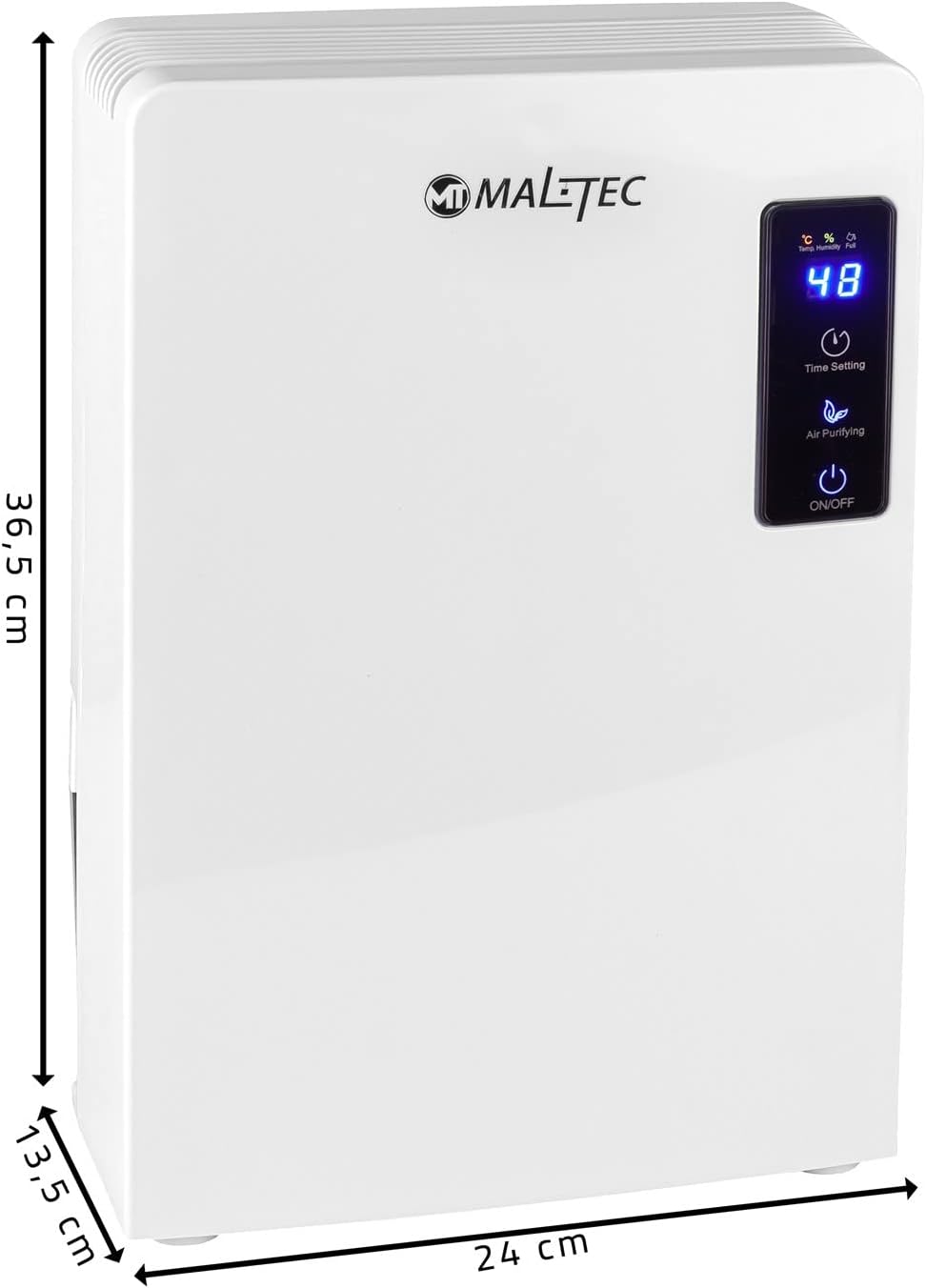
Figure 3.2: Dimensions of the MALTEC DH-2200 Dehumidifier: 14 cm (depth) x 24 cm (width) x 37 cm (height).
3.1 Key Features
- Peltier Technology: Operates without a compressor, using a thermoelectric Peltier element for quiet and efficient dehumidification.
- Automatic Defrost: Enables operation in lower temperatures by automatically shutting off to remove ice build-up.
- Water Tank with Auto-Shutoff: Features a 700 ml capacity water tank with an LED indicator that signals when full and automatically stops operation to prevent overflow.
- Compact and Quiet: Designed for minimal noise (38 dB) and a small footprint, making it suitable for various living spaces.
- Low Energy Consumption: Operates at 65 Watts.
3.2 Control Panel
The control panel provides easy access to the dehumidifier's functions.

Figure 3.3: The control panel features a digital display and touch-sensitive buttons for various functions.
- Digital Display: Shows current humidity or temperature (indicated by °C/% icons) and other status information. A "Full" indicator illuminates when the water tank is full.
- Time Setting Button: Used to set the operating timer.
- Air Purifying Button: Activates the air purifying function.
- ON/OFF Button: Powers the unit on or off.
4. Setup
Follow these steps to set up your dehumidifier for first use:
- Unpack: Carefully remove the dehumidifier from its packaging. Retain all packaging materials for future transport or storage.
- Placement: Choose a suitable location. Place the unit on a firm, level surface. Ensure there is at least 20 cm (approximately 8 inches) of clear space around the air inlet (rear) and air outlet (top) for optimal performance. Avoid placing it near heat sources or in direct sunlight.
- Power Connection: Plug the power cord into a grounded electrical outlet (230V).
- Water Tank: Ensure the water tank is correctly inserted into the unit.
5. Operation
5.1 Turning On/Off
- To turn on the dehumidifier, press the ON/OFF button. The digital display will illuminate, and the unit will begin operating.
- To turn off the dehumidifier, press the ON/OFF button again.
5.2 Dehumidification Process
The dehumidifier uses Peltier technology to condense moisture from the air. Humid air is drawn into the unit, passes over a cold surface, and the moisture condenses into water droplets that collect in the water tank. Drier air is then released back into the room.

Figure 5.1: Illustration of the dehumidification and air purification process, showing humid air entering, moisture being collected, and purified dry air being released.
5.3 Water Tank Management
The dehumidifier is equipped with a 700 ml water tank. When the tank is full, the unit will automatically shut off, and the "Full" indicator on the display will light up.
- Removing the Tank: Gently pull out the water tank from the back of the unit.
- Emptying: Carefully empty the collected water into a sink or drain.
- Reinserting: Slide the empty water tank back into its position until it clicks securely. The unit will resume operation automatically if it was on before.

Figure 5.2: The water tank can be easily removed for emptying.
5.4 Automatic Defrost Function
The DH-2200 features an automatic defrost function, allowing it to operate effectively in lower temperatures. If ice forms on the internal components, the unit will temporarily stop dehumidifying and enter defrost mode. Once the ice has melted, it will automatically resume normal operation.

Figure 5.3: The automatic defrost function ensures continuous operation even in cooler environments.
5.5 Timer Setting
Use the Time Setting button to program the dehumidifier to turn off after a set period. Refer to the control panel diagram (Figure 3.3) for button location. Specific timer intervals are typically indicated on the display or in the product's full specifications.
5.6 Air Purifying Function
Press the Air Purifying button to activate the air purification mode. This function helps to clean the air by removing particles and odors, complementing the dehumidification process.
6. Maintenance
Regular maintenance ensures the longevity and efficient operation of your dehumidifier. Always unplug the unit before cleaning.
- Exterior Cleaning: Wipe the exterior of the unit with a soft, damp cloth. Do not use abrasive cleaners, solvents, or harsh chemicals, as these can damage the surface.
- Water Tank Cleaning: Periodically clean the water tank to prevent mold and bacteria growth. Remove the tank, wash it with mild soap and warm water, rinse thoroughly, and dry before reinserting.
- Air Filter Cleaning (if applicable): While not explicitly detailed in the product features, many dehumidifiers have an air filter. If your model includes one, gently remove it and clean it with a vacuum cleaner or wash it with warm, soapy water. Ensure it is completely dry before reinserting.
- Storage: If storing the unit for an extended period, ensure the water tank is empty and clean. Store in a cool, dry place, preferably in its original packaging.
7. Troubleshooting
Before contacting customer support, please refer to the following common issues and solutions:
| Problem | Possible Cause | Solution |
|---|---|---|
| Dehumidifier does not turn on. | No power supply; Power cord not properly plugged in; Water tank full or incorrectly inserted. | Check power connection; Ensure water tank is empty and correctly seated. |
| Unit is running but not collecting water. | Room humidity is too low; Room temperature is too low; Air inlets/outlets are blocked. | Ensure room humidity is above 40-50%; Operate in a warmer environment; Clear any obstructions around the unit. |
| "Full" indicator is on, but tank is not full. | Water tank sensor malfunction or obstruction. | Remove and reinsert the water tank. Clean the sensor area if accessible. |
| Unusual noise during operation. | Unit not on a level surface; Internal component issue. | Place the unit on a stable, level surface. If noise persists, contact customer support. |
8. Specifications
Technical details for the MALTEC DH-2200 Dehumidifier:
| Feature | Detail |
|---|---|
| Brand | MalTec |
| Model Number | 5901924217862 |
| Color | White |
| Dimensions (L x W x H) | 14 x 24 x 37 cm |
| Weight | 2.12 Kilograms |
| Water Tank Capacity | 700 Milliliters |
| Power | 65 Watts |
| Voltage | 230 Volts |
| Material | Plastic |
| Noise Level | 38 Decibels |
| Special Features | Low energy consumption, Compact size, Quiet operation, Spacious water tank, Automatic defrost |
| Recommended Uses | Domestic, Industrial |
| Included Components | DH-2200 Dehumidifier, Original packaging, User manual (in Polish, for original product) |
9. Warranty and Support
For warranty information and customer support, please refer to the documentation included with your purchase or contact the retailer where the product was acquired. Keep your proof of purchase for any warranty claims.
For technical assistance or spare parts availability, please contact MALTEC customer service directly or visit their official website.


