
1. Introduction
This manual provides detailed instructions for the setup, operation, and maintenance of your VIJIM Ring Light kit. This versatile lighting solution is designed to enhance your video calls, live streams, makeup tutorials, selfies, and other video content by providing adjustable and consistent illumination.
Please read this manual thoroughly before using the product to ensure proper function and longevity.
2. Package Contents
Verify that all items listed below are included in your package:
- VIJIM Ring Light (20 cm diameter)
- Adjustable Tripod Stand
- Phone Holder
- Bluetooth Remote Control
- USB Power Cable (approximately 2 meters)

Image 2.1: All components included in the VIJIM Ring Light kit. This includes the ring light, tripod, phone holder, Bluetooth remote, and USB power cable.
3. Product Overview
The VIJIM Ring Light system consists of several key components designed for flexibility and ease of use:
- Ring Light: Provides soft, even illumination with adjustable brightness and color temperature. Features three cold shoe mounts for attaching accessories.
- Tripod Stand: A sturdy, height-adjustable stand that can also function as a handheld vlogging grip or a separate stand for cameras/smartphones.
- Phone Holder: Securely holds most smartphones (up to 84mm wide) and allows for 360-degree rotation for horizontal or vertical filming.
- Bluetooth Remote: Enables wireless control of your smartphone's camera shutter.

Image 3.1: The VIJIM Ring Light assembled on its telescopic tripod stand, providing a clear view of the product's overall structure.
4. Setup Instructions
4.1. Assembling the Ring Light and Tripod
- Unfold the tripod legs to create a stable base.
- Attach the ring light to the 1/4" screw on top of the tripod stand. Ensure it is securely tightened.
- Adjust the angle of the ring light using the tilt mechanism on the tripod mount.
4.2. Attaching the Phone Holder
- Locate one of the cold shoe mounts on the ring light.
- Slide the phone holder's cold shoe adapter into the mount until it clicks into place.
- Insert your smartphone into the phone holder. The holder is compatible with phones up to 84mm wide.
- Adjust the phone holder's angle and orientation (360-degree rotation) as needed.

Image 4.1: Step-by-step guide for installing the phone holder onto the ring light and demonstrating its 360-degree rotational capability, compatible with various phone sizes.
4.3. Adjusting Tripod Height
- Loosen the locking collars on the tripod stand.
- Extend the telescopic sections to your desired height. The tripod can extend up to 72 cm.
- Tighten the locking collars to secure the tripod at the chosen height.
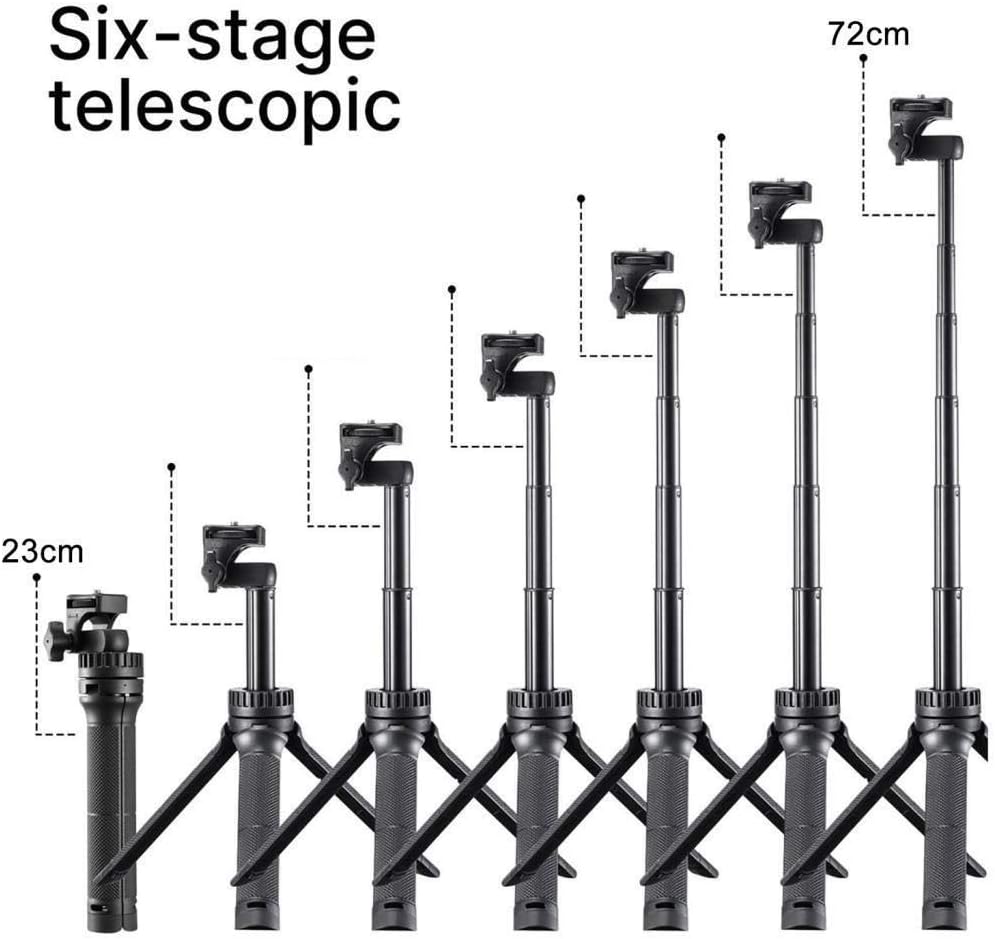
Image 4.2: Visual representation of the tripod's six-stage telescopic extension, showing height adjustments from its compact form to its maximum extension of 72 cm.
4.4. Connecting Power
Connect the USB power cable to the ring light's USB port and then to a compatible USB power source (e.g., a USB wall adapter, power bank, or computer USB port).
5. Operating Instructions
5.1. Power On/Off
Press the power button on the in-line controller of the USB cable to turn the ring light on or off.
5.2. Adjusting Brightness and Color Temperature
The ring light offers 10 brightness levels and 3 color temperature modes:
- Brightness Adjustment: Use the '+' and '-' buttons on the in-line controller to increase or decrease the light intensity.
- Color Temperature Modes: Press the mode button on the in-line controller to cycle through the three color temperature settings: Warm Light (3200K), Natural Light (4500K), and White Light (6500K).

Image 5.1: Illustration of the 10 brightness levels for White, Natural, and Warm light modes, demonstrating the range of illumination from 1% to 100% intensity.
5.3. Using the Bluetooth Remote Control
- Pairing: Turn on the Bluetooth remote. On your smartphone, go to Bluetooth settings and pair with the device named 'AB Shutter3' or similar.
- Operation: Once paired, open your smartphone's camera app. Press the button on the Bluetooth remote to trigger the camera shutter for photos or to start/stop video recording.
5.4. Utilizing Cold Shoe Mounts
The ring light features three cold shoe mounts. These allow you to attach additional accessories such as microphones, small monitors, or other compatible equipment to enhance your setup.
6. Maintenance
- Cleaning: Use a soft, dry cloth to clean the ring light and tripod. Do not use abrasive cleaners or solvents.
- Storage: When not in use, disassemble the kit and store it in a cool, dry place away from direct sunlight and moisture.
- Handling: Avoid dropping the product or subjecting it to strong impacts, as this may damage the internal components.
7. Troubleshooting
- Light does not turn on: Ensure the USB cable is securely connected to both the ring light and a working power source. Try a different USB port or power adapter.
- Bluetooth remote does not pair: Make sure the remote is turned on and within range of your smartphone. Check your phone's Bluetooth settings and try re-pairing. Ensure the remote's battery is not depleted.
- Light flickers: Check the power connection. Ensure the power source provides sufficient and stable power (9W).
- Phone holder is unstable: Ensure the phone holder is properly seated in the cold shoe mount and all tightening knobs are secure.
8. Specifications
| Feature | Specification |
|---|---|
| Brand | VIJIM (Ulanzi) |
| Model | Ulanzi 2199 |
| Power | 9 W |
| Color Temperature | 3200K (Warm), 4500K (Natural), 6500K (White) |
| Brightness Levels | 10 levels |
| Ring Diameter | 20 cm |
| Max Tripod Height | 72 cm |
| Product Dimensions (L x W x H) | 20.4 x 5.8 x 44.5 cm |
| Weight | 426 g |
| Material | Plastic, Aluminum |
| Connectivity | USB (power), Bluetooth (remote) |
| Phone Holder Compatibility | Up to 84mm wide smartphones |
| Additional Mounts | 3x Cold Shoe Mounts, 1/4" Screw Connection |
9. Warranty and Support
This VIJIM product comes with a 1-year warranty from the date of purchase. This warranty covers manufacturing defects and material faults under normal use.
For warranty claims, technical support, or any inquiries regarding your product, please contact your retailer or the manufacturer directly. Keep your proof of purchase for warranty validation.


