
1. Introduction
The Lefant M210 Robot Vacuum Cleaner is designed to provide efficient and convenient floor cleaning for your home. Featuring advanced FreeMove technology, multiple cleaning modes, and smart app control, it effectively handles dust, pet hair, and debris on various floor types, including hard floors and low-pile carpets. Its slim design allows it to navigate under furniture, ensuring comprehensive coverage.

Figure 1.1: Lefant M210 Robot Vacuum Cleaner and its companion app.
2. Safety Information
Please read all safety instructions carefully before using the appliance. Keep this manual for future reference.
- This appliance is for indoor use only.
- Do not use the robot in wet environments or on wet surfaces.
- Keep the robot away from open flames or fragile objects.
- Ensure all cables, curtains, and small objects are cleared from the cleaning path to prevent entanglement.
- Do not allow children or pets to operate the robot.
- Use only the original charging base and power adapter provided.
- Do not block the robot's suction port or brushes.
3. Package Contents
Verify that all items are present in the package:
- Lefant M210 Robot Vacuum Cleaner
- Charging Base
- Power Adapter
- 500ml Dustbin
- 2 HEPA Filters
- 4 Side Brushes
- Cleaning Brush
- User Manual
4. Product Overview
4.1 Components
The Lefant M210 features a compact design with essential components for effective cleaning.
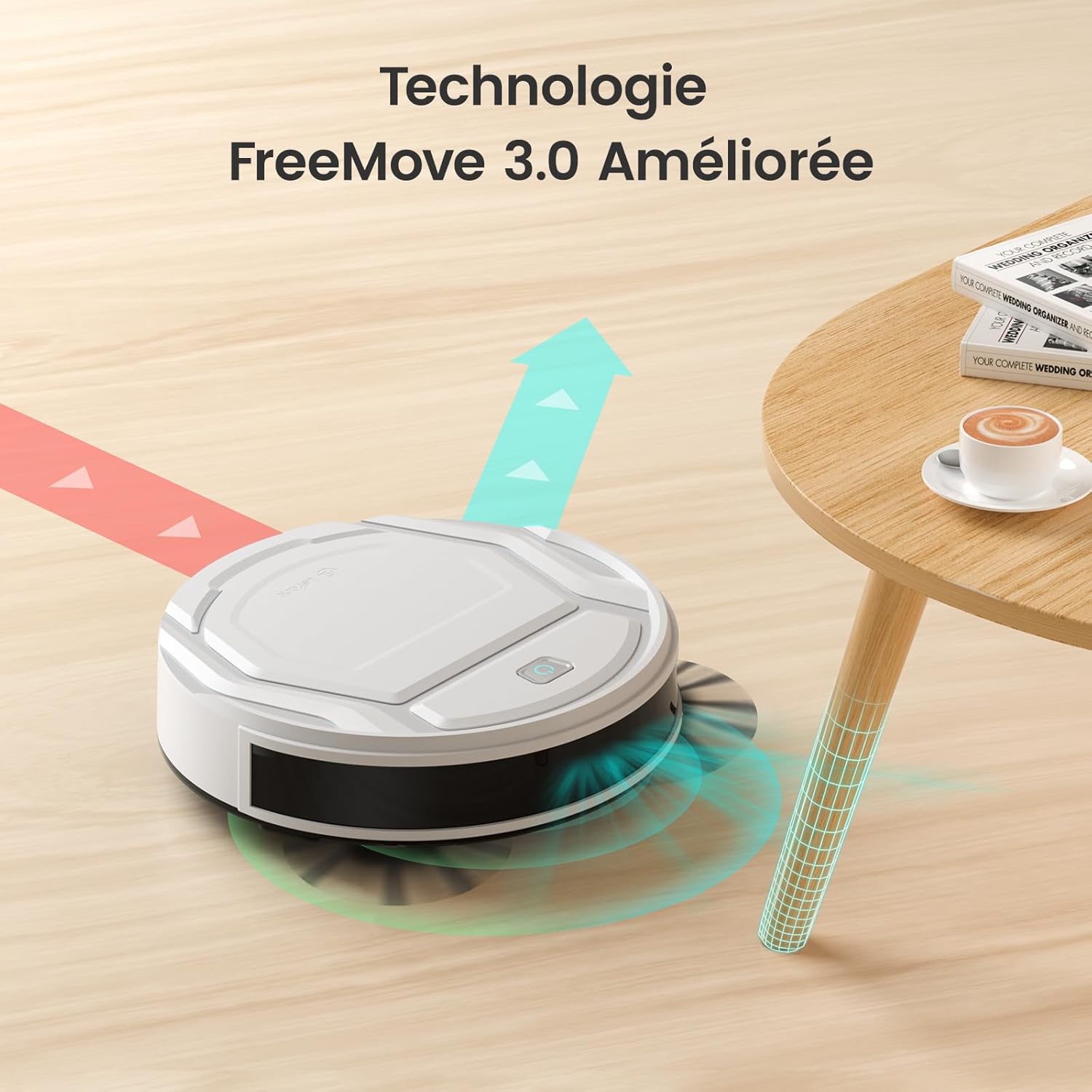
Figure 4.1: The M210's integrated infrared anti-collision sensors with FreeMove 3.0 technology.
The robot is equipped with an upgraded integrated infrared anti-collision sensor, allowing it to effectively detect its environment in 720 degrees, preventing it from getting stuck or falling from heights. Its slim body, only 28 cm wide, enables it to easily navigate small spaces and under furniture.

Figure 4.2: The M210's slim profile (7.8cm height) and quiet operation (55dB).
The M210 features a brushless suction port, which provides powerful suction without entanglement, making it ideal for picking up pet hair and dust. The 500ml dustbin reduces the frequency of emptying.

Figure 4.3: Tangle-free suction port of Lefant M210 compared to traditional roller brushes.
5. Setup
5.1 Initial Charging
Before first use, fully charge the robot vacuum. Place the charging base against a wall in an open area, ensuring there are no obstacles within 1 meter to the sides and 2 meters in front. Connect the power adapter to the charging base and a power outlet. Place the robot on the charging base, ensuring the charging contacts align. The indicator light will show charging status.

Figure 5.1: The robot automatically returns to its charging base when battery is low.
5.2 App Connection (Lefant APP)
Control your Lefant M210 from anywhere using the Lefant App. Follow these steps to connect:
- Download the "Lefant" application from your app store.
- Open the app and click "Add Device". Ensure Bluetooth is enabled on your phone.
- Turn the blue power button on the robot to "I" (ON).
- Press and hold the start button on the robot for 6 seconds until it enters pairing mode.
- The app will automatically detect the M210. Select it and connect to your 2.4GHz Wi-Fi network. (Note: Only 2.4GHz Wi-Fi is supported).
- Wait for the robot to successfully pair.

Figure 5.2: Step-by-step guide for connecting the M210 to the Lefant App.
5.3 Voice Assistant Setup (Alexa/Google Assistant)
Integrate your Lefant M210 with Alexa or Google Assistant for convenient voice control:
- Open the Lefant App, navigate to "Mine" -> "Third-party access service".
- Register your voice account and password.
- Open the Alexa App, go to "More" -> "Skills & Games".
- Search for "Smart Life".
- Click "ENABLE TO USE".
- Select your region and enter the voice account password from step 2.
- Wait for Alexa to connect successfully.
For Google Assistant, the process is similar: link the "Smart Life" service through the Google Home app and use your Lefant account credentials.

Figure 5.3: Voice control compatibility with Alexa and Google Assistant.
6. Operating the Robot Vacuum
6.1 Cleaning Modes
The Lefant M210 offers 6 cleaning modes to suit different needs:
- Automatic Cleaning: The robot intelligently navigates to clean the entire area.
- Edge Cleaning: Cleans along walls and furniture edges.
- Spot Cleaning: Concentrates cleaning in a specific area for localized dirt.
- Zigzag Cleaning: Follows an efficient S-shaped path for thorough coverage.
- Scheduled Cleaning: Set specific times for the robot to clean automatically.
- Manual Control: Control the robot's movement directly via the app.
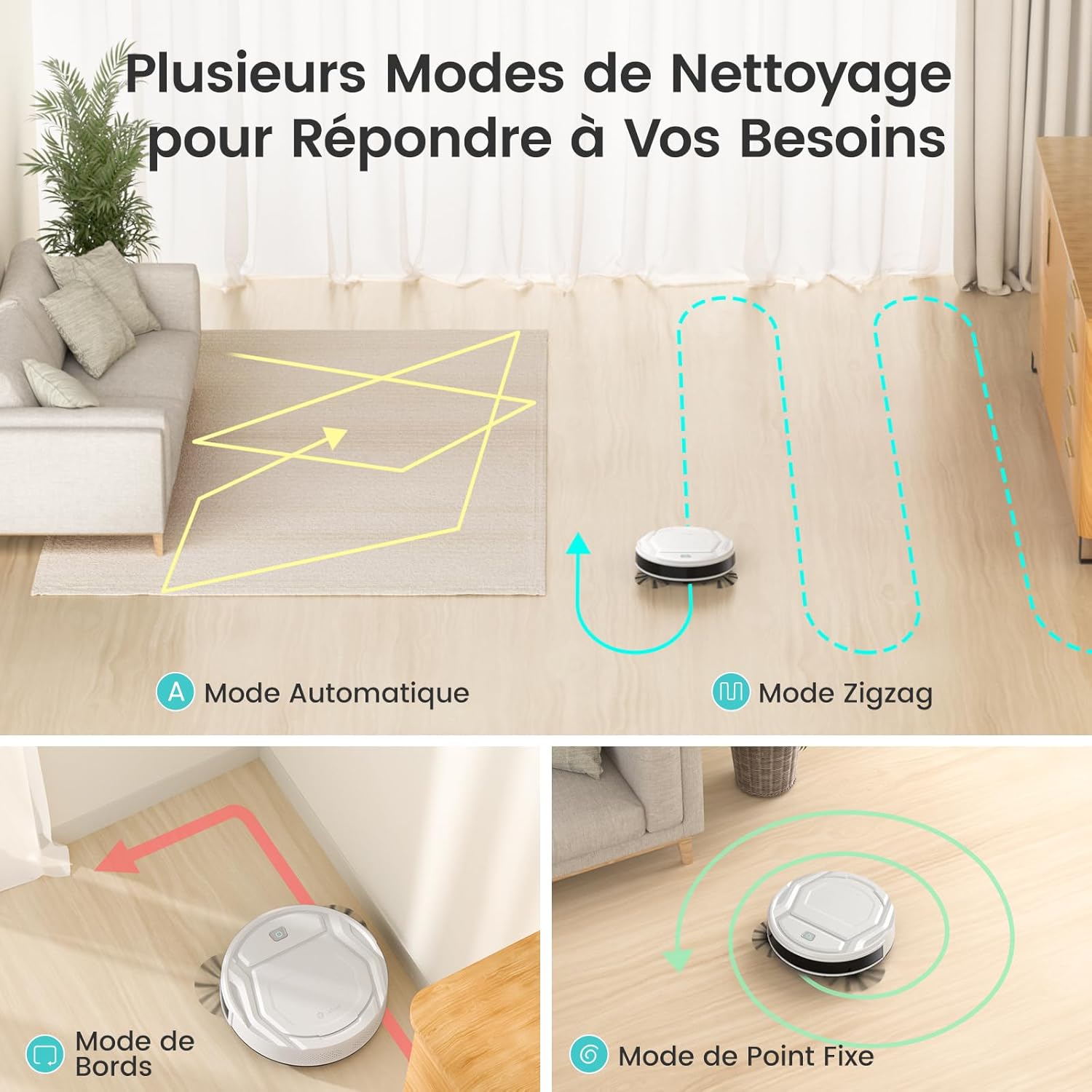
Figure 6.1: Various cleaning modes of the M210.
The M210 utilizes an original three-stage intelligent planning cleaning mode: 1. Zigzag cleaning, 2. Edge cleaning, 3. Finding missed areas and performing secondary zigzag cleaning.

Figure 6.2: Efficient zigzag cleaning path for thorough coverage.
6.2 Suction Power and Carpet Boost
The M210 offers three suction power levels: Silent (1000Pa, 56dB), Standard (1800Pa, 58dB), and Powerful (2200Pa, 60dB). It also features automatic carpet detection, increasing suction power when on low-pile carpets to effectively remove dust and pet hair embedded in fibers.

Figure 6.3: Suction power levels and corresponding noise levels.

Figure 6.4: Automatic carpet detection and suction boost.
6.3 Battery Life and Auto-Recharge
Equipped with a lithium iron phosphate battery, the M210 provides up to 120 minutes of cleaning time on a full charge. When the battery is low, the robot will automatically return to its charging base. The battery supports up to 5000 charge/discharge cycles, ensuring a long lifespan.

Figure 6.5: Extended runtime of 120 minutes for large area coverage.
7. Maintenance
Regular maintenance ensures optimal performance and extends the lifespan of your Lefant M210.
7.1 Dustbin and Filter Cleaning
It is recommended to clean the 500ml dustbin 1 to 2 times per week, depending on usage. The dual-layer filtration system helps prevent secondary pollution.
- Press the dustbin release button and pull out the dustbin.
- Open the dustbin cover and empty its contents.
- Remove the HEPA filter and foam filter. Tap them gently to remove dust. Do not wash HEPA filters with water.
- Rinse the dustbin with water if necessary, ensuring it is completely dry before reinserting.
- Reassemble the filters and dustbin, then reinsert into the robot.

Figure 7.1: The 500ml dustbin for easy cleaning.
7.2 Side Brush Maintenance
Check the side brushes regularly for tangled hair or debris. Use the provided cleaning brush to remove any obstructions. If brushes are worn, replace them with new ones (4 side brushes are included in the package).
7.3 Sensor Cleaning
Wipe the anti-drop sensors (located on the bottom of the robot) and anti-collision sensors (on the front bumper) with a clean, dry cloth to ensure proper functionality.
8. Troubleshooting
If you encounter issues with your Lefant M210, refer to the following common problems and solutions:
| Problem | Possible Cause | Solution |
|---|---|---|
| Robot does not turn on. | Low battery; Power switch off. | Charge the robot; Ensure power switch is in "I" (ON) position. |
| Robot gets stuck frequently. | Cables, rugs with long fringes, or small objects on the floor. | Clear the cleaning area of obstacles. Lift thin cables and secure rug edges. |
| Cannot connect to Wi-Fi/App. | Incorrect Wi-Fi band (5GHz); Incorrect password; Robot not in pairing mode. | Ensure your Wi-Fi is 2.4GHz. Re-enter password. Follow app connection steps to put robot in pairing mode. |
| Poor cleaning performance. | Full dustbin; Clogged filter; Worn side brushes. | Empty dustbin. Clean or replace filter. Clean or replace side brushes. |
| Robot does not return to charging base. | Charging base obstructed; Robot too far from base; Base not powered. | Ensure clear path to charging base. Place robot closer to base. Check power connection to base. |
9. Specifications
| Feature | Detail |
|---|---|
| Model Number | M210 |
| Dimensions (L x W x H) | 27.94 x 27.94 x 7.59 cm |
| Weight | 2 kilograms |
| Dustbin Volume | 500 Milliliters |
| Battery Life | Up to 120 minutes |
| Filter Type | HEPA |
| Special Features | 6 Cleaning Modes, 3 Suction Modes, Auto-recharge, Silent Operation, App/Alexa/Google Assistant Control |
| Connectivity | 2.4GHz Wi-Fi |
10. Warranty and Support
Lefant offers a 2-year quality warranty and professional after-sales technical support for its products. For any inquiries or assistance, please do not hesitate to contact Lefant customer service.
For more information, visit the official Lefant store: Lefant Store


