
HiQuick C9026/C9027
HiQuick C9026/C9027 Battery Charger User Manual
Model: C9026, C9027
Brand: HiQuick
Introduction
Welcome to the user manual for your HiQuick C9026/C9027 Battery Charger. This intelligent charger is designed to efficiently and safely charge your AA and AAA NiMH/NiCd rechargeable batteries. Please read this manual thoroughly before use to ensure optimal performance and safety.
Product Features
- Fast Battery Charger: HiQuick 8 Bay Battery Charger is more quick in Charging rate compared with other brands battery charger. It only takes 1.2h to charge 2pcs 1100mAh AAA rechargeable batteries and 1.6h to charge 2pcs 2800mAh AA rechargeable batteries.
- Independent Slot Design: HiQuick smart AA AAA battery charger offers 8 channels allowing you to charge any combination of AA/AAA NIMH/NICD rechargeable cells, not necessarily must even in pairs.
- Smart LCD Display: Each independent charging slot has its own indicator that you'll know when the batteries are 100% charged. They will blink during charging and stop when finished.
- Intelligent USB Charging: Freely charge anytime, anywhere, suitable for all kinds of USB interface input voltage, convenient and fast. The 2 Input port ports should not be used at the same time.
- Unique Charging Mode: This charger adopts -DV control technology, constant voltage and constant current, effectively improve battery life and prevent accidental damage. Let you and your family use it safely.
Package Contents
Verify that all items are present in your package:
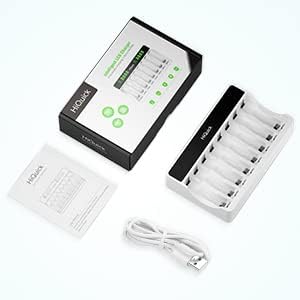
Image: Contents of the HiQuick Battery Charger package.
- 1 x HiQuick 8-Bay Battery Charger
- 1 x USB Charging Cable
- 1 x User Manual
Setup
Power Connection
Connect the provided USB cable to either the Type-C or Micro USB input port on the charger. Connect the other end to a 5V/2A USB power adapter (not included) or a compatible USB port.

Image: The HiQuick charger highlighting its dual USB input options (Type-C and Micro USB).
Note: The two input ports should not be used simultaneously.
Operating Instructions
Inserting Batteries
Insert AA or AAA NiMH/NiCd rechargeable batteries into the charging slots. Ensure correct polarity (+ and -) as indicated on the charger. The charger supports charging any combination of 1 to 8 batteries, including mixed AA and AAA sizes.

Image: The HiQuick charger demonstrating its ability to charge individual AA and AAA batteries simultaneously.
Charging Process
Once batteries are inserted correctly and power is connected, the LCD display for each slot will show the charging status.

Image: The HiQuick charger illustrating its high current mode and quick charging technology.
The charger employs high current mode and quick charging technology for efficient charging. For example, 2pcs 1100mAh AAA batteries can be charged in approximately 1.2 hours, and 2pcs 2800mAh AA batteries in about 1.6 hours.
Intelligent LCD Display
The charger features a smart LCD display for each independent charging slot, providing real-time status updates.

Image: The HiQuick charger's intelligent LCD screen displaying charging status.
| Indicator | Status |
|---|---|
| CHG | Charging (segments blinking) |
| FULL | Fully Charged (segments solid) |
| ERR | Error / Incompatible Battery (blinking "ERR") |
Multiple Protection Features
Your HiQuick charger is equipped with multiple safety protections to ensure safe and reliable operation.

Image: Visual representation of the multiple protection features of the HiQuick charger.
- Over Charge Protection
- Over Current Protection
- Over Voltage Protection
- Over Heat Protection
- Short Circuit Protection
Maintenance
- Clean the charger with a dry, soft cloth. Do not use abrasive cleaners or solvents.
- Keep the charger away from water and moisture.
- Store the charger in a cool, dry place when not in use.
- Do not attempt to disassemble or repair the charger yourself.
Troubleshooting
"ERR" displayed on LCD
This indicates an incompatible battery or a faulty battery.
- Ensure the battery type is NiMH or NiCd.
- Remove and reinsert the battery.
- Try a different battery in the same slot to check if the slot is working.
- If the error persists with multiple batteries, the battery may be damaged or non-rechargeable.
Batteries not charging
- Check if the power adapter is properly connected and providing 5V/2A output.
- Ensure batteries are inserted with correct polarity.
- Verify that the charging cable is securely connected to both the charger and the power source.
- Avoid using both input ports simultaneously.
Specifications
| Feature | Detail |
|---|---|
| Brand | HiQuick |
| Model | C9026/C9027 |
| Input Voltage | 5 Volts |
| Output Voltage | 5 Volts |
| Current Rating | 2 Amps |
| Battery Cell Composition | NiMH, NiCd |
| Product Dimensions | 14 x 9 x 3.5 cm |
| Item Weight | 101 g |
| Charging Time | Varies by battery capacity (e.g., 1.2h for 2x1100mAh AAA, 1.6h for 2x2800mAh AA) |
Warranty and Support
For warranty information or technical support, please refer to the contact details provided with your purchase or visit the official HiQuick website.
Related documentsC9026/C9027


Ask a question about this manual
Ask about setup, troubleshooting, compatibility, parts, safety, or missing instructions. Manuals+ will review the question and use this page’s manual context to help answer it.