
TOMLOV DM4S
TOMLOV DM4S Digital Microscope User Manual
Model: DM4S
Introduction
Welcome to the user manual for your new TOMLOV DM4S Digital Microscope. This versatile instrument is designed for detailed observation and analysis, suitable for a wide range of applications from coin collecting and electronics repair to educational purposes. Featuring a 4.3-inch LCD screen, adjustable LED illumination, and PC connectivity, the DM4S provides clear, magnified views and allows for photo and video capture.

Image: The TOMLOV DM4S Digital Microscope, showcasing its main components including the screen, lens, and adjustable side lights, with a coin placed on its base for observation.
What's in the Box
Upon unboxing your TOMLOV DM4S Digital Microscope, please ensure all the following components are present:
- TOMLOV DM4 4.3'' Digital Microscope Unit
- Aluminum Base with LED Lights
- Adjustable Stand
- USB Cable (for power and data transfer)
- 32GB MicroSD Card (pre-installed or included separately)

Image: A visual representation of all components included in the TOMLOV DM4S package, laid out clearly for identification.
Setup Guide
- Assemble the Stand: Attach the adjustable stand to the aluminum base. Ensure it is securely fastened.
- Mount the Microscope Unit: Carefully slide the TOMLOV DM4S microscope unit onto the adjustable stand. Tighten the securing knob to hold it in place.
- Connect Power: Use the provided USB cable to connect the microscope unit to a power source (e.g., USB wall adapter, computer USB port). The unit has an internal battery, but it's recommended to use external power for extended use.
- Insert MicroSD Card: If not already inserted, gently push the 32GB MicroSD card into the designated slot on the side of the microscope unit until it clicks into place.
- Position Side Lights: Adjust the flexible gooseneck side lights on the aluminum base to your desired position for optimal illumination of your subject.

Image: An illustrative diagram demonstrating the straightforward assembly process of the microscope, including attaching the main unit to the stand and base.
Operating Instructions
Basic Operation
- Power On/Off: Press and hold the power button on the microscope unit to turn it on or off.
- Adjust Magnification: Use the focus wheel on the side of the microscope unit to adjust the magnification and bring your subject into clear focus. The microscope offers 50-1000X magnification.
- Adjust Lighting: The microscope features 8 built-in LED lights around the lens and 2 adjustable side lights on the base. Use the dedicated buttons or controls on the unit to adjust their brightness and direction for optimal viewing.

Image: The microscope demonstrating its 8 built-in LEDs and 2 flexible side lights, with examples of different brightness levels for enhanced visibility.
Capturing Photos and Videos
- Photo Mode: Press the "OK" button to capture a still image of the current view. Images are saved to the inserted 32GB MicroSD card.
- Video Mode: Press the "Menu" button to switch to video recording mode. Press "OK" to start recording and press "OK" again to stop. Videos are saved to the MicroSD card.

Image: The microscope's screen displaying a magnified view of a coin, illustrating the photo capture function.
PC Connectivity
The TOMLOV DM4S can be connected to a computer for a larger viewing experience and easier management of captured media.
- Connect via USB: Use the provided USB cable to connect the microscope unit to your computer.
- Access on PC:
- For Windows systems, open the default "Windows Camera" application.
- For macOS/iMac, open the "Photo Booth" application.

Image: The digital microscope connected to both a desktop monitor and a laptop, demonstrating its PC viewing capability for a larger display.
Versatile Applications
Beyond coin collecting, the DM4S is suitable for various detailed observations:
- Insect Observation: Examine the intricate details of insects.
- PCB Soldering & Repair: Ideal for micro soldering and inspecting printed circuit boards due to its solid metal construction and clear magnification.
- Plant Checking: Observe plant structures and details.
- Watch Repairing: Aid in precise work on small watch components.
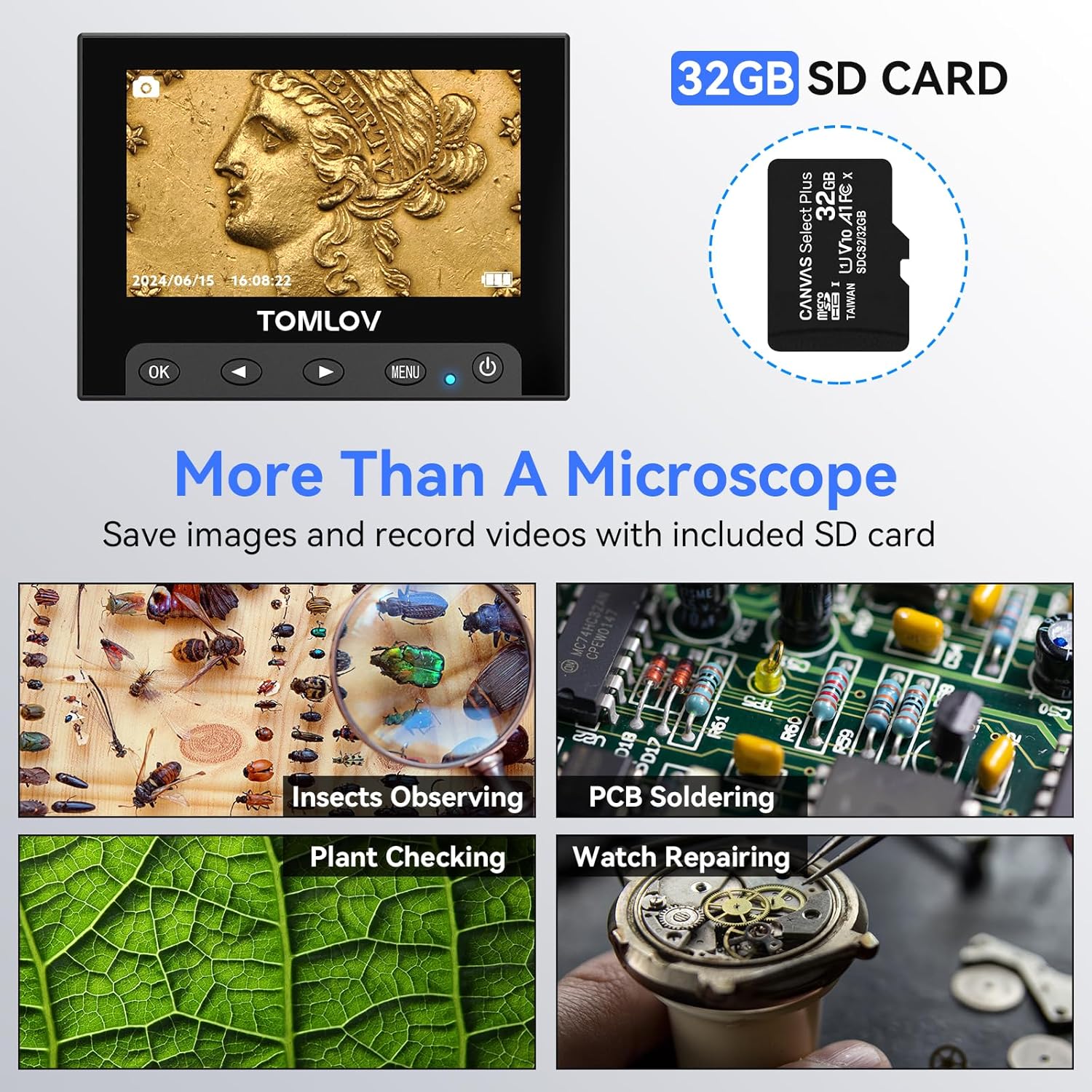
Image: A collage showing the microscope being used for various tasks such as observing insects, inspecting PCBs, examining plant leaves, and assisting with watch repair, highlighting its versatility.
Maintenance
- Cleaning the Lens: Use a soft, lint-free cloth specifically designed for optical surfaces to clean the microscope lens and screen. Avoid abrasive materials or harsh chemicals.
- General Cleaning: Wipe the body of the microscope and stand with a dry or slightly damp cloth. Ensure no liquid enters the electronic components.
- Storage: Store the microscope in a dry, dust-free environment when not in use. Avoid extreme temperatures.
- Battery Care: If the microscope has a built-in rechargeable battery, avoid fully discharging it frequently to prolong its lifespan. Charge it regularly.
Troubleshooting
| Problem | Possible Cause | Solution |
|---|---|---|
| No image on screen / Unit won't power on. | Low battery or no power connection. | Connect the USB cable to a power source and ensure it's properly plugged in. Charge the unit for at least 30 minutes. |
| Image is blurry or out of focus. | Incorrect focus adjustment or subject too far/close. | Adjust the focus wheel. Ensure the subject is within the optimal working distance of the lens. |
| Images/videos not saving to SD card. | SD card full, corrupted, or not inserted correctly. | Check if the SD card is properly inserted. Format the SD card (refer to device settings if available) or try a different SD card. Ensure enough storage space. |
| Cannot connect to PC. | Incorrect USB cable, port, or software not open. | Ensure you are using the correct USB cable. Try a different USB port on your computer. Open "Windows Camera" (Windows) or "Photo Booth" (macOS) after connecting. |
| Insufficient lighting. | LEDs off or too dim; side lights not positioned correctly. | Adjust the brightness of the built-in LEDs. Reposition the flexible side lights to illuminate the subject evenly. |
Specifications
- Model Name: DM4S
- Brand: TOMLOV
- Display: 4.3-inch Liquid Crystal Display
- Magnification: 50X to 1000X
- Illumination: 8 built-in LED lights, 2 adjustable side lights
- Storage: Supports MicroSD Card (32GB included)
- PC Compatibility: Windows (via "Windows Camera"), macOS (via "Photo Booth")
- Construction Material: Metal (Aluminum alloy base, stand, holder)
- Product Dimensions: 7.79 x 3.35 x 9.6 inches
- Item Weight: 1.7 pounds
- Battery: 1 Lithium Metal battery (included)
- Voltage: 5 Volts (DC)
- Color: Black
Warranty and Support
For warranty information and technical support, please refer to the official TOMLOV website or contact their customer service directly. Keep your purchase receipt as proof of purchase for warranty claims.
You can visit the official TOMLOV store on Amazon for more information: TOMLOV Store
Related documentsDM4S


Ask a question about this manual
Ask about setup, troubleshooting, compatibility, parts, safety, or missing instructions. Manuals+ will review the question and use this page’s manual context to help answer it.