
1. Product Overview
The Optoma X400LVe is a professional XGA projector designed for classrooms, meeting rooms, and training spaces. It delivers bright, clear images with 4,000 ANSI lumens and a 25,000:1 contrast ratio. Key features include flexible installation options, an integrated speaker, and a long lamp life.
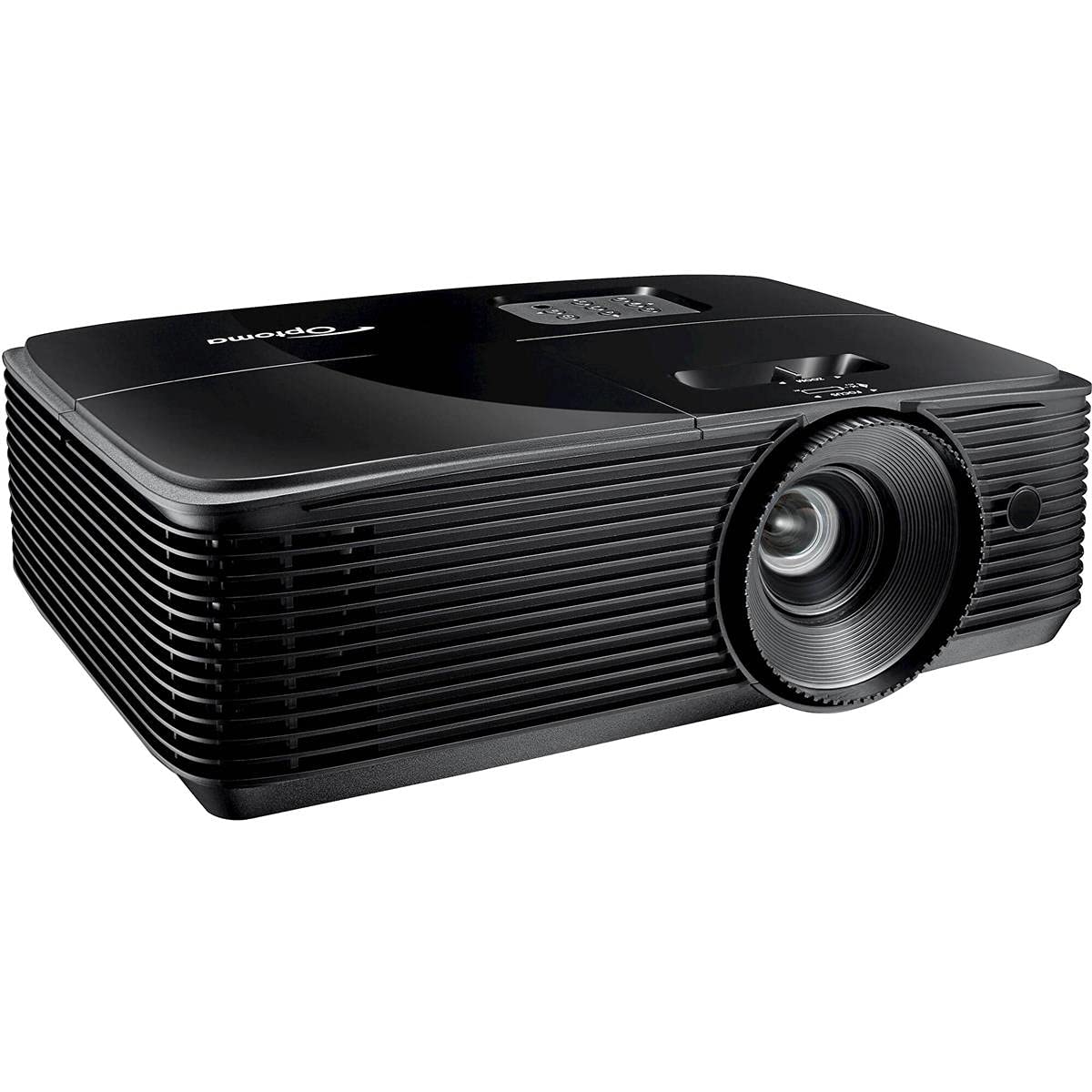
Figure 1: Front view of the Optoma X400LVe Projector.
Key Features:
- High Brightness: 4,000 ANSI lumens for clear images in well-lit environments.
- XGA Resolution: Native 1024 x 768 resolution for sharp text and graphics.
- High Contrast Ratio: 25,000:1 for vibrant colors and deep blacks.
- Flexible Connectivity: HDMI v1.4a, VGA, Composite, Audio-in/out, USB-A, RS232.
- Long Lamp Life: Up to 15,000 hours in Eco+ mode.
- Integrated Speaker: 10-watt speaker for audio without external equipment.
- Easy Setup: Vertical keystone correction (±40°) and 1.1x zoom for flexible placement.
2. Setup and Installation
2.1 Unpacking the Projector
Carefully remove the projector and all accessories from the packaging. Ensure all components listed in the packing list are present.
2.2 Projector Placement
The Optoma X400LVe can be placed on a tabletop, mounted on the ceiling (front or rear projection), or used for front or rear projection. Consider the projection distance and screen size for optimal viewing.
- Projection Distance: 3.9 feet to 46.9 feet.
- Projection Screen Size: 27.7 inches to 304.4 inches.

Figure 2: Optoma X400LVe dimensions and connectivity ports.
2.3 Connecting Devices
Connect your source devices (laptops, media players, gaming consoles) to the projector using the appropriate ports. The projector offers a variety of input options:
- HDMI v1.4a: For digital video and audio.
- VGA (Input & Output): For analog video.
- Composite Video: For standard definition video.
- Audio-in (3.5mm): For external audio input.
- Audio-out (3.5mm): For connecting to external speakers.
- USB-A (5V / 1.0 Amp): For powering devices like streaming sticks.
- RS232: For projector control via a computer or control system.

Figure 3: Rear panel with connectivity ports.
2.4 Power Connection
Connect the power cord to the projector's AC input and then to a power outlet (AC input 100-240V, 50-60Hz).
3. Operating the Projector
3.1 Powering On/Off
- Power On: Press the power button on the projector's control panel or the remote control.
- Power Off: Press the power button twice. The projector will enter cooling mode before shutting down completely.

Figure 4: Projector control panel and lens adjustments.
3.2 Image Adjustment
- Focus: Rotate the focus ring on the lens until the image is sharp.
- Zoom: Adjust the zoom ring on the lens to change the image size.
- Keystone Correction: Use the 'Keystone+' and 'Keystone-' buttons on the remote control or the projector's control panel to correct vertical image distortion (±40°).
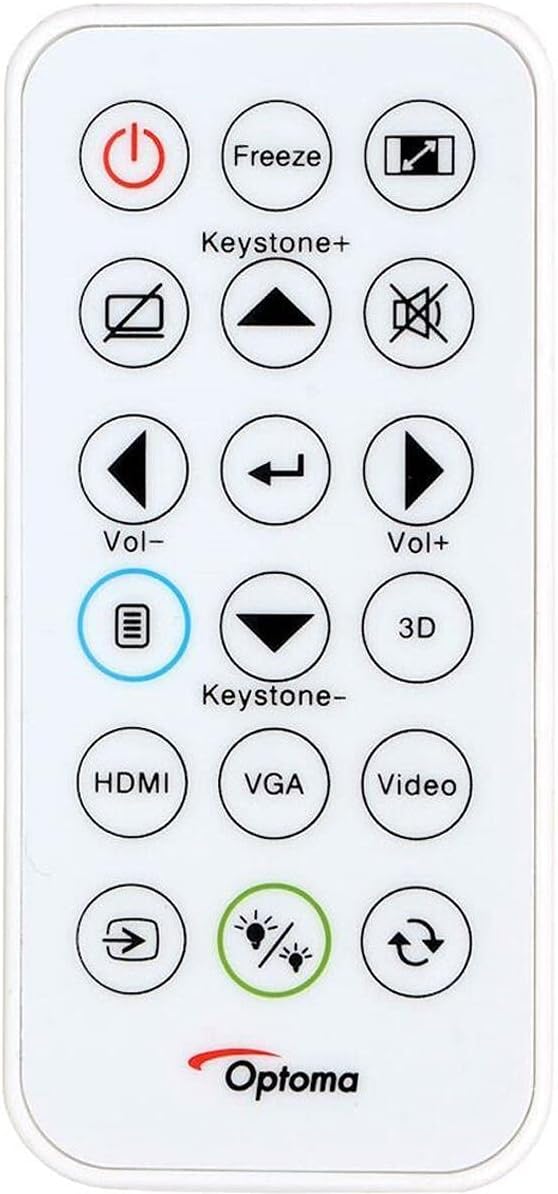
Figure 5: Remote control for the Optoma X400LVe Projector.
3.3 Input Source Selection
Press the 'Source' button on the remote control or projector to cycle through available input sources (HDMI, VGA, Composite). Dedicated input buttons may also be available on the remote.
3.4 Audio Control
Adjust the volume using the 'Vol+' and 'Vol-' buttons on the remote control. The integrated 10-watt speaker provides sufficient audio for most environments.
4. Maintenance
4.1 Lamp Life
The projector lamp has an estimated life of up to 15,000 hours in Eco+ mode. Actual lamp life may vary depending on usage and environmental conditions. Replace the lamp when its brightness significantly diminishes or if the lamp indicator light illuminates.

Figure 6: Eco+ mode for extended lamp life.
4.2 Cleaning
- Lens: Use a soft, lint-free cloth and lens cleaning solution. Avoid abrasive materials.
- Casing: Wipe the projector casing with a soft, damp cloth. Do not use harsh chemicals.
- Air Vents: Regularly clean the air vents to ensure proper airflow and prevent overheating.
5. Troubleshooting
5.1 No Image Displayed
- Ensure the projector is powered on and the lamp is lit.
- Verify the input source is correctly selected and the source device is active.
- Check all cable connections between the projector and the source device.
- Adjust focus and zoom settings.
5.2 Image is Distorted or Blurry
- Adjust the focus ring on the lens.
- Use keystone correction to fix trapezoidal distortion.
- Ensure the projector is placed on a stable, flat surface or securely mounted.
5.3 Projector Overheating
- Ensure air vents are clear and not obstructed.
- Operate the projector in a well-ventilated area.
- If operating above 5,000 feet, manually switch to high-altitude mode (refer to the on-screen display menu).
5.4 No Audio
- Check the volume level on the projector and the source device.
- Ensure audio cables are correctly connected (if using analog audio-in).
- If using HDMI, verify the source device is sending audio through HDMI.
6. Technical Specifications
| Feature | Specification |
|---|---|
| Brand | Optoma |
| Model Name | X400LVe |
| Display Technology | DLP |
| Native Resolution | XGA (1024 x 768) |
| Maximum Resolution | UXGA (1600 x 1200) |
| Brightness | 4000 ANSI Lumens |
| Contrast Ratio | 25,000:1 |
| Aspect Ratio | 4:3 (Native), 16:9 Compatible |
| Light Source Type | 203W Lamp |
| Light Source Life | 15,000/12,000/10,000/6,000 hours (Eco+/Dynamic/Eco/Bright) |
| Throw Ratio | 1.94 – 2.15:1 |
| Zoom | 1.1x Manual |
| Keystone Correction | ±40° Vertical |
| Integrated Speaker | 10W |
| Connectivity | HDMI v1.4a, VGA (in/out), Composite, Audio-in/out, USB-A (5V/1A), RS232 |
| Noise Level | 27dB |
| Dimensions (W x H x D) | 12.4″ x 3.9″ x 9.6″ |
| Weight | 6.7 lbs |
| Power Supply | AC input 100-240V, 50-60Hz |
| Security Features | Security bar, Kensington lock, password protection, keypad lock |
7. Warranty and Support
7.1 Warranty Information
The Optoma X400LVe projector comes with a 1-year limited parts and labor warranty. The projector lamp is covered by a separate 90-day lamp warranty. Please retain your proof of purchase for warranty claims.
7.2 Customer Support
For technical assistance, troubleshooting, or warranty inquiries, please contact Optoma customer support. Visit the official Optoma website for contact details and additional resources.


