
1. Introduction
This manual provides detailed instructions for the installation, operation, and maintenance of the Walfront SVP-912 Adjustable Voltage Protective Voltmeter. This device is designed to protect electrical equipment from damage caused by overvoltage and undervoltage conditions in 120VAC systems. It features automatic recovery and adjustable protection parameters.
Please read this manual thoroughly before installation and operation to ensure proper function and safety.
2. Safety Information
WARNING: Electrical shock hazard. Installation and servicing should only be performed by qualified personnel.
- Always disconnect power to the circuit before installing or servicing the device.
- Ensure all wiring connections are secure and comply with local electrical codes.
- Do not operate the device if it appears damaged.
- The device is designed for indoor use in a dry environment. Avoid exposure to moisture or extreme temperatures.
- Verify the voltage and current ratings of your system are compatible with the device specifications.
3. Product Overview
The Walfront SVP-912 is a compact, DIN rail mountable voltage protective device. It features a digital display for real-time voltage monitoring and buttons for setting protection parameters. The device automatically disconnects the load when voltage exceeds or falls below set thresholds and reconnects once voltage returns to a safe range after a configurable delay.

Figure 1: Front view of the Walfront SVP-912 Adjustable Voltage Protective Voltmeter, showing the digital display and control buttons.

Figure 2: Detailed view of the SVP-912's digital display, indicating current voltage, overvoltage (Over(V)), and undervoltage (Under(V)) indicators, along with 'SET' and adjustment buttons.
4. Specifications
| Parameter | Value |
|---|---|
| Model | SVP-912 |
| Rated Voltage | 120VAC 50/60Hz |
| Rated Current (Optional) | 40A, 63A, 80A |
| Overvoltage Value Range | 130V-150V-OFF (Default: 140V) |
| Overvoltage Recovery Value | Adjustable from 129V to 149V (Default: 250V - Note: Default value seems inconsistent, refer to device for actual default) |
| Overvoltage Action Time | 0.1-10s (Default: 0.1s) |
| Undervoltage Value Range | Adjustable from 100V-80V-OFF (Default: 90V) |
| Undervoltage Recovery Value Range | 81V-99V (Default: 95V) |
| Undervoltage Action Time | 0.1-10s (Default: 0.1s) |
| Failure Recovery Delay Time | 2-512s (Default: 60s) |
| Delay Time after Power-On | 2-255s (Default: 2s) |
| Power Consumption | ≤2W |
| Electrical Machinery Life | ≥ 4000 times |
| Installation | DIN Rail |
| Working Environment Temperature | -25℃ to +40℃ |
| Humidity | <90% |
| Altitude | ≤2000m/6561.7ft |
| Dimensions | Approx. 81 x 36 x 60mm (3.2 x 1.4 x 2.4in) |

Figure 3: Dimensional drawing of the SVP-912 device, showing measurements in millimeters and inches.
5. Installation
The Walfront SVP-912 is designed for DIN rail mounting. Ensure the power supply to the circuit is completely disconnected before proceeding with installation.
5.1 Wiring Diagram
Connect the device according to the wiring diagram provided below. The 'IN' terminals are for the incoming power supply, and the 'OUT' terminals are for the protected load. Ensure correct polarity (Neutral 'N' and Live 'L').
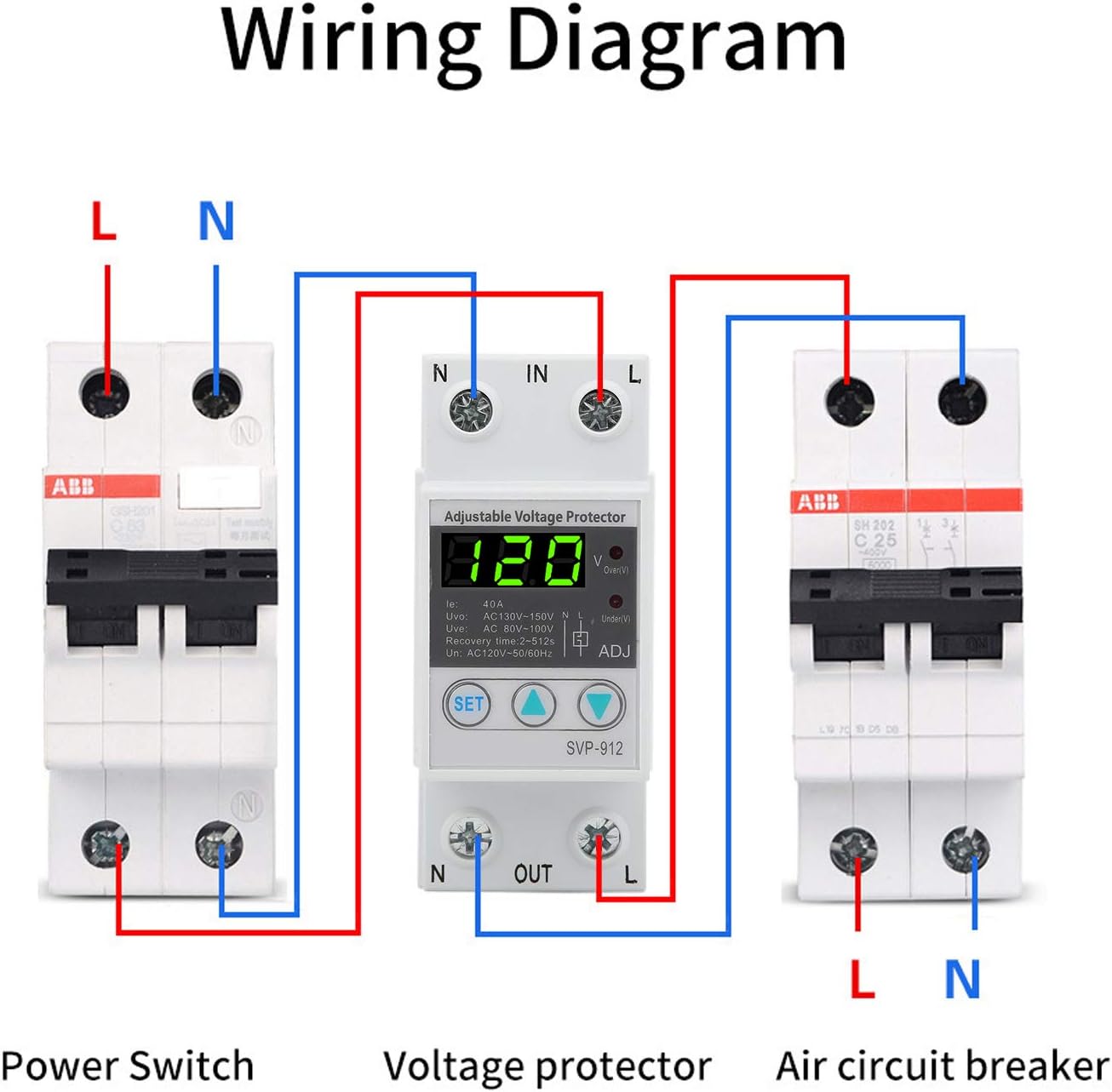
Figure 4: Wiring diagram illustrating the connection of the SVP-912 voltage protector between a power switch and an air circuit breaker, showing input (IN) and output (OUT) terminals for Live (L) and Neutral (N).
- Mount the SVP-912 onto a standard DIN rail.
- Connect the incoming Live (L) and Neutral (N) wires to the 'IN' terminals.
- Connect the outgoing Live (L) and Neutral (N) wires to the 'OUT' terminals, leading to your protected load.
- Tighten all terminal screws securely to prevent loose connections and arcing.
6. Operation
After successful installation and power-on, the device will display the current voltage. The 'SET' button and adjustment buttons are used to configure the protection parameters.
6.1 Setting Parameters
- Press the SET button to enter the parameter setting mode. The first parameter will flash on the display.
- Use the Up (▲) and Down (▼) buttons to adjust the value of the flashing parameter.
- Press SET again to confirm the value and move to the next parameter.
- Repeat steps 2 and 3 for all parameters.
- After setting the last parameter, the device will automatically save the settings and return to normal operation mode. If no button is pressed for a few seconds, the device will exit setting mode without saving the current parameter change.
6.2 Adjustable Parameters
- Overvoltage Value (Uvo): Sets the upper voltage limit. If the voltage exceeds this value, the device will trip.
- Overvoltage Recovery Value: Sets the voltage level at which the device will attempt to reconnect after an overvoltage trip.
- Overvoltage Action Time: Configures the delay before tripping on overvoltage.
- Undervoltage Value (Uve): Sets the lower voltage limit. If the voltage falls below this value, the device will trip.
- Undervoltage Recovery Value: Sets the voltage level at which the device will attempt to reconnect after an undervoltage trip.
- Undervoltage Action Time: Configures the delay before tripping on undervoltage.
- Failure Recovery Delay Time: The delay before the device attempts to reconnect the load after a voltage fault has cleared.
- Delay Time after Power-On: The initial delay before the device connects the load after power is applied.
- Reset Method Selection: Allows selection of automatic or manual reset after a fault.
6.3 Factory Reset
To restore the device to its factory default settings, refer to the specific instructions in the device's menu or consult the manufacturer's support. This function is typically accessed through a combination of button presses in the setting mode.
7. Maintenance
The Walfront SVP-912 is designed for reliable operation with minimal maintenance. However, periodic checks are recommended to ensure optimal performance and safety.
- Visual Inspection: Periodically inspect the device for any signs of physical damage, discoloration, or loose connections.
- Cleaning: If necessary, gently clean the exterior of the device with a dry, soft cloth. Do not use abrasive cleaners or solvents. Ensure power is disconnected before cleaning.
- Environmental Conditions: Ensure the operating environment remains within the specified temperature and humidity ranges.
8. Troubleshooting
This section addresses common issues you might encounter with the SVP-912.
| Problem | Possible Cause | Solution |
|---|---|---|
| Device does not power on. | No power supply; incorrect wiring; internal fault. | Check power source. Verify wiring connections. If power is present and wiring is correct, the device may be faulty; contact support. |
| Device trips frequently. | Voltage fluctuations outside set limits; sensitive settings. | Check incoming voltage stability. Adjust overvoltage/undervoltage thresholds to be less sensitive if minor fluctuations are acceptable. |
| Load does not reconnect after a trip. | Voltage still outside recovery limits; recovery delay not expired; manual reset required. | Verify voltage has returned to safe range. Wait for recovery delay. If manual reset is enabled, press the appropriate button or cycle power. |
| Display shows incorrect voltage. | Wiring issue; internal calibration error. | Verify wiring. Compare reading with a known accurate voltmeter. If discrepancy persists, contact support. |
| Cannot change settings. | Not in setting mode; buttons unresponsive. | Press the 'SET' button to enter setting mode. If buttons are unresponsive, power cycle the device. If issue persists, contact support. |
For issues not covered in this section, please contact Walfront customer support.
9. Warranty and Support
For warranty information, please refer to the documentation provided at the time of purchase or contact your seller directly. Walfront products typically come with a limited warranty covering manufacturing defects.
For technical support, troubleshooting assistance, or inquiries regarding parts and service, please contact Walfront customer service through their official website or the contact information provided with your purchase.