
1. Introduction
Thank you for choosing the PerfectAire Air Purifier with UV LED Germicidal Light. This manual provides essential information for the safe and efficient operation, maintenance, and troubleshooting of your new air purifier. Please read this manual thoroughly before use and retain it for future reference.
Important Safety Instructions
- Always unplug the air purifier before cleaning or performing any maintenance.
- Do not operate the unit with a damaged cord or plug.
- Keep the air purifier away from water or other liquids.
- Ensure proper ventilation around the unit. Do not block air inlets or outlets.
- This appliance is not intended for use by persons (including children) with reduced physical, sensory or mental capabilities, or lack of experience and knowledge, unless they have been given supervision or instruction concerning use of the appliance by a person responsible for their safety.
- Children should be supervised to ensure that they do not play with the appliance.
2. Product Overview
The PerfectAire Air Purifier is designed to improve indoor air quality through a multi-stage filtration system, including a True HEPA filter, Activated Carbon filter, and UV LED Germicidal Light.
Key Features:
- UV LED Germicidal Light: Helps neutralize airborne viruses, bacteria, and germs.
- True HEPA Filter: Captures 99.97% of airborne allergens as small as 0.3 microns.
- Activated Carbon Filter: Reduces common household odors from pets, smoking, and cooking.
- 3 Powerful Speeds: Adjustable fan speeds (Low, Medium, High) for customized airflow.
- Ultra-Quiet Sleep Mode: Operates at 32 dBA at low speed for minimal disturbance.
- Replacement Filter Indicator: Alerts when filter replacement is needed.
- Sturdy Built-in Handle: For convenient portability.
Product Components
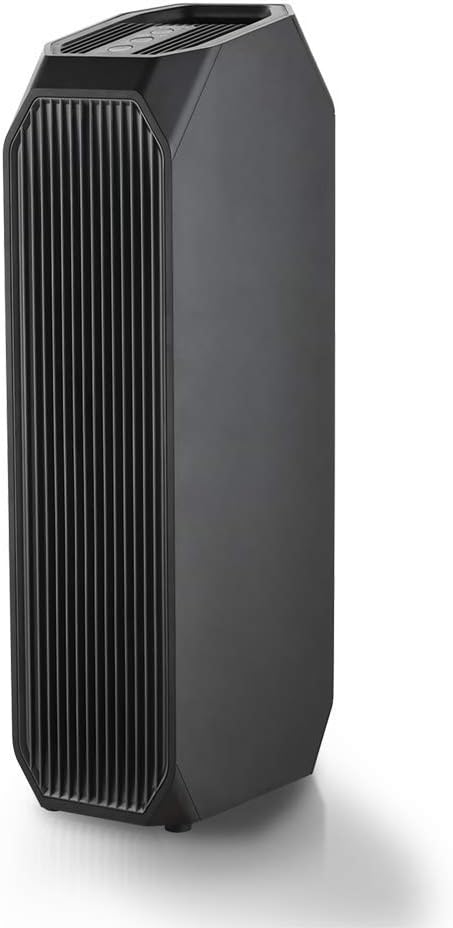
Figure 2.1: Front view of the PerfectAire Air Purifier. This image displays the sleek black tower design of the air purifier, highlighting its main air intake grille.

Figure 2.2: Top view of the control panel. This image shows the intuitive control buttons for fan speed (Low, Med, High), UV light, filter reset, and power, along with the 'Replace filter when flashing' indicator.

Figure 2.3: Diagram illustrating the three-stage air purification process. Air enters through the Carbon Activated Pre-Filter, then passes through the Anti-Allergen HEPA Filter, and finally through the UV LED Germicidal Light before being released as clean air.
3. Setup
- Unpack the Unit: Carefully remove the air purifier from its packaging. Retain packaging for future storage or transport.
- Remove Filter Packaging: Before first use, open the filter compartment (usually located at the back or bottom of the unit) and remove the plastic packaging from the filters. Reinsert the filters securely.
- Placement: Place the air purifier on a firm, level surface. Ensure there is at least 6 inches (15 cm) of clear space around all sides of the unit for optimal airflow. Avoid placing it directly against walls or furniture.
- Power Connection: Plug the power cord into a standard 120V AC electrical outlet.
4. Operating Instructions
Refer to Figure 2.2 for control panel layout.
- Power On/Off: Press the Power button () to turn the unit on or off. The unit will start in Low fan speed.
- Adjust Fan Speed: Press the Fan Speed button () repeatedly to cycle through Low, Medium, and High fan speeds. The corresponding indicator light (LOW, MED, HIGH) will illuminate.
- UV LED Function: Press the UV button () to activate or deactivate the UV LED Germicidal Light. The UV indicator light will illuminate when active.
- Filter Reset: After replacing the filter, press and hold the UV button for 3 seconds to reset the filter indicator. The 'Replace filter when flashing' light will turn off.
5. Maintenance
Filter Replacement
The 'Replace filter when flashing' indicator light will illuminate when it's time to replace the filter. Filter life varies based on usage and air quality, typically every 6-8 months.
- Power Off and Unplug: Turn off the air purifier and unplug it from the power outlet.
- Access Filter Compartment: Locate and open the filter access panel (refer to your unit's specific design for exact location, usually on the back or bottom).
- Remove Old Filter: Carefully remove the used filter. Dispose of it properly.
- Install New Filter: Unwrap the new PerfectAire replacement filter and insert it into the compartment, ensuring it is seated correctly.
- Close Compartment: Securely close the filter access panel.
- Reset Filter Indicator: Plug the unit back in and power it on. Press and hold the UV button for 3 seconds until the 'Replace filter when flashing' light turns off.
Cleaning the Unit
- Wipe the exterior of the air purifier with a soft, dry cloth.
- Do not use abrasive cleaners or solvents.
- Periodically vacuum the air intake and outlet grilles to remove dust buildup.
6. Troubleshooting
| Problem | Possible Cause | Solution |
|---|---|---|
| Unit does not turn on. | Not plugged in; Power outage; Damaged cord/plug. | Ensure unit is securely plugged into a working outlet; Check circuit breaker; Do not use if cord/plug is damaged, contact support. |
| Weak airflow or unusual noise. | Blocked air intake/outlet; Dirty filter; Incorrectly installed filter. | Clear any obstructions; Check and replace filter if dirty; Ensure filter is installed correctly. |
| Filter replacement indicator remains on after filter change. | Filter reset not performed. | Press and hold the UV button for 3 seconds to reset the indicator. |
| UV LED light not working. | UV function is off; UV LED bulb failure. | Press the UV button to turn it on; Contact customer support if the bulb is faulty. |
7. Specifications
| Feature | Detail |
|---|---|
| Brand | PerfectAire |
| Model Name | Air Purifier with UV LED Germicidal Light |
| Model Number | 1PAPUV27 |
| Item Dimensions (LxWxH) | 9.92 x 13.07 x 30 inches |
| Package Dimensions (LxWxH) | 29.6 x 12.9 x 9.7 inches |
| Item Weight | Approx. 7.08 Kilograms |
| Material | Plastic |
| Color | Black |
| Included Components | Air Purifier with UV LED Germicidal Light |
| Certifications | ETL US, Energy Star, AHAM Verified, ARB Certified (Federal Ozone Emissions Limit) |

Figure 7.1: Product label showing certifications including ETL US, Energy Star, AHAM Verified, and ARB Certified, along with the model number 1PAPUV27.
8. Warranty and Support
This PerfectAire product comes with a manufacturer's warranty. Please refer to the warranty card included with your purchase for specific terms and conditions. For technical support, replacement parts, or warranty claims, please contact PerfectAire customer service.
Manufacturer: Perfect Aire Llc
Warranty Description: Warranty (as per product specifications)
For further assistance, please visit the official PerfectAire website or contact their customer support line.