
1. Introduction
This manual provides essential information for the safe and effective use of your Festool AGC 18-125 EB-Basic Cordless Angle Grinder. Please read all instructions carefully before operating the tool. Proper use and maintenance will ensure optimal performance and extend the lifespan of your device.
2. Safety Instructions
Always observe basic safety precautions to reduce the risk of fire, electric shock, and personal injury. Keep this manual for future reference.
- Wear appropriate personal protective equipment (PPE): Always use safety glasses, hearing protection, gloves, and a dust mask when operating the angle grinder.
- Secure the workpiece: Ensure the material being worked on is stable and securely clamped to prevent movement during operation.
- Maintain a clean work area: Cluttered areas invite accidents. Keep your workspace well-lit and free of debris.
- Avoid accidental starting: Ensure the switch is in the off-position before inserting the battery pack, picking up, or carrying the tool.
- Use the correct accessories: Only use grinding or cutting discs and other accessories specifically designed for this angle grinder and rated for its maximum speed.
- Inspect the tool before use: Check for any damage, loose parts, or worn components. Do not operate a damaged tool.
- Keep hands clear: Never place hands near the rotating disc.
- Store properly: When not in use, store the tool in a dry, secure place out of reach of children.
3. Product Overview
The Festool AGC 18-125 EB-Basic is a powerful cordless angle grinder designed for various cutting, grinding, and deburring tasks. It is supplied without batteries or charger, allowing integration with your existing Festool 18V system. The tool comes with a SYS3 M Systainer for organized storage and transport, along with essential accessories.
Key Features:
- Cordless 18V operation for maximum mobility.
- Designed for 125mm diameter discs.
- Includes SYS3 M Systainer for storage.
- Basic version (batteries and charger sold separately).
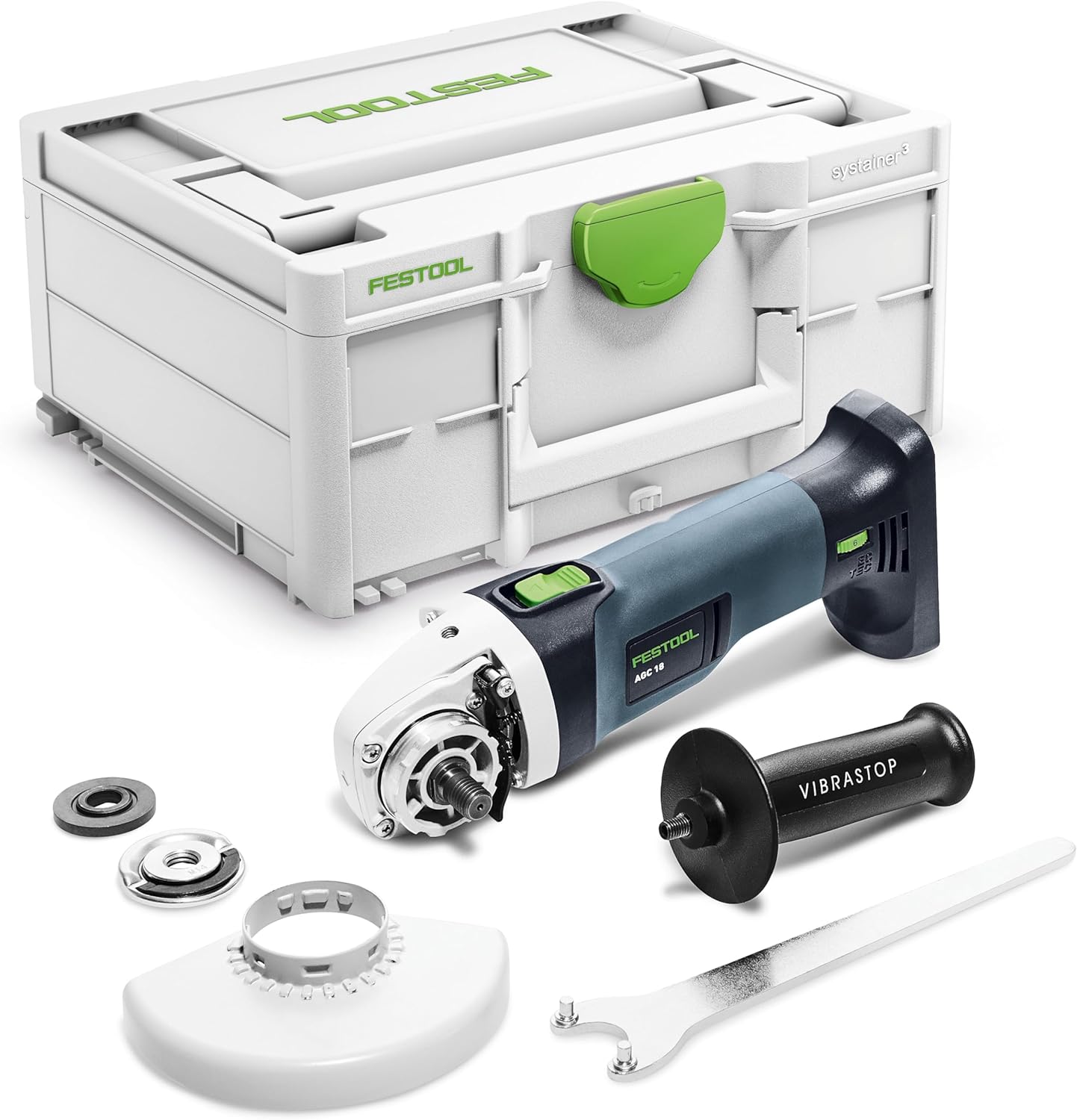
Figure 3.1: Festool AGC 18-125 EB-Basic Cordless Angle Grinder, shown with its SYS3 M Systainer, side handle, disc guard, and wrench.
4. Setup
4.1. Battery Installation
- Ensure the angle grinder is switched off.
- Align the battery pack with the battery slot at the rear of the tool.
- Slide the battery pack into the slot until it clicks securely into place.
- To remove, press the release button on the battery pack and slide it out.
4.2. Attaching the Side Handle
The side handle provides additional control and safety during operation. It can be attached to either side of the gear housing.
- Screw the side handle clockwise into one of the threaded holes on the gear housing until it is firmly secured.
- Ensure it is tightened sufficiently to prevent rotation during use.

Figure 4.1: The angle grinder with the side handle attached for improved grip and control.
4.3. Mounting the Protective Guard
The protective guard must always be used to shield against sparks, debris, and accidental contact with the rotating disc.
- Loosen the clamping screw on the protective guard.
- Place the guard over the spindle housing, ensuring it fits correctly.
- Rotate the guard to the desired position, providing maximum protection for your application.
- Tighten the clamping screw firmly to secure the guard.
4.4. Installing Grinding/Cutting Discs
Always ensure the tool is switched off and the battery is removed before changing discs.
- Press and hold the spindle lock button.
- Use the provided wrench to loosen and remove the clamping nut.
- Place the desired grinding or cutting disc onto the flange, ensuring it is centered.
- Replace the clamping nut and tighten it firmly with the wrench while holding the spindle lock.
- Release the spindle lock.
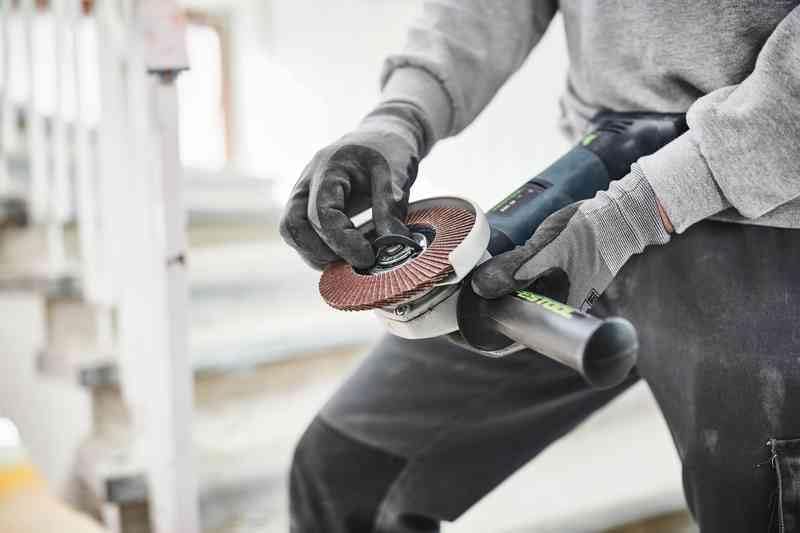
Figure 4.2: Demonstrating the process of changing a grinding disc on the tool.
5. Operating Instructions
5.1. Powering On and Off
- To turn on the tool, slide the switch forward.
- To turn off, slide the switch backward to the OFF position.
5.2. General Operation Guidelines
- Always hold the angle grinder firmly with both hands, using the main handle and the side handle.
- Allow the disc to reach full speed before making contact with the workpiece.
- Apply moderate pressure. Excessive pressure can reduce efficiency and damage the disc or tool.
- Maintain a consistent angle and direction of movement for smooth results.
- Be aware of sparks and debris. Direct them away from yourself and others.
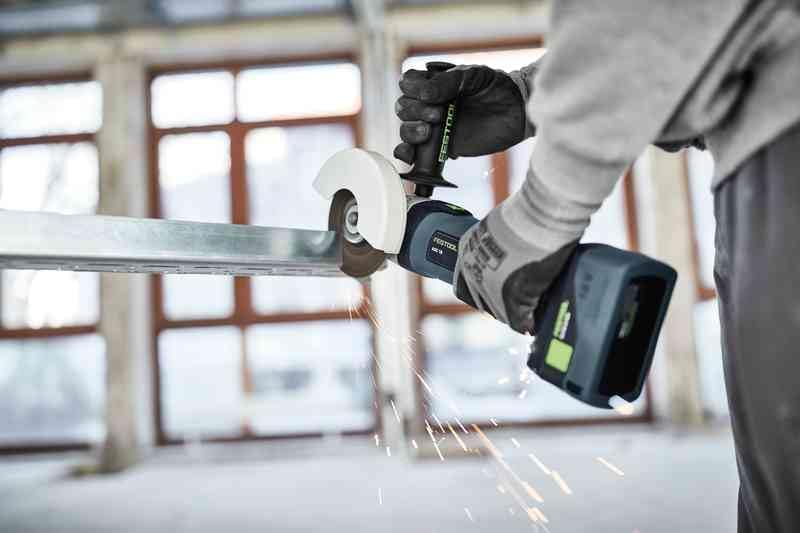
Figure 5.1: An operator cutting a metal profile with the Festool angle grinder, demonstrating proper handling.

Figure 5.2: The angle grinder being used for grinding on a concrete surface, showing sparks generated during operation.

Figure 5.3: An operator grinding a metal pipe, illustrating the tool's versatility for various materials.

Figure 5.4: An operator performing grinding work on concrete stairs, highlighting the tool's application in construction and renovation.
6. Maintenance
6.1. Cleaning
- Always disconnect the battery before cleaning.
- Regularly clean the ventilation slots to prevent overheating. Use compressed air if available.
- Wipe the tool housing with a soft, damp cloth. Do not use harsh chemicals or solvents.
6.2. Disc Replacement
Replace grinding or cutting discs when they become worn, damaged, or no longer perform effectively. Refer to section 4.4 for detailed instructions on disc installation.
6.3. Battery Care
- Use only genuine Festool battery packs and chargers.
- Store batteries in a cool, dry place away from direct sunlight and extreme temperatures.
- Do not short-circuit battery terminals.
- Dispose of depleted batteries according to local regulations.
7. Troubleshooting
| Problem | Possible Cause | Solution |
|---|---|---|
| Tool does not start. | Battery not inserted correctly or depleted. Switch not fully engaged. | Ensure battery is fully charged and properly inserted. Check switch position. |
| Reduced power or performance. | Low battery charge. Worn or incorrect disc. Overheating. | Charge battery. Replace disc. Allow tool to cool down. |
| Excessive vibration. | Damaged or unbalanced disc. Loose clamping nut. | Replace disc. Tighten clamping nut. |
| Tool stops during operation. | Overload protection activated. Battery depleted. | Reduce pressure. Charge battery. |
8. Specifications
| Specification | Value |
|---|---|
| Brand | Festool |
| Model | AGC 18-125 EB-Basic |
| Reference | 576825 |
| Product Dimensions (L x W x H) | 29.2 x 12.2 x 10.4 cm |
| Item Weight | 1.9 Kilograms |
| Color | Blue, Black |
| Material | Cast Iron |
| Power Source Type | Battery Powered |
| Voltage | 230 Volts (Tool operates on 18V battery, 230V likely refers to charger input if included, but tool is battery powered) |
| Maximum Rotational Speed | 8500 rpm |
| Batteries Included? | No |
| Battery(ies) Required | Yes |
| Included Components | 1 Product (Angle Grinder), SYS3 M Systainer, accessories (side handle, protective guard, wrench) |
9. Warranty and Support
Festool products are known for their quality and durability. For detailed warranty information, service, or technical support, please refer to the official Festool website or contact your local Festool dealer.
You can also visit the official Festool store on Amazon for more products and information: Festool Amazon Store.


