
Naztech 15350
Naztech Xpods PRO True Wireless Noise Cancelling Earbuds
Model: 15350
Brand: Naztech
Introduction
The Naztech Xpods PRO are advanced true wireless noise-cancelling earbuds designed for an immersive audio experience and clear communication. Featuring HD sound, touch controls, and IPX4 water resistance, these earbuds are suitable for various activities, including sports and daily use. They come with a wireless charging case for extended playtime and convenient recharging.

Image: Naztech Xpods PRO earbuds, charging case, and product packaging, highlighting key features like 25 hours play time and touch controls.
Setup
What's in the Box
- Wireless Charging Case
- USB-C Charging Cable
- 6 Sets of Silicone Ear Tips (3 sizes, 2 colors)
Charging the Earbuds and Case
Before first use, fully charge the Xpods PRO and their charging case. The case can be charged via the included USB-C cable or a Qi-compatible wireless charging pad.
- USB-C Charging: Connect the USB-C cable to the charging port on the case and to a power source.
- Wireless Charging: Place the charging case on a Qi-compatible wireless charging pad. Ensure the case is properly aligned for charging.
A 10-minute quick charge provides approximately 1 hour of playback. A full charge offers up to 5 hours of playtime for the earbuds, with the charging case providing an additional 20 hours, totaling 25 hours of playtime.
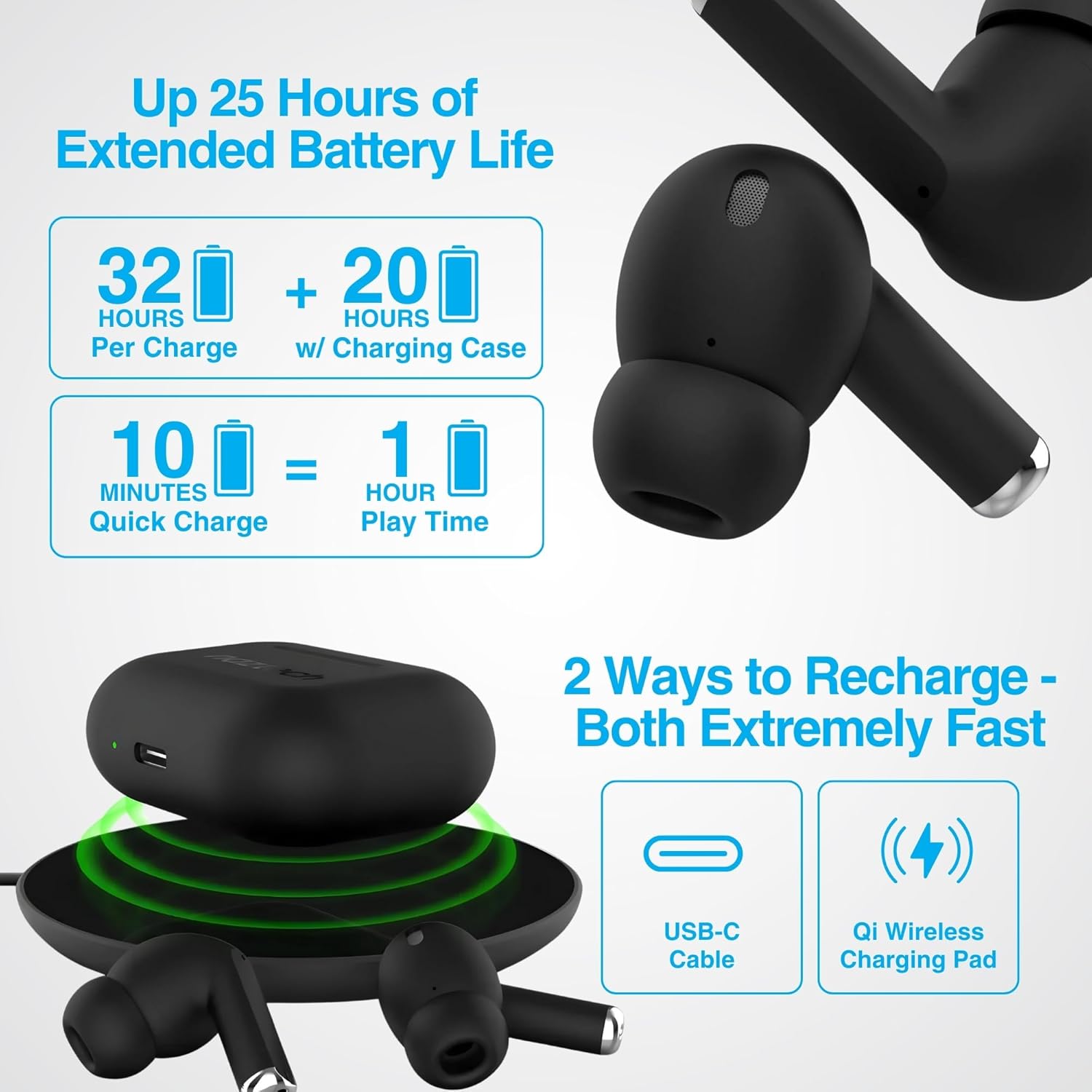
Image: Illustration showing USB-C and Qi wireless charging options for the Naztech Xpods PRO case, along with battery life indicators.
Pairing with Your Device
- Ensure the earbuds are charged.
- Open the charging case. The earbuds will automatically enter pairing mode.
- On your device (smartphone, tablet, etc.), go to Bluetooth settings and enable Bluetooth.
- Select "NAZTECH Xpods PRO" from the list of available devices.
- Once connected, you will hear an audible confirmation, and the earbuds will be ready for use.
The Xpods PRO feature Bluetooth 5.0 for stable connectivity up to 33 feet (10 meters) and auto-pair technology for seamless re-connection with previously paired devices.

Image: A smartphone screen showing the "NAZTECH Xpods PRO" listed in Bluetooth settings, demonstrating universal compatibility with various devices.
Operating Instructions
Touch Controls
The Xpods PRO feature intuitive touch sensor controls on each earbud for easy management of audio playback and calls.
| Action | Control |
|---|---|
| Play/Pause Music | Single tap on either earbud |
| Next Track | Double tap on the right earbud |
| Previous Track | Double tap on the left earbud |
| Answer/End Call | Single tap on either earbud |
| Reject Call | Press and hold either earbud for 2 seconds |
| Activate Voice Assistant | Triple tap on either earbud |

Image: Diagram illustrating the touch control functions on the Naztech Xpods PRO earbuds.
Wearing the Earbuds
For optimal sound quality and a secure fit, choose the silicone ear tips that best suit your ear canal. The Xpods PRO come with 6 sets of silicone ear tips in 3 sizes and 2 colors to ensure a comfortable and noise-isolating fit.

Image: Naztech Xpods PRO earbuds shown with various silicone ear tip sizes, emphasizing customizable fit.
Noise Cancellation
The Xpods PRO feature Passive Noise Cancellation through their closed-system design, which helps to immerse you in music by preserving low-frequency bass richness and reducing ambient noise. Dual microphones with advanced voice capture technology filter out wind and background noise for clear conversations.

Image: A person using Naztech Xpods PRO, illustrating the clear call quality and passive noise cancellation features.
Maintenance
Cleaning
To maintain optimal performance and hygiene, regularly clean your Xpods PRO earbuds and charging case. Use a soft, dry, lint-free cloth to wipe down the surfaces. For ear tips, you may gently wipe them with a slightly damp cloth and allow them to dry completely before reattaching.
Avoid using abrasive materials, solvents, or harsh chemicals, as these can damage the product.
Water Resistance (IPX4)
The Naztech Xpods PRO are rated IPX4 water-resistant, meaning they are protected against splashing water from any direction. This makes them suitable for workouts and light rain. However, they are not designed for submersion in water or exposure to pressurized water jets. Do not use them while swimming or showering.

Image: A person wiping sweat from their face, indicating the IPX4 water-resistant rating of the Naztech Xpods PRO for active use.
Storage
When not in use, store your Xpods PRO in their charging case to protect them from dust, dirt, and physical damage. Store the case and earbuds in a cool, dry place away from extreme temperatures and direct sunlight.
Troubleshooting
If you encounter issues with your Naztech Xpods PRO, refer to the following common solutions:
Earbuds Not Pairing or Connecting
- Check Battery: Ensure both earbuds and the charging case are sufficiently charged.
- Re-pair: Turn off Bluetooth on your device, place earbuds back in the case, close and reopen the case. Then, re-enable Bluetooth on your device and try pairing again.
- Forget Device: On your device's Bluetooth settings, "forget" or "unpair" the "NAZTECH Xpods PRO" and then attempt to pair from scratch.
- Distance: Ensure your device is within the 33ft (10m) Bluetooth range.
- Interference: Move away from other wireless devices that might cause interference.
Sound Quality Issues (e.g., Static, Low Volume)
- Clean Earbuds: Ensure the mesh filters and ear tips are clean and free of debris.
- Ear Tip Fit: Experiment with different sized silicone ear tips to ensure a proper seal in your ear canal, which significantly impacts sound quality and bass response.
- Source Quality: Ensure the audio source (music file, streaming service) is of high quality.
- Device Volume: Check the volume levels on both your connected device and the earbuds.
Charging Problems
- Cable Check: Ensure the USB-C cable is securely connected to both the case and the power source. Try a different USB-C cable and power adapter if available.
- Wireless Pad: If using wireless charging, ensure the case is correctly positioned on the charging pad and the pad is powered on.
- Earbud Placement: Ensure the earbuds are correctly seated in the charging case, making proper contact with the charging pins.
Specifications
| Feature | Detail |
|---|---|
| Model Name | NAZTECH Xpods PRO |
| Item Model Number | 15350 |
| Connectivity Technology | Wireless (Bluetooth 5.0) |
| Wireless Range | Up to 33ft / 10m |
| Control Type | Touch (Media Control) |
| Noise Control | Passive Noise Cancellation |
| Water Resistance Rating | IPX4 |
| Total Playtime | Up to 25 hours (with charging case) |
| Earbud Playtime (per charge) | Up to 5 hours |
| Quick Charge | 10 min charge for 1 hour playback |
| Charging Interface | USB-C, Qi Wireless Charging |
| Included Components | USB-C Charging Cable, 6 Sets of Silicone Ear Tips, Wireless Charging Case |
| Material | Plastic |
| Product Dimensions | 2.39 x 1.81 x 0.91 inches |
| Item Weight | 4.4 ounces |
Warranty and Support
Naztech products are designed for quality and performance. While specific warranty details are not provided in this manual, Naztech generally backs its products with warranties. For detailed warranty information, product support, or technical assistance, please visit the official Naztech website or contact their customer service directly.
You can find more information and support resources by visiting the Naztech Store on Amazon or their official website.
Related documents15350

Ask a question about this manual
Ask about setup, troubleshooting, compatibility, parts, safety, or missing instructions. Manuals+ will review the question and use this page’s manual context to help answer it.