
HOMOOI H12E3085P
HOMOOI Coffee Table Instruction Manual
Model: H12E3085P
Brand: HOMOOI
1. Introduction
Thank you for choosing the HOMOOI H12E3085P Coffee Table. This versatile piece of furniture is designed to enhance your living space, offering both aesthetic appeal and practical storage solutions. Its robust construction, combining engineered wood and a metal frame, ensures durability and stability. This manual provides detailed instructions for assembly, usage, maintenance, and troubleshooting to ensure you get the most out of your new coffee table.
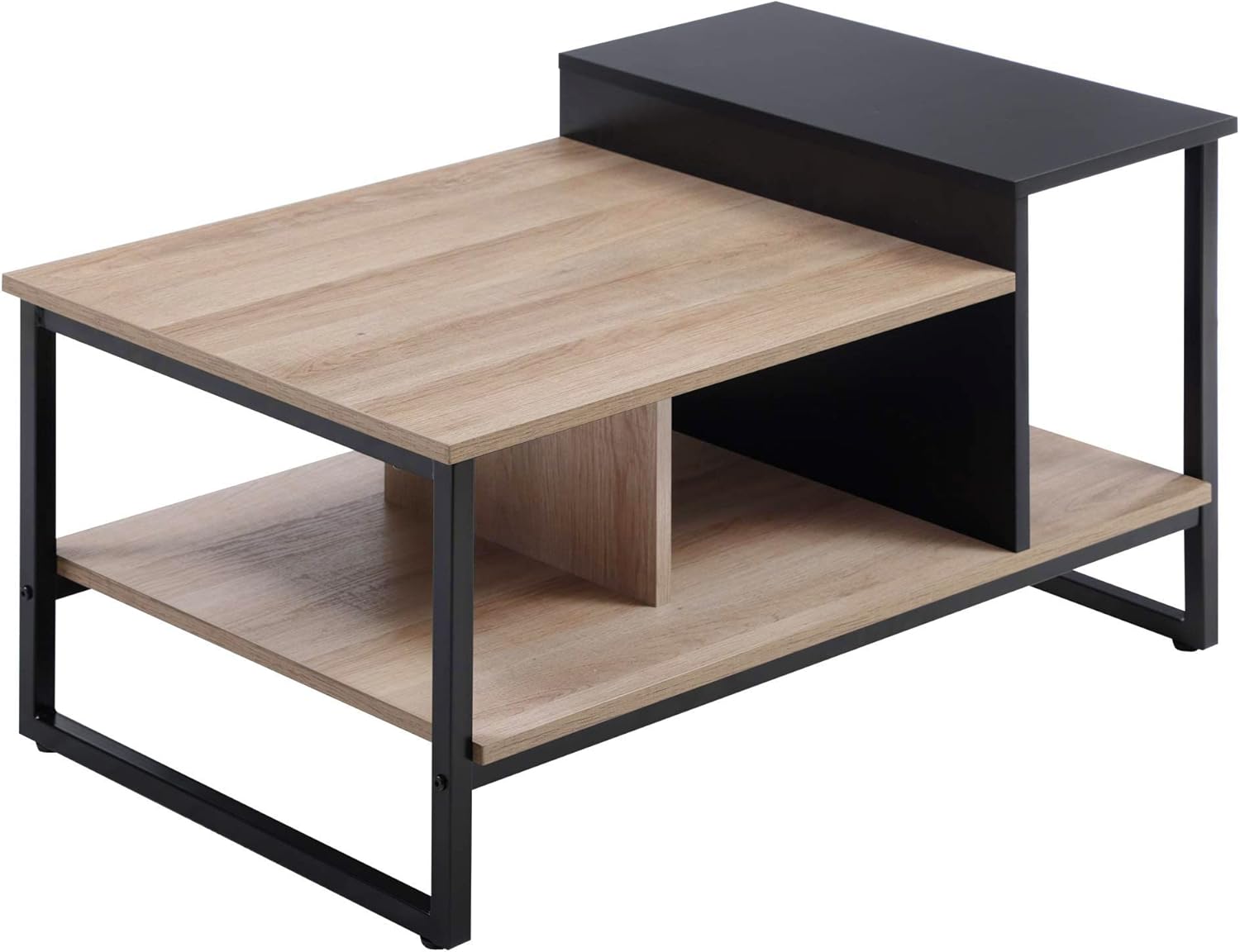
Image 1.1: The HOMOOI H12E3085P Coffee Table, showcasing its two-tone design and multi-level structure.
2. Safety Instructions
Please read and understand all safety instructions before assembling or using this product. Failure to follow these instructions may result in injury or damage to the product.
- Keep all small parts and packaging materials away from children and pets to prevent choking hazards.
- Assemble the product on a clean, flat, and soft surface to avoid scratching.
- Ensure all screws and fasteners are securely tightened before use. Periodically check and re-tighten as necessary.
- Do not overload the table. Refer to the "Specifications" section for maximum weight capacities.
- Do not stand or sit on the table.
- Avoid placing hot items directly on the surface without protective coasters.
- Use only the provided hardware for assembly.
3. Package Contents
Before beginning assembly, verify that all parts listed below are present and undamaged. If any parts are missing or damaged, please contact customer support.

Image 3.1: Exploded view showing all components and hardware included in the package.
Parts List:
- Top Panel (Oak finish)
- Lower Shelf (Oak finish)
- Black Top Panel
- Vertical Support Panels (Oak and Black)
- Metal Frame Legs (4 pieces)
- Adjustable Feet (4 pieces)
Hardware List:
- Screws (various sizes)
- Allen Wrench (Hex Key)
- Dowel Pins
4. Assembly Instructions
Follow these steps carefully for easy and correct assembly. It is recommended to have two people for assembly.
- Step 1: Attach Adjustable Feet to Metal Frame.
Screw the four adjustable feet into the pre-drilled holes at the bottom of the metal frame legs. Ensure they are securely fastened but allow for minor adjustments later.
- Step 2: Assemble the Metal Frame.
Connect the four metal frame legs using the provided screws and the Allen wrench. Ensure the frame forms a stable rectangular base.
- Step 3: Attach the Lower Shelf.
Place the lower oak-finish shelf onto the designated supports within the metal frame. Secure it with screws from underneath or through the frame, as indicated in the diagram.
- Step 4: Install Vertical Support Panels.
Insert the oak and black vertical support panels into their respective slots on the lower shelf and the main top panel. Use dowel pins and screws for a firm connection.
- Step 5: Attach the Main Top Panel and Black Top Panel.
Carefully place the main oak-finish top panel onto the assembled structure, aligning it with the vertical supports and the metal frame. Secure with screws. Then, attach the smaller black top panel to its designated elevated position, ensuring it is level and stable.
- Step 6: Final Check.
Once all parts are assembled, gently lift and move the table to its desired location. Check all connections to ensure they are tight and the table is stable. Adjust the feet if necessary to level the table on uneven floors.

Image 4.1: Detailed diagram illustrating key dimensions and structural components for assembly reference.
5. Usage
The HOMOOI H12E3085P Coffee Table is designed for versatile use in various settings:
- Living Room: Ideal as a central coffee table for holding beverages, books, and decorative items. The multi-level design and integrated storage compartments provide ample space for organization.
- Bedroom: Can serve as a stylish and functional bedside table or a small accent table for reading materials and personal items.
- Office/Study: Use it to hold documents, office supplies, or even a small plant, adding a touch of modern design to your workspace.
Utilize the open shelves and the elevated black section for displaying items or storing frequently accessed objects. The robust construction ensures stability for everyday use.
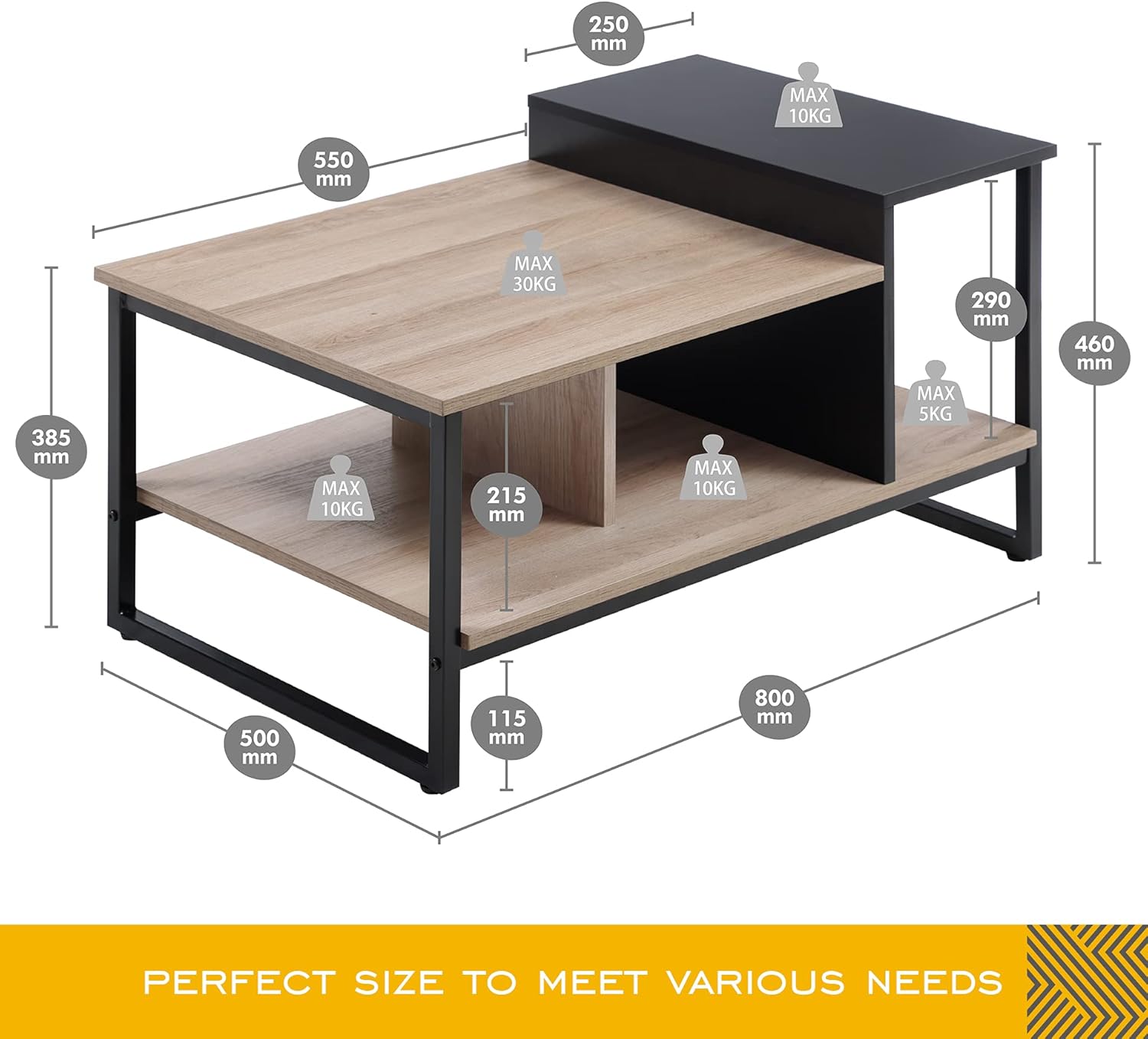
Image 5.1: The coffee table integrated into a modern living room, demonstrating its functional and aesthetic appeal.

Image 5.2: The coffee table showcasing its storage capabilities with books and decorative items.
6. Care and Maintenance
Proper care will extend the life and maintain the appearance of your HOMOOI coffee table.
- Cleaning: Wipe surfaces with a soft, damp cloth. Avoid using abrasive cleaners, harsh chemicals, or polishes that may damage the finish.
- Spills: Immediately wipe up spills with a dry cloth to prevent moisture damage, especially on the engineered wood surfaces.
- Heat and Moisture: Do not place hot items directly on the table surface. Use coasters for drinks and protective pads for hot dishes. Avoid prolonged exposure to direct sunlight or extreme temperatures and humidity.
- Stability Check: Periodically check all screws and connections to ensure they remain tight. Re-tighten if necessary to maintain stability.
- Moving: When moving the table, lift it rather than dragging it to prevent damage to the legs and floor.
7. Troubleshooting
If you encounter any issues with your coffee table, refer to the common problems and solutions below.
| Problem | Possible Cause | Solution |
|---|---|---|
| Table is wobbly. | Screws are loose; uneven floor; adjustable feet not properly set. | Tighten all screws. Adjust the adjustable feet to level the table. Ensure the table is on a flat surface. |
| Parts do not fit together. | Incorrect orientation of parts; wrong parts used. | Refer to the assembly diagrams and ensure parts are oriented correctly. Verify part numbers if available. |
| Missing hardware or damaged parts. | Packaging error; shipping damage. | Do not attempt to force assembly. Contact HOMOOI customer support for replacement parts. |
8. Specifications
Detailed specifications for the HOMOOI H12E3085P Coffee Table:
| Feature | Detail |
|---|---|
| Brand | HOMOOI |
| Model | H12E3085P |
| Dimensions (L x W x H) | 80 x 50 x 46 cm (31.5 x 19.7 x 18.1 inches) |
| Net Weight | 12.8 kg (28.2 lbs) |
| Gross Weight | 14.7 kg (32.4 lbs) |
| Material | Engineered Wood (MDF), Metal (Square Tube) |
| Color | Oak (wood finish), Black (metal frame and accent panel) |
| Features | Multi-level platform, Contrast color tabletop, Large storage spaces, Adjustable feet, PVC edge banding |
| Max. Load Capacity (Main Top) | 30 kg (66 lbs) |
| Max. Load Capacity (Lower Shelf) | 10 kg (22 lbs) |
| Max. Load Capacity (Small Black Shelf) | 5 kg (11 lbs) |
| Max. Load Capacity (Small Oak Shelf) | 10 kg (22 lbs) |

Image 8.1: Key features of the coffee table, including material quality and adjustable feet.

Image 8.2: Design elements such as the multi-level platform, contrast tabletop, and large storage areas.
9. Warranty and Support
HOMOOI is committed to providing high-quality products. For any questions, concerns, or issues regarding your H12E3085P Coffee Table, please contact our customer support team. While specific warranty details may vary by region and retailer, we strive to ensure customer satisfaction.
Please retain your proof of purchase for any warranty claims or support inquiries.
For assistance, visit the HOMOOI official website or contact the retailer from whom you purchased the product.
Ask a question about this manual
Ask about setup, troubleshooting, compatibility, parts, safety, or missing instructions. Manuals+ will review the question and use this page’s manual context to help answer it.