Introduction
This manual provides detailed instructions for the assembly, operation, and maintenance of your SEDETA White Gaming Desk. Please read all instructions carefully before beginning assembly and retain this manual for future reference. The desk is designed to provide a comfortable and functional workspace for gaming, studying, or office tasks, featuring LED lighting, a monitor stand, storage shelves, and a CPU holder.
Important Safety Information
- Always assemble the desk according to the provided instructions.
- Ensure all screws are tightened securely, especially at the table top, to maintain stability.
- Place the desk on a flat, even surface to prevent wobbling.
- Do not exceed the maximum weight capacity of 180 lbs to ensure the desk's stability and safety.
Key Features
The SEDETA White Gaming Desk is designed with several features to enhance your workspace:
- Multifunctional Design: Includes LED lighting, a monitor stand shelf, speaker stands, a top storage shelf, and CPU holders.
- Spacious Desktop: 55" (L) x 23.6" (W) surface accommodates multiple monitors and accessories.
- Ergonomic Monitor Riser: Elevates monitors to reduce neck and back strain.
- Durable Construction: Features a waterproof and scratch-proof desktop, alloy steel frame, and adjustable leg pads for stability.
- Integrated Storage: Top hutch for printers/files and two CPU holders keep your setup organized.

This image highlights key structural and design features such as cable management grommets, rounded corner design, stable "V" design, heavy-duty legs, and adjustable foot pads.

A close-up view of a speaker stand, demonstrating its utility for peripheral placement.

This image shows a CPU tower positioned on one of the integrated CPU holders, illustrating efficient space utilization.
Package Contents
Please verify that all components are present before beginning assembly. If any parts are missing or damaged, please contact customer support.
Main Components:
- Desktop Panel
- Monitor Stand Shelf
- Top Storage Shelf
- Speaker Stands (2)
- CPU Holder (2)
- Desk Frame Components (various metal bars and supports)
- LED Light Strip
Hardware:
- Various Screws (Types A, B, C, D, E)
- Adjustable Foot Pads (Type F)
- Washers (Type G)
- Cable Management Grommets (Type H)
- Shelf Brackets (Type I)
- Assembly Tools (Allen wrench, wrench)
Assembly Instructions
Follow these steps carefully to assemble your SEDETA White Gaming Desk. A visual guide is also provided below.
Video 1: SEDETA Gaming Desk Assembly Guide. This video provides a comprehensive visual guide for assembling your desk. Refer to the detailed steps below for written instructions.
- Step 1: Attach Adjustable Foot Pads. Attach the adjustable foot pads (F) to the bottom of the two main side frames (8). Ensure they are securely threaded into place.
- Step 2: Assemble the Base Frame. Connect the two main side frames (8) using the horizontal support bars (5, 6, 7). Use screws (D) to secure these connections. Ensure the frame is stable before proceeding.
- Step 3: Assemble CPU Holder Panels. Assemble the CPU holder panels (3, 4) by connecting them with screws (E) to form two L-shaped units. These will form the base for your CPU towers.
- Step 4: Attach CPU Holders to Base Frame. Secure the assembled CPU holder units to the bottom horizontal bars of the main frame using screws (E). Ensure they are positioned correctly on both sides.
- Step 5: Install Rear Cross Braces. Attach the rear cross braces (13) to the back of the main frame using screws (B) and washers (G). These braces provide additional stability to the desk structure.
- Step 6: Mount the Main Desktop Panel. Carefully place the main desktop panel (1) onto the assembled frame. Align the pre-drilled holes and secure it using screws (B) and cable management grommets (H).
- Step 7: Attach Monitor Stand Supports. Install the vertical supports (9) for the monitor stand onto the desktop panel using screws (C) and washers (G). Ensure they are firmly attached.
- Step 8: Assemble Upper Frame for Hutch. Connect the upper horizontal bars (5) to the vertical monitor stand supports (9) using screws (D). This forms the framework for the hutch and top shelf.
- Step 9: Install Shelf Brackets. Attach the small triangular shelf brackets (11) to the sides of the upper frame using screws (C) and washers (G). These will support the speaker stands.
- Step 10: Install Monitor Stand Shelf and Top Storage Shelf. Place the monitor stand shelf (2) onto the lower set of horizontal bars and secure it with screws (B). Then, place the top storage shelf (2) onto the uppermost horizontal bars and secure it with screws (B).
- Step 11: Attach Speaker Stands. Mount the speaker stands (10) onto the triangular shelf brackets (11) using screws (A). Ensure they are level and secure.
Operating Instructions
LED Light Strips
The SEDETA Gaming Desk includes RGB LED light strips. To operate:
- Connect the LED light strip to a power source.
- Control the lights via the dedicated mobile application.
- Choose from over 60,000 colors and 29 flashing modes.
- Utilize the music sync function: The built-in sensitivity adjustable microphone allows the LED light color to change with the rhythm of sound and music.
- Set timers for automatic on/off functions using the timer feature in the app.

This image illustrates the various control options for the LED light strip, including app control, key control, music synchronization, and timer functions.
Monitor Riser
The integrated monitor riser helps elevate your monitor to an ergonomic height, reducing strain on your back and neck during prolonged use. Position your monitor(s) directly on the riser for optimal viewing.
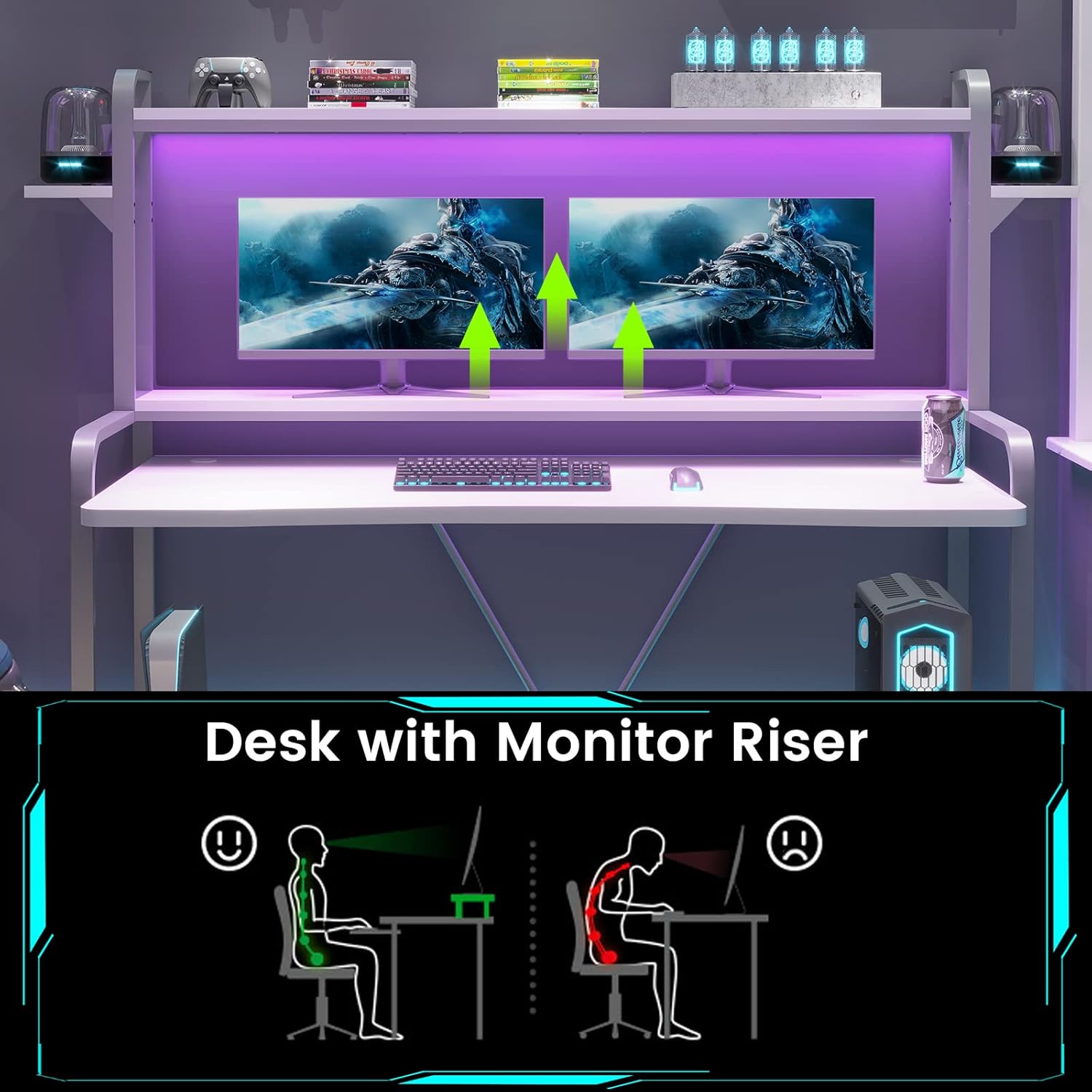
This diagram demonstrates the ergonomic benefits of using the monitor riser to maintain correct posture and reduce neck strain.
Maintenance
- Cleaning: The desktop surface is waterproof and scratch-proof. Clean the desk regularly with a soft, damp cloth. Avoid abrasive cleaners that may damage the finish.
- Tightening Screws: Periodically check all screws and connections to ensure they remain tight. Re-tighten as necessary to maintain stability.
- Adjustable Foot Pads: Ensure the adjustable leg pads are properly set to keep the desk stable on uneven surfaces.
Troubleshooting
Desk Wobbles After Assembly
If the desk feels unstable or wobbles after assembly:
- Check all connections: Ensure all screws are fully tightened. Refer back to the assembly steps to confirm each connection point.
- Adjust foot pads: Use the adjustable foot pads at the bottom of the desk legs to level the desk on uneven flooring. Rotate them clockwise or counter-clockwise until stability is achieved.
- Verify part orientation: Double-check that all frame components and panels are installed in the correct orientation as shown in the assembly instructions.
LED Lights Not Functioning
If the LED light strip does not turn on or function correctly:
- Power connection: Ensure the LED light strip is securely plugged into a working power outlet.
- App connection: Verify that your mobile device is properly connected to the LED light strip via the application.
- Check for damage: Inspect the light strip and its wiring for any visible damage or kinks.
Specifications
| Feature | Detail |
|---|---|
| Brand | SEDETA |
| Model Number | B08PZ12RSR |
| Product Dimensions (D x W x H) | 55"D x 72"W x 59.8"H |
| Color | White |
| Style | Gaming |
| Base Material | Alloy Steel |
| Top Material Type | Engineered Wood |
| Item Weight | 55 Pounds |
| Maximum Weight Recommendation | 180 Pounds |
| Special Features | LED Light Strip, Monitor Stand Shelf, Speaker Stands, Top Storage Shelf, CPU Holder, Adjustable Foot Pads, Cable Management Grommets, Rounded Corner Design, Stable "V" Design |
| Required Assembly | Yes |

This diagram provides detailed measurements of the desk, including length, width, and height of various components.
Warranty and Customer Support
SEDETA provides a 3-year warranty for this product. If you have any questions, require assistance with assembly, or encounter any issues, please do not hesitate to contact our experienced customer service team. We are committed to responding within 24 hours.
For support, please visit the official SEDETA store or contact us through the platform where you purchased the product.

