
1. Product Overview
The Philips Audio TAT1215 True Wireless Earbuds offer a seamless audio experience with up to 18 hours of playtime, clear sound, and a secure fit. Designed for convenience, these earbuds feature intuitive controls and IPX4 splash resistance.
What's in the Box
- 1 pair of Philips TAT1215 True Wireless Headphones
- 1 USB Type-C Charging Cable
- 1 Charging Case
- 3 sets of Ear Tips (Small, Medium, Large)
- 1 User Manual (this document)
- 1 Quick Start Guide

Image: Philips TAT1215 True Wireless Earbuds in their charging case, illustrating the product and its primary accessory.
2. Setup Guide
2.1 Charging Your Earbuds and Case
Before first use, fully charge the earbuds and the charging case. A full charge provides up to 18 hours of total playtime (6 hours on a single charge from the earbuds, plus 12 hours from the charging case).
- Place the earbuds into the charging case. Ensure they are correctly seated.
- Connect the USB Type-C charging cable to the charging case's port and the other end to a USB power source.
- The charging indicator on the case will illuminate to show charging status. A full charge typically takes 2 hours.

Image: Philips TAT1215 Earbuds removed from their charging case, ready for use or charging.
2.2 Pairing with a Bluetooth Device
Follow these steps for initial pairing with your smartphone, tablet, or other Bluetooth-enabled device.
- Ensure the earbuds are charged.
- Open the charging case. The earbuds will automatically enter pairing mode, indicated by a flashing LED light on the earbuds.
- On your device, go to Bluetooth settings and enable Bluetooth.
- Select "Philips TAT1215" from the list of available devices.
- Once connected, the LED indicator on the earbuds will stop flashing.
The earbuds will automatically reconnect to the last paired device when removed from the case, if Bluetooth is enabled on the device.
3. Operating Instructions
The Philips TAT1215 earbuds feature integrated controls for managing audio and calls.
3.1 Earbud Controls
The earbuds utilize physical buttons for control. Pressing the button on either earbud performs specific functions:
- Play/Pause Music: Press once on either earbud.
- Next Track: Double-press the right earbud.
- Previous Track: Double-press the left earbud.
- Answer/End Call: Press once on either earbud.
- Reject Call: Press and hold for 2 seconds on either earbud.
- Activate Voice Assistant: Triple-press on either earbud.
3.2 Voice Assistant
The earbuds support voice assistant activation. Triple-press the button on either earbud to activate your device's voice assistant (e.g., Google Assistant, Siri).
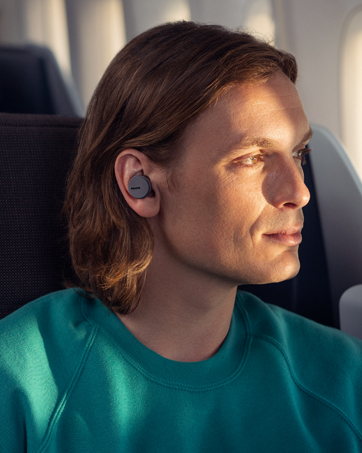
Image: A person wearing Philips TAT1215 earbuds, demonstrating typical usage during daily activities.
4. Maintenance
4.1 Cleaning
Regular cleaning helps maintain optimal performance and hygiene.
- Gently wipe the earbuds and charging case with a soft, dry, lint-free cloth.
- Remove ear tips and clean them with mild soap and water, then dry thoroughly before reattaching.
- Do not use abrasive cleaners, alcohol, or chemical solvents.
4.2 Storage
When not in use, store the earbuds in their charging case to protect them and ensure they remain charged.
4.3 Water Resistance (IPX4)
The Philips TAT1215 earbuds are IPX4-rated, meaning they are resistant to splashing water from any direction. This makes them suitable for workouts and light rain. However, they are not designed for submersion in water.
- Do not intentionally submerge the earbuds in water.
- If the earbuds get wet, wipe them dry before placing them back in the charging case.

Image: Philips TAT1215 Earbuds in their charging case with water droplets, visually representing their IPX4 splash resistance.
5. Troubleshooting
If you encounter issues with your Philips TAT1215 earbuds, refer to the following common solutions:
| Problem | Possible Solution |
|---|---|
| Earbuds not pairing |
|
| No sound or low volume |
|
| One earbud not working |
|
| Charging issues |
|
6. Technical Specifications
| Feature | Specification |
|---|---|
| Model Name | TAT1215 |
| Connectivity Technology | Bluetooth 5.1, Wireless |
| Maximum Operating Distance | 10 Metres |
| Playtime (Earbuds) | Up to 6 hours |
| Total Playtime (with Case) | Up to 18 hours (6 + 12 hours) |
| Charging Time | 2 hours |
| Driver Size | 6 mm Neodymium drivers |
| Frequency Response | 20 Hz - 20000 Hz |
| Impedance | 16 Ohm |
| Microphone | Built-In with echo cancellation |
| Water Resistance | IPX4 (Splash Resistant) |
| Control Type | Physical Buttons (Music, Call, Voice Assistant) |
| Item Weight | 43 g |
| Product Dimensions | 3.6 x 6.5 x 3.3 cm |
7. Warranty and Support
7.1 Warranty Information
This Philips Audio TAT1215 product comes with a 1-year manufacturer's warranty from the date of purchase. Please retain your proof of purchase for warranty claims.
7.2 Customer Support
For further assistance, technical support, or warranty claims, please contact Philips Audio customer service. Manufacturer contact information:
- Manufacturer: TPV Technology India Private Limited
- Contact Number: 18004256396
- Address: 501-508, 5TH FLOOR BESTECH CHAMBERS, BLOCK B SEC 27, SUSHANT LOK 1 GURUGRAM – 122002


