
1. Introduction
The Runleader Digital Wireless Hour Meter RL-HM016B is a vibration-activated device designed to track the operating hours of various gasoline and diesel-powered machines. This manual provides essential information for the proper setup, operation, and maintenance of your hour meter.
2. Product Features
- Total Hours (TOT) Tracking: Records and displays the total engine usage time, up to 99,999 hours.
- Partial Timer (PAr): Allows management of routine maintenance schedules, such as oil changes, by tracking specific operational periods.
- Adjustable Vibration Sensitivity: Features two sensitivity levels, Low (LO) and High (HI), to adapt to different engine vibration characteristics.
- Water and Shock Resistance: Constructed with 100% epoxy resin sealing for protection against dampness, moisture, and impacts.
- Lock Shutdown Function: Enables locking and shutting down the LCD display to conserve battery life during periods of inactivity.
- Simple Mounting: Designed for easy stick-on installation in a suitable position.
- Data Storage: User data is retained even after the display is shut down.

Figure 2.1: Overview of Runleader RL-HM016B features.
3. Package Contents
Verify that all items are present in the package:
- 1x Runleader Digital Wireless Hour Meter RL-HM016B
- 1x Double-sided adhesive tape
- 1x Paper card (packaging with basic instructions)

Figure 3.1: Package contents of the RL-HM016B hour meter.
4. Specifications
| Attribute | Detail |
|---|---|
| Model Number | RL-HM016B |
| Battery | 1 Lithium Metal battery (included) |
| Material | Acrylonitrile Butadiene Styrene (ABS) |
| Item Weight | 40 Grams |
| Total Hours Range | 0-99,999 Hours |
| Waterproof Rating | IP67 (100% epoxy resin sealing) |
| Manufacturer | Ningbo Jiangbei Run Leader Electronics Co., Ltd |
| Country of Origin | China |
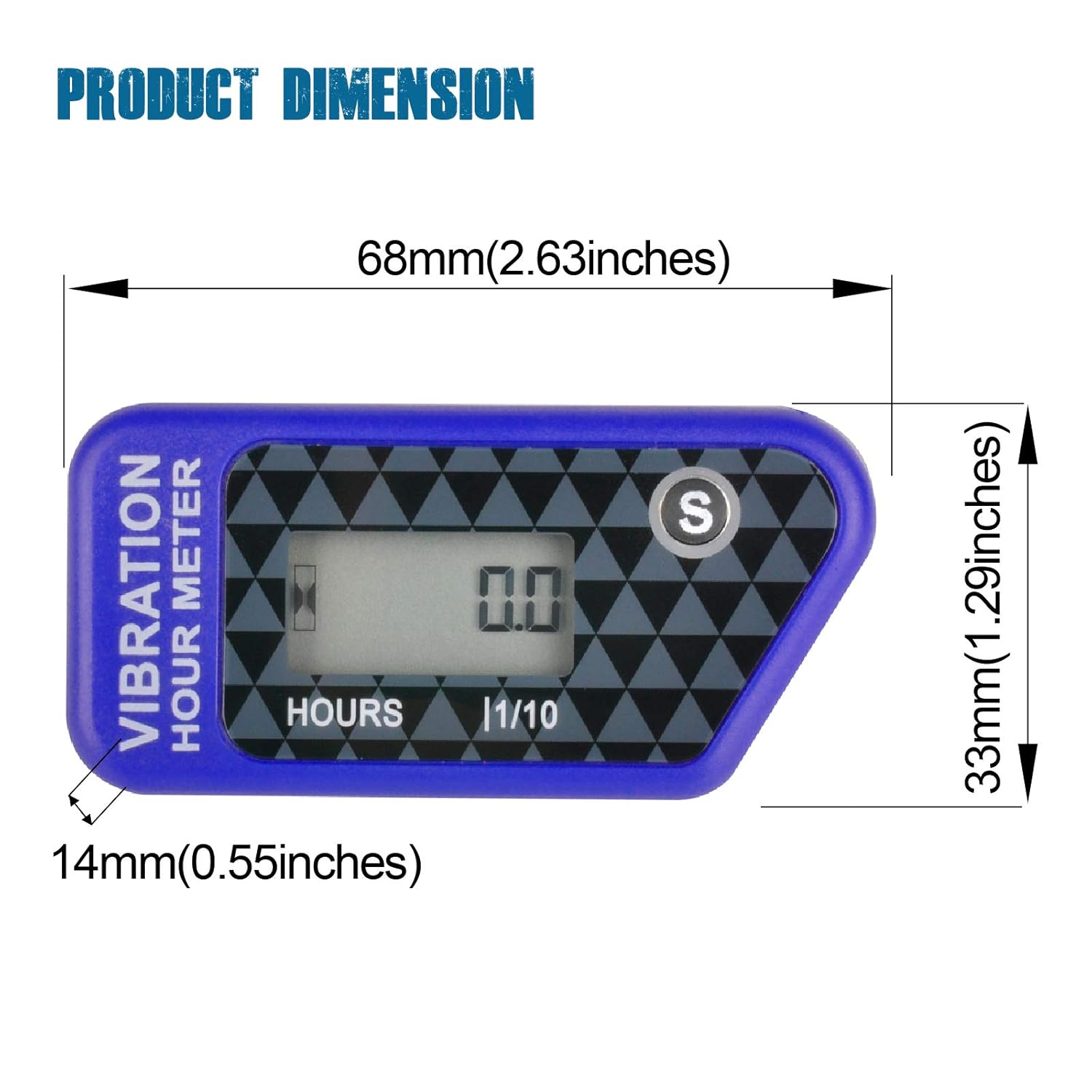
Figure 4.1: Product dimensions of the RL-HM016B.
5. Setup
5.1 Mounting the Hour Meter
The RL-HM016B hour meter is designed for simple stick-on mounting. Choose a flat, clean, and dry surface on your equipment where the meter will be exposed to engine vibrations.
- Clean the chosen mounting surface thoroughly to ensure proper adhesion.
- Peel off the protective backing from the double-sided adhesive tape.
- Firmly press the hour meter onto the cleaned surface, ensuring good contact.

Figure 5.1: Stick-on mounting method for the hour meter.
5.2 Adjusting Vibration Sensitivity
The hour meter has two vibration sensitivity settings: Low (LO) and High (HI). Adjust the sensitivity based on the vibration intensity of your equipment to ensure accurate tracking.
- LO (Low Sensitivity): Suitable for machines with strong vibrations (e.g., some generators, chainsaws).
- HI (High Sensitivity): Ideal for equipment with weaker or less consistent vibrations (e.g., electric fans, some lawn mowers).

Figure 5.2: Vibration sensitivity settings (LO and HI).
6. Operation
6.1 Total Hours (TOT) Display
The hour meter automatically tracks the total operating time of your equipment when it senses vibrations. The display shows the total accumulated hours (TOT) up to 99,999 hours.

Figure 6.1: Total Hours (TOT) display.
6.2 Partial Timer (PAr)
The partial timer allows you to track specific operational periods, which is useful for scheduling maintenance tasks. This timer can be reset independently without affecting the total hours.

Figure 6.2: Partial Timer (PAr) display.
6.3 Lock Shutdown
To extend battery life when the meter is not in use or during transport, you can activate the lock shutdown feature. This turns off the LCD display while retaining all recorded data.
7. Maintenance
The Runleader Digital Wireless Hour Meter is designed for minimal maintenance. The internal lithium metal battery is included and has a long lifespan. If the battery needs replacement, consult the manufacturer's guidelines or a qualified technician.
- Keep the meter clean and free from excessive dirt or debris.
- Ensure the mounting surface remains secure.
- Avoid exposing the meter to extreme temperatures beyond its operating range.
8. Troubleshooting
If you encounter issues with your hour meter, consider the following:
- Meter not displaying hours:
- Ensure the equipment is generating sufficient vibration.
- Check the vibration sensitivity setting (try switching between LO and HI).
- Verify the meter is securely mounted and receiving vibrations.
- Inaccurate hour readings:
- Adjust the vibration sensitivity to match your equipment's vibration level.
- Ensure the meter is not picking up extraneous vibrations from other sources.
- Display is off:
- The meter might be in lock shutdown mode. Press any button to wake it up.
- The internal battery may be depleted.
9. Applications
The Runleader Digital Wireless Hour Meter RL-HM016B is suitable for a wide range of gasoline and diesel-powered equipment, including but not limited to:
- Golf Carts
- Tractors
- Generators
- Compressors
- Chainsaws
- Motorcycles
- Dirt Bikes
- Pressure Washers
- Lawn Mowers
- Snowblowers

Figure 9.1: Examples of equipment compatible with the hour meter.
10. Warranty and Support
The Runleader Digital Wireless Hour Meter RL-HM016B comes with a 2-year manufacturer's warranty. For technical support, warranty claims, or further assistance, please contact the manufacturer directly using the information below:
Manufacturer: Ningbo Jiangbei Run Leader Electronics Co., Ltd
Contact Information: China 315036 Zhejiang Ningbo Cicheng xinhengliulu 1-2hao2zhuang +86 159 5823 9480
Please retain your proof of purchase for warranty purposes.
