
Legami EAR0001
Legami Be Free Wireless Earbuds User Manual
Model: EAR0001
Introduction
Thank you for choosing the Legami Be Free Wireless Earbuds. These earbuds are designed to provide a high-quality audio experience with the convenience of wireless connectivity. Featuring a charming panda-themed charging case, integrated dual microphones for clear calls, and intuitive touch controls, they are perfect for music, calls, and everyday use. This manual will guide you through the setup, operation, and maintenance of your new earbuds.
Package Contents
- Legami Be Free Wireless Earbuds (Left and Right)
- Panda-themed Charging Case
- USB Type-C Charging Cable
- User Manual (this document)

Image: The retail packaging of the Legami Be Free Wireless Earbuds, highlighting the panda design and key features like touch sensor, autopairing, 5 hours playtime, dual microphone, and compatibility.
Setup
1. Charging the Earbuds and Case
Before first use, ensure both the earbuds and the charging case are fully charged.
- Place the earbuds into their respective slots in the charging case. Ensure they are seated correctly to make contact with the charging pins.
- Connect the provided USB Type-C charging cable to the charging port on the case and the other end to a USB power source (e.g., computer USB port, wall adapter).
- The indicator light on the case will show charging status. Allow approximately 1-2 hours for a full charge.
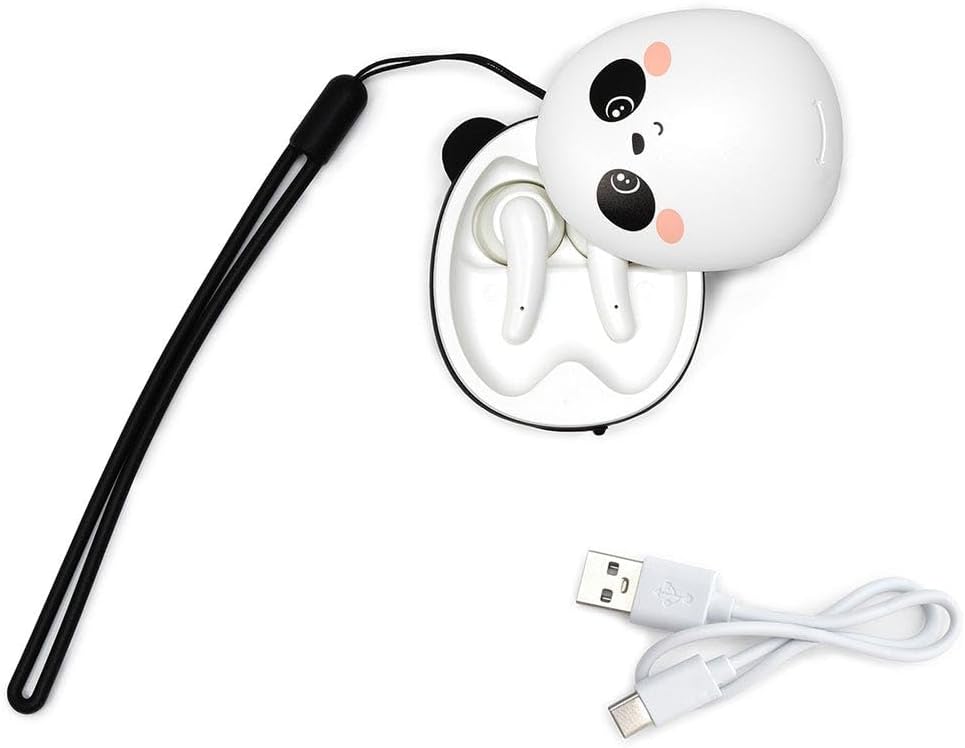
Image: The Legami Be Free earbuds nestled in their open panda charging case, with the USB Type-C charging cable visible, ready for charging.
2. Initial Pairing (Automatic Connection)
The Legami Be Free earbuds feature automatic connection for ease of use.
- Ensure Bluetooth is enabled on your device (smartphone, tablet, laptop).
- Open the charging case. The earbuds will automatically power on and enter pairing mode.
- On your device, search for Bluetooth devices and select "Legami Be Free" (or similar name) from the list.
- Once connected, you will hear a confirmation tone, and the earbuds will be ready for use.
Note: After the initial pairing, the earbuds will automatically connect to the last paired device when removed from the case and Bluetooth is active on the device.
Operating Instructions
The Legami Be Free earbuds utilize touch sensors for various functions. The touch sensitive area is typically located on the outer surface of each earbud.
Music Playback
- Play/Pause: Single tap on either the Left (L) or Right (R) earbud.
- Next Track: Double tap on the Right (R) earbud.
- Previous Track: Double tap on the Left (L) earbud.
- Volume Up: Triple tap on the Right (R) earbud.
- Volume Down: Triple tap on the Left (L) earbud.
Call Management
- Answer/End Call: Single tap on either earbud.
- Reject Call: Press and hold either earbud for 2 seconds.
Voice Assistant
- Activate Voice Assistant (Siri, Google Assistant): Press and hold either earbud for 3 seconds.
Maintenance
Proper care will extend the life of your Legami Be Free Wireless Earbuds.
- Cleaning: Use a soft, dry, lint-free cloth to clean the earbuds and charging case. Do not use abrasive cleaners, alcohol, or chemical solvents.
- Storage: When not in use, always store the earbuds in their charging case to protect them and keep them charged.
- Water Resistance: These earbuds are not waterproof. Avoid exposure to water, moisture, or extreme temperatures.
- Charging Contacts: Periodically check the charging contacts on both the earbuds and inside the case for any dust or debris and gently clean if necessary.

Image: The Legami Be Free Wireless Earbuds charging case, closed and showing its distinctive panda design, ready for storage or transport.
Troubleshooting
| Problem | Possible Cause | Solution |
|---|---|---|
| Earbuds not pairing/connecting. | Bluetooth is off on device; earbuds not in pairing mode; previously paired with another device. | Ensure Bluetooth is on. Place earbuds back in case, close, then open to re-enter pairing mode. Forget "Legami Be Free" from your device's Bluetooth list and re-pair. |
| Only one earbud working. | One earbud not charged; connection issue between earbuds. | Ensure both earbuds are charged. Place both earbuds back in the case, close, wait a few seconds, then open again. |
| Low volume or poor sound quality. | Earbuds not properly seated in ear; low battery; debris in earbud speaker. | Adjust earbud position. Charge earbuds. Gently clean speaker mesh with a dry cotton swab. |
| Earbuds not charging. | Charging cable issue; dirty charging contacts; case battery empty. | Try a different USB-C cable and power source. Clean charging contacts on earbuds and case. Charge the case. |
Specifications
| Feature | Detail |
|---|---|
| Model Number | EAR0001 |
| Brand | Legami |
| Connectivity Technology | Wireless (Bluetooth) |
| Playtime | Up to 5 hours |
| Microphone | Dual integrated microphone |
| Control Type | Touch Control |
| Compatibility | iOS and Android devices, Smartphones, tablets, and laptops with Bluetooth |
| Charging Port | USB Type-C |
| Material | Acrylonitrile Butadiene Styrene (ABS), Silicone |
| Weight | 130 Grams |
| Dimensions (Case) | Length 5.5 cm, Height 7 cm, Width 3 cm (Approximate) |
| Frequency Range | 20 Hz - 20 kHz |
Warranty and Support
For warranty information and customer support, please refer to the documentation provided with your purchase or visit the official Legami website. Keep your proof of purchase for warranty claims.
Online Support: www.legami.com
Related documentsEAR0001


Ask a question about this manual
Ask about setup, troubleshooting, compatibility, parts, safety, or missing instructions. Manuals+ will review the question and use this page’s manual context to help answer it.