
Introduction
Thank you for purchasing the Shinco Bluetooth Speaker. This speaker is designed to deliver powerful audio with deep bass and vibrant party lights, suitable for various occasions. It features Bluetooth connectivity, True Wireless Stereo (TWS) pairing, and multiple input options including USB, TF card, AUX, and microphone/guitar inputs. Please read this manual carefully to ensure proper use and to maximize your listening experience.
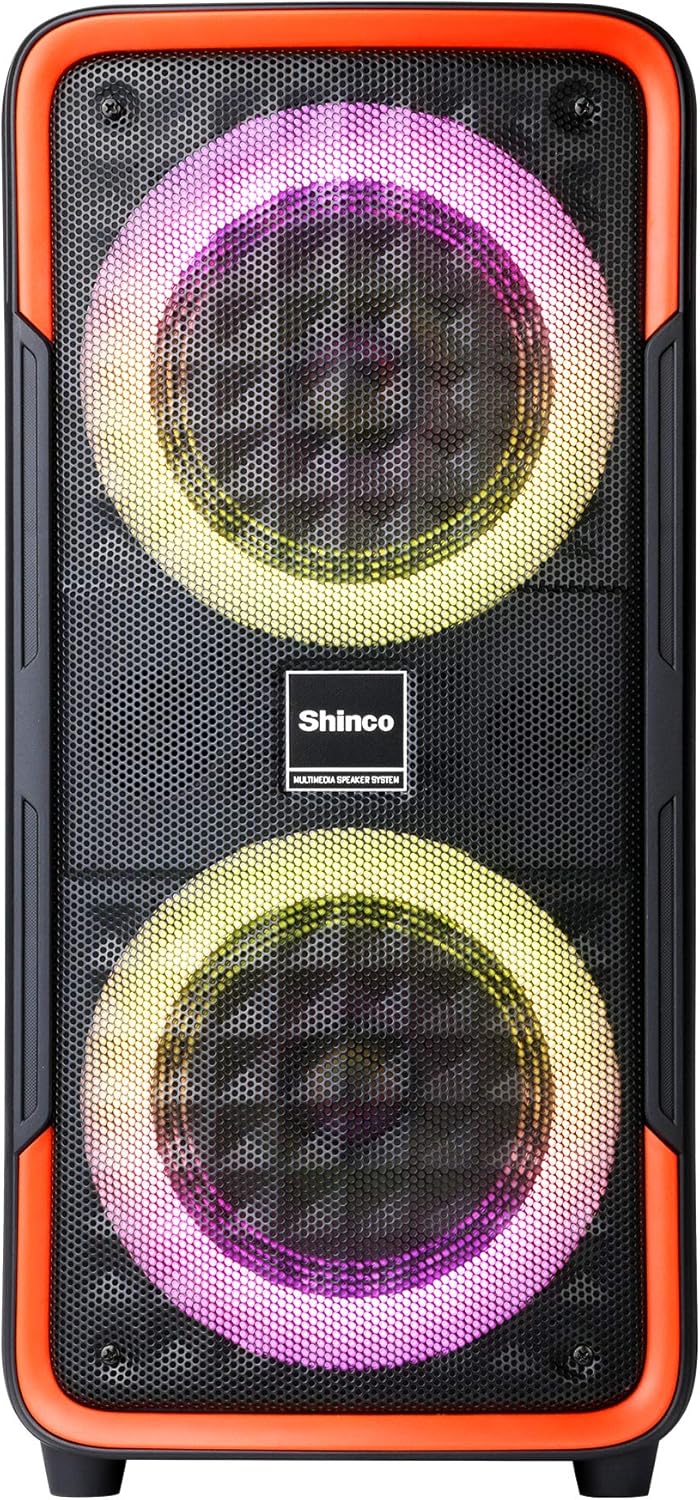
Figure 1: Front view of the Shinco Bluetooth Speaker, showcasing its dual woofers with dynamic LED lighting.
What's in the Box
Upon unpacking your Shinco Bluetooth Speaker, please ensure all items are present:
- Shinco Bluetooth Speaker
- Power Adapter (for charging)
- Wired Microphone (if included with your model)
- User Manual
Setup
Charging the Speaker
Before first use, fully charge the speaker. Connect the provided power adapter to the DC 5V input port on the speaker and plug the other end into a wall outlet. The charging indicator light will illuminate. Once fully charged, the indicator light may change color or turn off, depending on the model. A full charge typically takes several hours.
Power On/Off
To power on the speaker, press and hold the Power button located on the control panel. You will hear an audible prompt, and the LED lights will activate. To power off, press and hold the Power button again.

Figure 2: Close-up of the speaker's control panel, showing the power button, mode selection, volume controls, and various input ports.
Operating Instructions
Bluetooth Connectivity
- Power on the speaker. It will automatically enter Bluetooth pairing mode, indicated by a flashing Bluetooth icon or LED.
- On your mobile phone or tablet, enable Bluetooth and search for available devices.
- Select "Shinco Speaker" (or similar name) from the list of devices.
- Once connected, you will hear a confirmation sound, and the Bluetooth indicator will stop flashing.
The speaker can maintain a stable connection within 65 feet (approximately 20 meters) in an open area.
True Wireless Stereo (TWS) Pairing
TWS allows you to pair two Shinco Bluetooth Speakers for a stereo sound experience.
- Ensure both speakers are powered on and not connected to any Bluetooth device.
- On one speaker (this will be the primary speaker), press and hold the TWS button. You will hear a prompt indicating TWS pairing mode.
- The primary speaker will automatically search for and connect to the secondary speaker.
- Once paired, you will hear a confirmation sound. The LED indicators on both speakers will show a stable connection.
- Now, connect your device to the primary speaker via Bluetooth as described above. Audio will play in stereo through both speakers.

Figure 3: Two Shinco speakers operating in True Wireless Stereo (TWS) mode, providing a wider soundstage.
USB/TF Card Playback
Insert a USB flash drive or TF (Micro SD) card into the respective port on the control panel. The speaker will automatically detect the storage device and begin playing audio files (MP3, WAV, etc.). Use the playback controls (Play/Pause, Next/Previous Track) on the speaker to manage your music.
AUX Input
Connect an external audio device (e.g., MP3 player, laptop) to the AUX input port using a 3.5mm audio cable. The speaker will automatically switch to AUX mode, or you may need to press the Mode button to select AUX. Audio will then be played from your connected device.
Microphone/Guitar Input
Plug a 1/4" microphone or guitar into the MIC/GUITAR input port. Adjust the microphone volume using the dedicated knob (if available) or the main volume control. This feature is ideal for karaoke or live performances.
Party Lights
The speaker features integrated LED party lights. Press the LED button on the control panel to cycle through various lighting modes and patterns. The lights can flash, blink, and synchronize with the rhythm of the music, enhancing the atmosphere.
Maintenance
- Cleaning: Use a soft, dry cloth to clean the speaker's exterior. Do not use abrasive cleaners, waxes, or solvents.
- Storage: Store the speaker in a cool, dry place away from direct sunlight and extreme temperatures.
- Battery Care: To prolong battery life, avoid fully discharging the battery frequently. Charge the speaker regularly, even if not in use, to maintain battery health.
- Water Exposure: This speaker is not waterproof. Avoid exposing it to water or excessive moisture.
Troubleshooting
| Problem | Possible Cause | Solution |
|---|---|---|
| Speaker does not power on. | Battery is depleted. | Connect the speaker to a power source using the provided adapter and allow it to charge. |
| No sound from the speaker. | Volume is too low; incorrect input mode; device not connected properly. | Increase volume on both the speaker and the connected device. Ensure the correct input mode (Bluetooth, AUX, USB/TF) is selected. Reconnect the device. |
| Bluetooth connection fails. | Speaker is out of range; device's Bluetooth is off; speaker is connected to another device. | Move the device closer to the speaker. Ensure Bluetooth is enabled on your device. Disconnect from other devices and try pairing again. |
| TWS pairing fails. | Speakers are too far apart; one speaker is already connected via Bluetooth. | Ensure both speakers are close to each other. Disconnect any Bluetooth devices from both speakers before initiating TWS pairing. |
| Microphone sound is poor or absent. | Microphone not fully plugged in; microphone volume too low; faulty microphone. | Ensure the microphone is securely plugged into the 1/4" input. Adjust microphone volume. Test with another microphone if possible. |
Specifications
| Feature | Detail |
|---|---|
| Model | B08PTZVWF2 |
| Dimensions (HWD) | 22.83 x 11.42 x 10.63 inches (approx. 21 x 9.65 x 8.66 inches as per feature bullets) |
| Weight | 10.38 pounds |
| Connectivity | Bluetooth, USB, TF Card, AUX (3.5mm Jack), 1/4" Microphone/Guitar Input |
| Special Features | Party Lights (LED), True Wireless Stereo (TWS), Built-in Handles |
| Power Source | Battery Powered (1 Lithium Ion battery included) |
| Color | Black, Red |

Figure 4: Shinco Bluetooth Speaker illustrating its physical dimensions.
Warranty and Support
Shinco products are designed for reliability and performance. This product comes with a standard manufacturer's warranty against defects in materials and workmanship. Please refer to the warranty card included with your purchase for specific terms and conditions, including the warranty period and coverage details.
For technical support, troubleshooting assistance, or warranty claims, please contact Shinco customer service. Contact information can typically be found on the product packaging or on the official Shinco website. Please have your product model number (B08PTZVWF2) and proof of purchase ready when contacting support.