
1. Introduction
This manual provides essential information for the safe and effective use of your JEGS 81496 Replacement Parts Washer Pump. This pump is designed as a direct replacement for JEGS 555-81525 (20-gallon parts washer) and JEGS 555-81526 (5-gallon portable parts washer) models. Please read all instructions carefully before installation and operation.
2. Safety Information
WARNING: Failure to follow these safety instructions may result in injury or damage to the product.
- Do not operate without water: The pump is designed for submersible use in liquid. Operating it dry will cause damage and void the warranty.
- Maintain proper grounding: Ensure the pump is correctly grounded according to local electrical codes to prevent electrical shock.
- Electrical Connection: Connect the pump to a properly rated and grounded electrical outlet. Do not use extension cords unless absolutely necessary and ensure they are rated for outdoor/wet use and appropriate amperage.
- Liquid Compatibility: This pump is intended for use with standard parts washer solvents. Do not use with highly corrosive or flammable liquids such as acetone, as this may damage the pump and create a fire hazard.
- Inspection: Before each use, inspect the power cord and pump housing for any signs of damage. Do not use if damaged.
- Maintenance: Disconnect power before performing any maintenance or cleaning.
3. Package Contents
Verify that all components are present upon opening the package:
- JEGS 81496 Replacement Parts Washer Pump (1 unit)
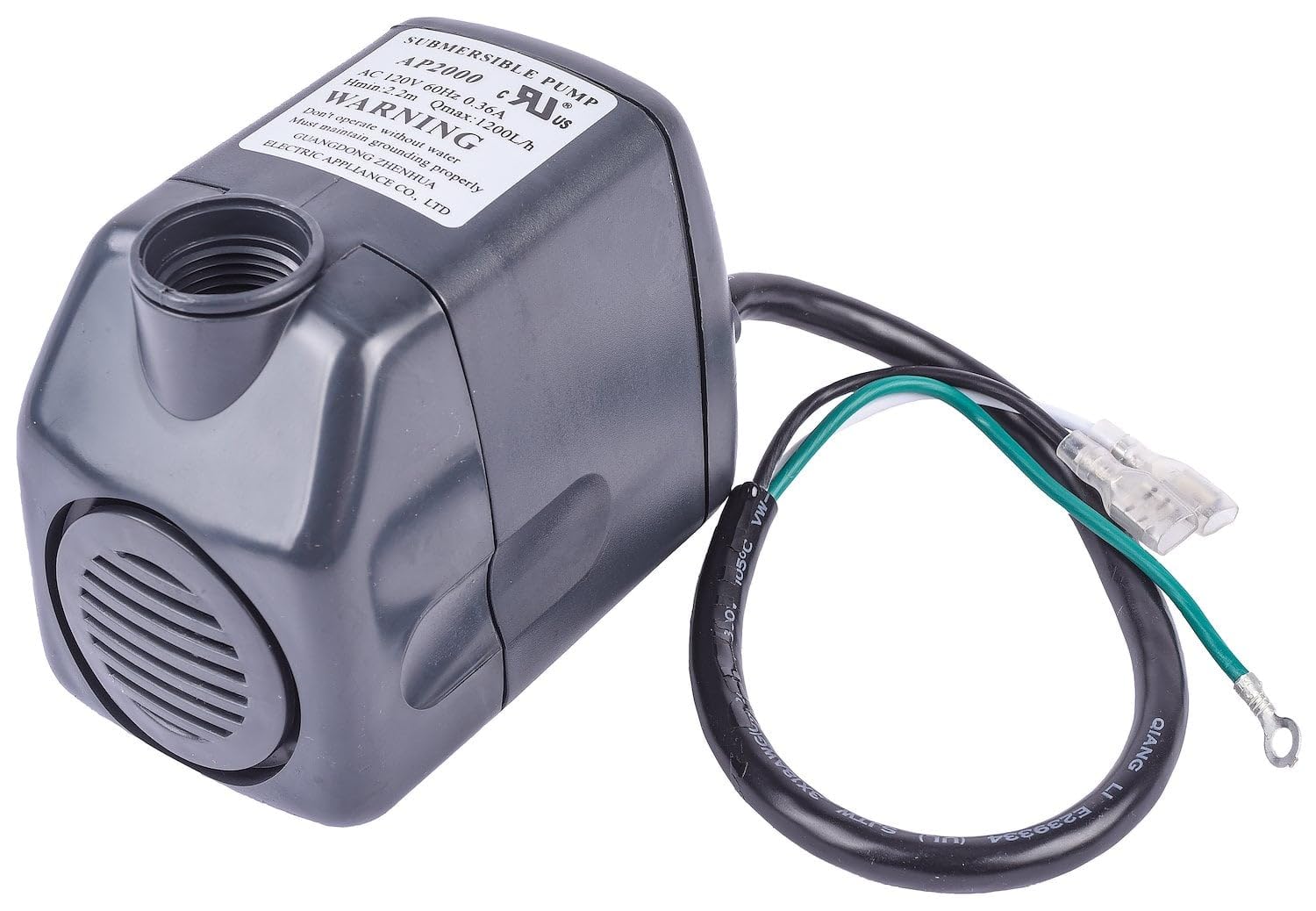
Image 3.1: The JEGS 81496 Replacement Parts Washer Pump, showing its compact design and electrical wiring.
4. Setup and Installation
Follow these steps to install the replacement pump:
- Disconnect Power: Ensure the parts washer is unplugged from the electrical outlet before beginning installation.
- Drain Washer: If the parts washer contains liquid, drain it completely according to the washer's instructions.
- Remove Old Pump: Carefully disconnect the old pump's electrical wiring and any hoses. Remove the old pump from its mounting location within the parts washer.
- Position New Pump: Place the new JEGS 81496 pump in the designated pump compartment of your JEGS 555-81525 or 555-81526 parts washer. Ensure it is seated securely.
- Connect Hoses: Attach the parts washer's fluid intake and output hoses to the appropriate ports on the new pump. Ensure connections are tight to prevent leaks.
- Connect Electrical Wiring: Connect the pump's electrical wires to the parts washer's internal wiring. Match the colors (typically black to black, white to white, and green/ground to green/ground). Ensure all connections are secure and insulated.
- Refill Washer: Refill the parts washer with an appropriate cleaning solvent, ensuring the pump is fully submerged.

Image 4.1: The JEGS 81496 pump showing its electrical wiring connections (black, white, green/ground).

Image 4.2: Top view of the pump, displaying the warning label and specifications for electrical connection.
5. Operating Instructions
Once the pump is installed and the parts washer is filled with solvent:
- Plug In: Plug the parts washer's power cord into a grounded electrical outlet.
- Activate Pump: Turn on the parts washer's power switch. The pump should begin circulating the cleaning solvent.
- Verify Flow: Check for a steady flow of solvent from the parts washer's nozzle. If no flow, refer to the Troubleshooting section.
- Operation: Use the parts washer as intended, ensuring the pump remains fully submerged during operation.
- Shut Down: When finished, turn off the parts washer's power switch and unplug it from the outlet.
6. Maintenance
Regular maintenance ensures optimal performance and extends the life of your pump.
- Cleaning: Periodically clean the pump's intake screen to prevent blockages from debris. Disconnect power before cleaning.
- Solvent Replacement: Follow the parts washer's instructions for replacing old or contaminated cleaning solvent.
- Inspection: Regularly inspect the pump and its wiring for any signs of wear, cracks, or damage. Replace the pump if significant damage is observed.
- Storage: If storing the parts washer for an extended period, ensure the pump is clean and dry, or stored submerged in clean solvent.

Image 6.1: Side view of the pump, highlighting the intake grill that should be kept clear of debris.
7. Troubleshooting
If you encounter issues with your pump, refer to the following common problems and solutions:
| Problem | Possible Cause | Solution |
|---|---|---|
| Pump does not turn on | No power to parts washer; Loose electrical connection; Pump motor failure | Check parts washer power cord and outlet; Verify pump wiring connections; Replace pump if motor is faulty. |
| Low or no fluid flow | Pump intake clogged; Output hose kinked or blocked; Insufficient fluid level | Disconnect power and clean pump intake screen; Check and clear hoses; Ensure pump is fully submerged in solvent. |
| Pump is noisy | Operating dry (not submerged); Debris in pump impeller | Ensure pump is fully submerged; Disconnect power and inspect impeller for foreign objects. |
If problems persist after troubleshooting, contact JEGS customer support.
8. Specifications
- Model Number: 555-81496
- Compatibility: JEGS 555-81525 (20-gallon) and 555-81526 (5-gallon portable) Parts Washers
- Power Source: AC/DC (specifically AC 120V, 60Hz, 0.36A as per pump label)
- Maximum Flow Rate: 1200 Liters Per Hour
- Maximum Head (Hmin): 2.2 meters (approx. 7.2 feet)
- Item Weight: 1.7 Pounds
- Material: Plastic, Polypropylene (PP)
- Style: Diaphragm
- Color: Gray
9. Warranty Information
This JEGS 81496 Replacement Parts Washer Pump is covered by a 30-day manufacturer's warranty from the date of purchase. This warranty covers defects in materials and workmanship under normal use. It does not cover damage resulting from misuse, neglect, improper installation, or use with incompatible liquids (e.g., acetone). For warranty claims, please retain your proof of purchase and contact JEGS customer support.
10. Support
For further assistance, technical support, or to inquire about replacement parts, please visit the official JEGS website or contact their customer service department.
JEGS Website: www.jegs.com
JEGS Store on Amazon: Visit the JEGS Store