
NPET S20
NPET S20PRO RGB Gaming Keyboard & Mouse Combo User Manual
Model: S20
Introduction
This manual provides comprehensive instructions for the setup, operation, and maintenance of your NPET S20PRO RGB Gaming Keyboard and Mouse Combo. This combo is designed for an immersive gaming experience with dynamic RGB lighting, high performance, and durable construction.

Image: The NPET S20PRO RGB Gaming Keyboard and Mouse Combo, showcasing the keyboard with multi-color backlighting and the matching RGB mouse.
Product Features
- Dynamic RGB Lighting Synergy:
- Keyboard: Customizable 5 independent zones with 16.8 million colors and doubleshot ABS keycaps for vibrant illumination.
- Mouse: 4-mode RGB effects that sync seamlessly with keyboard lighting for immersive setup aesthetics.
- Elite Gaming Performance:
- Keyboard: Features 4x faster response time, 26 anti-ghosting keys, and dedicated media controls for uninterrupted gameplay.
- Mouse: Offers 6 adjustable DPI levels (1200-7200) with a 1ms response time for precise accuracy in gaming.
- Battle-Ready Durability:
- Spill-resistant keyboard design repels liquids and crumbs.
- Reinforced mouse switches are built to withstand 10 million clicks.
- Includes a 1.8m mouse cable and keyboard adjustable feet for stability during long sessions.

Image: Close-up of the keyboard surface with water droplets, illustrating its spill-resistant design.

Image: Underside view of the keyboard, highlighting its durable metal base and ABS topplate construction.
- Ergonomic Comfort Design:
- Keyboard: Adjustable feet reduce wrist strain during extended use.
- Mouse: Contoured grip and textured sides prevent fatigue and slippage from sweat.

Image: Diagram illustrating the comfortable ergonomic design of the mouse, shaped to fit the hand naturally.

Image: Side view of the keyboard showing the adjustable feet extended, allowing for angle adjustment to improve comfort.
- Universal Plug-and-Play Compatibility:
- Full Windows support (XP/7/8/10/11) and basic Mac functionality.
- Zero-driver installation – works instantly with PCs, laptops, and gaming rigs.

Image: The keyboard and mouse combo connected to a desktop computer, with various Windows operating system logos in the background, indicating broad compatibility.
What's in the Box
Your NPET S20PRO RGB Gaming Keyboard & Mouse Combo package includes:
- NPET S20PRO RGB Gaming Keyboard
- NPET RGB Gaming Mouse
- Keycap Puller
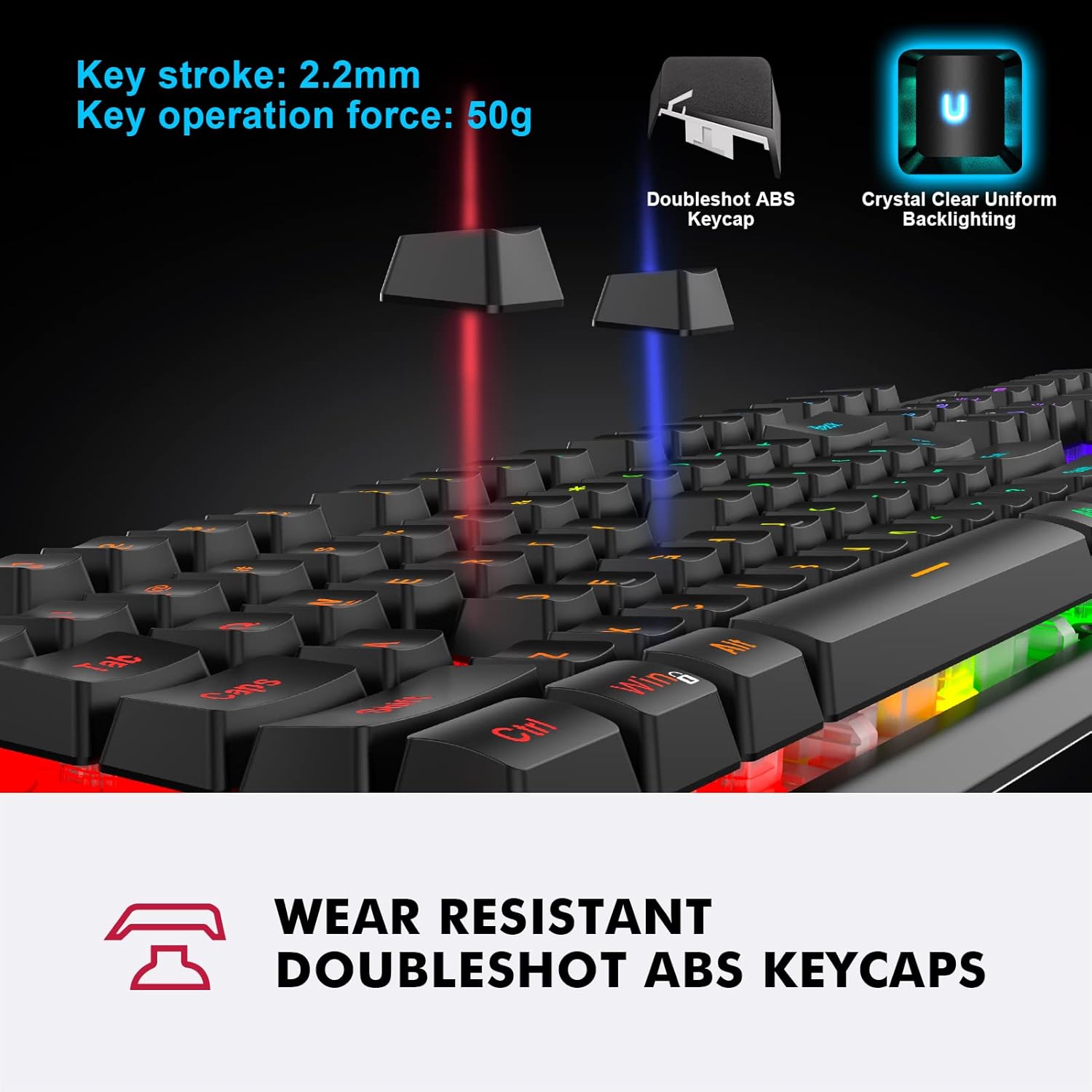
Image: A close-up showing the doubleshot ABS keycaps and the included keycap puller, demonstrating the keycap structure and removal tool.
Setup Instructions
The NPET S20PRO RGB Gaming Keyboard and Mouse Combo is designed for simple plug-and-play functionality. No additional drivers are required for basic operation.
- Connect the Keyboard: Locate an available USB port on your computer (PC, laptop, or gaming rig). Insert the USB connector of the keyboard firmly into the USB port.
- Connect the Mouse: Locate another available USB port on your computer. Insert the USB connector of the mouse firmly into the USB port.
- System Recognition: Your operating system (Windows XP/7/8/10/11 or Mac for basic functions) will automatically detect and install the necessary generic drivers. This process usually takes a few seconds.
- Adjust Keyboard Angle: Extend the adjustable feet located on the underside of the keyboard to set your preferred typing angle for ergonomic comfort.
Operating Instructions
Keyboard Operation
- RGB Backlighting Control: The keyboard features dynamic RGB lighting across 5 independent zones. Specific key combinations (e.g., Fn + lighting keys, if available) can be used to cycle through 16.8 million colors and various lighting effects. Refer to the quick start guide or on-screen prompts for detailed lighting customization.
- Anti-Ghosting Keys: The keyboard supports 26 anti-ghosting keys, allowing multiple key presses to be registered simultaneously without conflict, which is crucial for gaming.
- Multimedia Controls: Utilize the dedicated multimedia keys (often accessed via the 'Fn' key in combination with F-keys) to control audio playback, volume, and other media functions directly from your keyboard.

Image: The keyboard illuminated with vibrant RGB lighting, demonstrating its 10-zone RGB illumination and color schemes.
Mouse Operation
- DPI Adjustment: The mouse features 6 adjustable DPI levels (1200-7200 DPI). Use the dedicated DPI button (usually located behind the scroll wheel) to cycle through these settings to match your preference for speed and precision in different applications or games.
- RGB Lighting Effects: The mouse includes 4-mode RGB effects that can synchronize with the keyboard's lighting. These effects are typically controlled automatically or through the DPI button.

Image: The gaming mouse with indicators for its adjustable DPI settings (1000, 1600, 3200, 6400 DPI), highlighting its customizable sensitivity.
Maintenance
Proper care and maintenance will extend the lifespan of your NPET S20PRO Gaming Keyboard and Mouse Combo.
- Cleaning the Keyboard:
- The keyboard features a spill-resistant design. In case of accidental spills, immediately unplug the keyboard and gently wipe off any liquid with a clean, dry cloth. Allow it to air dry completely before reconnecting.
- For general cleaning, use a soft, lint-free cloth slightly dampened with water or a mild cleaning solution. Avoid harsh chemicals or abrasive materials.
- Use the included keycap puller to remove keycaps for deeper cleaning of dust and debris.
- Cleaning the Mouse:
- Wipe the mouse surface with a soft, dry, or slightly damp cloth.
- Ensure the optical sensor on the underside of the mouse is clean and free of debris for optimal tracking performance.
- Storage: When not in use for extended periods, store the keyboard and mouse in a clean, dry environment away from extreme temperatures and direct sunlight.
Troubleshooting
If you encounter issues with your NPET S20PRO RGB Gaming Keyboard and Mouse Combo, please refer to the following common solutions:
| Problem | Possible Solution |
|---|---|
| Keyboard/Mouse not responding |
|
| Backlighting not working or incorrect colors |
|
| Mouse cursor erratic or not moving |
|
| Keys are sticky or unresponsive |
|
Specifications
| Feature | Detail |
|---|---|
| Product Dimensions (Keyboard) | 17.32 x 5.51 x 0.98 inches |
| Item Weight (Keyboard) | 2.02 pounds |
| Manufacturer | NPET |
| Model Number | S20 |
| Brand | NPET |
| Compatible Devices | Laptop, Gaming Console, PC |
| Connectivity Technology | USB |
| Keyboard Description | Gaming |
| Special Features | Backlit, Ergonomic, Keyboard and mouse combo |
| Color | Black (with RGB backlighting) |
| Keyboard Backlighting Color Support | RGB |
| Material | Acrylonitrile Butadiene Styrene, Plastic |
| Included Components | Keycap Puller |
| Hand Orientation (Mouse) | Ambidextrous |
| Mouse DPI Range | 1200-7200 DPI (6 adjustable levels) |
| Mouse Cable Length | 1.8m (approx. 5.9 ft) |

Image: Top-down and bottom-up views of the keyboard, displaying its overall dimensions and cable length.
Warranty and Support
For warranty information, technical support, or any inquiries regarding your NPET S20PRO RGB Gaming Keyboard and Mouse Combo, please contact NPET customer service directly.
You can typically find contact details on the official NPET website or through the retailer where the product was purchased. Please have your product model number (S20) and purchase details ready when contacting support.
For more information, visit the official NPET store: NPET Store on Amazon
Related documentsS20

Ask a question about this manual
Ask about setup, troubleshooting, compatibility, parts, safety, or missing instructions. Manuals+ will review the question and use this page’s manual context to help answer it.