1. Introduction
Thank you for choosing the Cecotec Grandheat 2090 Built-In Touch Microwave with Grill. This appliance is designed to provide efficient and versatile cooking options for your kitchen. Please read this manual thoroughly before operating the appliance to ensure safe and correct use. Keep this manual for future reference.
2. Safety Instructions
Always follow basic safety precautions when using electrical appliances to reduce the risk of fire, electric shock, injury, or exposure to excessive microwave energy.
- Do not attempt to operate this oven with the door open as this can result in harmful exposure to microwave energy.
- Do not place any object between the oven front face and the door or allow soil or cleaner residue to accumulate on sealing surfaces.
- Do not operate the oven if it is damaged. It is particularly important that the oven door closes properly and that there is no damage to the: (1) door (bent), (2) hinges and latches (broken or loosened), (3) door seals and sealing surfaces.
- The oven should not be adjusted or repaired by anyone except properly qualified service personnel.
- Liquids or other foods must not be heated in sealed containers since they are liable to explode.
- Only use utensils that are suitable for use in microwave ovens.
- When heating food in plastic or paper containers, keep an eye on the oven due to the possibility of ignition.
- If smoke is observed, switch off or unplug the appliance and keep the door closed in order to stifle any flames.
- This appliance is intended to be used in household and similar applications.
- The microwave oven is intended for heating food and beverages. Drying of clothing and heating of warming pads, slippers, sponges, damp cloth and similar may lead to risk of injury, ignition or fire.
- The appliance is not intended for use by persons (including children) with reduced physical, sensory or mental capabilities, or lack of experience and knowledge, unless they have been given supervision or instruction.
3. Product Overview
The Cecotec Grandheat 2090 features a sleek design with a digital touch control panel and a spacious interior.

Figure 1: Front View of the Microwave. This image displays the front of the Cecotec Grandheat 2090 Built-In Touch Microwave, highlighting its black finish, glass door, and digital touch control panel on the right side.
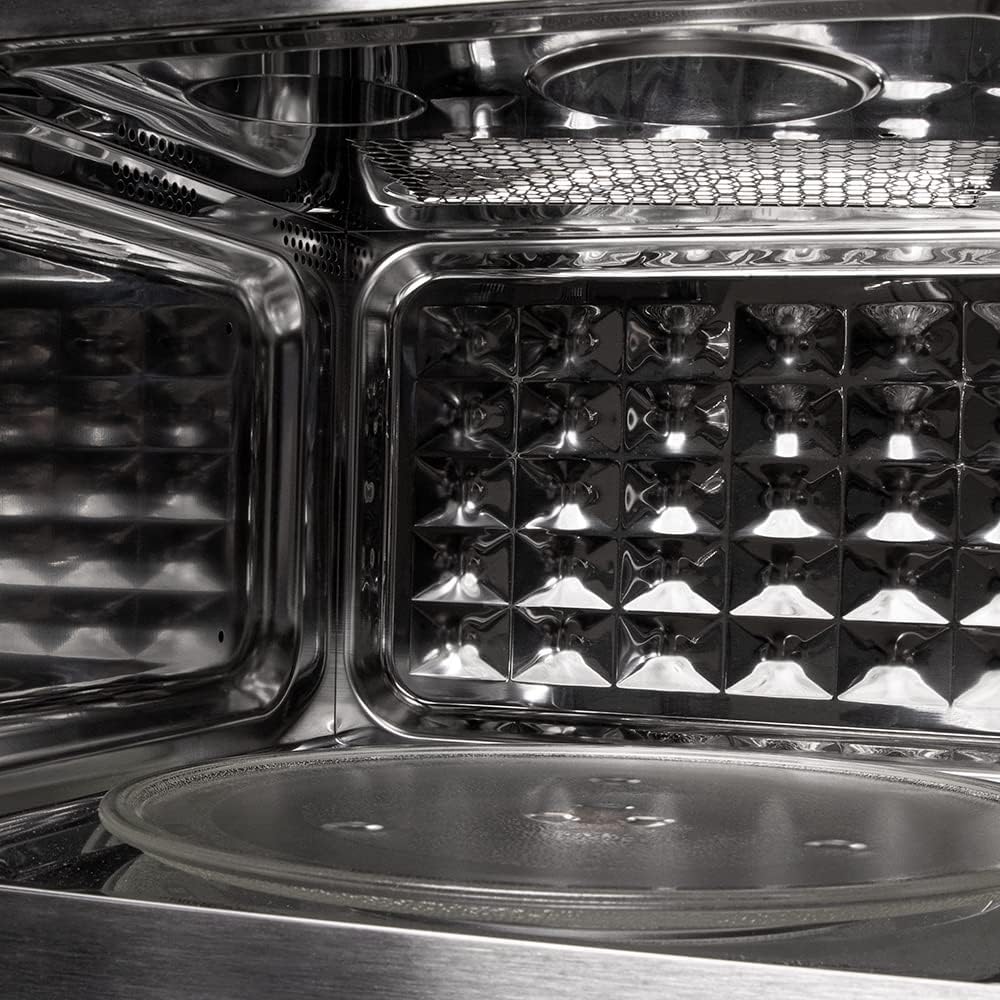
Figure 2: Interior Components. A close-up view of the microwave's interior, showing the glass turntable, the metal grill rack, and the textured back wall designed for even heat distribution.
Components:
- Control Panel: Digital display with touch controls and a rotary knob.
- Door: Glass door with a secure latch mechanism.
- Turntable: Removable glass plate for even cooking.
- Turntable Support: Ring with rollers to support the turntable.
- Grill Rack: Metal rack for grilling functions.
- Interior Light: Illuminates the oven cavity during operation.
4. Setup and Installation
The Cecotec Grandheat 2090 is a built-in microwave oven. Professional installation is recommended to ensure proper fit and function within your kitchen cabinetry.

Figure 3: Installed Microwave. This image shows the Cecotec Grandheat 2090 microwave seamlessly integrated into a modern kitchen cabinet, demonstrating its built-in design.

Figure 4: Product Dimensions. An illustration detailing the external dimensions of the microwave: 59.5 cm (width), 34.3 cm (depth), and 38.8 cm (height), crucial for proper installation.
Installation Steps:
- Ensure the cabinet opening meets the specified dimensions (refer to Figure 4 and the Specifications section).
- Remove all packaging materials and accessories. Check the oven for any damage such as dents or a broken door. Do not install if damaged.
- Insert the turntable support and glass turntable into the oven cavity.
- Carefully slide the microwave into the prepared cabinet opening.
- Secure the microwave to the cabinet using the provided screws and mounting brackets.
- Plug the appliance into a properly grounded electrical outlet.
Note: Ensure adequate ventilation around the appliance as specified in the installation guide provided with the product packaging.
5. Operating Instructions
The Cecotec Grandheat 2090 offers various cooking modes for your convenience.
Control Panel Overview:
The control panel features a digital display, touch buttons for functions, and a rotary knob for setting time/weight.
Basic Microwave Cooking:
- Place food in a microwave-safe container on the glass turntable.
- Close the oven door securely.
- Press the 'Microwave' button (often indicated by a wave symbol).
- Use the rotary knob to select the desired cooking time and power level (e.g., 1200 W).
- Press 'Start' to begin cooking.
Grill Function:
Use the grill function for browning and crisping food. Place food on the grill rack.
- Place food on the grill rack.
- Press the 'Grill' button (often indicated by a zigzag line).
- Use the rotary knob to set the grilling time.
- Press 'Start'.
Combination Cooking:
This mode combines microwave and grill functions for faster cooking and browning.
- Place food in a suitable container.
- Press the 'Combination' button (often indicated by a wave and zigzag line).
- Select the desired combination mode (e.g., microwave + grill).
- Use the rotary knob to set the cooking time.
- Press 'Start'.
Defrost Mode:
Defrost food by time or weight, preserving its texture and freshness.
- Place frozen food in the oven.
- Press the 'Defrost' button (often indicated by a snowflake symbol).
- Select defrost by 'Time' or 'Weight' using the corresponding button or rotary knob.
- Adjust the time or weight using the rotary knob.
- Press 'Start'.
Quick Start Function:
For immediate cooking at full power for a short duration.
- Press the 'Quick Start' button (often indicated by a '+30s' or similar symbol) to start cooking instantly at full power for 30 seconds. Each subsequent press adds 30 seconds.
Preset Functions:
The microwave includes 8 preset functions for common food types:
- Pizza
- Meat
- Vegetables
- Pasta
- Potatoes
- Fish
- Drinks
- Popcorn

Figure 5: Popcorn Preset in Use. This image illustrates the microwave in operation, with a bowl of popcorn inside, demonstrating the use of one of its convenient preset functions.
To use a preset function, select the desired program and confirm with 'Start'. The oven will automatically set the appropriate cooking time and power.
6. Cleaning and Maintenance
Regular cleaning and maintenance will ensure the longevity and optimal performance of your microwave oven.
Exterior Cleaning:
- Wipe the exterior with a damp cloth and mild detergent. Avoid abrasive cleaners.
- Clean the door, door seals, and control panel with a soft, damp cloth.
Interior Cleaning:
- Remove the glass turntable and turntable support for cleaning. Wash them in warm, soapy water or in a dishwasher.
- Wipe the interior cavity with a damp cloth. For stubborn food residue, place a bowl of water with lemon slices inside and microwave for 2-3 minutes to loosen the grime, then wipe clean.
- Ensure the interior is dry before closing the door or operating the oven.
Grill Element Cleaning:
- After grilling, allow the oven to cool. Wipe the grill element and interior roof with a damp cloth.
- The grill rack can be washed in warm, soapy water.
7. Troubleshooting
If you encounter issues with your microwave, refer to the following common problems and solutions:
| Problem | Possible Cause | Solution |
|---|---|---|
| Oven will not start | Door is not closed properly. | Close the door securely. |
| Power cord is not plugged in. | Ensure the power cord is firmly plugged into the outlet. | |
| A fuse has blown or circuit breaker tripped. | Replace fuse or reset circuit breaker. | |
| Food is not heating | Cooking time is too short. | Increase cooking time. |
| Power level is too low. | Increase power level. | |
| Turntable is noisy | Turntable support or turntable is dirty. | Clean the turntable and its support. |
| Turntable is not correctly placed. | Ensure the turntable is correctly seated on its support. | |
| Oven light not working | Light bulb needs replacement. | Contact qualified service personnel for bulb replacement. |
If the problem persists after attempting these solutions, please contact customer support.
8. Specifications
Detailed technical specifications for the Cecotec Grandheat 2090 Built-In Touch Microwave with Grill.
| Feature | Specification |
|---|---|
| Brand | Cecotec |
| Model Number | 01383 |
| Capacity | 21 Litres |
| Microwave Power | 1200 Watts (5 levels) |
| Grill Power | 1000 Watts |
| Dimensions (L x W x H) | 59.5P x 34.3l x 38.8H cm |
| Material (Exterior) | Aluminium |
| Material (Interior) | Glass |
| Installation Type | Integrated (Built-in) |
| Special Feature | Ventilated Microwave Oven |
| Voltage | 230 Volts |
| Weight | 15 Kilograms |
| Power Consumption | 800 Watts (General) |
9. Warranty and Support
Warranty Information:
This Cecotec Grandheat 2090 Microwave with Grill comes with a three-year manufacturer's warranty from the date of purchase. This warranty covers manufacturing defects and malfunctions under normal use conditions.
Please retain your proof of purchase for any warranty claims.
Spare Parts Availability:
Spare parts for this model are available for a period of 10 years from the date of purchase, ensuring long-term usability and maintenance.
Customer Support:
For technical assistance, warranty claims, or to inquire about spare parts, please contact Cecotec customer support through their official website or the contact information provided in your product packaging.
When contacting support, please have your model number (01383) and proof of purchase ready.


