
Introduction
This manual provides essential information for the safe and effective operation, maintenance, and troubleshooting of your DEWALT XR 18V 5.0Ah Hammer Drill Driver, model DCD796P3. Please read these instructions carefully before using the tool and keep them for future reference.
The DCD796P3 is a versatile cordless hammer drill driver designed for drilling into wood, metal, and masonry, as well as for screwdriving applications. It features a brushless motor for extended runtime and durability, and comes equipped with 5.0Ah XR Lithium-Ion batteries.
Safety Instructions
Always follow basic safety precautions to reduce the risk of fire, electric shock, and personal injury. Keep your work area clean and well-lit. Do not operate power tools in explosive atmospheres, such as in the presence of flammable liquids, gases, or dust.
- Wear appropriate personal protective equipment (PPE) including eye protection, hearing protection, and gloves.
- Secure the workpiece. Use clamps or a vise to hold the workpiece firmly.
- Ensure the drill bit or accessory is correctly installed and tightened in the chuck before operation.
- Avoid accidental starting. Ensure the switch is in the off-position before connecting to a battery pack, picking up or carrying the tool.
- Do not force the tool. Let the tool do the work at the correct speed.
- Disconnect the battery pack before making any adjustments, changing accessories, or storing the tool.
- Use only DEWALT recommended accessories and battery packs.
- Maintain tools with care. Keep cutting tools sharp and clean.
Components Overview
Familiarize yourself with the main components of your DEWALT DCD796P3 Hammer Drill Driver.

Figure 1: Overall view of the DEWALT DCD796P3 Hammer Drill Driver with an attached 5.0Ah battery pack. This image displays the main body, chuck, clutch settings, mode selector, trigger, and battery interface.
- Chuck: Keyless chuck for quick bit changes.
- Torque Adjustment Collar: Adjusts the torque setting for screwdriving applications.
- Mode Selector: Switches between screwdriving, drilling, and hammer drilling modes.
- Speed Selector: Two-speed gearbox for high-speed drilling or high-torque screwdriving.
- Trigger Switch: Variable speed control.
- Forward/Reverse Button: Changes rotation direction.
- LED Work Light: Illuminates the work area.
- Battery Release Button: For detaching the battery pack.
- Belt Clip: For convenient carrying.
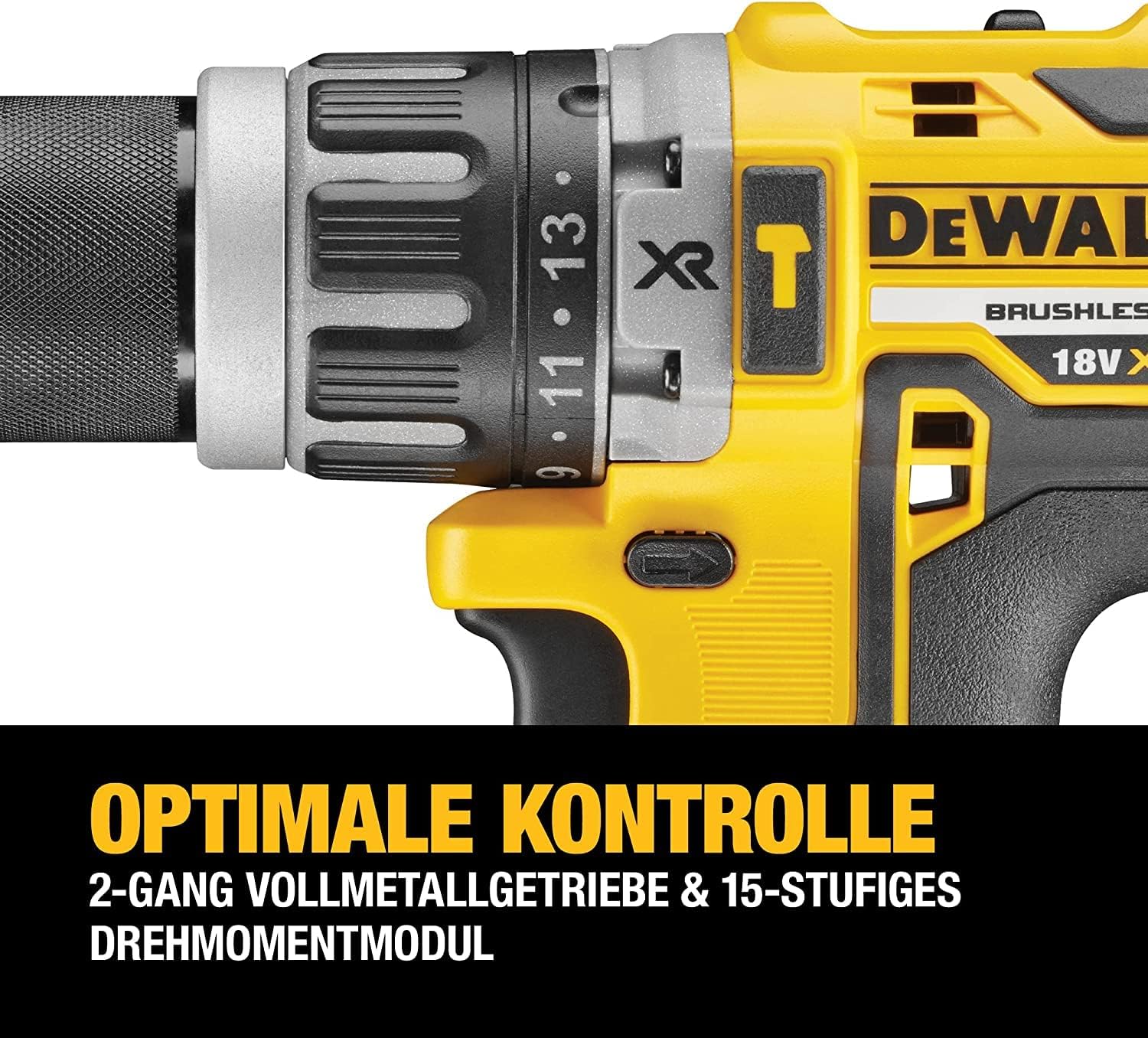
Figure 2: A detailed view of the drill's chuck, torque adjustment collar, and mode selector. The numbers on the collar indicate different torque settings, and the icons represent screwdriving, drilling, and hammer drilling modes.
Setup
Battery Installation and Charging
The DCD796P3 uses DEWALT 18V XR Lithium-Ion battery packs. Ensure the battery is fully charged before first use.
- To install the battery: Align the battery pack with the tool's handle and slide it in until it clicks securely into place.
- To remove the battery: Press the battery release button and pull the battery pack out of the tool.
- To charge the battery: Insert the battery pack into the DEWALT charger (included). Refer to the charger's instruction manual for specific charging procedures and indicators.
Installing and Removing Drill Bits/Accessories
The drill features a keyless chuck for easy accessory changes.
- Rotate the front collar of the chuck counter-clockwise until the chuck jaws are open wide enough to accept the bit.
- Insert the drill bit or accessory fully into the chuck.
- Rotate the front collar clockwise to tighten the chuck jaws securely around the bit. Ensure the bit is centered and firmly gripped.
- To remove the bit, reverse the tightening procedure.
Operating Instructions
Selecting Operating Mode
The mode selector allows you to choose between three operating modes:
- Screwdriving Mode (⚙ icon): For driving screws. Use the torque adjustment collar to set the desired clutch setting. The clutch will disengage once the set torque is reached, preventing overtightening or stripping.
- Drilling Mode (★ icon): For drilling into wood and metal. The clutch is bypassed in this mode, providing maximum torque.
- Hammer Drilling Mode (⚒ icon): For drilling into masonry and concrete. This mode combines rotary action with a hammering action.
Rotate the mode selector collar to align the desired icon with the indicator mark on the drill body.
Setting Torque (Screwdriving Mode Only)
The torque adjustment collar has settings from 1 to 15, plus a drill icon. Select a lower number for smaller screws or softer materials, and a higher number for larger screws or harder materials. Experiment on scrap material to find the appropriate setting.
Selecting Speed
The speed selector switch is located on top of the drill. It has two settings:
- Speed 1 (Low Speed): Provides higher torque for heavy-duty screwdriving and large diameter drilling. (0-550 RPM)
- Speed 2 (High Speed): Provides higher speed for fast drilling with smaller bits. (0-2000 RPM)
Ensure the tool is stopped before changing speed settings.
Operating the Trigger Switch and Forward/Reverse Control
- Trigger Switch: Squeeze the trigger to start the tool. The speed is variable; press further for higher speed.
- Forward/Reverse Button: Push the button from the left side for forward rotation (drilling/driving). Push from the right side for reverse rotation (removing screws/bits). Center position locks the trigger to prevent accidental starting.

Figure 3: The DEWALT DCD796P3 Hammer Drill Driver being used to drive a screw into a wooden beam, demonstrating a typical application. The user is holding the tool firmly, and a magnetic bit holder is visible.
Maintenance
Regular maintenance ensures optimal performance and extends the life of your tool.
- Cleaning: Keep the ventilation slots clear of dust and debris. Use a soft brush or compressed air to clean the tool. Do not use water or chemical cleaners.
- Chuck Maintenance: Periodically clean the chuck jaws to ensure proper gripping of bits.
- Battery Care: Store batteries in a cool, dry place away from direct sunlight. Do not store fully discharged batteries for extended periods.
- Inspection: Regularly inspect the power tool, battery pack, and charger for any damage. Do not use damaged components.
- Lubrication: This tool is factory lubricated and requires no additional lubrication.
Troubleshooting
If your DEWALT DCD796P3 is not operating correctly, refer to the following common issues and solutions:
| Problem | Possible Cause | Solution |
|---|---|---|
| Tool does not start. | Battery not charged or improperly installed. Trigger lock engaged. | Charge battery and ensure it is fully seated. Disengage trigger lock by pushing the forward/reverse button to either side. |
| Reduced power or speed. | Low battery charge. Tool overheating. | Recharge battery. Allow tool to cool down. |
| Bit slips in chuck. | Chuck not tightened sufficiently. Bit shank is dirty or damaged. | Retighten chuck firmly. Clean or replace bit. |
| Hammer action not engaging. | Mode selector not set to hammer drilling. | Rotate mode selector to the hammer drilling icon. |
For issues not covered here, contact DEWALT customer service or an authorized service center.
Specifications
| Feature | Specification |
|---|---|
| Model Number | DCD796P3 |
| Voltage | 18 V |
| Battery Type | XR Lithium-Ion |
| Battery Capacity | 5.0 Ah |
| Max Torque | 70 Nm |
| Max Power Output | 460 W |
| No Load Speed (Speed 1) | 0-550 RPM |
| No Load Speed (Speed 2) | 0-2000 RPM |
| Chuck Capacity | 1.5 - 13 mm |
| Max Drilling Capacity (Wood) | 40 mm |
| Max Drilling Capacity (Metal) | 13 mm |
| Max Drilling Capacity (Masonry) | 13 mm |
| Weight (Tool only) | Approximately 1.7 kg (without battery) |
| Dimensions (Length x Height x Width) | 190 mm x 203 mm x 67 mm |
Note: Specifications are subject to change without notice.
Warranty and Support
DEWALT provides a limited warranty for its products. For detailed warranty information, including terms and conditions, please refer to the warranty card included with your product or visit the official DEWALT website. Keep your proof of purchase for warranty claims.
For technical assistance, service, or to locate an authorized service center, please contact DEWALT customer support. Contact information can typically be found on the DEWALT website or in the documentation provided with your tool.
Online Resources: For additional support, product registration, and access to the latest manuals and parts diagrams, visit www.dewalt.com.


