1. Introduction
The Team Associated Reedy Electronic Power Switch ASC27035 is designed to provide reliable and convenient power control for your remote-controlled vehicle's electronic speed controller (ESC) and receiver system. This electronic switch offers a modern alternative to traditional mechanical switches, ensuring consistent performance and durability. It features selectable battery modes for both NiMH and LiPo battery types, enhancing versatility for various power setups.
This manual provides detailed instructions for the proper installation, operation, and maintenance of your Reedy Electronic Power Switch to ensure optimal performance and longevity.
2. Features
- Electronic Switching: Provides a reliable and consistent power on/off function, eliminating issues associated with mechanical switches.
- NiMH/LiPo Mode Selection: Easily switch between NiMH and LiPo battery modes to match your power source, ensuring proper voltage cutoff and protection.
- Compact Design: Small footprint allows for easy integration into various RC vehicle chassis.
- Integrated Power Button: Simple push-button operation for turning the system on and off.
- LED Indicators: Clear visual feedback for power status (PWR) and selected battery type (LIPO).
3. Setup and Installation
Proper installation is crucial for the reliable operation of your electronic power switch. Follow these steps carefully:
- Mounting the Switch: Identify a suitable, secure location on your vehicle's chassis for mounting the electronic power switch. Use the provided screws to firmly attach the switch, ensuring it is protected from excessive vibration and impact.
- Connecting to Receiver: Plug the switch's servo-style connector (typically a black, red, and white wire) into an available channel on your receiver. It is commonly connected to the battery (BATT) or auxiliary (AUX) port. Refer to your receiver's manual for specific port recommendations.
- Connecting to ESC/Battery: The other end of the switch, usually with thicker red and black wires, connects to the power input of your Electronic Speed Controller (ESC) or directly to your battery if the ESC does not have a dedicated switch input. Ensure correct polarity (red to positive, black to negative).
- Cable Management: Secure all wires using zip ties or cable clips to prevent them from interfering with moving parts or becoming damaged during operation.
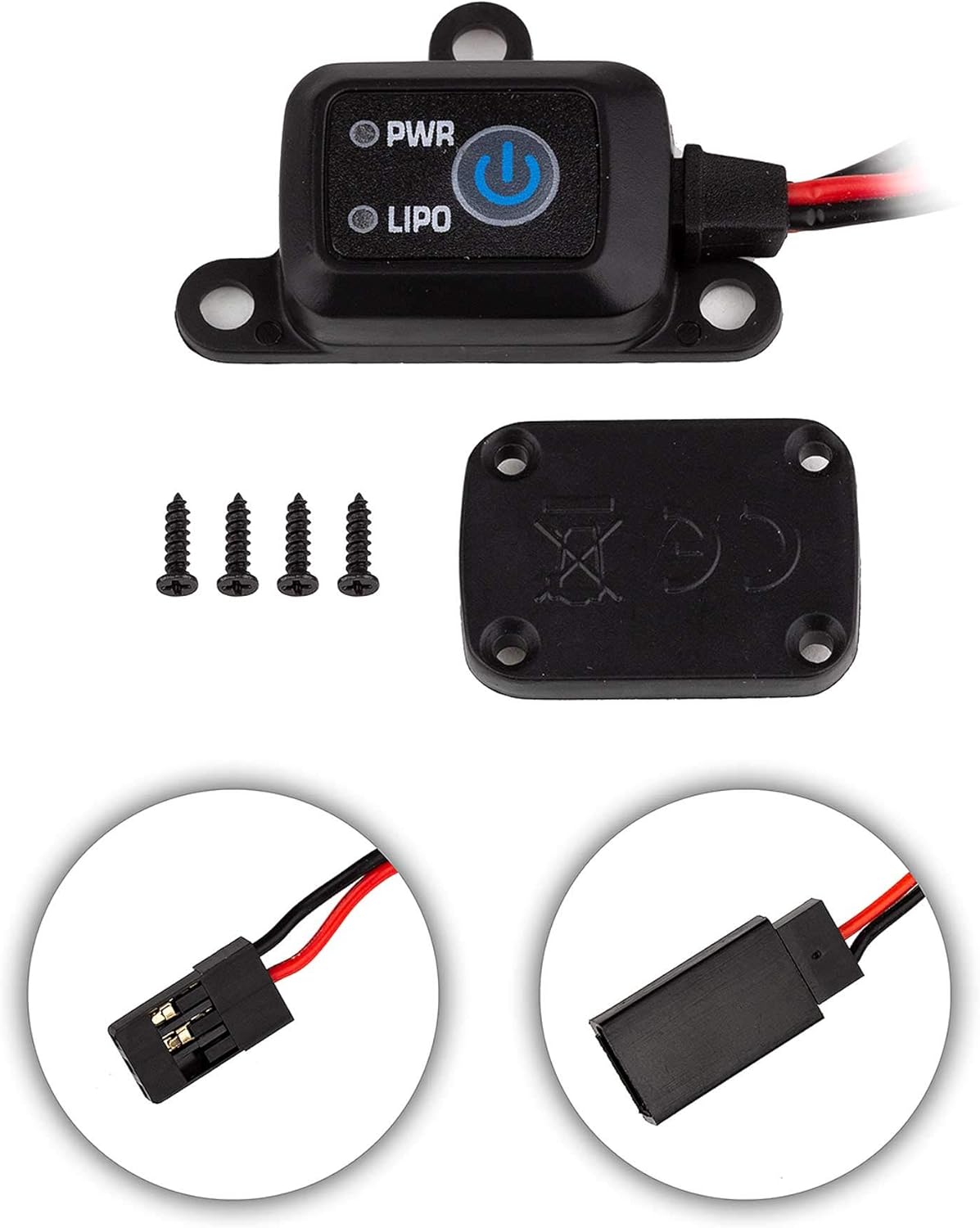
This image displays the Team Associated Reedy Electronic Power Switch, showing its main unit with 'PWR' and 'LIPO' indicators and a power button. Below it are four mounting screws and the bottom cover of the switch. The lower part of the image shows close-ups of the male and female servo-style connectors.
4. Operating Instructions
The Reedy Electronic Power Switch is designed for straightforward operation:
- Powering On: Press and hold the power button (marked with a universal power symbol) for approximately 1-2 seconds until the 'PWR' LED illuminates. Your vehicle's electronics should now be active.
- Powering Off: Press and hold the power button for approximately 2-3 seconds until the 'PWR' LED turns off. This will safely shut down your vehicle's electronics.
- Battery Mode Selection (NiMH/LiPo):
- With the switch powered on, briefly press the power button (do not hold).
- The 'LIPO' LED will toggle on or off.
- If the 'LIPO' LED is illuminated, the switch is set for LiPo battery operation.
- If the 'LIPO' LED is off, the switch is set for NiMH battery operation.
- Always ensure the correct battery mode is selected to prevent over-discharge of LiPo batteries or improper voltage cutoff for NiMH batteries.
5. Maintenance
The Reedy Electronic Power Switch requires minimal maintenance. Follow these guidelines to ensure its longevity:
- Cleaning: Periodically clean the exterior of the switch with a soft, dry cloth. Avoid using solvents or harsh chemicals.
- Inspection: Regularly inspect the wires and connectors for any signs of wear, fraying, or damage. Ensure all connections are secure.
- Storage: When not in use, store the switch in a dry, cool environment, away from direct sunlight and extreme temperatures.
- Avoid Water Exposure: This switch is not waterproof. Avoid exposing it to water or excessive moisture.
6. Troubleshooting
If you encounter issues with your Reedy Electronic Power Switch, refer to the following common problems and solutions:
| Problem | Possible Cause | Solution |
|---|---|---|
| Switch does not power on. | No power from battery; incorrect connection; faulty switch. | Check battery charge. Verify all connections are secure and correct polarity. If issues persist, the switch may be faulty. |
| Incorrect battery mode selected. | User error in selection. | Briefly press the power button to toggle between NiMH (LIPO LED off) and LiPo (LIPO LED on) modes. |
| Intermittent power. | Loose connection; damaged wire. | Inspect all wiring and connectors for damage or looseness. Re-secure connections. |
7. Specifications
| Specification | Value |
|---|---|
| Model Number | ASC27035 |
| Product Dimensions | 5.2 x 3.8 x 0.84 inches |
| Item Weight | 0.96 ounces |
| Manufacturer | Team Associated |
| Recommended Age | 0 - 9 years (Manufacturer's recommendation) |
8. Official Product Videos
No official product videos from the seller are available for this item at this time.
9. Warranty and Support
For warranty information or technical support regarding your Team Associated Reedy Electronic Power Switch ASC27035, please refer to the official Team Associated website or contact their customer service directly. Keep your proof of purchase for any warranty claims.
Note: Warranty terms and conditions may vary by region and retailer.


