
1. Introduction
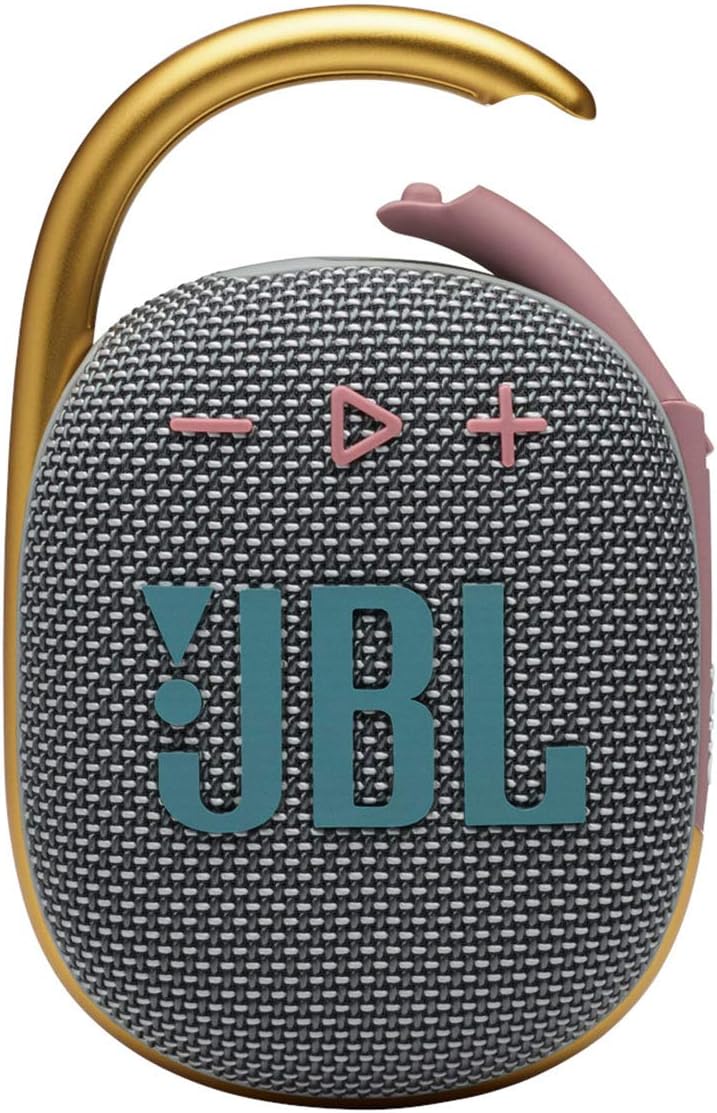
The JBL Clip 4 is a compact and durable portable Bluetooth speaker designed for on-the-go audio. Featuring an integrated carabiner, IP67 waterproof and dustproof rating, and up to 10 hours of playtime, it delivers clear sound for various environments. This manual provides essential information for setting up, operating, and maintaining your speaker.
2. Safety Information
Before using this product, please read all safety information carefully. Keep this manual for future reference. Do not expose the speaker to extreme temperatures or attempt to disassemble it. Ensure the USB-C port cover is securely closed when using the speaker near water to maintain its waterproof rating.
3. Package Contents
Verify that all items are present in your package:
- 1 x JBL Clip 4 Portable Bluetooth Speaker
- 1 x Type-C to Type-A Charging Cable
- 1 x Quick Start Guide
- 1 x Safety Sheet
- 1 x Warranty Card
4. Product Overview
Familiarize yourself with the main components and controls of your JBL Clip 4 speaker.

Controls and Indicators:
- Power Button: Located on the side, press to turn the speaker On/Off.
- Bluetooth Button: Located on the side, press to enter Bluetooth pairing mode.
- Volume Buttons (+/-): Located on the front, press to adjust audio volume.
- Play/Pause Button: Located on the front, press to play or pause audio. Double-press to skip track.
- Integrated Carabiner: Allows for easy attachment to bags, belts, or other loops.

Ports:
- USB-C Charging Port: Located on the bottom, used for charging the speaker. Ensure the cover is sealed when not charging.
5. Setup
5.1. Charging the Speaker
- Open the protective cover of the USB-C charging port located on the bottom of the speaker.
- Connect the provided Type-C to Type-A charging cable to the speaker's USB-C port.
- Connect the other end of the cable to a compatible USB power adapter (not included).
- The LED indicator will show charging status. Once fully charged, the LED will turn off.
- Close the USB-C port cover firmly to ensure waterproof and dustproof integrity.
A full charge provides up to 10 hours of playtime, depending on volume level and audio content.
5.2. Bluetooth Pairing
- Turn on the JBL Clip 4 by pressing the Power button.
- Press the Bluetooth button on the side of the speaker. The LED indicator will flash, indicating it is in pairing mode.
- On your smartphone or tablet, go to the Bluetooth settings and select "JBL Clip 4" from the list of available devices.
- Once connected, the LED indicator will turn solid, and you will hear an audible confirmation.
6. Operating Instructions
6.1. Power On/Off
- Press the Power button once to turn the speaker ON.
- Press and hold the Power button for a few seconds to turn the speaker OFF.
6.2. Audio Playback
- Play/Pause: Press the Play/Pause button once.
- Skip Track: Double-press the Play/Pause button to skip to the next track.
- Volume Control: Press the '+' button to increase volume, and the '-' button to decrease volume.
6.3. Call Management
The JBL Clip 4 features a noise and echo-canceling speakerphone for clear calls.
- Answer/End Call: Press the Play/Pause button once.
- Reject Call: Press and hold the Play/Pause button for 2 seconds.
6.4. Using the Integrated Carabiner
The redesigned integrated carabiner allows for versatile attachment options.
- Simply open the carabiner clip and attach it to your backpack, belt loop, bike, or any other secure point.
- Ensure the carabiner is fully closed after attachment to prevent accidental detachment.
6.5. Waterproof and Dustproof Use (IP67)
The JBL Clip 4 is IP67 rated, meaning it is fully waterproof and dustproof.
- It can be submerged in water up to 1 meter (3.3 feet) for up to 30 minutes.
- It is protected against dust ingress.
- Always ensure the USB-C port cover is completely sealed before exposing the speaker to water or dust.
- After exposure to water, dry the speaker thoroughly before charging.

7. Maintenance
- Cleaning: Use a soft, damp cloth to clean the speaker. Do not use harsh chemicals or abrasive materials.
- Storage: Store the speaker in a cool, dry place when not in use. Avoid prolonged exposure to direct sunlight or extreme temperatures.
- Battery Care: To prolong battery life, fully charge the speaker at least once every three months.
8. Troubleshooting
| Issue | Possible Solution |
|---|---|
| Speaker does not power on | Ensure the battery is charged. Connect to a power source using the USB-C cable. |
| No sound from speaker | Check volume levels on both the speaker and your connected device. Ensure the speaker is properly paired via Bluetooth. |
| Cannot pair via Bluetooth | Ensure the speaker is in pairing mode (flashing LED). Turn off and on Bluetooth on your device. Move closer to the speaker (within 10 meters). |
| Poor sound quality | Move the speaker closer to your device. Ensure there are no obstructions between the speaker and the device. Check for interference from other wireless devices. |
9. Specifications
| Feature | Detail |
|---|---|
| Model Name | JBL CLIP 4 - Grey |
| Dimensions (D x W x H) | 1.8" x 3.4" x 5.3" |
| Item Weight | 8.5 ounces |
| Power Source | Battery Powered (1 Lithium Polymer battery included) |
| Speaker Maximum Output Power | 5 Watts |
| Frequency Response | 110 Hz |
| Signal-to-Noise Ratio | 85 dB |
| Wireless Communication Technology | Bluetooth 5.1 |
| Bluetooth Range | 10 Meters |
| Playtime | Up to 10 hours |
| Water Resistance Level | IP67 (Waterproof and Dustproof) |
| Material | Fabric & Rubberized ABS |
| Color | Grey |
| UPC | 050036378246 |

10. Warranty and Support
The JBL Clip 4 comes with a limited warranty. Please refer to the included Warranty Card for detailed terms and conditions. For product support, technical assistance, or warranty claims, please visit the official JBL website or contact their customer service.
Official JBL Website: www.jbl.com


