
1. Product Overview
The OontZ Soundbar is designed to elevate your home theater audio experience. This compact yet powerful Bluetooth speaker delivers crystal-clear sound and rich bass, suitable for various room sizes. It can function as a standalone unit or be wirelessly paired with compatible OontZ speakers for an enhanced audio setup.

Image: The OontZ Soundbar, its remote control, and power adapter, showcasing the main components included with the product.
2. What's Included
Please verify that all items listed below are present in your package:
- OontZ Angle 3 Pro Soundbar
- 3.5mm Stereo Audio Cable
- Digital Audio Optical Cable
- Dual Voltage Power Adapter
- Remote Control
- User Guide (this manual)
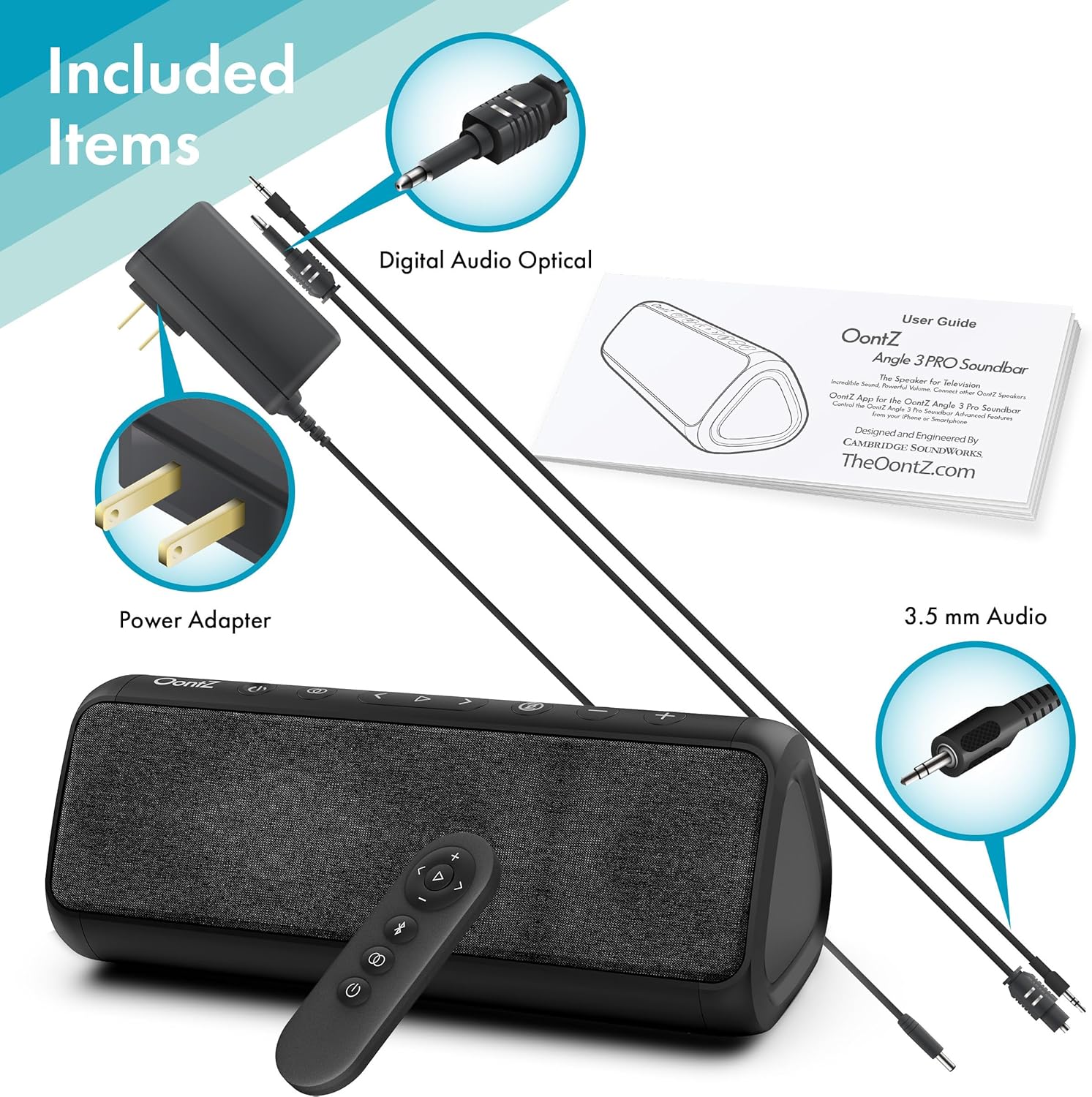
Image: A visual representation of all components included in the OontZ Soundbar package, laid out for easy identification.
3. Setup Guide
3.1. Connecting to Power
Connect the provided Dual Voltage Power Adapter to the DC IN port on the soundbar and then plug it into a wall outlet. The soundbar requires continuous power for operation.
3.2. Audio Connections
The OontZ Soundbar offers multiple ways to connect to your audio source:
- Optical Input: For high-quality digital audio, connect your TV or other device using the Digital Audio Optical Cable.
- AUX 3.5mm Audio: Use the 3.5mm Stereo Audio Cable for analog audio connections to devices with a headphone jack or AUX output.
- Bluetooth: For wireless audio streaming from mobile devices, refer to the Bluetooth Pairing section in Operating Instructions.

Image: A detailed diagram illustrating the various connection ports available on the OontZ Soundbar, including AUX, Optical, and USB, along with labels for the control buttons.
4. Operating Instructions
4.1. Button Features
The soundbar features intuitive controls on its top panel:
- Power Button: Turns the soundbar on or off.
- Source Button: Cycles through input sources (Optical, AUX, Bluetooth).
- Play/Pause Button: Controls media playback in Bluetooth mode.
- Track Forward/Back Buttons: Skips tracks in Bluetooth mode.
- Volume Up/Down Buttons: Adjusts the master volume.
- Multi-Function Button: (Refer to specific app instructions for advanced functions)
Image: A detailed view of the OontZ Soundbar's top panel, highlighting each button and its corresponding function for easy user interaction.
4.2. Remote Control Usage
The included remote control provides convenient access to all soundbar functions from a distance.

Image: The compact remote control for the OontZ Soundbar, showing its various buttons for power, input selection, volume, and media playback.
4.3. Bluetooth Pairing
- Turn on the OontZ Soundbar.
- Press the Bluetooth button on the remote or the Source button on the soundbar until the Bluetooth indicator light flashes.
- On your mobile device, enable Bluetooth and select "OontZ Soundbar" from the list of available devices.
- Once connected, the Bluetooth indicator light will turn solid.

Image: The OontZ Soundbar connected to a smartphone, illustrating its capability to play music from mobile devices.
4.4. Surround Sound Setup (Optional)
For an immersive audio experience, you can pair 2 OontZ Angle 3 Pro speakers or up to 3 OontZ Angle 3 ULTRA (4th Gen) portable Bluetooth speakers with your soundbar. Refer to the OontZ app for detailed instructions on creating a surround sound system.
4.5. Using the OontZ App
Download the OontZ app from your device's app store to access additional features, including equalization control and advanced pairing options for surround sound.
4.6. USB Power Port
The soundbar includes a built-in USB Power Port that can be used to charge compatible devices.
4.7. Product Video
Video: An official product video from OontZ showcasing the features and benefits of OontZ Bluetooth Speakers, including the soundbar's capabilities for clear sound and rich bass, surround sound setup, and portability.
5. Maintenance
To ensure the longevity and optimal performance of your OontZ Soundbar, follow these maintenance guidelines:
- Cleaning: Use a soft, dry cloth to wipe the exterior of the soundbar. Do not use liquid cleaners or aerosols directly on the device.
- Storage: When not in use for extended periods, store the soundbar in a cool, dry place away from direct sunlight and extreme temperatures.
- Handling: Avoid dropping the soundbar or subjecting it to strong impacts.
6. Troubleshooting
| Problem | Possible Cause | Solution |
|---|---|---|
| No Power | Power adapter not connected or outlet not working. | Ensure power adapter is securely connected to the soundbar and a working power outlet. |
| No Sound | Incorrect input source selected; volume too low; audio cable not connected properly. | Verify the correct input source is selected (Optical, AUX, Bluetooth). Increase volume on both soundbar and source device. Check audio cable connections. |
| Bluetooth Disconnection | Device too far from soundbar; interference; low battery on source device. | Move device closer to the soundbar (within 100ft unobstructed). Avoid obstacles. Recharge source device if necessary. Re-pair Bluetooth. |
| Remote Control Not Working | Dead battery; obstruction between remote and soundbar. | Replace the remote control battery (CR2032). Ensure no objects are blocking the remote's signal to the soundbar. |
7. Specifications
| Feature | Detail |
|---|---|
| Model Name | OontZ Soundbar |
| Model Number | SWOA3PRSB |
| Speaker Type | Soundbar |
| Mounting Type | Tabletop Mount |
| Material | Plastic |
| Color | Black |
| Product Dimensions (L x H) | 9.25" x 3.5" |
| Item Weight | 0.6 Kilograms (1.32 pounds) |
| Power Source | Corded Electric |
| Speaker Maximum Output Power | 30 Watts |
| Frequency Response | 20000 Hz |
| Wireless Communication Technology | Bluetooth 5.0 |
| Bluetooth Range | 10 Meters (approx. 33 feet), up to 100 feet unobstructed |
| Connectivity Technology | Auxiliary, Bluetooth, USB, Optical |
| Audio Output Mode | Movie, Music, Surround |
| Controller Type | Remote Control, Touchpad, App |
| Special Features | Bass Boost, USB Power Port |
| Manufacturer | Cambridge SoundWorks |
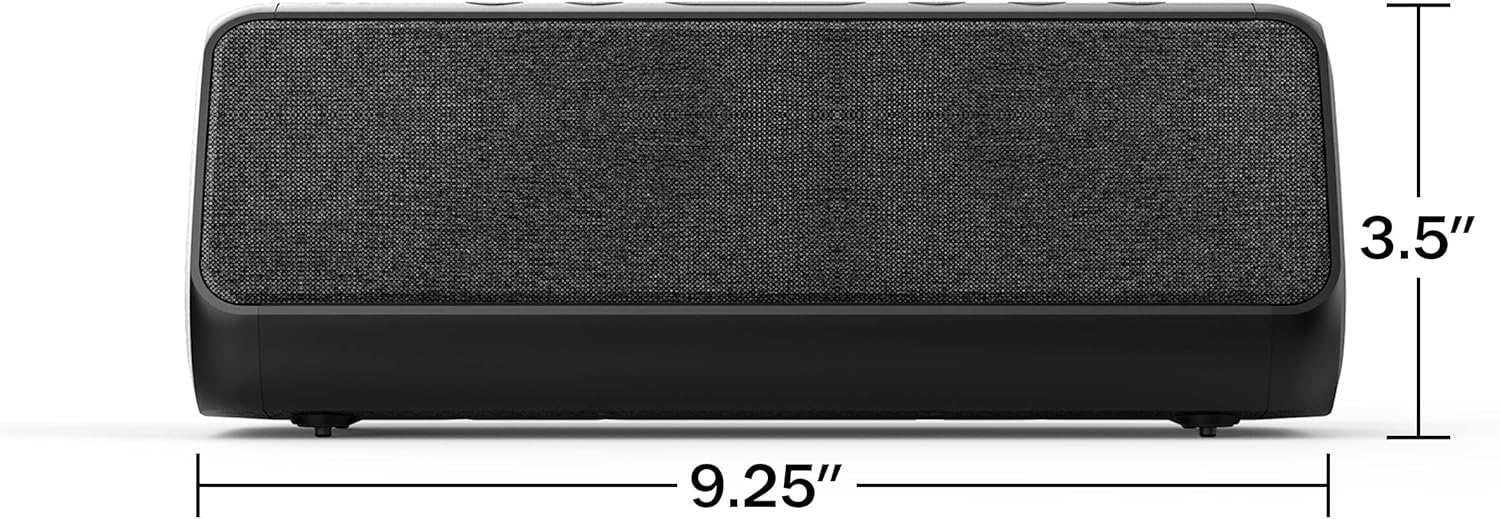
Image: A visual representation of the OontZ Soundbar's dimensions, indicating its length of 9.25 inches and height of 3.5 inches.
8. Warranty and Support
8.1. Limited Warranty
The OontZ Soundbar comes with a Limited Warranty. Please refer to the warranty card included in your package or visit the official OontZ website for detailed terms and conditions regarding warranty coverage.
8.2. Customer Support
For technical assistance, troubleshooting, or any inquiries regarding your OontZ Soundbar, please contact OontZ Customer Support:
- Website: www.TheOontZ.com
- Email: Refer to website for contact form or email address.
- Phone: Refer to website for phone support options.


