
1. Introduction
The Auxmir M4 Bedside Lamp is a versatile and portable lighting solution designed for various environments. It features touch control and remote control options, offering 13 RGB colors, 5 levels of warm white brightness, and multiple lighting modes. Equipped with a rechargeable battery, it provides convenient wireless operation.
2. Safety Instructions
- Do not disassemble or modify the device.
- Keep away from water and high humidity environments.
- Avoid extreme temperatures.
- Use only the provided USB cable for charging.
- If the lamp flashes continuously due to low power, charge it promptly.
- Keep out of reach of small children.
3. Package Contents
Please check the package for the following items:
- Auxmir M4 Bedside Lamp
- Remote Control
- USB Charging Cable (Type-C)
- User Manual
4. Product Overview
Familiarize yourself with the main components of your Auxmir M4 Bedside Lamp.
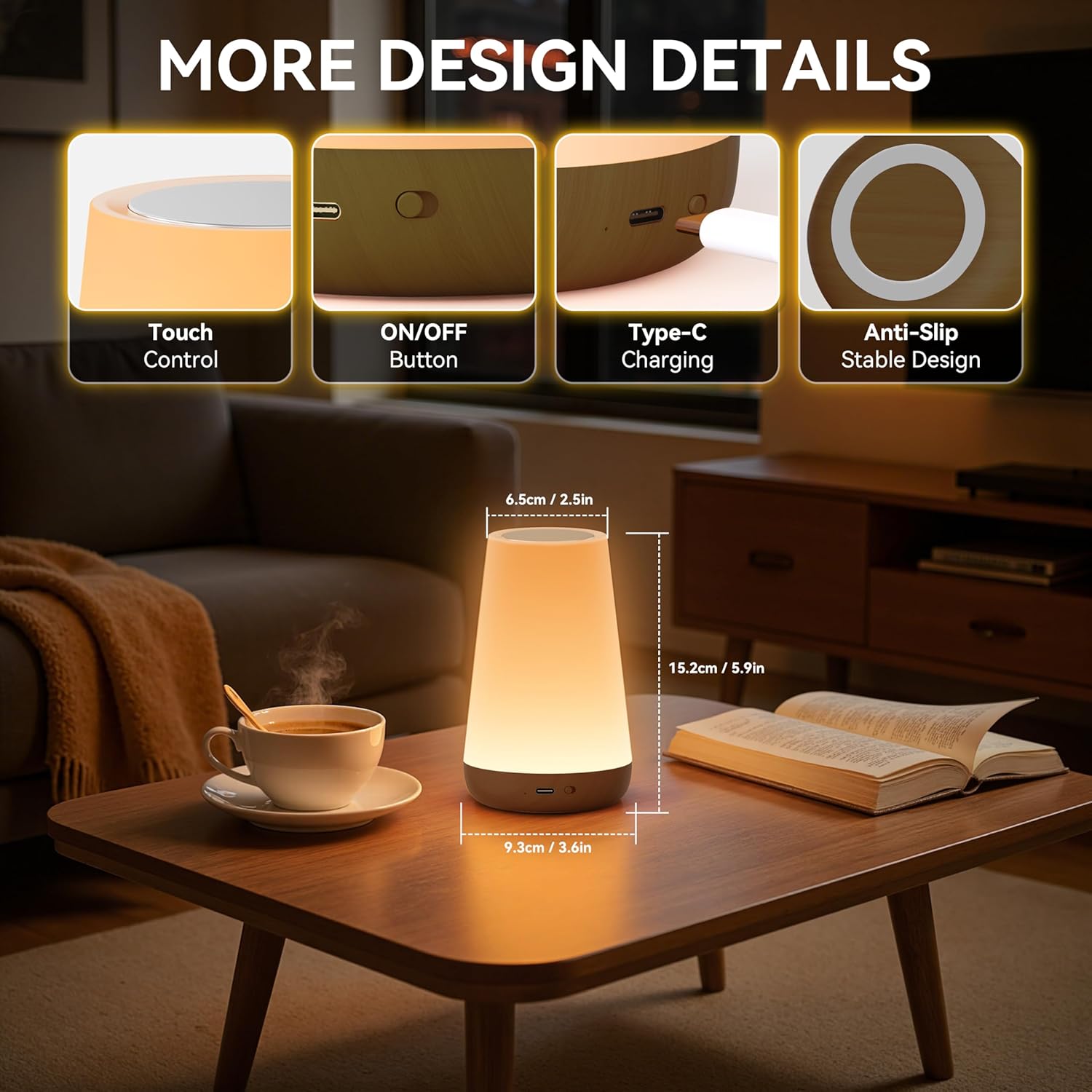
Image: Product diagram highlighting touch control, ON/OFF button, Type-C charging port, and anti-slip base. Dimensions are 6.5cm / 2.5in diameter, 9.3cm / 3.6in width, and 15.2cm / 5.9in height.
- Touch Control Area: Located on the top surface for manual operation.
- ON/OFF Button: Power button, usually located at the base.
- Type-C Charging Port: For connecting the USB charging cable.
- Anti-Slip Stable Design: Base designed for stability.
5. Setup
- Unpack: Carefully remove the lamp and all accessories from the packaging.
- Initial Charge: Before first use, fully charge the lamp using the provided USB Type-C cable. Connect the cable to the lamp's charging port and a compatible USB power adapter (not included). The charging indicator will show the charging status.
- Remote Control: Ensure the remote control has a working battery. If not, insert or replace the battery according to the markings.
6. Operating Instructions
6.1 Power On/Off
- Using Touch Control: Lightly tap the top surface of the lamp to turn it on or off.
- Using Remote Control: Press the "ON" or "OFF" button on the remote control.
6.2 Adjusting Brightness (Warm White Mode)
The lamp offers 5 levels of brightness for warm white light.

Image: Visual representation of the 5 brightness levels (20%, 40%, 60%, 80%, 100%) for the warm white light, adjustable via remote control.
- Using Touch Control: In warm white mode, long-press the top surface to cycle through brightness levels. Release when the desired brightness is reached.
- Using Remote Control: Use the brightness adjustment buttons (sun icon with + or -) on the remote to increase or decrease brightness.
6.3 Changing Colors and Modes (RGB Mode)
The lamp features 13 RGB colors and 4 lighting modes: Flash, Strobe, Fade, and Constant.

Image: The lamp showcasing 13 different RGB colors and the four available light modes: Flash, Strobe, Fade, and Constant Light.
- Using Touch Control: Tap the top surface to switch between warm white and RGB color modes. In RGB mode, tap to cycle through the 13 colors.
- Using Remote Control:
- Press the colored buttons (R, G, B, W, etc.) on the remote to select a specific color.
- Press "FLASH" for a rapid color change effect.
- Press "STROBE" for a slower, pulsating color change.
- Press "FADE" for a smooth transition between colors.
- Press "SMOOTH" (or a similar button if available) for a constant color.
6.4 Timer Function
The lamp can be set to automatically turn off after a specified duration (1, 2, 4, or 6 hours).

Image: The lamp's timer function, allowing automatic shut-off after 1, 2, 4, or 6 hours, ideal for energy saving and promoting deep sleep.
- Using Remote Control: Press the "1H", "2H", "4H", or "6H" button on the remote to activate the corresponding timer. The lamp will turn off automatically after the set time.
7. Charging
The Auxmir M4 Bedside Lamp is equipped with a 1800mAh rechargeable battery.

Image: The lamp's charging features, indicating a runtime of 15-20 hours, a charge time of 3-4 hours, and the inclusion of a Type-C USB cable.
- Connect the provided USB Type-C cable to the lamp's charging port and a standard USB power source (e.g., wall adapter, computer USB port).
- The charging indicator light will illuminate during charging.
- A full charge typically takes 3-4 hours.
- Once fully charged, the lamp provides approximately 15-20 hours of continuous use in dark light mode.
- When the battery is low, the lamp will flash continuously. Please charge it promptly to avoid interruption.
8. Maintenance
- Clean the lamp with a soft, dry cloth. Do not use abrasive cleaners or solvents.
- Ensure the charging port is free from dust and debris.
- Store the lamp in a cool, dry place when not in use for extended periods.
9. Troubleshooting
| Problem | Possible Cause | Solution |
|---|---|---|
| Lamp does not turn on. | Battery is depleted. | Charge the lamp fully. |
| Remote control is not working. | Battery in remote is dead or incorrectly inserted. | Replace the remote control battery or ensure it is inserted correctly. |
| Lamp flashes continuously. | Low battery warning. | Charge the lamp immediately. |
| Cannot change colors/brightness. | Incorrect mode or remote control issue. | Ensure you are in the correct mode (warm white for brightness, RGB for colors). Check remote control battery. |
10. Specifications
| Feature | Detail |
|---|---|
| Model Number | M4 |
| Dimensions (L x W x H) | 6.5 x 6.5 x 15.2 cm (2.56 x 2.56 x 5.98 inches) |
| Weight | 172.5 Grams |
| Battery Capacity | 1800mAh (Rechargeable) |
| Input Voltage | 5 Volts (DC) |
| Wattage | 1.6 Watts |
| Light Source Type | LED |
| Color Options | 13 RGB Colors + Warm White |
| Brightness Levels | 5 (for Warm White) |
| Lighting Modes | Flash, Strobe, Fade, Constant |
| Control Method | Touch Control, Remote Control |
| Timer Function | 1H, 2H, 4H, 6H |
| Material | Plastic ABS |
| Connectivity | USB (Type-C) |
| Energy Efficiency Class | F (EPREL Link) |

Image: Product Information Sheet providing comprehensive technical details for the Auxmir M4 Bedside Lamp.
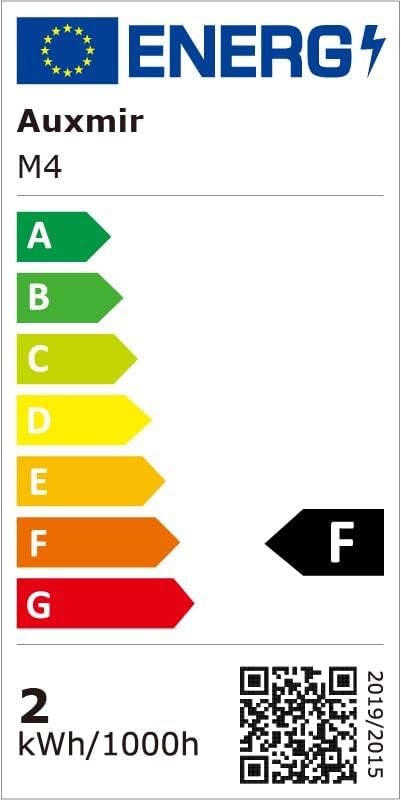
Image: EU Energy Label for the Auxmir M4 Bedside Lamp, indicating an energy efficiency class of F.
11. Usage Scenarios
The Auxmir M4 Bedside Lamp is suitable for various applications, providing ambient lighting for different occasions.

Image: Multiple usage scenarios including parties, camping, a nursery for breastfeeding, and a family dining setting, demonstrating the lamp's versatility.
- Bedroom: Ideal as a night light for children or for breastfeeding, providing soft, adjustable illumination.
- Living Room: Creates a warm and inviting atmosphere for relaxation or social gatherings.
- Outdoor/Camping: Portable design makes it suitable for outdoor activities, providing light for tents or patio areas.
- Office/Study: Offers adjustable lighting for focused work or ambient light during breaks.
12. Product Demonstration Videos
Video: Demonstration of the Auxmir M4 Bedside Lamp's touch control, remote control, brightness adjustment, and various color modes.
Video: Overview of the Auxmir M4 Bedside Lamp's features, including USB charging, color changing capabilities, and timer functions.
13. Warranty and Support
For warranty information and customer support, please refer to the contact details provided with your purchase or visit the official Auxmir website.
- Manufacturer: Auxmir
- Contact: Refer to product packaging or Auxmir's official support channels.

