
1. Product Overview
The FOXWELL NT604 Elite is a professional OBD2 diagnostic scan tool designed for car owners to efficiently identify and resolve common vehicle issues. It provides comprehensive diagnostics for key systems including Engine, ABS (Anti-lock Braking System), SRS (Supplemental Restraint System), and Transmission. This device offers features such as reading and clearing fault codes, live data streaming, and vehicle information retrieval, empowering users to monitor vehicle health and perform basic troubleshooting.

Figure 1.1: FOXWELL NT604 Elite OBD2 Scanner main unit with display and control buttons.
Key features include a 4.3-inch color screen, user-friendly interface with large buttons, and a durable protective case for storage. It supports a wide range of vehicle makes from America, Asia, and Europe, and comes with lifetime free updates to ensure compatibility with new models and bug fixes.
2. What's in the Box?
- FOXWELL NT604 Elite Scan Tool
- 1 * Sturdy Protective Box
- 1 * Diagnostic Cable & USB Cable
- 1 * User Manual
- 1 * Quick Start Guide

Figure 2.1: All items included in the FOXWELL NT604 Elite product package.
3. Setup
The FOXWELL NT604 Elite is designed for immediate use right out of the box, with pre-installed software. No initial software download is required before first use.
- Connect to Vehicle: Locate your vehicle's OBDII port (typically under the dashboard on the driver's side). Plug the diagnostic cable into the OBDII port.
- Turn on Ignition: Turn your car's ignition to the "ON" position (engine can be off). The scanner will power on automatically.
- Select Menu: Use the navigation buttons on the scanner to select the desired menu option (e.g., "AutoVin" for automatic vehicle identification or "Diagnostic" to begin scanning).

Figure 3.1: Visual guide for connecting the scanner to the OBDII port and turning on ignition.
Video 3.1: A quick overview of the FOXWELL NT604 Elite OBD2 scanner, demonstrating its physical features and initial setup steps. This video is provided by the seller, OBDZON.
4. Operating the Scanner
The NT604 Elite offers various operating modes for comprehensive vehicle diagnostics.
4.1. AutoVIN Scan
This feature automatically identifies your vehicle's VIN (Vehicle Identification Number) and retrieves essential vehicle information, saving time from manual input.
Video 4.1: A short preview demonstrating the AutoVIN feature of the FOXWELL NT604 Elite, showing how it automatically identifies vehicle information. This video is provided by the seller, OBDZON.
4.2. Enhanced 4-System Diagnosis
The core functionality of the NT604 Elite lies in its ability to diagnose four critical systems:
- Engine System: Read and clear check engine codes to troubleshoot engine-related issues.
- ABS System: Diagnose anti-lock braking system faults and clear warning lights.
- SRS (Airbag) System: Identify airbag system issues and clear SRS warning lights. (Note: Airbag crash/collision data cannot be cleared even if the airbag is replaced.)
- Transmission System: Scan for transmission-related fault codes and view live data to pinpoint problems.

Figure 4.1: Diagram illustrating the four main systems diagnosed by the NT604 Elite: Engine, Transmission, SRS, and ABS.

Figure 4.2: The scanner can help turn off ABS, Airbag, Check Engine, and AT lights after issues are resolved.
4.3. Live Data Stream
View real-time sensor data in text and graph formats, which is crucial for diagnosing intermittent problems and monitoring system performance. This includes data like transmission temperature, wheel speed, engine RPM, and more.
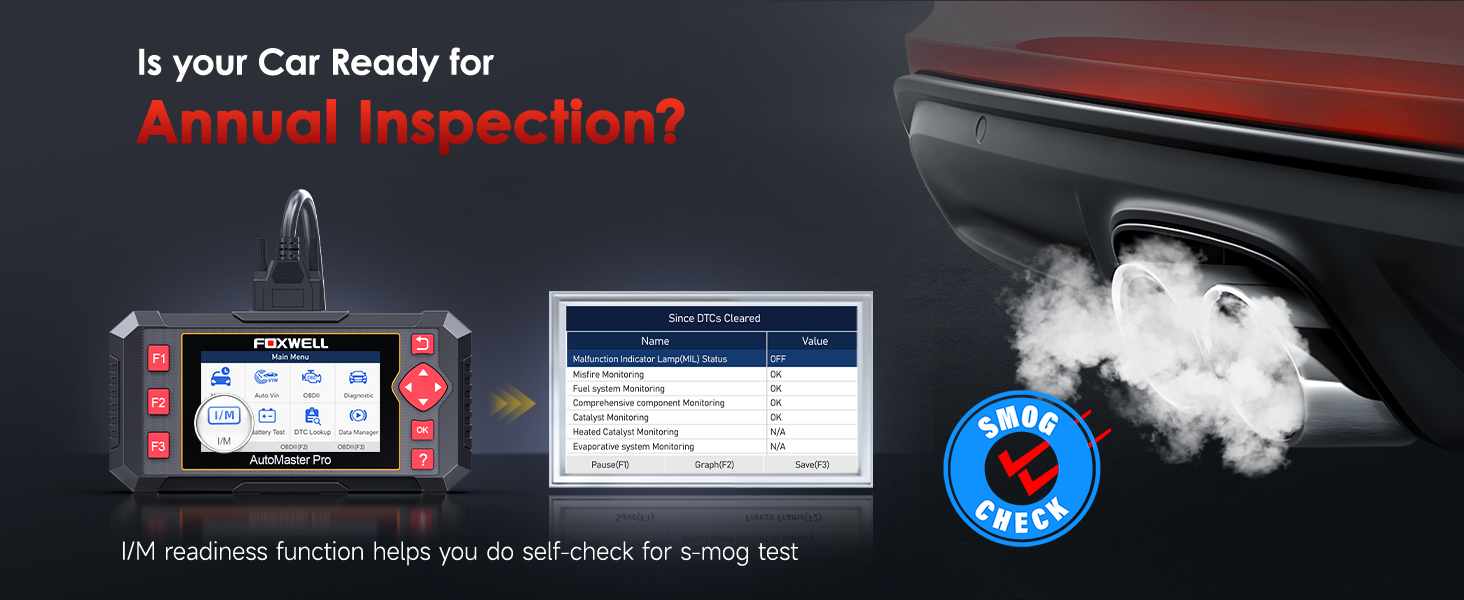
Figure 4.3: Example of live data stream displayed in graph format on the scanner.
4.4. OBDII Functions
Beyond the 4-system diagnosis, the NT604 Elite also performs standard OBDII functions:
- Read DTCs: Retrieve diagnostic trouble codes.
- Clear Codes: Erase DTCs from the vehicle's computer.
- Freeze Frame: View a snapshot of vehicle conditions when a fault code is triggered.
- I/M Readiness: Check if the vehicle's emission systems are ready for inspection.
- O2 Sensor Test: Monitor oxygen sensor performance.
- On-Board Monitor Test: Access results of on-board diagnostic monitoring tests.
- Vehicle Information: Retrieve vehicle identification information (VIN, CID, CVN).
- DTC Lookup: Built-in library to look up definitions of fault codes.
- Evap Test: Perform evaporative emission system tests.

Figure 4.4: Overview of the professional OBDII code reader functions available.

Figure 4.5: The I/M Readiness function helps determine if your car is ready for an annual inspection (smog test).
5. Maintenance
The FOXWELL NT604 Elite is primarily a diagnostic tool. It does not support advanced maintenance functions such as EPB Reset, ABS Bleeding, Oil Light Reset, or Battery Reset Programming. For these functions, a more specialized tool would be required.
5.1. Software Updates
The NT604 Elite offers lifetime free updates. To update the software:
- Visit the official FOXWELL website (www.foxwelltech.us/register.html) to register your device.
- Download and install the FoxAssist PC application from the support section (www.foxwelltech.us/support-tools.html).
- Connect the scanner to your computer using the provided USB cable or by inserting the Micro SD card into a card reader connected to your computer.
- Follow the on-screen instructions in the FoxAssist software to download and install the latest vehicle software and bug fixes.

Figure 5.1: The scanner supports lifetime free updates and allows printing of diagnostic reports.
6. Troubleshooting
Here are some common questions and solutions for the NT604 Elite:
- Q: Why can't this scan tool clear fault codes for my car?
A: To clear the fault code successfully, please repair your car and fix the problem first. - Q: Can the scanner work on all cars?
A: Compatibility varies by car makes and models. Please confirm coverage before purchasing by checking the FOXWELL website. - Q: Why can't it turn on or connect?
A: Ensure the vehicle battery voltage is normal. Turn on the ignition and connect the scanner correctly with the OBDII port of your car. If issues persist, contact customer support. - Q: What's the difference between NT604 Elite and basic code readers?
A: Basic $50-100 code readers are mainly for OBDII diagnosis. The NT604 Elite offers deeper diagnosis for ABS, SRS, transmission, and check engine control modules, making it more comprehensive. - Q: Does NT604 Elite support maintenance functions?
A: No, the NT604 Elite only supports diagnostic functions for control modules like ABS, SRS, transmission, and check engine. It does NOT support maintenance functions like EPB Reset, ABS Bleeding, Oil light reset, or battery reset programming.

Figure 6.1: Common FAQs regarding the FOXWELL NT604 Elite scanner.
7. Specifications
| Feature | Detail |
|---|---|
| Brand | FOXWELL |
| Model Number | NT604Elite |
| Item Weight | 2.79 pounds |
| Product Dimensions | 7.68 x 3.54 x 1.18 inches |
| Display Resolution | 480x272 |
| Operating System | Windows 10 (for software updates) |
| Date First Available | December 2, 2020 |
8. Warranty and Support
FOXWELL provides a one-year limited warranty for the NT604 Elite scanner. For any assistance with registration, updates, compatibility, or other issues, please contact FOXWELL customer support.
- Contact Support: You can send a message via Amazon or ask a question on the product page. Fast responses are typically provided within 24 hours.
- User Guide (PDF): For detailed instructions, refer to the official User Guide available at: https://manuals.plus/m/4cf910ca3e122efc73e2e578c80231556087f130ce42c35389c0923921a86e07
- User Manual (PDF): An additional User Manual is available at: https://manuals.plus/m/3ca4e1e28c8b87aee2c467886149767b07a5687a48088cbdb741dd7e81973ba9


