1. Introduction
Thank you for choosing the Cecotec GrandHeat 2300 Flatbed Touch Microwave Oven. This appliance is designed to offer convenience and efficiency in your kitchen. Please read this manual carefully before using the product and keep it for future reference. This manual provides important information on installation, operation, maintenance, and troubleshooting to ensure safe and optimal performance.
2. Important Safety Instructions
When using electrical appliances, basic safety precautions should always be followed, including the following:
- Read all instructions before using the appliance.
- Ensure the voltage indicated on the appliance corresponds to your local mains voltage before connecting.
- Do not operate the microwave oven if the door or door seals are damaged. Contact qualified service personnel.
- Do not heat liquids or other foods in sealed containers as they are liable to explode.
- Only allow children to use the oven without supervision when adequate instructions have been given so that the child is able to use the oven in a safe way and understands the hazards of improper use.
- Do not use corrosive chemicals or vapors in this appliance.
- Do not use this oven for commercial purposes. It is intended for household use only.
- Do not attempt to repair or modify the appliance yourself.
- Always ensure proper ventilation around the appliance.
3. Product Features
- Flatbed Technology: No turntable design maximizes internal space and simplifies cleaning.
- Capacity: 20 liters.
- Power: 700 W microwave power with 6 power levels, and a 900 W electric grill for perfect grilling results.
- Pre-configured Functions: 8 pre-set functions for common food types (milk/coffee, rice, pasta, potatoes, auto-reheat, fish, chicken, meat, skewers).
- Timer: Up to 95 minutes.
- Quick Start: Instant start at maximum power for set durations (up to 10 minutes).
- Automatic Start: Program the microwave to start a program at a specific time.
- Ceramic Interior: Easy-to-clean ceramic coating that repels dirt.
- Control Panel: Intuitive touch control panel with a rotary knob.
- Design: Elegant stainless steel finish.
- Child Safety Lock: Prevents accidental operation by children.

Figure 1: Front view of the Cecotec GrandHeat 2300 Flatbed Touch Microwave Oven.

Figure 2: The microwave oven positioned on a kitchen counter, showcasing its sleek design.

Figure 3: Detailed view of the intuitive touch control panel and rotary knob.

Figure 4: The spacious interior of the microwave oven with the door open, highlighting the flatbed design.

Figure 5: Diagram illustrating the 20-liter capacity, emphasizing the efficient use of space due to the flatbed design.
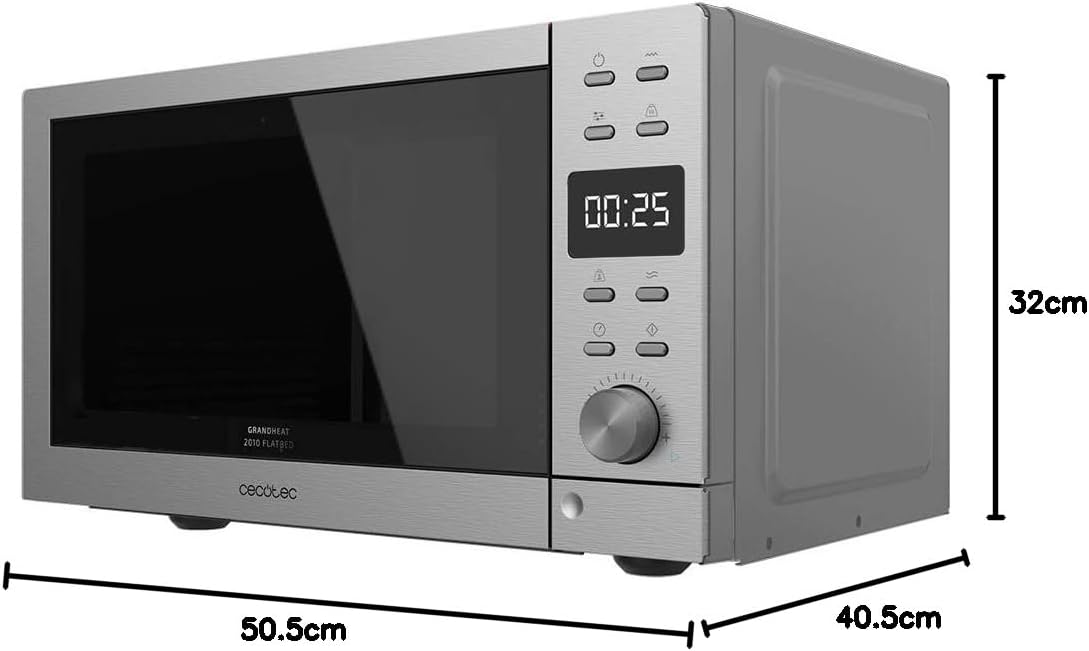
Figure 6: Product dimensions: 50.5 cm (width) x 40.5 cm (depth) x 32 cm (height).
4. Setup
- Unpacking: Carefully remove the microwave oven from its packaging. Retain the packaging materials for future transport or storage.
- Placement: Place the oven on a flat, stable surface capable of supporting its weight. Ensure there is adequate ventilation space around the oven (at least 10 cm at the back, 20 cm at the top, and 5 cm on the sides). Do not block any ventilation openings.
- Power Connection: Plug the power cord into a grounded electrical outlet. Ensure the outlet meets the voltage requirements of the appliance.
- Initial Cleaning: Before first use, wipe the interior and exterior of the oven with a damp cloth.
5. Operating Instructions
5.1. Basic Microwave Cooking
- Place food in a microwave-safe container inside the oven.
- Close the oven door securely.
- Press the Microwave Power button to select the desired power level (e.g., P100 for 100% power).
- Use the rotary knob to set the cooking time (up to 95 minutes).
- Press the Start/Quick Start button to begin cooking.
5.2. Grill Function
- Place food on the grill rack (if provided) or a heat-resistant dish.
- Press the Grill button.
- Use the rotary knob to set the grilling time.
- Press the Start/Quick Start button to begin grilling.
5.3. Combination Cooking
The oven offers combination modes to use both microwave and grill functions simultaneously.
- Place food in a suitable container.
- Press the Combi button to cycle through available combination modes (e.g., C-1 for 70% microwave + 30% grill, C-2 for 55% microwave + 45% grill).
- Use the rotary knob to set the cooking time.
- Press the Start/Quick Start button to begin.
5.4. Defrosting
The microwave offers defrosting by time or by weight.
- Defrost by Time: Press the Defrost by Time button and use the rotary knob to set the desired defrosting time.
- Defrost by Weight: Press the Defrost by Weight button and use the rotary knob to input the food's weight. The oven will automatically calculate the defrosting time.
- Press the Start/Quick Start button to begin defrosting.
5.5. Pre-configured Functions
The oven includes 8 pre-set functions for convenient cooking:
- Milk/Coffee
- Rice
- Pasta
- Potatoes
- Auto-reheat
- Fish
- Chicken
- Meat/Skewers
To use, select the desired function and press Start/Quick Start. The oven will automatically set the appropriate cooking time and power level.
5.6. Timer and Quick Start
- Setting the Timer: Use the rotary knob to set a cooking time up to 95 minutes.
- Quick Start: Press the Start/Quick Start button repeatedly to add quick cooking intervals (e.g., 30 seconds, 1 minute, etc.) at full power.
- Automatic Start: This feature allows you to program a delayed start for a cooking program. Consult the full manual for detailed steps on setting a delayed start.
5.7. Child Safety Lock
To activate the child safety lock, press and hold the Stop button for approximately 3 seconds until a lock indicator appears on the display. To deactivate, repeat the process.
Official Product Videos
Video 1: Overview of the Cecotec GrandHeat 2300 Flatbed Touch Microwave Oven, highlighting its features and design. This video demonstrates the product's functionality and aesthetic appeal.
Video 2: Demonstration of the Cecotec GrandHeat 2000 Flatbed Microwave, showcasing its compact design, turntable-free interior, and ease of use for various cooking tasks. While a slightly different model number, the flatbed feature and general operation are similar and relevant.
6. Maintenance and Cleaning
- Interior Cleaning: The ceramic interior is designed to repel dirt. Wipe the interior with a soft, damp cloth after each use. For stubborn stains, use a mild detergent and then wipe with a clean, damp cloth.
- Exterior Cleaning: Clean the exterior surface with a soft, damp cloth. Do not use abrasive cleaners or harsh chemicals.
- Door and Seals: Regularly clean the door, door seals, and adjacent parts to remove any food spills.
- Power Cord: Always unplug the appliance before cleaning. Ensure the power cord is not damaged.
7. Troubleshooting
| Problem | Possible Cause | Solution |
|---|---|---|
| Oven does not start | Power cord not plugged in; Door not closed properly; Fuse blown. | Ensure plug is securely in outlet; Close door firmly; Check household fuse/circuit breaker. |
| Food not heating | Incorrect cooking time/power level; Food not suitable for microwave. | Adjust time/power; Use microwave-safe dishes. |
| Unusual noise during operation | Food container touching oven walls. | Reposition food container to ensure it does not touch the interior walls. |
| Display not working | Power interruption; Child lock activated. | Check power supply; Deactivate child lock by pressing and holding the Stop button. |
8. Specifications
- Brand: Cecotec
- Model: GrandHeat 2300 Flatbed Touch (01399)
- Capacity: 20 Liters
- Microwave Power: 700 W (6 levels)
- Grill Power: 900 W
- Voltage: 230 V
- Material: Aluminum (exterior finish)
- Product Dimensions (W x D x H): 50.5 x 40.5 x 32 cm
- Item Weight: 1 kg
- Special Features: Automatic cooking, Flatbed (no turntable), Quick start buttons, Child safety lock.
9. Warranty and Support
This product comes with a standard manufacturer's warranty. For detailed warranty information, technical support, or service requests, please refer to the warranty card included with your product or visit the official Cecotec website. Keep your purchase receipt as proof of purchase.
For further assistance, you may visit the Cecotec Store on Amazon.