
Candy CS 1492DE-S
Candy Smart CS 1492DE-S Washing Machine User Manual
Model: CS 1492DE-S | Brand: Candy
Introduction
This manual provides essential information for the safe and efficient operation, installation, and maintenance of your Candy Smart CS 1492DE-S washing machine. Please read it thoroughly before using the appliance and keep it for future reference.
The Candy Smart CS 1492DE-S is a front-loading washing machine designed for household use, featuring a 9 kg capacity and a maximum spin speed of 1400 rpm. It includes a variety of wash programs, quick cycles, and smart features via NFC connectivity.
Safety Information
General Safety:
- Ensure the appliance is properly grounded.
- Do not touch the appliance with wet hands or feet.
- Do not allow children to operate or play with the appliance.
- Unplug the appliance before cleaning or performing any maintenance.
- Do not force the door open during operation.
- Keep packaging materials away from children.
Installation Safety:
- Install the machine on a stable, level surface.
- Remove all transit bolts before use. Failure to do so can cause severe damage.
- Ensure water and electrical connections are made by a qualified professional if you are unsure.
Setup and Installation
Unpacking
Carefully remove all packaging materials. Check for any damage during transit. Keep packaging for future transport if needed.
Removing Transit Bolts
Before operating the washing machine, it is crucial to remove the transit bolts located at the rear of the appliance. These bolts secure the drum during transport and must be removed to prevent damage during operation.
- Locate the transit bolts on the back panel.
- Use a suitable wrench to loosen and remove all bolts.
- Insert the plastic caps provided into the holes.
Positioning and Leveling
Place the washing machine on a firm, flat surface. Adjust the adjustable feet to ensure the machine is perfectly level. A level machine reduces vibration and noise during operation.
Water Connection
Connect the water inlet hose to a cold water tap with a 3/4" thread. Ensure the connection is tight to prevent leaks. Position the drain hose into a suitable drain pipe or sink, ensuring it is securely fixed and not kinked.
Electrical Connection
Plug the power cord into a grounded electrical outlet. Ensure the voltage and frequency match the specifications on the appliance's rating plate. Do not use extension cords or adapters.
Operating Instructions
Control Panel Overview
The washing machine features a rotary knob for program selection and a touch screen for additional functions and settings.

Image: Front view of the Candy Smart CS 1492DE-S washing machine, showing the control panel, detergent drawer, and large loading door.
Loading Laundry
Open the large loading door and place laundry loosely into the drum. Do not overload the machine. The maximum capacity is 9 kg.

Image: Close-up view of the washing machine drum interior, highlighting the stainless steel drum with perforations.
Adding Detergent
Pull out the detergent drawer. Add appropriate amounts of detergent and fabric softener to the designated compartments. Refer to your detergent packaging for dosage recommendations.
Program Selection
Turn the program selector knob to choose one of the 15 available wash programs. These include:
- Cotton
- Eco 40°/60°
- Synthetics
- Rinse
- Drain/Spin
- Jeans
- Hygiene Program
- Delicates
- 5 Quick Programs: Mixed & Colors (14, 30, 44, 59 minutes), Cotton 59 minutes
Additional Functions (Touch Screen)
Use the touch screen to select additional options:
- Intense Rinse: For thorough rinsing.
- Hygiene: Enhanced hygiene for laundry.
- Easy Iron: Reduces creasing.
- Delay Start: Postpone the start of the wash cycle by up to 24 hours.
- Quick Programs: Select specific quick cycle durations.
- Soil Level: Adjust wash intensity based on dirtiness.
- Temperature Selection: Adjust wash temperature.
- Safety Lock: Child lock function.
- Remaining Time Display: Shows estimated time left.
- Start/Pause: To begin or temporarily stop a cycle.
NFC Connectivity (SimplyFi App)
The washing machine is equipped with NFC technology. Download the Candy SimplyFi app to your smartphone to unlock additional features:
- Machine diagnostics and troubleshooting.
- Download new wash programs.
- Activate voice assistant.
- Manage delay start functions remotely.
Maintenance
Cleaning the Detergent Drawer
Regularly clean the detergent drawer to prevent residue buildup. Remove the drawer and rinse it under running water. Use a brush to clean stubborn deposits.
Cleaning the Drum
Run a maintenance wash (e.g., a hot cycle with no laundry and a descaling agent) periodically to clean the drum and remove any odors or residue.
Cleaning the Drain Filter
The drain filter should be cleaned regularly to ensure proper drainage and prevent blockages. This is typically located at the bottom front of the machine.

Image: Close-up view of the washing machine's drain filter compartment, showing the removable filter and its housing.
- Place a shallow container under the filter cover to catch any residual water.
- Open the filter cover.
- Slowly unscrew the filter counter-clockwise and allow water to drain.
- Remove the filter and clean it under running water, removing any lint or debris.
- Reinsert the filter and screw it back in tightly. Close the cover.
Cleaning the Door Seal
Wipe the rubber door seal after each wash to prevent mold and mildew buildup. Ensure no small items are trapped in the seal.
Troubleshooting
| Problem | Possible Cause | Solution |
|---|---|---|
| Machine does not start | Power cord unplugged; Door not closed properly; Program not selected; Delay start active. | Check power connection; Ensure door clicks shut; Select a program and press Start; Check delay start setting. |
| No water intake | Water tap closed; Inlet hose kinked; Water pressure too low. | Open water tap; Straighten hose; Check household water pressure. |
| Water not draining | Drain hose kinked or blocked; Drain filter clogged. | Straighten or clear drain hose; Clean drain filter (refer to Maintenance section). |
| Excessive vibration/noise | Transit bolts not removed; Machine not level; Uneven load. | Remove transit bolts; Level the machine; Redistribute laundry evenly. |
| Detergent residue in drawer | Detergent drawer clogged; Too much detergent used. | Clean detergent drawer; Reduce detergent amount. |
For issues not listed here, or if problems persist, please contact customer support.
Specifications
| Feature | Detail |
|---|---|
| Brand | Candy |
| Model Number | CS 1492DE-S (8059019005140) |
| Capacity | 9 Kilograms |
| Max Spin Speed | 1400 rpm |
| Dimensions (H x W x D) | 85 x 60 x 52 cm |
| Weight | 66.5 Kilograms |
| Noise Level (Spin) | 79 dB |
| Energy Efficiency Class (New) | D (as per 2021 EU energy label) |
| Annual Energy Consumption | 218 kWh/year (based on old A+++ rating) / 76 kWh/100 cycles (new D rating) |
| Water Consumption | 46 Liters/cycle (Eco 40-60 program) |
| Control Type | Tactile (Touch) |
| Special Features | 5 Quick Cycles, NFC Connectivity, Hygiene Program |
| Material | Stainless Steel (drum) |
For detailed energy information, refer to the official EU EPREL database:
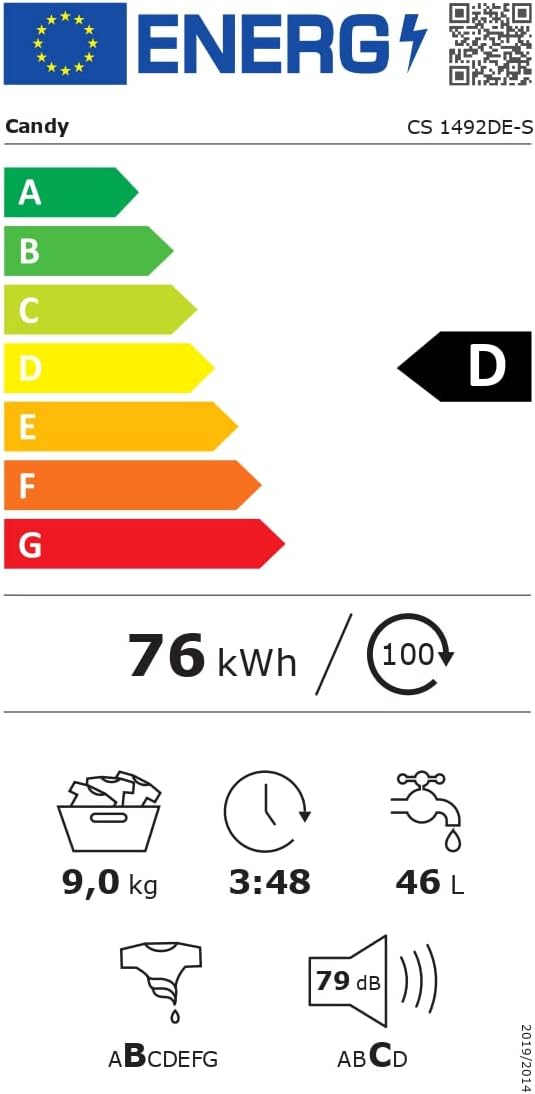
Image: EU Energy Label for the Candy Smart CS 1492DE-S washing machine, showing D energy class, 9 kg capacity, 76 kWh/100 cycles, 46 L/cycle, and 79 dB noise level.
Warranty and Support
This product comes with a standard manufacturer's warranty. Please refer to your purchase documentation for specific warranty terms and conditions. The typical warranty period is 24 months from the date of purchase.
For technical assistance, spare parts, or service requests, please contact Candy customer support. Have your model number (CS 1492DE-S) and serial number ready when contacting support.
You can also find more information and support resources on the official Candy website.
Ask a question about this manual
Ask about setup, troubleshooting, compatibility, parts, safety, or missing instructions. Manuals+ will review the question and use this page’s manual context to help answer it.