
Introduction
Thank you for choosing the Tribesigns 47-inch Computer Desk with Hutch. This manual provides detailed instructions for assembly, usage, maintenance, and troubleshooting to ensure optimal performance and longevity of your desk. Please read all instructions carefully before beginning assembly and retain this manual for future reference.
Safety Information
For your safety, please adhere to all included assembly instructions. Ensure the desk is stable and anchored if necessary. Do not exceed the maximum weight limit of 300 pounds. Keep small parts away from children during assembly. Always use the appropriate tools and follow steps in the correct order.
Package Contents
Before assembly, verify that all components are present and undamaged. The package typically includes:
- Desktop panel
- Hutch shelves and dividers
- Metal frame components (legs, supports)
- Bottom bookshelf panel
- Assembly hardware (screws, bolts, Allen key)
- Instruction manual
If any parts are missing or damaged, please contact customer support.
Assembly Instructions
Assembly of this desk is designed to be straightforward, typically taking around 20 minutes for most individuals. Two people are recommended for easier and safer assembly. A Phillips-head screwdriver (not included) may be helpful in addition to the provided Allen key.
- Unpack and Identify Parts: Carefully unpack all components and lay them out on a clean, soft surface to prevent scratches. Refer to the parts list in your included manual to identify each piece.
- Assemble the Base Frame: Attach the metal legs and support bars according to the diagrams in your manual. Ensure all screws are finger-tightened initially.
- Attach the Desktop: Secure the main desktop panel to the assembled base frame. Fully tighten all screws once the desktop is correctly aligned.
- Install the Bottom Bookshelf: Position and secure the bottom bookshelf panel to the lower frame.
- Assemble the Hutch: Construct the hutch frame and attach the shelves and dividers. Then, mount the complete hutch assembly onto the main desktop frame.
- Final Tightening: Once all components are in place, go back and securely tighten all screws and bolts. Do not overtighten.
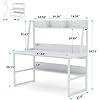
Figure 1: Desk Dimensions. Refer to this diagram for precise measurements during assembly and placement.
Video 1: Product Overview. This video provides a general overview of the desk's features and may assist with visual assembly guidance.
Product Features and Usage
The Tribesigns 47-inch Computer Desk with Hutch is designed for home office use, offering a space-saving solution with integrated storage.
- Spacious Desktop: The 47.2-inch by 23.6-inch desktop provides ample space for a laptop or desktop PC and various office accessories, accommodating up to two monitors.
- Integrated Hutch: The vertical design includes an open bookshelf hutch, offering convenient storage and display options above the main work surface.
- Lower Bookshelf: An additional shelf below the desktop provides extra storage for books, binders, or other items, helping to keep your workspace organized.
- Durable Construction: The desk features heavy-duty metal legs (1.18" x 1.18" width) for stability and durability. The 0.6-inch thick desktop is made from environmental E1 standard particle wood, known for its wear-resistant, heat-resistant, and easy-to-clean properties.

Figure 2: Tribesigns Computer Desk with Hutch in use, demonstrating its spacious desktop and integrated storage.

Figure 3: Desktop thickness measurement, highlighting the robust construction.

Figure 4: Metal frame detail, illustrating the sturdy leg construction.

Figure 5: Hutch shelf detail, showing organized storage for small items.

Figure 6: Bottom shelf storage, ideal for books and binders.
Care and Maintenance
To maintain the appearance and extend the life of your Tribesigns desk, follow these care instructions:
- Cleaning: Dust and wipe down regularly with a damp cloth. Avoid using abrasive cleaners or harsh chemicals, as these can damage the finish.
- Moisture Protection: Avoid prolonged contact with water. Promptly wipe up any spills to prevent damage to the engineered wood.
- Metal Components: For metal parts, apply rust prevention measures as needed, especially in humid environments.
- Weight Distribution: Distribute weight evenly across the desktop and shelves. Do not place excessively heavy items on the hutch shelves to prevent bending.
Troubleshooting
| Problem | Possible Cause | Solution |
|---|---|---|
| Desk wobbles after assembly | Screws not fully tightened; uneven floor; parts misaligned. | Ensure all screws are securely tightened. Check for uneven floor and use the adjustable feet (if present) or shims to stabilize. Verify all parts are correctly aligned according to the manual. |
| Parts do not align or holes don't match | Incorrect orientation of parts; manufacturing variation. | Double-check the diagrams in the instruction manual for correct part orientation. If issues persist, contact customer support for assistance. Do not force parts together. |
| Hutch shelf appears to bend | Excessive weight placed on the shelf. | Reduce the weight on the hutch shelf. Distribute items evenly and avoid placing very heavy objects in the middle. |
| Minor cosmetic damage (e.g., chipped paint) | Shipping damage; minor manufacturing defect. | For minor cosmetic issues, consider touch-up paint or decorative covers. If the damage is significant or affects functionality, contact customer support. |
Specifications
| Feature | Detail |
|---|---|
| Brand | Tribesigns |
| Model Number | B08P87CLRV |
| Product Dimensions | 23"D x 47"W x 54"H |
| Item Weight | 65 pounds |
| Maximum Weight Recommendation | 300 pounds |
| Material Type | Engineered Wood (E1 Standard Particle Wood) |
| Base Material | Metal |
| Tabletop Thickness | 0.6 inches |
| Number of Shelves | 2 (Hutch and Bottom Bookshelf) |
| Recommended People for Assembly | 2 |
Warranty and Customer Support
This Tribesigns product comes with a limited warranty. For specific details regarding warranty coverage, please refer to the documentation included with your purchase or contact customer support.
If you encounter any issues, have questions about assembly, or require assistance with your product, please do not hesitate to contact Tribesigns customer support. Contact information can typically be found on the product packaging or the official Tribesigns website.


