1. Introduction
This document provides comprehensive instructions for the installation, operation, and maintenance of your Wolf-Guard SGS GSM Home Alarm System. This system functions as both a GSM/APP control unit and an audible/visual alarm host. It receives signals from PIR motion detectors and remote control transmissions to trigger alarm calls, SMS alerts, app notifications, and audible/visual alarms. Additional sensors such as SOS buttons, door sensors, or water sensors can be added to expand protection.
Featuring an integrated sound and light design, the siren produces a loud 110 dB alarm, effectively deterring intruders and protecting property. Designed for outdoor solar charging, this wireless system requires no wiring, making it suitable for various locations requiring protection, such as homes, offices, schools, hospitals, banks, and warehouses.
Package Contents:
- 1 x Wireless GSM Solar Siren (SGS)
- 2 x YK-011 Remote Controls
- 1 x HW-04C PIR Motion Detector
- 1 x Power Adapter (5V DC)
2. Safety Information
- Ensure all components are installed securely to prevent accidental falls or damage.
- Do not attempt to disassemble or repair the device yourself. Refer to qualified personnel for service.
- Keep the system away from extreme temperatures, direct sunlight (except for the solar panel), and high humidity.
- Dispose of batteries according to local regulations.
- This system is designed to enhance security but cannot guarantee absolute protection against all intrusions.
3. Product Overview
3.1 Wolf-Guard SGS Wireless GSM Solar Siren
The SGS Solar Siren is the central unit of your alarm system, integrating a solar panel for power, a loud siren, and a flashing strobe light. It communicates wirelessly with detectors and remote controls, and uses a GSM SIM card for remote notifications.

Image: Front and side view of the SGS Solar Siren with dimensions (300mm height, 190mm width, 68mm depth).
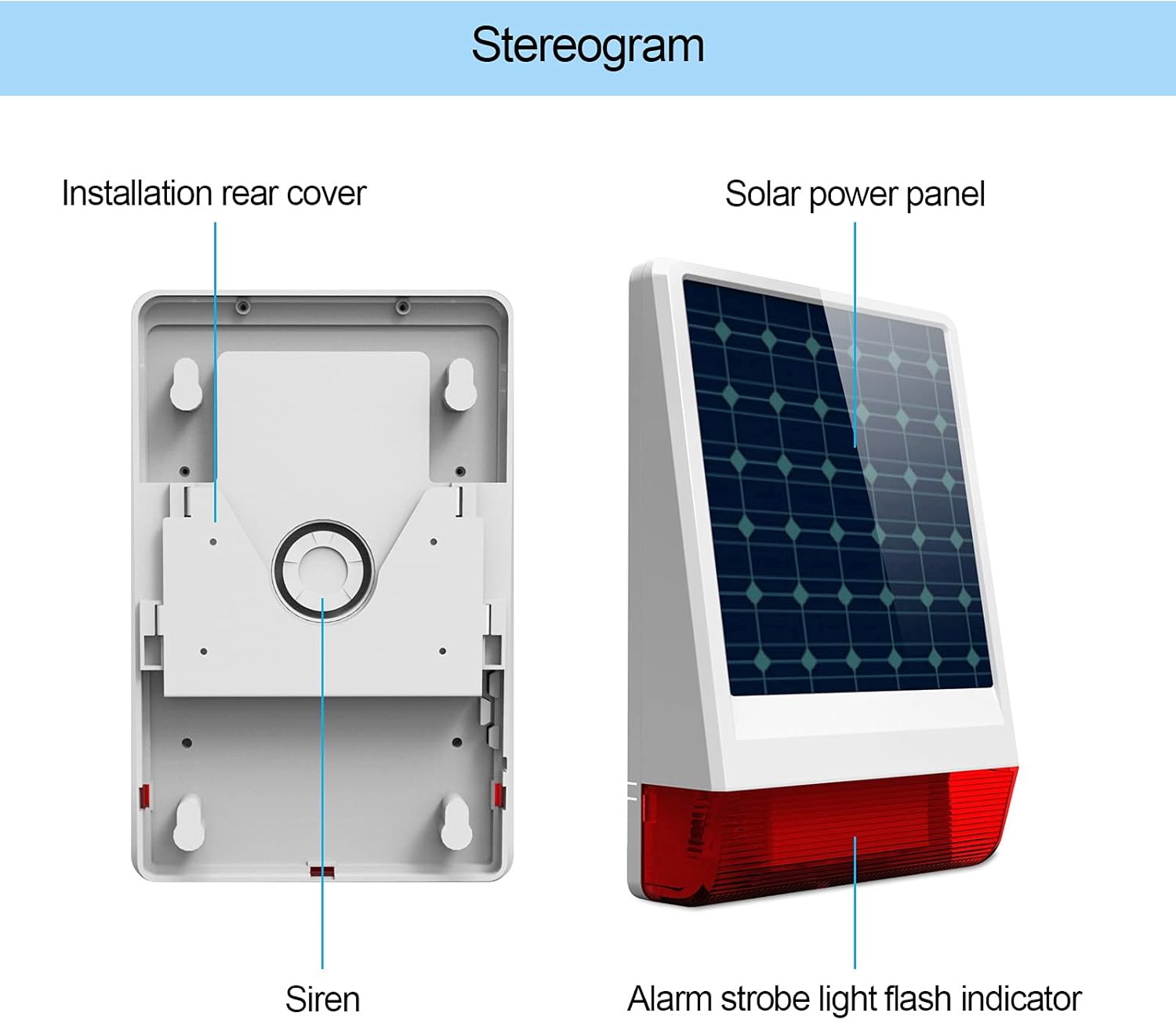
Image: Stereogram illustrating the installation rear cover, siren, solar power panel, and alarm strobe light flash indicator of the SGS Solar Siren.
3.2 HW-04C PIR Pet Immune Motion Detector
This passive infrared (PIR) motion detector is designed to detect human movement while ignoring pets, reducing false alarms. It transmits signals wirelessly to the solar siren when motion is detected.

Image: Illustration of the PIR motion detector's pet immunity feature, showing it ignoring a small dog.

Image: Close-up view of the HW-04C PIR detector, showing the 'CODE', 'ON', and 'OFF' switches.
3.3 YK-011 Remote Control
The remote control allows for convenient arming, disarming, and emergency (SOS) functions of the alarm system from a distance.

Image: The SGS Solar Siren in an indoor setting, with a hand holding the remote control and an illustration of PIR detection of an intruder.
4. Setup
4.1 Unpacking and Initial Inspection
Carefully unpack all components and verify that all items listed in the Package Contents section are present and undamaged.
4.2 Solar Siren Installation
- Choose Location: Select an outdoor location for the solar siren that receives direct sunlight for several hours daily to ensure optimal charging of the internal battery. The location should also be within wireless range of your PIR detectors and remote controls (up to 80m in open areas).
- Mounting: Use the provided mounting hardware to securely attach the siren to a wall or sturdy surface. Ensure it is mounted at a height that provides good visibility and sound projection, while also being difficult for intruders to tamper with.
- Initial Charge: Although solar-powered, it is recommended to connect the included 5V DC power adapter for an initial full charge before first use, especially if the device has been stored for a long time or if sunlight is limited.
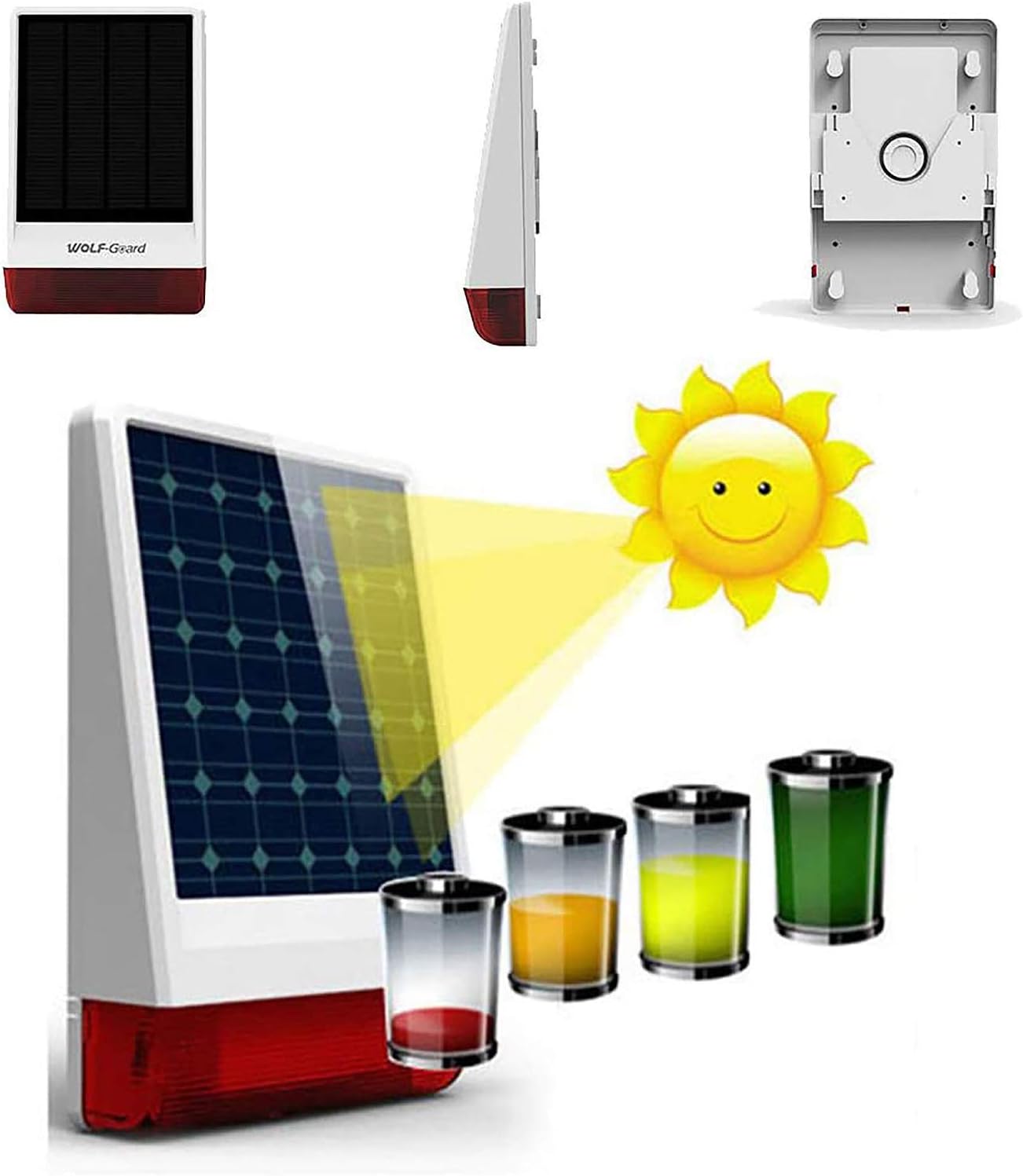
Image: The solar siren with a sun icon and battery level indicators, demonstrating its solar charging capability.
4.3 PIR Motion Detector Installation (HW-04C)
- Battery Installation: Open the PIR detector casing and insert a 9V DC battery (not included). Ensure correct polarity.
- Mounting Height: Install the PIR detector at a height of 1.8 to 2.4 meters (approximately 6 to 8 feet) from the ground for optimal detection and pet immunity.
- Placement Considerations: Avoid pointing the detector directly at heat sources, windows, or areas with significant air currents (e.g., near air conditioners or vents) to prevent false alarms. Position it to cover the desired detection area (10-12m range, 110° horizontal angle).
- Pet Immunity: When mounted at the recommended height, the detector's lower detection zones are designed to ignore small pets. Test the placement with your pets to confirm effective immunity.
4.4 SIM Card Insertion (for GSM Functionality)
To enable GSM call and SMS alerts, a valid 2G GSM SIM card (not included) must be inserted into the solar siren. Ensure the SIM card has sufficient credit and is activated. Refer to the siren's specific SIM card slot location and insertion method in the device's internal diagram or quick start guide.
4.5 App Control Setup
- Download App: Search for the official "Wolf-Guard" app on your smartphone's app store (Google Play Store for Android, Apple App Store for iOS). Note: Some users have reported issues with direct app links; searching directly in the app store is recommended.
- Registration/Login: Follow the in-app instructions to create an account or log in.
- Add Device: Within the app, select the option to add a new device. You may need to scan a QR code on the siren or manually enter its device ID. Follow the pairing prompts to connect your solar siren to the app.
5. Operating Instructions
5.1 Arming the System
When the system is armed, the PIR motion detector will actively monitor for movement, and the siren will trigger upon detection.
- Using Remote Control: Press the Arm button (often depicted as a closed padlock or a house icon) on your YK-011 remote control. The siren will typically emit a confirmation sound.
- Using Mobile App: Open the Wolf-Guard app, select your alarm system, and tap the Arm function.
- Using GSM Call/SMS: Refer to your quick start guide for specific SMS commands or call sequences to arm the system via your registered phone number.
5.2 Disarming the System
Disarming the system will deactivate the motion detector and prevent the siren from triggering.
- Using Remote Control: Press the Disarm button (often depicted as an open padlock or an unlocked house icon) on your YK-011 remote control. The siren will typically emit a confirmation sound.
- Using Mobile App: Open the Wolf-Guard app, select your alarm system, and tap the Disarm function.
- Using GSM Call/SMS: Refer to your quick start guide for specific SMS commands or call sequences to disarm the system via your registered phone number.
5.3 Emergency (SOS) Function
In an emergency, press the SOS button on your remote control. This will immediately trigger the siren and send emergency notifications via GSM/App, regardless of the system's armed status.
5.4 Alarm Notifications
When an alarm is triggered (e.g., by the PIR detector), the solar siren will activate its 110 dB audible alarm and flashing strobe light. Simultaneously, the system will send notifications:
- Alarm Call: The system will call pre-programmed phone numbers.
- SMS Alert: An SMS message will be sent to pre-programmed phone numbers.
- App Notification: An alert will appear on your smartphone via the Wolf-Guard app.
6. Maintenance
6.1 Solar Panel Care
Regularly clean the solar panel on the SGS siren to ensure it remains free of dirt, dust, and debris. A clean panel maximizes sunlight absorption and charging efficiency. Use a soft, damp cloth for cleaning.

Image: The SGS Solar Siren mounted on a brick wall, demonstrating its waterproof design with water droplets on the surface.
6.2 Battery Replacement
- PIR Motion Detector (HW-04C): Replace the 9V DC battery when the low battery indicator (if present) illuminates or when the detector's performance degrades.
- Remote Control (YK-011): The remote control uses a CR2016 3V lithium battery, which typically lasts for 2 years. Replace it when the operating range decreases or the remote becomes unresponsive.
- Solar Siren (SGS): The siren has a built-in 3.7V/2400mA polymer battery. While primarily charged by solar power, ensure the external 5V DC power adapter is used if the siren is in a low-light environment or if the battery level is consistently low.
6.3 Waterproof Design
The solar alarm features a robust, waterproof, and anti-tamper design, allowing normal operation in rainy weather for up to half a month on a full battery charge. However, it is not designed for submersion. Ensure all covers and seals are properly closed after any maintenance.
7. Troubleshooting
- Alarm activates by itself when deactivated:
Possible Cause: Incorrect sensor placement, high sensitivity, or environmental interference.
Solution: Review PIR detector placement, ensuring it's not pointing at heat sources or areas with drafts. Adjust sensitivity settings if available. If the issue persists, contact support. - App link not working / Cannot find official app:
Possible Cause: Outdated link or regional app store restrictions.
Solution: Search directly for "Wolf-Guard" in your smartphone's official app store (Google Play Store or Apple App Store). If still unable to find or install, contact Wolf-Guard customer support for the correct and latest app information. - No GSM signal or alerts:
Possible Cause: SIM card not inserted correctly, no network coverage, or insufficient SIM card balance.
Solution: Reinsert the SIM card, check network coverage in the siren's location, and ensure the SIM card has active credit for calls and SMS. - Siren not sounding during an alarm:
Possible Cause: Low battery, siren volume set to minimum, or system not armed correctly.
Solution: Check the siren's battery level and ensure it's charging. Verify volume settings via the app or physical controls. Confirm the system is in an armed state. - PIR detector not detecting motion:
Possible Cause: Low battery, incorrect mounting height, or obstructed view.
Solution: Replace the 9V battery. Ensure the detector is mounted at 1.8-2.4m and has a clear line of sight to the detection area.
8. Specifications
| Feature | Specification |
|---|---|
| Brand | Wolf-Guard |
| Model Number | SGS |
| Color | White |
| Power Source Type | Battery Powered, Solar Powered |
| Voltage | 5 Volts |
| Sound Level | 110-120 Decibels |
| Connectivity Technology | Wireless |
| Control Method | Remote Control, Smartphone App |
| Alert Type | Motion Only |
| Item Weight | 1.2 Kilograms |
| Compatible Devices | Smartphone |
| Max Range (PIR Detection) | 12 Meters |
| SGS Solar Siren Standby Current | <6 mA |
| SGS Solar Siren Solar Recharging Current | 270 mA |
| SGS Solar Siren Built-in Battery | 3.7V/2400mA Polymer Battery |
| SGS Solar Siren Wireless Reception Range | > 80 m (open area) |
| PIR Detector Battery Power | 9V DC |
| PIR Detector Transmission Range | 80 m (open area) |
| PIR Detector Detection Distance | 10 to 12 m |
| PIR Detector Detection Angle | Horizontal 110° |
| PIR Detector Mounting Height | 1.8 to 2.4 m |
| Remote Key Fob Power Supply | CR2016 3V Lithium Battery (2-year lifespan) |
| Remote Key Fob Operating Range | 80 m |
9. Warranty and Support
Specific warranty information for the Wolf-Guard SGS GSM Home Alarm System is not provided in the product details. For warranty claims, technical support, or further assistance, please contact your retailer or the manufacturer directly. Keep your purchase receipt as proof of purchase.


