
1. Introduction
This manual provides essential instructions for the safe and efficient operation, maintenance, and troubleshooting of your Buffalo Touch Control Induction Hob 3kW, model DF825. Please read this manual thoroughly before using the appliance and retain it for future reference.
The Buffalo single-zone induction hob features a robust stainless steel base and a durable glass-ceramic top. It is designed for professional kitchen environments, offering 3 kW of efficient power for instant heat and rapid cooking. Key features include a built-in timer and precise touch controls. Its portability, powered by a standard 13A plug, makes it suitable for various catering needs.

Figure 1: Buffalo Touch Control Induction Hob with a pan containing broccoli, cauliflower, and red peppers. This image illustrates the hob's compact design and its use with cookware.
2. Safety Instructions
Always follow basic safety precautions when using electrical appliances to reduce the risk of fire, electric shock, and injury.
- Ensure the appliance is placed on a stable, level, and heat-resistant surface.
- Do not immerse the appliance in water or any other liquid.
- Keep the appliance away from children and unauthorized personnel.
- Use only induction-compatible cookware. Non-induction cookware will not heat.
- Do not operate the appliance with a damaged cord or plug.
- Allow adequate ventilation around the unit during operation.
- The surface remains hot after use; avoid touching until cooled.
- Do not place metallic objects (e.g., knives, forks, spoons, lids) on the hob surface as they can become hot.
3. Setup
- Unpacking: Carefully remove the induction hob from its packaging. Retain packaging for future transport or storage.
- Placement: Position the hob on a flat, stable, and heat-resistant surface. Ensure there is at least 10 cm (4 inches) of clear space around all sides for proper ventilation. Do not place it near heat sources or flammable materials.
- Power Connection: Plug the appliance into a standard 13A electrical outlet. Ensure the power supply matches the specifications listed on the appliance's rating label.
- Initial Cleaning: Before first use, wipe the glass-ceramic surface and stainless steel body with a damp cloth to remove any dust or residue from manufacturing. Ensure the unit is completely dry before plugging it in.
- Cookware Check: Verify that your cookware is induction-compatible. This can be done by checking for an induction symbol on the bottom of the pan or by testing with a magnet (a magnet will stick to the bottom of induction-compatible cookware).
4. Operating Instructions
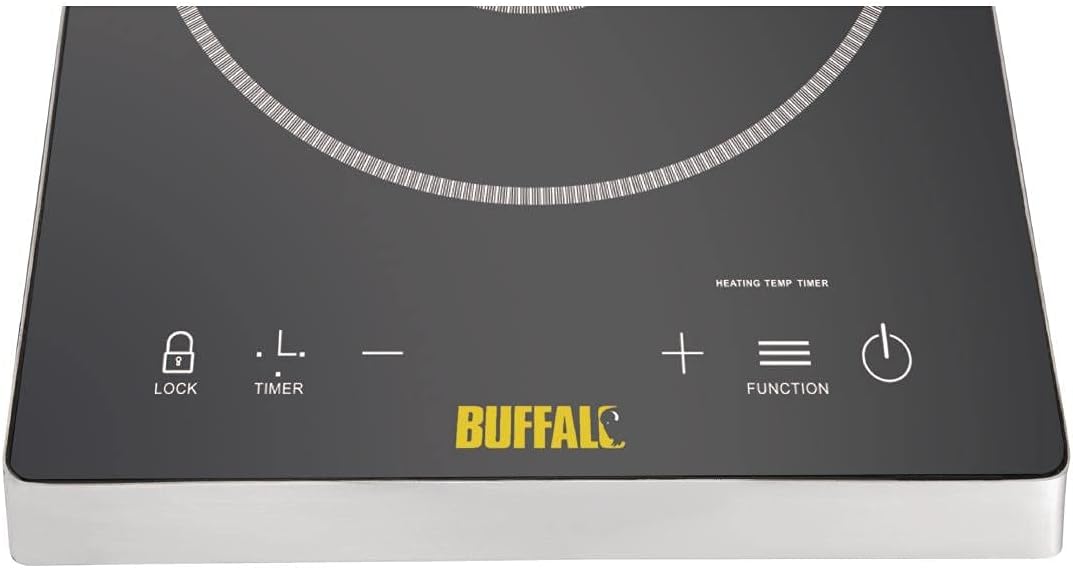
Figure 2: Detailed view of the touch control panel, showing the Power (circle with vertical line), Function (three horizontal lines), Plus/Minus, Timer (clock symbol), and Lock (padlock symbol) buttons.
- Power On: Place induction-compatible cookware centrally on the hob's cooking zone. Press the Power button (circle with vertical line) to turn on the appliance. The display will illuminate.
- Select Function: Press the Function button (three horizontal lines) to switch between heating modes (e.g., Power or Temperature).
- Adjust Settings: Use the + and - buttons to adjust the power level or temperature. The hob offers 10 temperature settings, ranging from 60°C to 240°C.
- Set Timer: Press the Timer button (clock symbol) and then use the + and - buttons to set the desired cooking time, from 0 to 180 minutes. The hob will automatically turn off once the timer expires.
- Lock Function: To prevent accidental changes to settings during cooking, press the Lock button (padlock symbol). The controls will be locked. Press it again to unlock.
- Power Off: After cooking, press the Power button to turn off the hob. The fan may continue to run for a short period to cool the internal components.
Cookware Compatibility
The Buffalo Induction Hob requires cookware made of ferromagnetic material. Suitable materials include cast iron, enameled iron, steel, and stainless steel with a magnetic base. Cookware with a flat bottom and a diameter between 12 cm and 26 cm is recommended for optimal performance.
Unsuitable cookware includes glass, ceramic, aluminum, copper, and non-magnetic stainless steel.
5. Maintenance and Cleaning
Regular cleaning and maintenance will ensure the longevity and optimal performance of your induction hob.
- Before Cleaning: Always unplug the hob from the power outlet and allow it to cool completely before cleaning.
- Glass-Ceramic Surface: Wipe the surface with a soft, damp cloth and a mild detergent. For stubborn stains, use a specialized ceramic hob cleaner. Avoid abrasive cleaners, scouring pads, or harsh chemicals, as these can scratch or damage the surface.
- Stainless Steel Body: Clean the stainless steel exterior with a damp cloth and a mild, non-abrasive cleaner. Dry thoroughly with a soft cloth to prevent water spots.
- Ventilation Openings: Ensure the ventilation openings are free from dust and debris. Use a soft brush or vacuum cleaner to gently clear any blockages.
- Storage: If storing the hob for an extended period, ensure it is clean and dry. Store it in a cool, dry place, preferably in its original packaging.
6. Troubleshooting
Before contacting customer support, please refer to the following common issues and their solutions.
| Problem | Possible Cause | Solution |
|---|---|---|
| Hob does not turn on. | No power supply; loose plug. | Check if the hob is properly plugged into a working outlet. Check the circuit breaker. |
| Cookware is not heating. | Cookware is not induction-compatible; pan not centered; pan too small/large. | Use induction-compatible cookware. Ensure the pan is centered on the cooking zone and has an appropriate diameter (12-26 cm). |
| Display shows an error code (e.g., "E0", "E1"). | Overheating; internal fault; sensor error. | Turn off the hob and unplug it. Allow it to cool down for 10-15 minutes. If the error persists, consult an authorized service technician. |
| Unusual noise during operation. | Normal fan operation; cookware vibration. | A low humming sound from the cooling fan is normal. Some cookware may produce a slight buzzing sound due to induction technology; this is not a fault. |
7. Specifications
| Feature | Detail |
|---|---|
| Model Number | DF825 |
| Brand | Buffalo |
| Power (Wattage) | 3 KW |
| Power Source | 13A Plug, Induction |
| Controls Type | Touch |
| Burner Type | Induction |
| Heating Elements | 1 |
| Temperature Range | 60°C - 240°C |
| Temperature Settings | 10 |
| Timer Range | 0 - 180 minutes |
| Material | Stainless Steel (body), Glass-Ceramic (top) |
| Color | Stainless Steel |
| Special Feature | Portable |
| Item Weight | 17.53 pounds (approx. 7.95 kg) |
| Manufacturer | Zhongshan Better Home Applianc |
8. Warranty and Support
The Buffalo Touch Control Induction Hob 3kW is covered by a manufacturer's warranty against defects in materials and workmanship. Please refer to the warranty card included with your product or contact your retailer for specific warranty terms and conditions.
For technical support, service, or spare parts, please contact your supplier or an authorized Buffalo service center. Do not attempt to repair the appliance yourself, as this may void the warranty and pose safety risks.
Contact information for support can typically be found on the manufacturer's official website or through your point of purchase.