
1. Introduction
The ELECFREAKS microbit TPbot Coding Starter Kit is an educational robot car designed to introduce users to programming concepts through the BBC micro:bit platform. This kit offers two primary modes of operation: an entertainment mode for immediate play and a programmable mode for learning coding with MakeCode. Its modular design and compatibility with building blocks encourage creativity and hands-on learning. This manual provides detailed instructions for assembly, operation, programming, and maintenance to ensure a rewarding experience.
2. Product Features
- Durable Construction: The TPbot robot car features an ABS material body, offering enhanced safety, color, and hardness compared to open-frame designs.
- Dual Operation Modes:
- Entertainment Mode: Functions such as line following and obstacle avoidance are available without the micro:bit inserted.
- Programming Mode: Becomes a programmable smart car when a micro:bit is inserted, enabling coding education.
- Customizable Lighting: The robot's "eye patch" LEDs can be customized with different colors through graphical MakeCode programming, allowing for vibrant light displays.
- Rich Extension Interfaces: Equipped with RJ11 (standard: 4P4C) and 4-way servo (standard: 3-pin) interfaces for connecting various sensors and expanding functionality.
- Building Block Compatibility: Designed to be compatible with standard building blocks, allowing users to create diverse shapes and structures, fostering imagination and programming interest.
3. What's in the Box
Please verify that all components are present upon unboxing:
- TPBot Smart Car x1
- Sticker Sheet x1
- User Manual x1
- Line-tracking Map x1
Note: The micro:bit board and AAA batteries are NOT included and must be purchased separately.

Figure 3.1: Contents of the TPbot Coding Starter Kit packaging.
4. Setup and Assembly
Follow these steps to assemble your TPbot robot car:
4.1. Battery Installation
The TPbot requires 4 AAA 1.5V dry batteries (not included). Locate the battery compartment on the underside of the robot and insert the batteries, ensuring correct polarity.

Figure 4.1: Location of the battery compartment and other ports.
4.2. Attaching the Ultrasonic Sensor
The ultrasonic sensor is crucial for obstacle avoidance. Carefully attach it to the front of the TPbot as shown in the diagram.

Figure 4.2: Ultrasonic sensor and LED lights on the front of the TPbot.
4.3. Inserting the micro:bit Board
To enable programming mode, gently insert your BBC micro:bit board into the designated slot on top of the TPbot. Ensure it is securely seated.

Figure 4.3: Micro:bit board inserted into the TPbot.
Video 4.1: This video demonstrates the unboxing and basic assembly steps for the micro:bit TPbot smart coding robot car, including battery and sensor installation, and micro:bit insertion.
5. Operating Modes
The TPbot offers two distinct modes of operation:
5.1. Entertainment Mode (Without micro:bit)
Even without a micro:bit, the TPbot can perform pre-programmed functions. Simply turn on the robot, and it will automatically engage in line-following or obstacle avoidance behaviors. Use the included line-tracking map to explore its line-following capabilities.
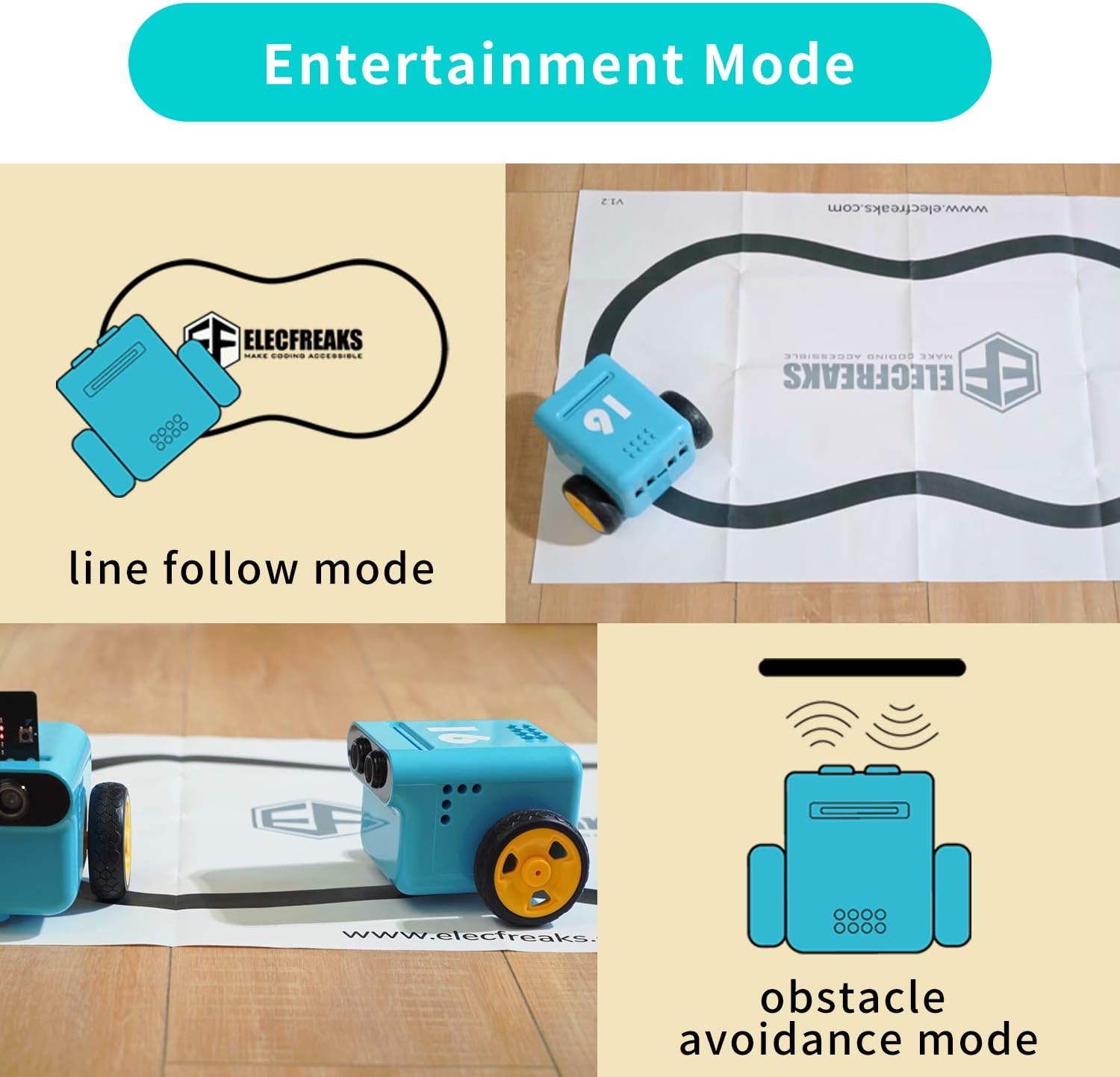
Figure 5.1: TPbot demonstrating line follow and obstacle avoidance in Entertainment Mode.
5.2. Programming Mode (With micro:bit)
With the micro:bit inserted, the TPbot transforms into a fully programmable robot. You can use MakeCode graphical programming or Python to create custom behaviors. This mode unlocks the full educational potential of the kit.
6. Programming with MakeCode
The TPbot is designed for easy programming using the MakeCode platform. MakeCode provides a block-based visual programming environment that is ideal for beginners.
6.1. Accessing the Wiki Tutorial
For detailed programming guides and project ideas, please visit the official Wiki Tutorial: wiki.elecfreaks.com/en/. This resource offers step-by-step instructions for various MakeCode projects.
6.2. Customizing with MakeCode
You can program the TPbot to perform complex sequences, control its movements, and customize its LED displays. The graphical interface makes it intuitive to drag and drop code blocks to build your programs.
Video 6.1: This video showcases various STEM educational projects that can be created with the Elecfreaks microbit coding robot, demonstrating its versatility in different programmed scenarios.
7. Extension and Compatibility
The TPbot is designed for expandability and integration with other components.
7.1. Sensor Modules
Utilize the RJ11 (standard: 4P4C) and 4-way servo (standard: 3-pin) interfaces to connect additional sensor modules. This allows for the creation of more complex and interactive projects.
7.2. Building Block Integration
The TPbot is compatible with standard building blocks. This feature allows users to personalize the robot's appearance and add mechanical extensions, enhancing creative possibilities and engineering skills.

Figure 7.1: TPbot customized with building blocks.
8. Specifications
| Feature | Detail |
|---|---|
| Product Name | TPBot Smart Car |
| Controller | micro:bit board (optional) |
| Coding Method | Makecode graphical programming / Python |
| Main Functions | Entertainment mode / Programming mode |
| Compatibility | Standard toy brick attachment |
| Expandability | 4-way sensor connection and 4-way servo connection |
| Dimensions | 113mm * 128mm * 90mm |
| Battery | 4 * 1.5V (AAA) Dry batteries |
| Item Weight | 1.5 pounds |
| Manufacturer Recommended Age | 8 years and up |
9. Troubleshooting
- Robot not powering on: Ensure batteries are correctly inserted with proper polarity and are not depleted. Check the power switch.
- Micro:bit not recognized: Verify the micro:bit is fully and correctly seated in its slot. Ensure the micro:bit itself is functional.
- Programming issues: Double-check your MakeCode or Python program for errors. Ensure the correct extensions are loaded in MakeCode. Refer to the Wiki Tutorial for common programming mistakes.
- Movement problems: Check that the wheels are securely attached and free from obstructions. Ensure motors are correctly connected if applicable.
- Sensor malfunction: Ensure sensors are properly connected to the correct ports. Calibrate sensors if necessary (refer to Wiki Tutorial).
10. Safety Information
- This product contains small parts and is not suitable for children under 3 years of age due to choking hazards.
- Adult supervision is recommended during assembly and operation, especially for younger users.
- Do not expose the product to water or extreme temperatures.
- Use only recommended battery types and ensure correct polarity during installation.
- Avoid direct contact with moving parts during operation to prevent injury.
11. Warranty and Support
EF ELECFREAKS is committed to providing high-quality products and excellent customer service. For any technical support, questions, or concerns regarding your TPbot Coding Starter Kit, please contact us directly through our Amazon store by clicking on "elecfreaks" and then "Ask a question" to send us an email. We are here to assist you with any inquiries.
For additional resources, including detailed tutorials and community support, please visit our official Wiki: wiki.elecfreaks.com/en/.