
HelloBaby HB50
HelloBaby HB50 Video Baby Monitor User Manual
Model: HB50
Introduction
Thank you for choosing the HelloBaby HB50 Video Baby Monitor. This manual provides essential information for the safe and effective operation of your device. Please read it thoroughly before use and retain it for future reference.

Image: The HelloBaby HB50 Video Baby Monitor, showing the parent unit with a 5-inch LCD screen and the baby camera unit.
Important Safety Information
Please observe the following safety guidelines to prevent injury or damage to the device:
- Strangulation Hazard: Children have STRANGLED in cords. Keep the baby monitor audio & video power cables out of the reach of children (more than 3 ft (0.9 m) away). Do not remove the warning tag.
- Ensure all power adapters are securely plugged into appropriate outlets.
- Do not place the monitor or camera in direct sunlight or near heat sources.
- Avoid exposing the units to water or excessive humidity.
- Use only the provided power adapters.
Setup Guide
The HelloBaby HB50 is designed for easy setup, offering a plug-and-play experience.
- Unpack Components: Carefully remove the parent unit, baby camera unit, and power adapters from the packaging.
- Position the Camera: Place the baby camera unit in a location that provides a clear view of your baby, ensuring it is at least 3 feet (0.9 meters) away from the crib or play area to prevent strangulation hazards from the power cable. The camera can be wall-mounted or placed on a flat surface.
- Connect Power:
- Connect the power adapter to the baby camera unit and plug it into a wall outlet.
- Connect the power adapter to the parent unit and plug it into a wall outlet. The parent unit has a built-in rechargeable battery for portable use.
- Power On: Press and hold the power button on the parent unit to turn it on. The units are pre-paired from the factory.
- Initial Pairing (if needed): If the units do not connect automatically, refer to the "Pairing Camera and Monitor" section in this manual.

Image: Overview of the HelloBaby HB50 monitor and camera, highlighting key features such as 2-way audio, night vision, VOX, thermal display, lullabies, zoom, 5-inch screen, and 1000ft range.
Operating Instructions
Display and Navigation
The parent unit features a 5-inch high-quality color LCD screen for clear viewing. Use the navigation buttons to access various functions.

Image: A close-up view of the 5-inch LCD screen on the parent unit, demonstrating the 2X zoom capability to view details of a sleeping baby.
Night Vision
The camera is equipped with international advanced infrared night vision, automatically activating in low-light conditions to provide a clear black and white image of your baby, even in dark rooms.
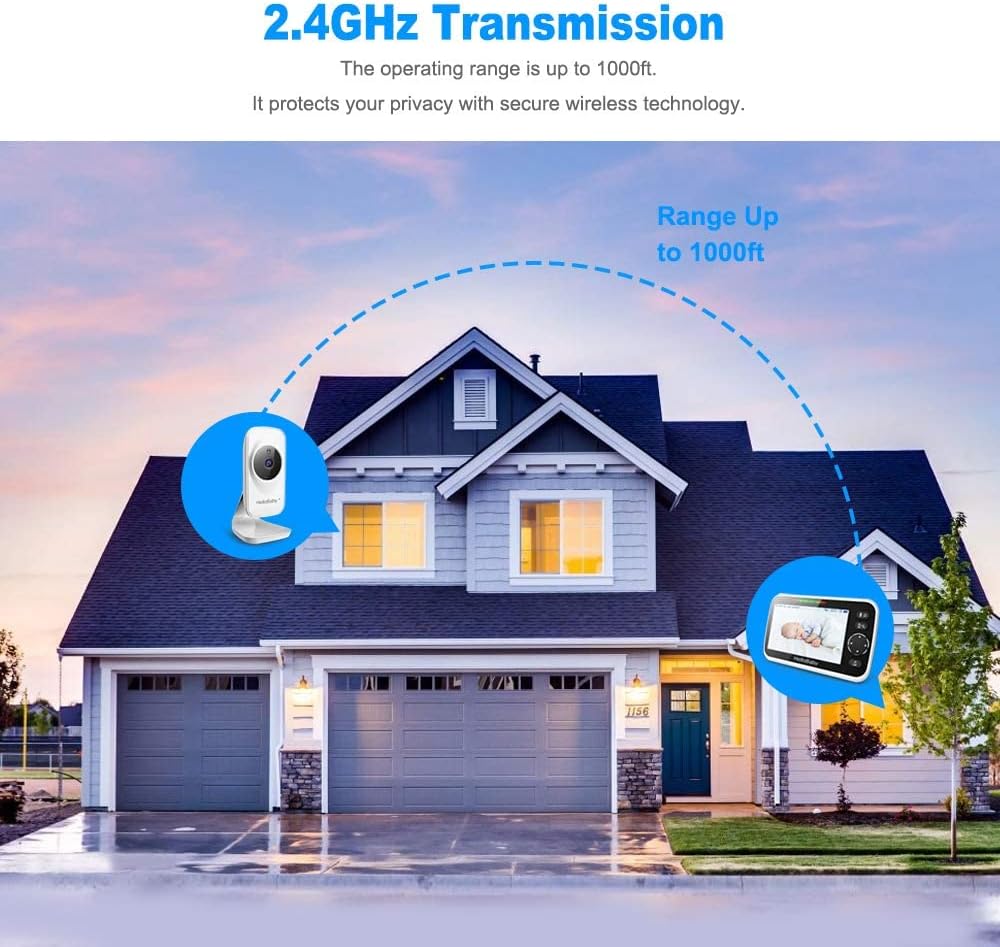
Image: The baby camera and parent unit displaying a baby sleeping, illustrating the HD infrared night vision capability in a dark environment.
VOX Mode (Voice Activation)
In VOX mode, the screen will automatically light up when sound is detected from the baby's room and turn off when muted, conserving battery life. This feature ensures you are notified when your baby needs attention.

Image: A split image showing the monitor in VOX sleep state when the baby is sleeping, and in voice-activated state when the baby is crying, demonstrating power saving.
Two-Way Talk
Utilize the two-way talk feature to communicate with your baby or other individuals in the room. Press and hold the microphone button on the parent unit to speak, and release to listen.
Video: An official product video demonstrating the ease of use and multi-functions of the HelloBaby Video Baby Monitor, including two-way communication.
Lullabies
The monitor includes 8 pre-programmed lullabies to help soothe your baby. Access this feature through the parent unit's menu.
Temperature Monitoring
The baby camera unit features a built-in temperature sensor that displays the room temperature on the parent unit. You can set temperature alarms to be notified if the room becomes too hot or too cold.

Image: The parent unit displaying a temperature alert, indicating the room temperature detected by the baby camera unit.
Multi-Camera Expandability
The HelloBaby HB50 system can connect up to 4 cameras, allowing you to monitor multiple rooms or angles. This feature is useful for baby care, pet care, elderly monitoring, or home security.

Image: An illustration showing the versatility of the HelloBaby HB50 camera for multi-camera monitoring in various scenarios, including home security, baby care, pet care, and elderly care.
Wireless Range
The system utilizes advanced 2.4GHz FHSS and digital encryption technology, providing a secure and hack-free connection with an operating range of up to 1000 feet (300 meters) in open areas. This ensures privacy and reliable monitoring.

Image: An illustration depicting the 2.4GHz transmission range of the HelloBaby HB50 system, extending up to 1000 feet across a typical home environment.
Maintenance
- Cleaning: Use a soft, dry cloth to clean the surfaces of the monitor and camera. Do not use abrasive cleaners or solvents.
- Battery Care: For optimal battery life, avoid fully discharging the parent unit's battery frequently. Charge it regularly.
- Storage: If storing the device for an extended period, ensure it is fully charged and stored in a cool, dry place.
Troubleshooting
| Problem | Possible Cause | Solution |
|---|---|---|
| No image/sound on monitor | Units are not powered on or not paired. | Ensure both units are plugged in and powered on. Re-pair if necessary (refer to setup section). |
| Poor signal/range | Obstructions (walls, furniture) or distance. | Reduce distance between units. Remove obstructions. Avoid placing near other 2.4GHz devices. |
| Screen turns off frequently (VOX) | VOX sensitivity setting is too high. | Adjust VOX sensitivity in the monitor settings to a lower level. |
| Low battery alarm | Parent unit battery is low. | Connect the parent unit to its power adapter for charging. |
Specifications
| Feature | Detail |
|---|---|
| Model Number | HB50 |
| Screen Size | 5 inches |
| Connectivity Technology | Wireless (2.4GHz FHSS) |
| Video Capture Resolution | 720p |
| Night Vision | Infrared |
| Two-Way Talk | Yes |
| VOX Mode | Yes (Voice Activation) |
| Lullabies | 8 melodies |
| Temperature Sensor | Yes |
| Multi-Camera Support | Up to 4 cameras |
| Operating Range | Up to 1000ft (300m) in open space |
| Parent Unit Battery | Built-in 2000mAh Lithium Ion (Up to 13 hours audio-only, 8 hours live screen) |
| Power Source | AC/DC Adapter |
| Item Weight | 1 pound (16 ounces) |
| Dimensions | 6.93 x 4.37 x 4.21 inches (Package) |
| Mounting Type | Wall mount, Stand |
| International Protection Rating | IP54 |
Warranty and Support
For warranty information and customer support, please refer to the contact details provided with your product packaging or visit the official HelloBaby website. HelloBaby is committed to providing excellent after-sales service.
You can also visit the HelloBaby Store on Amazon for more product information and support resources.
Related documentsHB50


Ask a question about this manual
Ask about setup, troubleshooting, compatibility, parts, safety, or missing instructions. Manuals+ will review the question and use this page’s manual context to help answer it.