
1. Introduction
This user manual provides essential information for the safe and effective use of your Superer Charger Cord. This product is designed to provide reliable power for compatible Beats earphones and other devices requiring a USB Type-C charging cable.
Please read this manual thoroughly before using the product and retain it for future reference.
2. Product Overview

Image: The Superer charger cord and wall adapter. The black wall adapter features a USB-A port, and the black cable has a standard USB-A connector on one end and a USB Type-C connector on the other.
The Superer Charger Cord includes a wall adapter and a 5-foot USB Type-C cable. It is specifically designed for charging various Beats earbud models and other compatible devices.
2.1 Compatibility
This charger is compatible with devices that utilize a USB Type-C charging port. Please verify your device's charging port type before use.
- Compatible with: Beats Flex, Beats Studio Buds, Beats Studio Buds+, Beats Fit Pro, Beats Studio Pro Wireless Earbuds Headphone.
- Not compatible with: Devices using a Micro-USB port, such as Beats Solo3 Wireless, Beats Studio3 Wireless, Powerbeats Pro, and Beats Pill+.

Image: A visual comparison showing the distinct shapes of a USB-C charging port (correct, with a checkmark) and a Micro-USB charging port (incorrect, with an 'X'). The charger is shown plugged into a wall outlet.

Image: A chart illustrating compatibility. It shows a USB-C connector with checkmarks next to "Fit for Beats Flex", "Beats Studio Buds", and "Beats Fit Pro". Below, a Micro-USB connector is shown with an 'X' next to "Not Fit for Beats Solo3 Wireless", "Beats Studio3 Wireless", "Powerbeats Pro", and "Beats Pill+".

Image: Examples of compatible Beats devices: Beats Flex (light blue earbuds with neckband), Beats Studio Buds (black true wireless earbuds in case), and Beats Fit Pro (black true wireless earbuds in case).
3. Setup and Installation
- Unpack: Carefully remove the AC charger and 5-foot power cable from the packaging.
- Connect Cable to Adapter: Insert the standard USB-A end of the charging cable into the USB-A port on the Superer wall adapter. Ensure it is firmly seated.

Image: A close-up view of the USB-A port on the Superer wall adapter, showing the cable being inserted.
- Plug into Power Outlet: Insert the prongs of the wall adapter into a standard 100-240V AC wall outlet.

Image: A close-up view of the Superer wall adapter's prongs, ready to be plugged into an electrical outlet.
- Connect to Device: Insert the USB Type-C end of the cable into the charging port of your compatible earbud or headphone device.

Image: A close-up view of the USB Type-C connector on the charging cable.
4. Operating Instructions
Once connected, your device should begin charging automatically. The charger provides a stable 5V 2A output for efficient charging.

Image: A pair of black earbuds with a neckband connected to the Superer charger, which is plugged into a wall outlet. A laptop is also visible in the background.
The compact and portable design allows for easy transport and use in various settings.
Video: This video demonstrates the compact size and portability of the Superer charger, showing it being plugged into an outlet and used to charge various devices like earbuds, tablets, and phones in different environments.
5. Maintenance and Care
- Keep the charger and cable dry. Avoid exposure to liquids.
- Do not expose to extreme temperatures.
- Store in a clean, dry place when not in use.
- Avoid sharp bends or excessive pulling on the cable to prevent damage.
- Clean the charger and cable with a soft, dry cloth. Do not use harsh chemicals or abrasive materials.

Image: This image highlights the durability features of the cable, including resistance to water, high insulation tensile strength, and abrasion resistance.
6. Troubleshooting
| Problem | Possible Cause | Solution |
|---|---|---|
| Device not charging. | Incorrect port type; loose connection; faulty outlet; damaged cable/charger. |
|
| Slow charging. | Device drawing more power than supplied; background apps on device. |
|
| Charger feels warm. | Normal operation during charging. | A slight warmth is normal. If it becomes excessively hot or emits smoke/odor, immediately unplug it and discontinue use. |
The charger is equipped with multiple safety protections:
- Short Circuit Protection
- Overcurrent Protection
- Overheating Protection
- Overvoltage Protection
- Electrostatic Protection
- Overcharge Protection

Image: An illustration showing the Superer charger alongside icons representing its safety features: Short Circuit Protection, Overcurrent Protection, Overheating Protection, and Overvoltage Protection.
7. Specifications
| Feature | Detail |
|---|---|
| Model Number | PSD0502000US |
| Input | 100-240V ~ 50-60Hz 0.5A Max |
| Output | 5V 2A |
| Product Dimensions | 1.78 x 1.42 x 0.4 inches (charger only) |
| Item Weight | 3.2 ounces |
| Cable Length | 5 feet |
| Connectivity Technology | USB |
| Connector Type | USB Type C |
| Safety Certification | UL Listed |
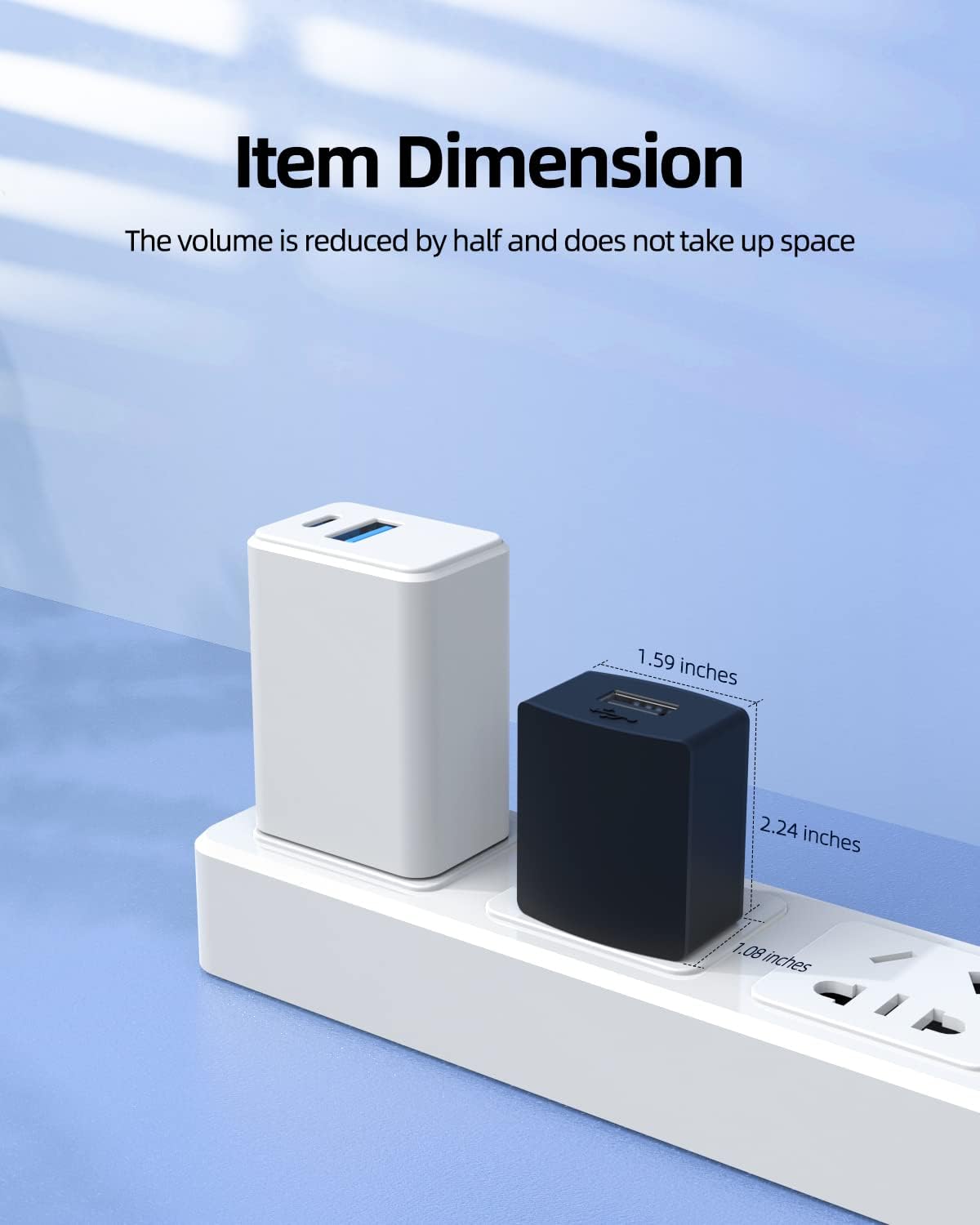
Image: A visual representation of the charger's dimensions, showing it plugged into a power strip next to a larger white adapter, illustrating its compact size.
8. Warranty and Support
Superer stands behind the quality of its products. This charger cord is backed by the following:
- 30-Day Replacement or Returns: Eligible for replacement or returns within 30 days of purchase.
- 12-Month Manufacturer Guarantee: The manufacturer provides an additional 12 Months Guarantee from the date of purchase.
For any inquiries or support needs, please refer to the contact information provided with your product packaging or visit the official Superer website.

Image: An infographic detailing the customer support policy, including "Replace Service Within 12 Months", "Refund Within 30 Days of Purchase", and "Quick feedback to any problems".