
HSH 47 Inch Rustic Oak
HSH Rustic Home Office Computer Desk 47 Inch (Rustic Oak) Instruction Manual
Model: 47 Inch Rustic Oak | Brand: HSH
Introduction
Thank you for choosing the HSH Rustic Home Office Computer Desk. This manual provides detailed instructions for the assembly, operation, and maintenance of your new desk. Please read this manual thoroughly before beginning assembly and retain it for future reference.
This desk features a rustic wood grain textured desktop and heavy-duty K-shaped metal legs, designed for both aesthetic appeal and durability in a home office environment.

Figure 1: Overall view of the HSH Rustic Home Office Computer Desk.
Setup and Assembly
Assembly of this 47-inch desk is designed to be straightforward and typically takes approximately 20 minutes for most individuals. All necessary hardware is included in the package.
Included Components:
- Desktop Panel (1)
- Left Leg Frame (1)
- Right Leg Frame (1)
- Support Bars (2)
- Assembly Hardware (screws, Allen wrench)
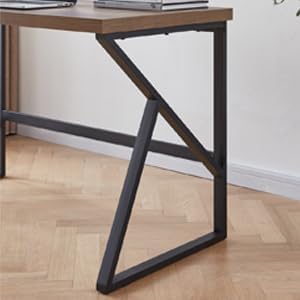
Figure 2: Exploded view of desk components for assembly.
Assembly Steps:
- Unpack Components: Carefully remove all parts from the packaging and lay them out on a clean, soft surface to prevent scratches. Verify all components are present against the parts list.
- Attach Support Bars to Leg Frames: Align the pre-drilled holes on the support bars with the corresponding holes on the K-shaped metal leg frames. Secure them using the provided screws and Allen wrench. Do not overtighten initially.
- Attach Leg Assembly to Desktop: Place the desktop upside down on your protected surface. Position the assembled leg frames onto the desktop, aligning the holes. Secure the leg frames to the desktop using the remaining screws.
- Tighten All Screws: Once all components are loosely assembled, gradually tighten all screws to ensure a stable and secure structure.
- Upright the Desk: With assistance, carefully turn the desk upright. Ensure it is stable before placing any items on it.

Figure 3: Detail of the K-shaped metal leg design.
Operating and Usage
The HSH Rustic Home Office Computer Desk is designed for versatile use in various settings, including home offices, study areas, and gaming setups. Its spacious surface and sturdy construction provide a comfortable and efficient workspace.
Key Features:
- Spacious Desktop: The 47.2-inch wide surface provides ample space for multiple monitors, laptops, and other office essentials.
- Generous Legroom: The design ensures comfortable legroom, allowing for extended periods of work or study.
- High Weight Capacity: The desk can support up to 300 lbs, accommodating various equipment and accessories.

Figure 4: Desk in use with a laptop and accessories.

Figure 5: Desk weight capacity illustration (300 lbs).
Recommended Uses:
- Home Office Desk
- Writing Desk
- Study Table
- Gaming Desk
Care and Maintenance
Proper care will ensure the longevity and appearance of your HSH desk.
- Cleaning: Wipe the desktop and metal frame with a soft, damp cloth. Avoid abrasive cleaners or harsh chemicals that may damage the finish.
- Spills: Immediately wipe up any spills to prevent staining or damage to the engineered wood surface.
- Heat and Moisture: Use coasters for drinks and protective pads under hot items to prevent marks.
- Sunlight: Avoid prolonged exposure to direct sunlight to prevent fading or discoloration of the desktop.
- Hardware: Periodically check and tighten all screws to maintain stability.

Figure 6: Detail of the rustic oak desktop finish.
Troubleshooting
If you encounter any issues with your desk, please refer to the following common solutions:
| Problem | Possible Cause | Solution |
|---|---|---|
| Desk is wobbly | Loose screws or uneven floor. | Ensure all assembly screws are tightened. Adjust the desk's position or use shims under the legs if the floor is uneven. |
| Parts missing or damaged | Manufacturing defect or shipping damage. | Contact HSH Customer Service immediately for replacement parts. |
| Difficulty during assembly | Incorrect alignment or steps. | Review the assembly instructions carefully. Ensure parts are oriented correctly before tightening screws. |
Product Specifications
| Feature | Detail |
|---|---|
| Brand | HSH |
| Model | 47 Inch Rustic Oak |
| Product Dimensions (D x W x H) | 23.62"D x 47.24"W x 29.72"H |
| Color | Rustic Oak |
| Top Material Type | Engineered Wood |
| Base Material | Metal |
| Weight Capacity | 300 lbs |
| Assembly Required | Yes (approx. 20 minutes) |
Product Videos
HSH Computer Desk Overview
This video provides a brief overview of the HSH computer desk, showcasing its design and features across different sizes (47, 55, 60 inch models).
Warranty Information
This HSH Rustic Home Office Computer Desk comes with a 1-year Quality Warranty from the date of purchase. This warranty covers manufacturing defects and material flaws under normal use. It does not cover damage resulting from misuse, accidents, unauthorized repairs, or normal wear and tear.
Please retain your proof of purchase for warranty claims.
Customer Support
For any questions, concerns, or assistance with your HSH product, our dedicated customer service team is available to help.
- Service Availability: 24-Hour Professional Customer Service
- Returns: 30-Day Free Return Policy
- Contact: Please refer to your purchase platform or the HSH official website for contact details.
Ask a question about this manual
Ask about setup, troubleshooting, compatibility, parts, safety, or missing instructions. Manuals+ will review the question and use this page’s manual context to help answer it.