
1. Introduction
The Watts BT-D03 RF is a wireless digital room thermostat designed for precise temperature control in various heating and cooling installations. It features a backlit LCD screen and operates via 868 MHz radio frequency communication. This manual provides comprehensive instructions for the proper installation, operation, and maintenance of your thermostat.

Figure 1: Front view of the Watts BT-D03 RF Thermostat, showing the display and control buttons.
2. Safety Information
- Read all instructions carefully before installation and operation.
- Installation should only be performed by a qualified electrician or heating engineer.
- Ensure the power supply is disconnected before performing any wiring or maintenance.
- Do not expose the device to extreme temperatures, humidity, or direct sunlight.
- Keep the device away from children.
3. Package Contents
Verify that all components are present in the package:
- Watts BT-D03 RF Wireless Digital Room Thermostat
- Tabletop stand
- Mounting screws and wall plugs
- User Manual
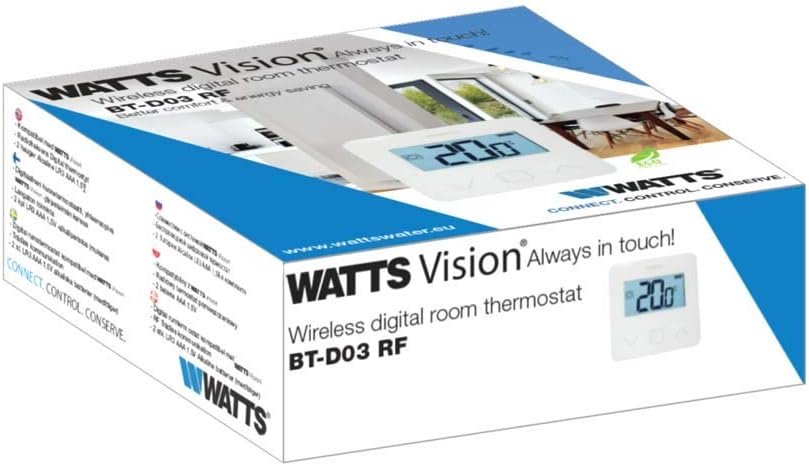
Figure 2: Product packaging of the Watts BT-D03 RF Thermostat.
4. Product Overview
4.1 Components
- LCD Display: Backlit screen showing temperature, battery level, and operating status.
- Control Buttons: Up, Down, and OK/Menu buttons for navigation and setting adjustments.
- Internal Sensors: For detecting ambient room temperature.
- External Sensor Port: For optional NTC 10 kOhm external sensor (not included).
- LED Indicator: Shows active heating/cooling signal.
- Internal Reset Button: For quick RF pairing or system reset.
- Buzzer: Provides audible feedback for certain operations.

Figure 3: Detailed front view of the thermostat display.

Figure 4: Back view of the thermostat, showing battery compartment and mounting points.
4.2 Dimensions
The physical dimensions of the thermostat are provided below for installation planning.
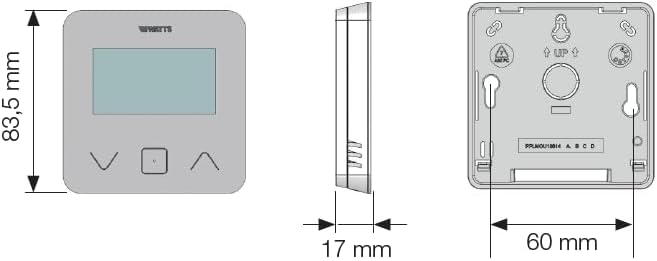
Figure 5: Dimensional drawing of the Watts BT-D03 RF Thermostat.
5. Setup
5.1 Battery Installation
- Remove the back cover of the thermostat.
- Insert two AAA batteries, ensuring correct polarity.
- Replace the back cover.
5.2 Mounting Options
The thermostat can be installed in two ways:
- Wall Mounting: Use the provided screws and wall plugs to secure the thermostat to a wall at an appropriate height (typically 1.5 meters from the floor).
- Tabletop Placement: Attach the included stand to the back of the thermostat for placement on a flat surface.

Figure 6: Thermostat with tabletop stand attached.
5.3 RF Pairing
To establish wireless communication with the receiver unit (sold separately), follow the pairing instructions provided with your receiver. The thermostat features an internal reset button for quick RF pairing, typically requiring a short press during the receiver's pairing mode.
6. Operating Instructions
6.1 Powering On/Off
The thermostat powers on automatically upon battery insertion. There is no dedicated on/off button for the thermostat unit itself; it remains active as long as batteries are present.
6.2 Temperature Adjustment
Use the Up and Down buttons to adjust the desired setpoint temperature. The LCD will display the current setpoint during adjustment.
6.3 Display Modes
You can choose to display either the detected ambient temperature or the currently set temperature on the LCD. Refer to the full installation parameters mode for configuration details.
6.4 Keypad Lock (PIN Code)
To prevent unauthorized changes, the keypad can be locked using a PIN code. This feature is particularly useful for installations in public areas. Consult the advanced settings menu for PIN code setup and activation.
6.5 Open Window Detection
The thermostat includes an open window detection feature. When a sudden drop in temperature is detected, the thermostat can temporarily suspend heating/cooling to conserve energy. This function can be configured in the settings.
6.6 Proportional Band Setting (PWM)
The thermostat supports proportional band setting (PWM) or configurable institutions (0.2÷3) for precise control of heating/cooling systems. This advanced setting allows for fine-tuning the system's response to temperature changes.
7. Maintenance
7.1 Battery Replacement
When the battery charge level indicator on the LCD shows low power, replace the two AAA batteries promptly to ensure continuous operation. Follow the battery installation steps in Section 5.1.
7.2 Cleaning
Clean the thermostat's exterior with a soft, dry cloth. Do not use abrasive cleaners, solvents, or spray directly onto the device.
8. Troubleshooting
- No Display: Check battery installation and charge level. Replace batteries if necessary.
- No Communication with Receiver: Ensure the thermostat and receiver are within range. Re-perform the RF pairing procedure (Section 5.3).
- Incorrect Temperature Reading: Ensure the thermostat is not exposed to direct sunlight, drafts, or heat sources.
- Keypad Unresponsive: Check if the keypad lock (PIN Code) is active. Unlock the keypad as per instructions.
8.1 Reset Function
If the thermostat is not functioning as expected, an internal reset button can be used. Consult the full installation parameters mode for specific reset procedures, as this may clear custom settings.
9. Technical Specifications
| Brand | Watts |
| Model Number | BT-D03-RF-GT |
| Product Dimensions (L x W x H) | 6.2 x 1.7 x 8.35 cm |
| Item Weight | 0.18 g |
| Voltage | 230 Volts (for connected system, thermostat is battery powered) |
| Power Source | Battery powered |
| Controller Type | Manual Control |
| Display Type | LCD |
| Backlight | Yes |
| Operating Temperature | 0 to 40 °C |
10. Compliance Information
The Watts BT-D03 RF Wireless Digital Room Thermostat complies with the following directives:
- 2014/35/EU
- 2014/30/EU
- 2014/53/EU
- 2011/65/EU
- 2012/19/EU
- 2015/1188/EU


