
Donner DP-Z
Donner DP-Z Guitar Pedal Power Supply User Manual
Model: DP-Z
1. Introduction
Thank you for choosing the Donner DP-Z Guitar Pedal Power Supply. This unit is designed to provide stable and isolated power to your guitar effect pedals, ensuring optimal performance and minimizing unwanted noise. Featuring multiple isolated DC outputs and a convenient USB charging port, the DP-Z is a versatile solution for powering your pedalboard.

Image 1.1: The Donner DP-Z power supply unit, its external power adapter, and various DC power cables included in the package.
2. Key Features
- Super Power Adapter: Equipped with a DC 18V 2000mA input adapter to ensure stable and sufficient power delivery to all outputs.
- 10 Isolated DC Outputs: Provides clean, isolated power to prevent ground loops and noise interference between pedals.
- Versatile Output Options: Includes outputs for 9V, 12V, and 18V pedals with varying current capacities (100mA, 300mA, 500mA).
- USB Charging Port: A dedicated 5V 1000mA USB port for charging mobile devices or powering USB-compatible accessories.
- Noise Reduction Circuit Design: Engineered to minimize noise, providing a clearer audio signal.
- Short Circuit Protection: Each output is independently protected against short circuits, ensuring other outputs remain operational if one experiences a fault.
- LED Indicators: Bright blue LED lights indicate power status for each output and can also signal a short circuit. An LED bar provides general pedalboard lighting.

Image 2.1: Overview of the DP-Z's independent power interfaces, highlighting its 10 outputs, low noise operation, and stable power delivery.
3. Package Contents
Please check that all items are present in your package:
- Donner DP-Z Guitar Pedal Power Supply Unit
- DC 18V 2000mA Power Adapter
- DC Power Cables (various lengths and types for connecting pedals)
- Polarity Reversal Cables (for pedals requiring center-positive power)
- 9V Battery Emulator Cables (for powering pedals designed for 9V batteries)
4. Setup Instructions
- Connect the Power Adapter: Plug the included DC 18V 2000mA power adapter into the "DC IN 18V" port on the DP-Z unit. Ensure the adapter is securely connected.
- Connect to Wall Outlet: Plug the power adapter into a suitable AC wall outlet. The blue LED bar on the DP-Z unit should illuminate, indicating power.
- Connect Pedals: Use the provided DC power cables to connect your effect pedals to the appropriate output jacks on the DP-Z.
- Match the voltage (9V, 12V, 18V) and current (mA) requirements of your pedals to the corresponding outputs on the DP-Z. Refer to Section 6 for detailed output specifications.
- Most guitar pedals use a center-negative polarity. If a pedal requires center-positive polarity, use one of the included polarity reversal cables. Always verify your pedal's polarity requirements to prevent damage.
- USB Device Connection (Optional): If desired, connect a USB charging cable to the "USB DC OUT 5V" port to charge mobile devices or power USB-compatible accessories.

Image 4.1: Proper connection of the 18V 2000mA power adapter to the DP-Z unit, showing the magnet ring designed to reduce noise.
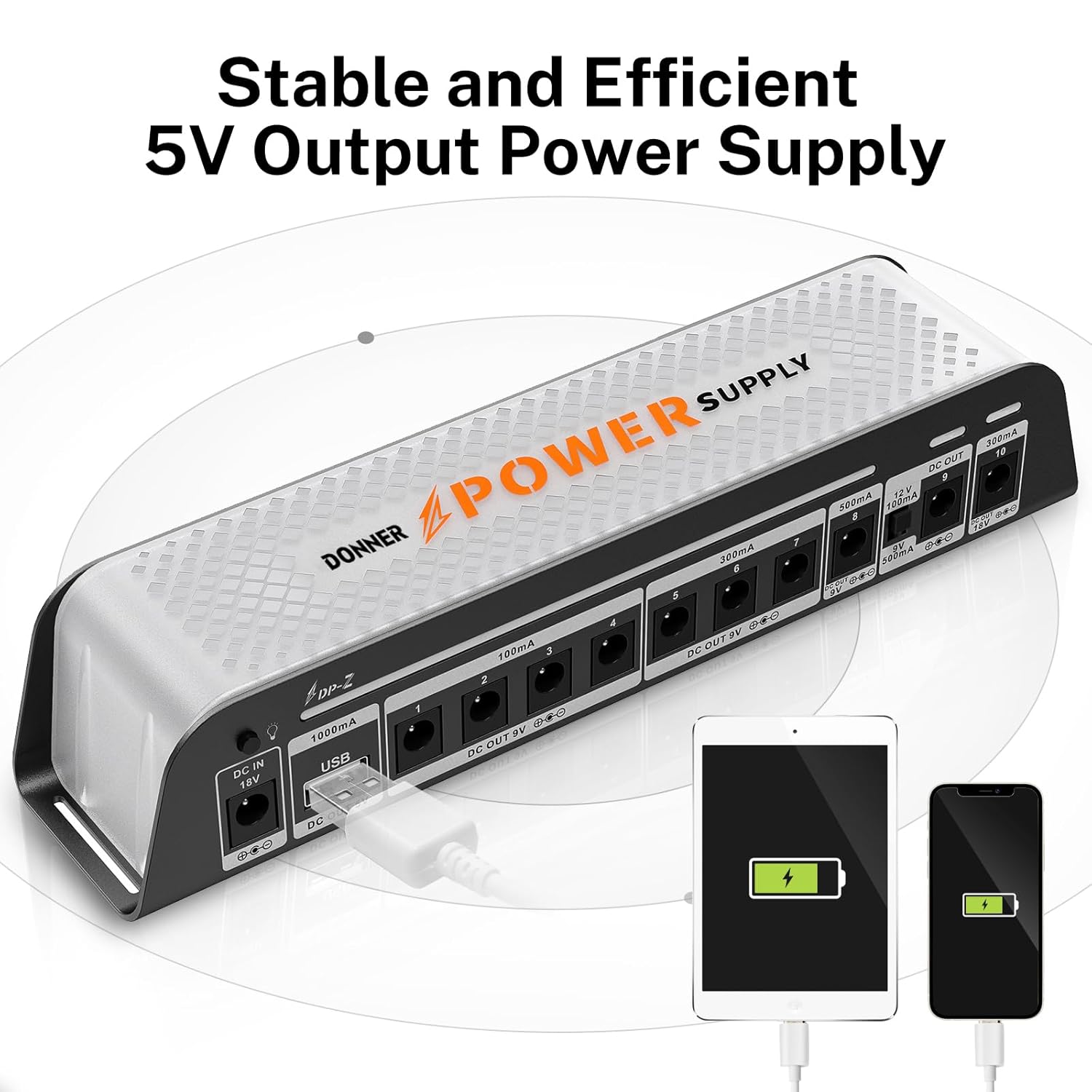
Image 4.2: The DP-Z unit installed on a pedalboard, illustrating its compact design and how it fits into a typical setup.
5. Operating Instructions
The Donner DP-Z is designed for simple operation. Once connected as described in the Setup section:
- Power On: The unit powers on automatically when the 18V adapter is plugged into a wall outlet. The blue LED bar will illuminate.
- Output Indicators: Each DC output has a corresponding blue LED indicator. These LEDs will light up when a pedal is connected and receiving power.
- Short Circuit Indication: If an output experiences a short circuit, its individual blue LED will turn off, while other outputs will continue to function normally. Disconnect the problematic pedal and cable, then reconnect to reset the protection.
- LED Bar Control: A small button near the DC IN port allows you to toggle the main blue LED bar on or off. This does not affect the power output to your pedals.
- 9V/12V Switchable Output: Output 9 offers a switch to select between 9V 500mA and 12V 100mA. Ensure this switch is set correctly for your pedal's requirements before connecting.

Image 5.1: Detailed view of the DP-Z's output section, illustrating the six different specifications of output available for various pedals.
6. Output Specifications
The Donner DP-Z provides 10 isolated DC outputs and 1 USB charging port with the following specifications:
| Output Number | Voltage | Current (Max) | Notes |
|---|---|---|---|
| 1, 2, 3, 4 | 9V DC | 100mA | Standard 9V outputs for low-current pedals. |
| 5, 6, 7 | 9V DC | 300mA | For medium-current 9V pedals. |
| 8 | 9V DC | 500mA | For high-current 9V pedals. |
| 9 | 9V DC / 12V DC | 500mA (9V) / 100mA (12V) | Switchable output. Ensure correct voltage selection. |
| 10 | 18V DC | 300mA | For 18V compatible pedals. |
| USB Port | 5V DC | 1000mA | For charging mobile devices or powering USB accessories. |
Always check the voltage and current requirements of your pedals before connecting them to avoid damage. Most guitar pedals are center-negative; use polarity reversal cables if your pedal requires center-positive.

Image 6.1: The DP-Z's 5V 1000mA USB output port, capable of charging mobile devices.
7. Safety Information
- Use only the provided DC 18V 2000mA power adapter. Using an incorrect adapter may damage the unit or connected pedals.
- Do not expose the unit to water, moisture, or extreme temperatures.
- Avoid dropping or subjecting the unit to strong impacts.
- Do not attempt to open or modify the unit. This will void the warranty and could lead to electric shock.
- Ensure proper ventilation around the unit during operation.
- Always verify the voltage, current, and polarity requirements of your pedals before connecting them to any output.
8. Troubleshooting
| Problem | Possible Cause | Solution |
|---|---|---|
| No power to a pedal. |
|
|
| Excessive noise (humming, buzzing). |
|
|
| Unit does not power on. |
|
|
9. Technical Specifications
- Model: DP-Z
- Input: DC 18V 2000mA
- Outputs:
- 4 x DC 9V 100mA
- 3 x DC 9V 300mA
- 1 x DC 9V 500mA
- 1 x DC 9V/12V 500mA (switchable)
- 1 x DC 18V 300mA
- 1 x USB DC 5V 1000mA
- Dimensions: 7.87 x 1.97 x 1.97 inches (200 x 50 x 50 mm)
- Weight: 1.5 pounds (0.68 kg)
- Material: Aluminum alloy (base), Plastic (cover)
10. Warranty and Support
Donner products are designed for reliability and performance. For any questions or assistance, please refer to the following:
- Warranty: This product comes with up to a 12-month warranty from the date of purchase. Please retain your proof of purchase for warranty claims.
- Return Policy: A 30-day free return policy is typically offered. Please check with your retailer for specific return conditions.
- Customer Service: For technical support or service inquiries, please contact Donner customer service. 24/7 services, including phone chat and email assistance, are available. Visit the official Donner website for contact information.
Ask a question about this manual
Ask about setup, troubleshooting, compatibility, parts, safety, or missing instructions. Manuals+ will review the question and use this page’s manual context to help answer it.