
Introduction
This manual provides essential instructions for the safe and effective use of your BORNMIO CS-PSU950RC replacement battery. This battery is designed for compatibility with various Philips Pronto remote control models, including DS3000, RU990, TSU7000, RU960, RU950, TSU6000/01, and RC9200. Please read this manual thoroughly before installation and use.
Safety Information
- Do not disassemble, crush, puncture, or short-circuit the battery.
- Do not expose the battery to high temperatures (above 60°C / 140°F) or direct sunlight.
- Do not immerse the battery in water or other liquids.
- Keep the battery away from children and pets.
- Use only the charger specified for your Philips Pronto device.
- Dispose of used batteries according to local regulations. Do not dispose of with household waste.
- If the battery shows signs of damage, swelling, or leakage, discontinue use immediately.
Package Contents
- 1 x BORNMIO CS-PSU950RC Replacement Battery
Setup and Installation
Follow these steps to replace the battery in your compatible Philips Pronto remote control. Refer to your device's original manual for specific instructions on opening the battery compartment.
- Power Off Device: Ensure your Philips Pronto remote control is completely powered off before beginning the installation.
- Locate Battery Compartment: Identify and open the battery compartment on your remote control. This usually involves removing a cover or panel.
- Disconnect Old Battery: Carefully disconnect the old battery from its connector. Note the orientation of the connector to ensure correct installation of the new battery.
- Insert New Battery: Place the BORNMIO CS-PSU950RC replacement battery into the compartment.

Image: The BORNMIO CS-PSU950RC replacement battery, showing its compact design and the white connector plug with red and black wires.
- Connect New Battery: Align the connector of the new battery with the port inside the remote control and gently push until it clicks into place. Do not force the connection.

Image: A close-up view of the battery's white connector, highlighting the metal pins for proper alignment during installation.
- Secure Compartment: Close the battery compartment cover securely.
- Initial Charge: It is recommended to fully charge the device after installing the new battery before its first use.
Operating Instructions
Once installed and fully charged, your BORNMIO replacement battery will power your Philips Pronto remote control. The battery is rechargeable, allowing for repeated use.
- Charging: Charge the battery using the original charging cradle or power adapter provided with your Philips Pronto device.
- First Use: For optimal performance, allow the battery to undergo a few full charge and discharge cycles.
- Normal Use: The battery will provide power for your remote control's functions. Recharge when the device indicates low battery.
Maintenance
Proper maintenance can extend the life of your battery.
- Storage: If storing the battery for an extended period, store it in a cool, dry place at approximately 50% charge. Avoid storing fully charged or fully depleted.
- Cleaning: Keep the battery and its contacts clean and dry. Use a soft, dry cloth to wipe away any dust or debris.
- Temperature: Avoid exposing the battery to extreme temperatures, both hot and cold, as this can degrade performance and lifespan.
Troubleshooting
If you encounter issues with your battery, consider the following:
- Battery Not Charging:
- Ensure the battery is correctly installed and the connector is firmly seated.
- Verify that the charging cable and adapter are functioning correctly and properly connected to the device and power source.
- Check for any visible damage to the battery or charging port.
- Short Battery Life:
- Ensure the battery has been fully charged.
- Battery capacity naturally diminishes over time and with usage cycles.
- High usage of the remote control's features (e.g., backlight, constant screen activity) can deplete the battery faster.
- Device Not Powering On:
- Confirm the battery is fully charged and correctly installed.
- If the issue persists, the problem may lie with the remote control device itself, not the battery.
Specifications
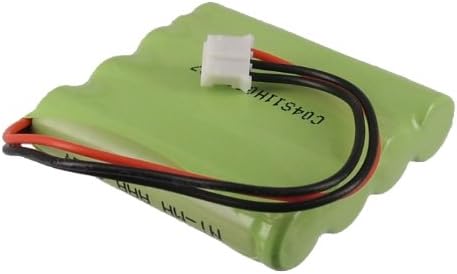
Image: Top view of the BORNMIO CS-PSU950RC battery, displaying its label with model number and specifications.
| Feature | Detail |
|---|---|
| Model Number | CS-PSU950RC |
| Battery Type | Ni-MH (Nickel-Metal Hydride) |
| Capacity | 700mAh |
| Voltage | 4.8V |
| Energy (WH) | 3.36Wh |
| Dimensions | 46.23 x 41.13 x 10.4 mm (1.82 x 1.62 x 0.41 inches) |
| Weight | 143g |
| Certifications | ISO9001, RoHS, CE, UN38.3, MSDS |
| Reusability | Rechargeable |
Warranty and Support
BORNMIO products undergo strict quality inspection. If you have any questions or experience issues with your replacement battery, please contact the seller directly. We offer a full refund or a free replacement without any reason, as per our product guarantee.
