
Tilta TLT-TA-T08-TH1-B
Tiltaing Adjustable Top Handle User Manual
Model: TLT-TA-T08-TH1-B
1. Product Overview
The Tiltaing Adjustable Top Handle is a versatile accessory designed to enhance the handling and mounting capabilities of camera cages for professional videography and photography. It provides a secure and ergonomic grip, along with multiple mounting points for additional accessories.
This handle is constructed from durable aluminum alloy and stainless steel, ensuring longevity and reliability in demanding environments.

Figure 1.1: The Tiltaing Adjustable Top Handle, showcasing its design and construction.
2. Key Features
- Adjustable Design: The handle features an articulated central adjustment with a button configuration, allowing for quick and easy rotation to the desired position.
- Rosette Mounting: Attaches securely to camera cages via rosette mounting points.
- Accessory Mounting: Includes a cold shoe mounting point and a 15mm rod support for attaching external accessories such as monitors, microphones, or lights.
- Durable Construction: Made from high-quality aluminum alloy and stainless steel for robust performance.
- Compatibility: Designed for full Tilta A7S III cages and Red Komodo cages.
3. Compatibility
This adjustable top handle is specifically designed for use with the following camera cages:
- Full Tilta A7S III Camera Cage
- Red Komodo Camera Cage
Important Note: This handle is not compatible with the Tilta A7S III half cage.
4. Setup and Installation
Follow these steps to properly attach the Tiltaing Adjustable Top Handle to your compatible camera cage:
- Identify Mounting Point: Locate a rosette mounting point on your Red Komodo or full Tilta A7S III camera cage.
- Align Handle: Align the rosette connection of the top handle with the rosette mounting point on the cage.
- Secure Attachment: Use the provided locking mechanism (typically a screw or lever) to firmly secure the handle to the cage. Ensure it is tightened sufficiently to prevent rotation or wobbling during use.
- Adjust Position: Once attached, press the button on the articulated central adjustment and rotate the handle to your desired ergonomic position. Release the button to lock the handle in place.

Figure 4.1: Top handle mounted on a Red Komodo camera cage, showing the top-down perspective.
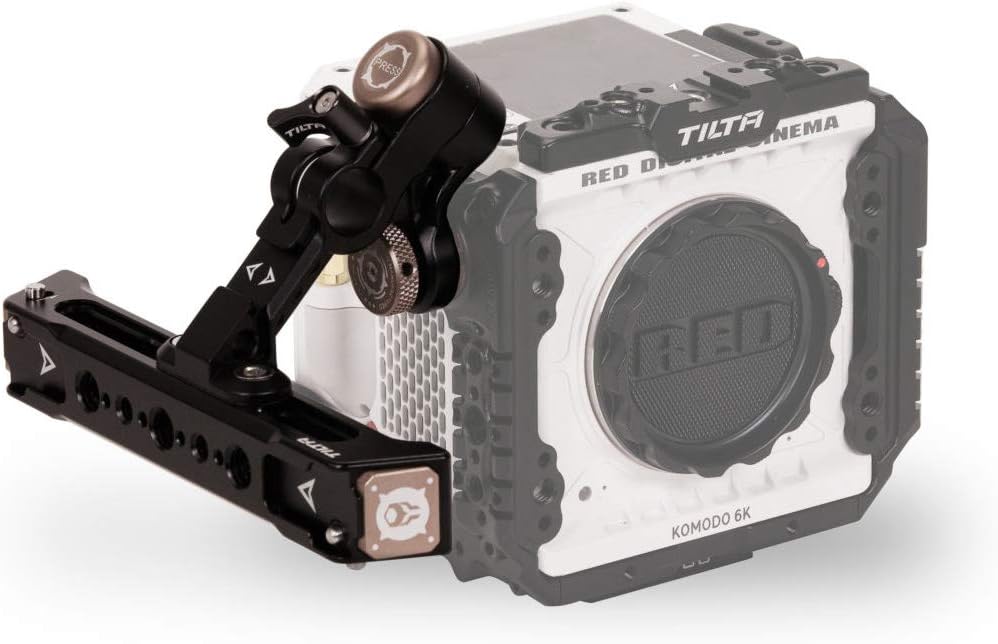
Figure 4.2: Side view of the top handle attached to a Red Komodo camera cage, illustrating its adjustable nature.
5. Operating Instructions
The Tiltaing Adjustable Top Handle is designed for straightforward operation:
- Holding the Camera: Use the top handle to comfortably carry and stabilize your camera rig, especially when shooting from low angles or moving quickly.
- Adjusting Handle Angle: To change the angle of the handle, press the central button on the articulated joint. While holding the button, rotate the handle to the desired position. Release the button to lock the handle securely in place.
- Attaching Accessories:
- Cold Shoe Mount: Slide accessories with a cold shoe base (e.g., external monitors, microphones, LED lights) into the cold shoe slot located on the handle.
- 15mm Rod Support: Attach 15mm rods to the integrated rod support for mounting additional gear like follow focus systems or battery plates.
6. Maintenance
To ensure the longevity and optimal performance of your Tiltaing Adjustable Top Handle, follow these maintenance guidelines:
- Cleaning: Wipe the handle with a soft, dry cloth after each use to remove dust, dirt, and fingerprints. For stubborn grime, a slightly damp cloth can be used, followed by immediate drying. Avoid abrasive cleaners or solvents.
- Inspection: Periodically inspect all screws, joints, and mounting points for tightness. Re-tighten any loose components to prevent accidental detachment or instability.
- Storage: Store the handle in a clean, dry environment away from extreme temperatures and humidity. If detached from the camera cage, consider storing it in a protective bag or case.
- Lubrication: The articulated joint is designed for smooth operation. Avoid applying lubricants unless specifically instructed by Tilta support, as this could attract dust or degrade internal components.
7. Troubleshooting
This section addresses common issues you might encounter with the Tiltaing Adjustable Top Handle.
| Problem | Possible Cause | Solution |
|---|---|---|
| Handle feels loose or wobbly on the cage. | Mounting screw/lever is not fully tightened. | Ensure the rosette mounting screw or lever is securely tightened. Check for proper alignment with the cage's rosette. |
| Handle adjustment is stiff or difficult. | Button not fully pressed; dirt/debris in joint. | Press the adjustment button firmly. Inspect the joint for any visible debris and gently clean if necessary. Do not force the adjustment. |
| Accessories do not fit cold shoe or rod support. | Incompatible accessory; debris in mount. | Verify that your accessory uses a standard cold shoe or 15mm rod. Clean the mounting slots to ensure no obstructions. |
If you encounter issues not listed here or require further assistance, please contact Tilta customer support.
8. Specifications
| Attribute | Detail |
|---|---|
| Model Number | TLT-TA-T08-TH1-B |
| Brand | Tilta |
| Color | Black |
| Materials | Aluminum alloy, Stainless steel |
| Compatible Devices | Camera (specifically Red Komodo, Tilta A7S III Full Cage) |
| Package Dimensions (L x W x H) | 17.2 x 11 x 9.8 cm |
| Package Weight | 330 grams |
9. Warranty and Support
Information regarding specific warranty terms for the Tiltaing Adjustable Top Handle is not provided in the product details. For warranty claims, technical support, or further inquiries, please contact Tilta directly through their official website or authorized distributors.
Always refer to the manufacturer's official channels for the most accurate and up-to-date support information.
Related documentsTLT-TA-T08-TH1-B


Ask a question about this manual
Ask about setup, troubleshooting, compatibility, parts, safety, or missing instructions. Manuals+ will review the question and use this page’s manual context to help answer it.