
1. Product Overview
The Roku Universal Remote Control Model T1120 is designed to provide seamless control for a wide range of devices, including Roku TVs from various manufacturers, Bose Wave Music Systems, and Apple TV generations (1/2/3). This remote aims to simplify your entertainment experience by consolidating multiple controls into a single device.
Key Features:
- Broad Compatibility: Works with numerous Roku TV brands (TCL, Sanyo, LG, RCA, Philips, Hitachi, Haier, ONN, Insignia, Hisense, Sharp, JVC), Bose Wave I/II/III/IV, and Apple TV 1/2/3 Generations.
- No Programming Required for Basic Roku TV Functions: For many Roku TV models, simply insert batteries and the remote is ready for use.
- Learning Mode: Advanced functionality allows for programming specific buttons or the entire remote to control other devices or customize functions.
- Dedicated Shortcut Buttons: Quick access to popular streaming services.

This image displays the front of the universal remote control, featuring a standard layout with power, navigation, volume, channel, and dedicated streaming service buttons.
2. Setup and Battery Installation
The Roku Universal Remote Control T1120 requires two AAA batteries for operation. Ensure correct polarity when inserting the batteries.
Battery Installation:
- Locate the battery compartment on the back of the remote control.
- Slide the battery cover downwards or outwards to open.
- Insert two new AAA batteries, matching the (+) and (-) terminals as indicated inside the compartment.
- Replace the battery cover by sliding it back into position until it clicks securely.
Once batteries are installed, the remote is ready for basic operation with compatible Roku TVs without further setup.
3. Operation
Basic Functions (for Roku TVs):
For most Roku TV models, the remote will function immediately after battery installation. Point the remote directly at your Roku TV and press the desired buttons.
- Power Button: Turns the TV on or off.
- Navigation Pad (Up, Down, Left, Right): Moves cursor through menus.
- OK Button: Selects highlighted items.
- Home Button: Returns to the Roku home screen.
- Back Button: Returns to the previous screen.
- Volume Up/Down: Adjusts TV volume.
- Mute Button: Mutes or unmutes TV audio.
- Channel Up/Down: Changes channels (if applicable).
- Dedicated App Buttons (Netflix, Amazon, Hulu, etc.): Launches specified streaming applications directly.
Learning Mode / Advanced Setup:
The remote features a learning mode to program functions from your original remote controls for other devices (e.g., Bose Wave, Apple TV) or to customize specific buttons. This allows the universal remote to mimic signals from other remotes.

This instruction sheet provides details on the remote's functions, including a learning mode for custom programming, and a diagram labeling key buttons such as Power, Mute, Volume, Navigation, and dedicated shortcut keys.
Steps for Learning Mode:
- Press and hold the POWER button and the desired function button (e.g., a specific app button or a button in the 'LEARNING' area) simultaneously for 3 seconds. The red light will flash twice and then stay on, indicating the remote is in learning state.
- Place the transmitter head of your original remote control and the T1120 remote directly opposite each other, approximately 3-5 cm apart.
- Press the button on your original remote that you wish to teach to the T1120. The red light on the T1120 will flash three times, indicating successful learning.
- Repeat step 3 for any other buttons you wish to program.
- To exit learning mode, press the POWER button on the T1120. The red light will turn off. If no operation occurs for 12 seconds, the remote will automatically exit learning mode.
Setting Method for Specific Devices:
For certain devices, a specific setting method may be required. Refer to the detailed instructions below for common devices.

This comprehensive instruction sheet outlines specific setting procedures for pairing the universal remote with a wide range of devices, including various Roku set-top boxes, Roku TVs from multiple manufacturers, Bose Wave Music Systems, and Apple TV generations.
The image above illustrates specific setting methods for various devices. Generally, this involves pressing a combination of buttons (e.g., a specific brand button + OK) to initiate pairing. Follow the visual guide for your specific device.
4. Compatibility
The Roku Universal Remote Control T1120 is designed for broad compatibility with various entertainment systems.
Compatible Devices Include:
- Roku TVs: TCL, Sanyo, LG, RCA, Philips, Hitachi, Haier, ONN, Insignia, Hisense, Sharp, JVC.
- Roku Player Boxes: Various models.
- Bose Wave Music Systems: Generations I, II, III, and IV.
- Apple TV: Generations 1, 2, and 3.
Note: This remote is NOT compatible with Roku Stick devices.

This chart demonstrates the universal remote's compatibility with numerous Roku TV models from brands such as Sharp, TCL, Hisense, Hisense, Haier, Insignia, and LG, displaying their original remote designs.
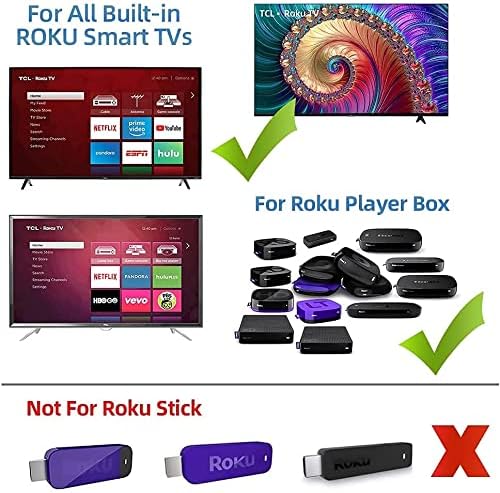
This image clarifies that the remote is compatible with Smart TVs featuring built-in Roku functionality and standalone Roku Player Boxes, but it is not designed for use with Roku Stick models.

The image shows examples of Roku TV interfaces from brands like TCL, Hisense, Onn, Hitachi, and RCA, confirming the remote's broad compatibility with these integrated systems.
5. Troubleshooting
If you encounter issues with your Roku Universal Remote Control T1120, consider the following troubleshooting steps:
- Remote Not Responding:
- Ensure batteries are inserted correctly with the correct polarity.
- Replace old batteries with new AAA batteries.
- Check for any obstructions between the remote and the device's infrared (IR) receiver.
- Ensure you are within the effective range of the device.
- Specific Buttons Not Working:
- If you have used the learning mode, ensure the button was programmed correctly. Repeat the learning process if necessary.
- For Roku TVs, verify that the TV's IR receiver is functioning.
- Remote Not Controlling Non-Roku Devices:
- Utilize the learning mode to program the remote with your original device's remote control signals. Refer to the 'Learning Mode / Advanced Setup' section.
- Ensure the original remote is functional and emitting IR signals during the learning process.
6. Product Specifications
| Feature | Specification |
|---|---|
| Model Number | T1120 |
| Product Dimensions | 1.9 x 6.8 x 0.8 inches (approximately 4.8 x 17.3 x 2.0 cm) |
| Item Weight | 2.54 ounces (approximately 72 grams) |
| Batteries Required | 2 x AAA batteries |
| Manufacturer | Young Electronics |
| Color | Black |
| Max Number of Supported Devices | 1 (via direct control or learning mode for a specific setup) |

The image illustrates the physical dimensions of the universal remote (235mm length) compared to a smaller, typical Roku remote (140mm length), highlighting its larger size.
7. Warranty and Support
This product comes with a satisfaction guarantee. If you are not satisfied with your purchase for any reason, please contact the seller or manufacturer for assistance. For specific support inquiries or warranty claims, refer to the contact information provided at the point of purchase or on the product packaging.


