
1. Introduction
This manual provides detailed instructions for the Eapmic CT120S-USB 12 Channel Sound Mixer. This professional audio mixing console is designed for live studio applications, offering comprehensive control over audio signals with its 12 channels, 48V phantom power, and USB connectivity. Please read this manual thoroughly before operating the device to ensure proper use and to maximize its performance.
2. Safety Information
- Always connect the power adapter to a grounded outlet.
- Do not expose the mixer to rain or moisture to prevent electric shock.
- Avoid placing the mixer near heat sources or in direct sunlight.
- Do not open the casing; refer all servicing to qualified personnel.
- Ensure proper ventilation around the unit during operation.
- Disconnect power before cleaning or when not in use for extended periods.
3. Package Contents
Verify that all items are present in the package:
- 1 x Eapmic CT120S-USB Mixing Console
- 1 x Power cable (US plug)
- 1 x User Manual (English)
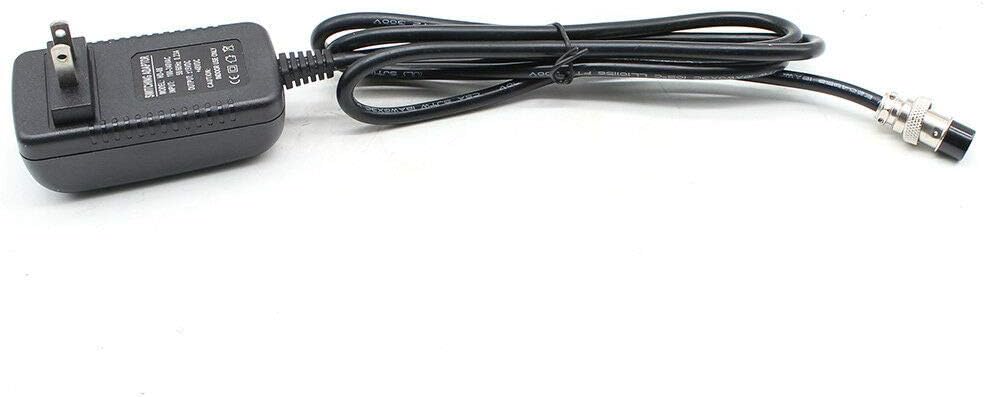
Image: Included power cable for the mixing console.

Image: Detailed view of the power cable connector.
4. Product Overview and Features
The Eapmic CT120S-USB is a 12-channel mixing console designed for versatile audio control. It features XLR and LINE inputs, 48V phantom power for condenser microphones, and a USB interface for digital audio integration.
- 12 Channels: Each channel includes GAIN, 3-band EQ, AUX, EFFECT, and PAN control knobs, along with individual volume control faders.
- 48V Phantom Power: Available for XLR inputs to power condenser microphones.
- USB Interface: For connecting to computers or playing media, with an integrated LCD display and control buttons.
- Monitoring Capabilities: PEL switch for individual channel monitoring, and power/output level indicator lights.
- Flexible Outputs: XLR (L/R) and 1/4" (L/R) stereo output jacks, REC (L/R) outputs, and a headset interface.
- Effects Section: Dedicated AUX send & return jacks for external effects, plus master section controls for EFFECT level, REPEAT, EFF SEND, DELAY, SEND, and RETURN.

Image: Front view of the Eapmic CT120S-USB 12 Channel Sound Mixer, showing all controls and inputs.

Image: Angled view of the mixer, highlighting the faders and knobs.

Image: Top-down view of the mixer, providing a clear layout of all channels and master controls.
5. Setup
5.1 Power Connection
- Connect the provided power cable to the mixer's power input.
- Plug the power adapter into a suitable AC outlet (100-240V AC, 50/60Hz).
- Ensure the mixer's power switch is in the OFF position before connecting.
5.2 Input Connections
- Microphones: Connect microphones to the XLR inputs. For condenser microphones requiring power, activate the 48V phantom power switch.
- Line-Level Devices: Connect instruments or other line-level audio sources to the 1/4" LINE inputs.
- USB Devices: Connect a USB drive for media playback or a computer for recording/playback via the USB interface.
5.3 Output Connections
- Main Outputs: Connect your main speakers or amplifier to the XLR (L/R) or 1/4" (L/R) stereo output jacks.
- Recording Outputs: Use the REC (L/R) outputs to connect to a recording device.
- Headphones: Plug headphones into the headset interface for monitoring.
- External Effects: Connect external effects processors using the AUX send & return jacks.
6. Operating Instructions
6.1 Channel Controls

Image: Close-up view of individual channel controls, including GAIN, EQ, AUX, EFFECT, and PAN knobs.
- GAIN: Adjusts the input sensitivity for each channel. Set this to an appropriate level to avoid clipping.
- 3-Band EQ (HIGH, MID, LOW): Controls the treble, midrange, and bass frequencies for each channel.
- AUX: Sends a portion of the channel signal to an auxiliary output, often used for monitor mixes.
- EFFECT: Sends a portion of the channel signal to the internal or external effects processor.
- PAN: Adjusts the stereo position (left to right) of the channel's signal.
- PEL (Pre-Fader Listen): Activates individual channel monitoring through headphones without affecting the main mix.
- Channel Fader: Controls the output volume of each individual channel to the main mix.
6.2 Master Section Controls
- EFFECT Level: Controls the overall level of the effects sent to the main mix.
- REPEAT, EFF SEND, DELAY, SEND, RETURN: These knobs control various parameters of the built-in effects and the routing for external effects.
- MAIN Faders: Control the overall output volume of the stereo main mix.
- Power/Output Level Indicators: LEDs display the power status and the main output signal level.
6.3 USB Playback/Recording
- Insert a USB drive into the USB port for media playback. Use the LCD display and control buttons to navigate and play audio files.
- Connect the mixer to a computer via USB for recording the main mix or for playing back audio from the computer through the mixer.
7. Maintenance
- Cleaning: Use a soft, dry cloth to clean the surface of the mixer. Do not use liquid cleaners or solvents.
- Storage: Store the mixer in a cool, dry place away from direct sunlight and extreme temperatures.
- Dust Protection: Cover the mixer when not in use to prevent dust accumulation, which can affect faders and knobs.
8. Troubleshooting
- No Power: Ensure the power cable is securely connected to both the mixer and the power outlet. Check the power switch.
- No Sound Output: Verify that main faders are up, channel faders are up, and input gain is set correctly. Check all cable connections to speakers/amplifiers.
- No Microphone Signal: Check microphone connection. If using a condenser mic, ensure 48V phantom power is activated. Verify channel gain.
- Distorted Sound: Reduce input GAIN or channel fader levels to prevent clipping. Check cable integrity.
- USB Playback Issues: Ensure the USB drive is formatted correctly and contains compatible audio files. Check USB connection.
9. Specifications

Image: Eapmic CT120S-USB mixer with approximate dimensions (52cm width, 34.5cm depth, 4cm height) indicated.
| Feature | Specification |
|---|---|
| Model | CT120S-USB |
| Color | Black |
| Material | Metal |
| Input Voltage | 100-240V AC 50/60Hz 0.23A |
| Output Voltage | 15V DC48V |
| Item Size (Approx.) | 34.5 x 52 x 4 cm (13.6 x 20.5 x 1.6 inches) |
| Weight (Approx.) | 5.3 kg |
| Number of Channels | 12 |
| Connectivity Technology | Interface, Aux, XLR, USB |
10. Warranty and Support
For warranty information and technical support, please refer to the documentation provided at the time of purchase or contact your retailer. Keep your proof of purchase for any warranty claims.