
Yamato MIG 140S
Yamato MIG 140S Inverter Welding Machine User Manual
Model: MIG 140S | Brand: Yamato
1. Important Safety Instructions
Read and understand all safety warnings and instructions before operating this welding machine. Failure to follow these instructions may result in electric shock, fire, serious injury, or death.
- Electric Shock: Welding current can cause fatal electric shock. Do not touch live electrical parts. Wear dry, insulating gloves and protective clothing.
- Fumes and Gases: Welding produces fumes and gases hazardous to health. Work in a well-ventilated area. Use an exhaust fan or fume extractor.
- Arc Rays: Arc rays can burn eyes and skin. Wear a welding helmet with appropriate shade filter and protective clothing.
- Fire and Explosion: Welding sparks and hot metal can cause fire or explosion. Keep flammable materials away from the welding area. Have a fire extinguisher readily available.
- Hot Parts: Welded parts and equipment can be hot. Allow them to cool before handling.
- Pacemakers: Persons with pacemakers should consult their doctor before welding.
- Maintenance: Only qualified personnel should perform maintenance and repairs. Disconnect power before servicing.
2. Product Overview
The Yamato MIG 140S is an inverter welding machine designed for MIG/MAG welding processes. It offers compact design and efficient performance for various welding tasks.
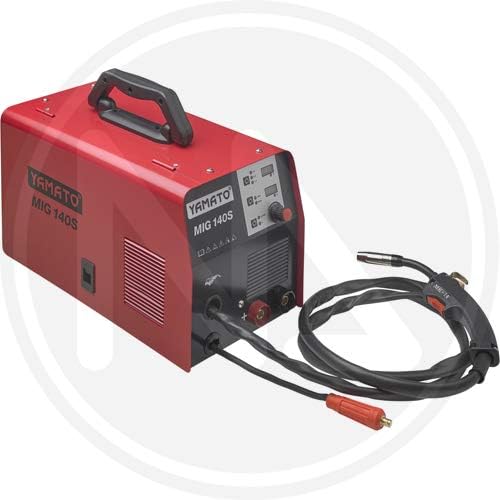
Figure 2.1: Front view of the Yamato MIG 140S Inverter Welding Machine. The red main unit features a top handle for portability, ventilation grilles on the side, and a control panel on the front. The control panel includes indicator lights and adjustment knobs. Connected to the unit are the MIG torch with its cable and a separate cable for the ground clamp.
2.1 Components and Controls
- Main Unit: The compact red housing containing the inverter power source.
- Handle: Integrated on top for easy transport.
- Control Panel: Located on the front, includes:
- Power Indicator Light: Illuminates when the machine is powered on.
- Overload Indicator Light: Illuminates if the machine overheats or is overloaded.
- Voltage/Current Adjustment Knob: Controls the welding output.
- Wire Feed Speed Adjustment Knob: Controls the speed at which the welding wire is fed.
- MIG Torch: Used to deliver welding wire, shielding gas, and welding current to the workpiece.
- Ground Clamp: Connects to the workpiece to complete the welding circuit.
- Gas Inlet: Connection point for the shielding gas cylinder (typically on the rear, not visible in image).
- Wire Feeder: Internal mechanism for feeding welding wire (accessed via a side panel, not visible in image).
3. Setup
Before operating the welding machine, ensure proper setup to guarantee safety and optimal performance.
- Placement: Place the welding machine on a stable, level surface in a well-ventilated area, away from flammable materials. Ensure adequate space around the machine for airflow.
- Power Connection: Connect the machine's power cord to a suitable electrical outlet. Verify that the power supply matches the machine's requirements (voltage and amperage).
- Ground Clamp Connection: Securely attach the ground clamp to a clean, bare metal section of the workpiece. Ensure good electrical contact.
- MIG Torch Connection: Ensure the MIG torch is properly connected to the machine's front panel.
- Shielding Gas Connection (if applicable):
- Connect the gas hose from the machine's gas inlet to a suitable shielding gas cylinder (e.g., Argon/CO2 mix for MIG, or CO2 for MAG).
- Install a gas regulator onto the cylinder and set the gas flow rate according to your welding application (typically 10-15 liters/minute).
- Welding Wire Installation:
- Open the wire feeder compartment (usually a side panel).
- Mount the welding wire spool onto the spindle, ensuring it rotates freely.
- Thread the wire through the guide tube and feed rollers. Adjust the tension on the feed rollers to prevent slipping or crushing the wire.
- Feed the wire through the torch liner until it emerges from the contact tip. Ensure the contact tip matches the wire diameter.
4. Operating Instructions
Follow these steps for safe and effective operation of your Yamato MIG 140S welding machine.
- Personal Protective Equipment (PPE): Always wear appropriate PPE, including a welding helmet, welding gloves, flame-resistant clothing, and safety shoes.
- Power On: Turn on the main power switch of the welding machine. The power indicator light should illuminate.
- Set Parameters:
- Adjust the Voltage/Current Adjustment Knob to the desired setting based on the material thickness and type of welding wire.
- Adjust the Wire Feed Speed Adjustment Knob. The wire feed speed should generally correspond to the voltage setting for a stable arc.
- Test Weld: Before welding on your actual workpiece, perform a test weld on a scrap piece of the same material to fine-tune your settings.
- Welding Technique:
- Hold the MIG torch at a consistent angle (typically 10-15 degrees from vertical in the direction of travel).
- Maintain a consistent stick-out (the length of wire extending from the contact tip).
- Press the trigger on the torch to initiate the arc and wire feed.
- Move the torch steadily along the joint, creating a consistent weld bead.
- Release the trigger to stop welding.
- Cool Down: Allow the machine to cool down after extended use. The fan will continue to run to dissipate heat.
- Power Off: Once finished, turn off the main power switch and disconnect the machine from the power supply. Close the gas cylinder valve.
5. Maintenance
Regular maintenance ensures the longevity and safe operation of your welding machine.
- Daily/Before Use:
- Inspect all cables for damage (cuts, fraying). Replace damaged cables immediately.
- Check the MIG torch nozzle and contact tip for spatter buildup. Clean or replace as necessary.
- Ensure the ground clamp makes good contact and is free of corrosion.
- Weekly/After Use:
- Clean the exterior of the machine with a dry, soft cloth.
- Use compressed air to blow out dust and debris from the ventilation grilles. Ensure power is disconnected before doing so.
- Check the wire feed rollers for wear and cleanliness. Clean any wire residue.
- Periodically:
- Inspect the torch liner for blockages or wear. Replace if wire feeding becomes inconsistent.
- Check all electrical connections for tightness.
- Storage: Store the machine in a clean, dry environment, protected from dust and moisture.
6. Troubleshooting
This section provides solutions to common issues you might encounter during operation.
| Problem | Possible Cause | Solution |
|---|---|---|
| Machine does not power on. | No power supply; faulty power cord; internal fuse blown. | Check power outlet and circuit breaker. Inspect power cord. Contact service if fuse is suspected. |
| No arc when trigger is pressed. | Poor ground connection; no welding wire; incorrect settings; faulty torch. | Ensure ground clamp is clean and secure. Check wire spool and feed. Verify voltage/current settings. Inspect torch for damage. |
| Wire feed is inconsistent or stops. | Wire spool tangled; feed roller tension incorrect; dirty/worn torch liner; wrong contact tip size. | Untangle wire. Adjust feed roller tension. Clean or replace torch liner. Ensure contact tip matches wire diameter. |
| Poor weld quality (porosity, spatter). | Insufficient shielding gas; incorrect voltage/wire speed; dirty workpiece; wrong wire type. | Check gas cylinder and flow rate. Adjust welding parameters. Clean workpiece thoroughly. Use appropriate welding wire. |
| Overload indicator light is on. | Machine overheated due to extended use or insufficient ventilation. | Stop welding and allow the machine to cool down. Ensure ventilation grilles are clear. Reduce duty cycle. |
7. Specifications
Technical specifications for the Yamato MIG 140S Inverter Welding Machine.
- Model: MIG 140S
- Manufacturer: Yamato
- Model Number: 8000071806091
- Product Dimensions (L x W x H): 29 x 13 x 24 cm (approximately 11.4 x 5.1 x 9.4 inches)
- Weight: 542.06 grams (approximately 1.2 lbs) - Note: This weight appears unusually low for a welding machine. Please verify with product packaging or official documentation.
- Power Type: Electric with cord
- Color: Red (as depicted in product images)
- ASIN: B08NP8BG5F
8. Support and Contact Information
For technical assistance, spare parts, or warranty inquiries, please contact your retailer or the manufacturer's customer service department. Keep your purchase receipt and model number handy when contacting support.
Manufacturer: Yamato
Model Number: 8000071806091
Ask a question about this manual
Ask about setup, troubleshooting, compatibility, parts, safety, or missing instructions. Manuals+ will review the question and use this page’s manual context to help answer it.