
Introduction
The JBL Xtreme 3 is a portable Bluetooth speaker designed to deliver powerful sound for various environments. It features a durable, waterproof, and dustproof design, making it suitable for both indoor and outdoor use. This manual provides essential information for setting up, operating, maintaining, and troubleshooting your speaker.
What's in the Box
- JBL Xtreme 3 Speaker
- JBL Adaptor with Power Cable + Regional Plug
- JBL Xtreme 3 Strap
- Quick Start Guide
- Warranty Card
- Safety Sheet

Image: JBL Xtreme 3 speaker, strap, and charging accessories.
Video: A user demonstrates the JBL Xtreme 3 speaker, its strap, and charger, highlighting its portability and included accessories.
Features
- Massive JBL Original Pro Sound: Four drivers and two JBL Bass Radiators deliver dynamic, immersive sound with deep bass and plenty of detail.
- 15 Hours of Playtime: Enjoy extended listening sessions with an incredible 15 hours of battery life.
- IP67 Waterproof and Dustproof: Designed to withstand water and dust, making it ideal for various environments, including pools and parks.
- Wireless Bluetooth Streaming: Connect up to two smartphones or tablets wirelessly to the speaker.
- PartyBoost: Pair two JBL PartyBoost-compatible speakers for stereo sound or link multiple compatible speakers for an enhanced audio experience.
- Built-In Powerbank: Charge your devices directly from the speaker.
- Convenient Carrying Strap: Features a carrying strap with a built-in bottle opener for easy portability.
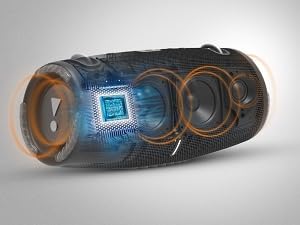
Image: Internal components of the JBL Xtreme 3, illustrating drivers and passive radiators.
Image: IP67 rating for waterproof and dustproof capabilities.
Video: A user demonstrates the JBL Xtreme 3, highlighting its powerful sound, portability with the strap, and waterproof design.
Setup
1. Power On/Off
- Press the Power button (usually indicated by a circle with a vertical line) located on the top of the speaker to turn it on or off.
2. Bluetooth Pairing
- Turn on the JBL Xtreme 3 speaker.
- Press the Bluetooth button (usually indicated by a Bluetooth symbol) on the speaker. The LED indicator will flash, indicating it's in pairing mode.
- On your smartphone or tablet, go to the Bluetooth settings and select "JBL Xtreme 3" from the list of available devices.
- Once connected, the Bluetooth LED will remain solid.
Operating Instructions
1. Volume Control
- Press the '-' button to decrease the volume.
- Press the '+' button to increase the volume.
2. Music Playback
- Press the Play/Pause button (usually indicated by a triangle) to play or pause music.
- Double-press the Play/Pause button to skip to the next track.
3. PartyBoost
- To activate PartyBoost, press the PartyBoost button (usually indicated by an infinity symbol) on all desired JBL PartyBoost-compatible speakers.
- The speakers will automatically connect and synchronize playback.
4. Power Bank Functionality
- Open the protective flap on the back of the speaker.
- Connect your device to the USB-A output port using a compatible charging cable.
- The speaker's internal battery will begin charging your device.
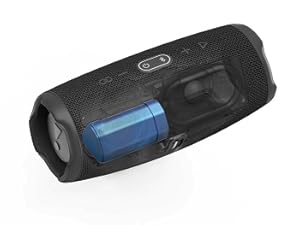
Image: Internal battery and power bank feature of the JBL Xtreme 3.
Maintenance
1. Cleaning
- Ensure the speaker is powered off and all cables are disconnected before cleaning.
- Use a soft, damp cloth to wipe the exterior of the speaker. Avoid using harsh chemicals or abrasive materials.
- For stubborn dirt, a mild soap solution can be used, followed by wiping with a clean, damp cloth.
2. Waterproof and Dustproof Care
- Always ensure the protective flap covering the charging ports is securely closed when exposing the speaker to water or dust.
- After exposure to water, gently shake the speaker to remove excess water and allow it to air dry completely before charging or using the ports.
Troubleshooting
| Issue | Possible Cause | Solution |
|---|---|---|
| Speaker does not power on | Low battery | Charge the speaker using the provided power adapter. |
| Cannot pair via Bluetooth | Speaker not in pairing mode / Device out of range | Press the Bluetooth button on the speaker. Ensure your device is within 10 meters (33 feet) of the speaker. |
| No sound or low volume | Volume too low / Device not connected | Increase volume on both the speaker and your connected device. Re-establish Bluetooth connection. |
| PartyBoost not working | Speakers not compatible / Not activated correctly | Ensure all speakers are JBL PartyBoost-compatible. Press the PartyBoost button on all speakers to activate. |
Specifications
- Brand: JBL
- Model Name: Xtreme 3
- Connectivity Technology: Bluetooth
- Speaker Maximum Output Power: 100 Watts
- Audio Output Mode: Stereo
- Speaker Type: Woofer, Tweeter
- Water Resistance Level: Waterproof (IP67)
- Battery Average Life: 15 Hours
- Battery Capacity: 5000 Milliamp Hours
- Bluetooth Range: 10 Meters
- Item Weight: 4.3 Pounds
- Item Dimensions (D x W x H): 5.28"D x 11.75"W x 5.35"H
- Control Method: Touch
- Compatible Devices: Smartphone, Tablet
- Power Source: Battery Powered
- Material: Plastic
Warranty and Support
The JBL Xtreme 3 comes with a 1-year manufacturer warranty. For technical support, warranty claims, or additional product information, please visit the official JBL support website or contact their customer service. Keep your proof of purchase for warranty validation.


