
Xtorm FS401
Xtorm 20W Fuel Series Power Bank 10.000mAh User Manual
Model: FS401
Introduction
Thank you for choosing the Xtorm 20W Fuel Series Power Bank 10.000mAh. This manual provides essential information for the safe and efficient use of your power bank. Please read it carefully before use and keep it for future reference.
The Xtorm Fuel Series Power Bank is designed to provide portable power for your mobile devices, featuring 20W power delivery, a 10,000mAh battery capacity, and multiple output ports for versatile charging.
Package Contents
Ensure all items are present in the package:
- 1x Xtorm 20W Fuel Series Power Bank 10.000mAh (Model: FS401)
- 1x USB to USB-C Cable
- 1x User Manual
Product Overview
Familiarize yourself with the components of your Xtorm Power Bank:

Image: Top-down view of the Xtorm Fuel Series Power Bank FS401, showcasing its textured grey surface and orange accent.
This image displays the overall design of the power bank, highlighting its compact and ergonomic form factor. The textured surface provides a secure grip, and the orange accent adds a touch of style.

Image: Xtorm Fuel Series Power Bank shown next to a credit card and passport, with dimensions indicated.
This image illustrates the portable travel size of the power bank, with dimensions of 136mm length, 71mm width, and 15mm thickness. It weighs 215 grams, making it easy to carry in a pocket or bag.
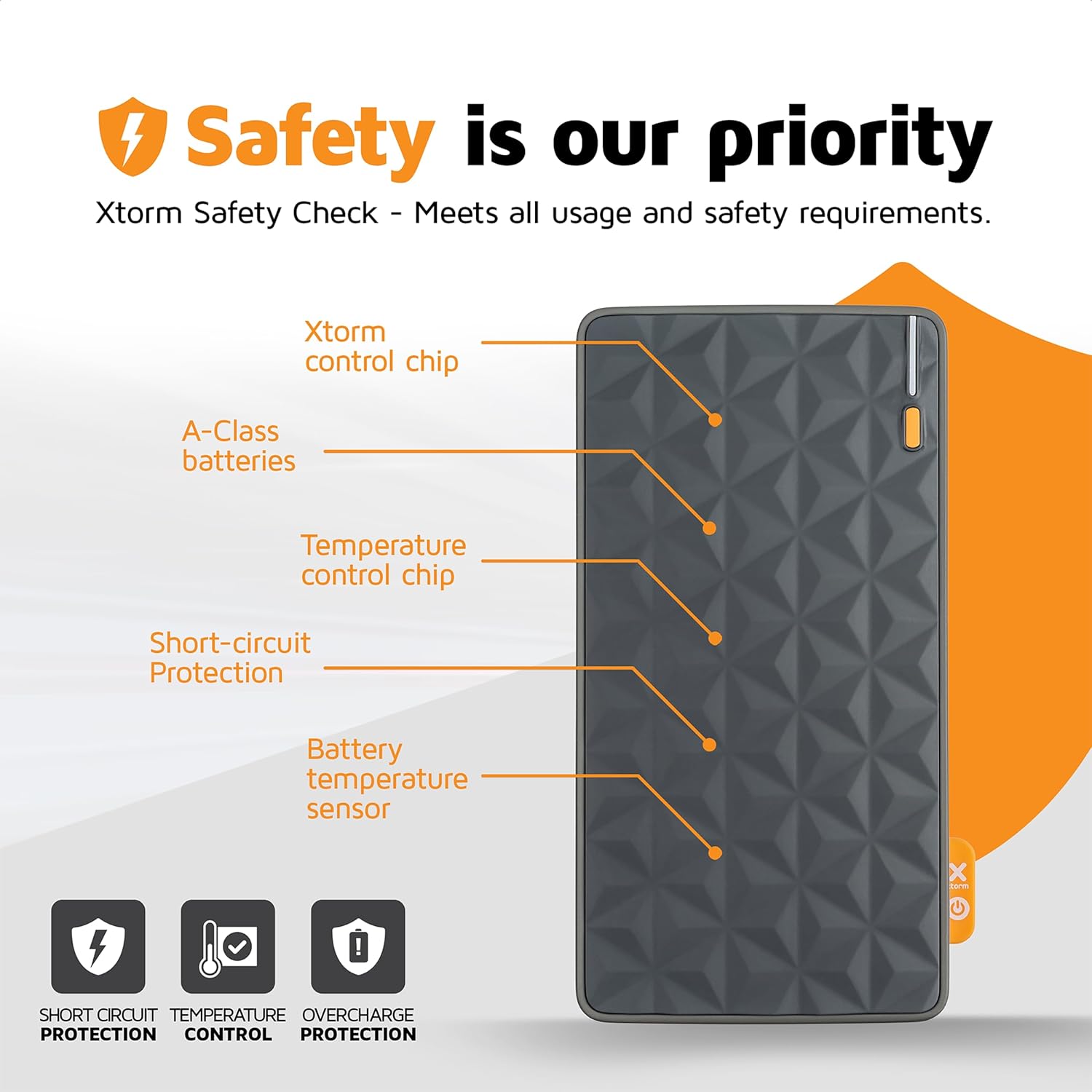
Image: Diagram highlighting the safety features of the Xtorm Fuel Series Power Bank.
This diagram points out key internal components responsible for safety, including the Xtorm control chip, A-Class batteries, temperature control chip, short-circuit protection, and battery temperature sensor. These features ensure safe and reliable operation, protecting against short circuits, temperature fluctuations, and overcharge.

Image: Xtorm Fuel Series Power Bank demonstrating universal compatibility with various devices.
This image shows the power bank's ability to charge different devices, including smartphones (Apple iPhone, Samsung Galaxy) and tablets, indicating its versatile charging capabilities with 2x Universal USB output and 1x USB-C in/output.

Image: Xtorm Fuel Series Power Bank simultaneously charging a smartphone, tablet, and wireless earbuds.
This image illustrates the power bank's capability to charge up to three devices concurrently using its multiple output ports (1x USB-C PD 20W, 2x USB Quick Charge 3.0).
Setup
Initial Charging of the Power Bank
Before first use, it is recommended to fully charge your Xtorm Power Bank.
- Connect the supplied USB to USB-C cable to the USB-C input port on the power bank.
- Connect the other end of the cable to a compatible USB wall charger (not included). For optimal charging speed, use a 20W USB-C PD adapter.
- The LED indicators on the power bank will illuminate to show the charging progress.
- The power bank is fully charged when all LED indicators are solid. A full charge takes approximately 2.5 hours with a 20W PD charger.
Note: The power bank may not be fully charged out of the box.
Operating Instructions
Charging Your Devices
The Xtorm Power Bank features one USB-C output and two standard USB outputs, allowing you to charge up to three devices simultaneously.
- Identify the correct charging cable for your device.
- Connect one end of your device's charging cable to the appropriate output port on the power bank (USB-C or USB-A).
- Connect the other end of the cable to your device.
- The power bank will automatically begin charging your device. The LED indicators will show the remaining battery level of the power bank.
USB-C Output: Provides up to 20W Power Delivery (PD) for fast charging compatible smartphones and tablets.
USB-A Outputs: Provide standard USB charging for a wide range of devices.
Checking Battery Level
The power bank is equipped with LED indicators to show its current battery level. Press the power button once to activate the indicators.
- 4 LEDs solid: 75-100% charged
- 3 LEDs solid: 50-75% charged
- 2 LEDs solid: 25-50% charged
- 1 LED solid: 0-25% charged
- 1 LED blinking: Low battery, needs recharging
Maintenance
Proper maintenance ensures the longevity and optimal performance of your power bank.
- Cleaning: Use a soft, dry cloth to clean the surface of the power bank. Do not use harsh chemicals or abrasive materials.
- Storage: Store the power bank in a cool, dry place away from direct sunlight and extreme temperatures.
- Battery Care: To prolong battery life, avoid fully discharging the power bank frequently. Recharge it when the battery level is low. If storing for extended periods, charge it to about 50-70% every 3-6 months.
- Avoid Drops: Protect the power bank from drops and impacts, which can damage internal components.
Troubleshooting
| Problem | Possible Cause | Solution |
|---|---|---|
| Power bank not charging |
|
|
| Device not charging from power bank |
|
|
| Slow charging speed |
|
|
| Power bank gets hot during use/charging |
|
|
Specifications
| Feature | Detail |
|---|---|
| Model Number | FS401 |
| Battery Capacity | 10,000mAh |
| Input (USB-C) | 20W Power Delivery (PD) |
| Output 1 (USB-C) | 20W Power Delivery (PD) |
| Output 2 (USB-A) | Standard USB Output |
| Output 3 (USB-A) | Standard USB Output |
| Dimensions | 136 x 71 x 15 mm |
| Weight | 215 grams |
| Battery Type | Lithium-Polymer |
| Color | Multicolor (Grey/Orange) |
Warranty and Support
The Xtorm 20W Fuel Series Power Bank 10.000mAh comes with a 2-year Xtorm warranty.
For warranty claims, technical support, or any questions regarding your product, please contact Xtorm customer service. Refer to the official Xtorm website for the most up-to-date contact information.
Important: Do not attempt to disassemble or repair the power bank yourself. This will void the warranty and may cause damage or injury.
Safety Information
Please read and follow these safety guidelines to prevent damage to the product or injury to yourself.
- Do not expose the power bank to extreme temperatures (hot or cold), direct sunlight, or high humidity.
- Do not use the power bank in wet environments or submerge it in water.
- Keep the power bank away from flammable materials and explosive environments.
- Do not drop, puncture, or disassemble the power bank.
- Keep out of reach of children.
- Dispose of the power bank responsibly according to local regulations for electronic waste.
- Only use original or certified charging cables and adapters.
Related documentsFS401


Ask a question about this manual
Ask about setup, troubleshooting, compatibility, parts, safety, or missing instructions. Manuals+ will review the question and use this page’s manual context to help answer it.