
1. Introduction
The Fox Mini Micron X Presentation Set offers a modern re-worked version of the classic Mini Micron Bite Alarm, now available as a combination set with a wireless receiver. This set is designed for reliable and consistent bite detection, featuring advanced technology and user-friendly controls. It comes in a durable hardcase for easy storage and transport.

Figure 1.1: The Fox Mini Micron X Presentation Set, including three bite alarms and one receiver unit, designed for comprehensive bite indication.
2. Product Features
2.1. Alarm Features
- Receiver technology for wireless communication.
- Volume control button with seven adjustable levels.
- Tone control button with four distinct settings.
- Sensitivity control button with four different settings.
- Drop back differential for distinct indication.
- Two Ø5mm High Vis Multi-coloured LEDs (Green, Blue, Red, Orange).
- Adjustable LED brightness (hold volume, press tone).
- D-Tec Sensing System/Roller wheel technology for clear, consistent bite detection.
- 2.5mm power out socket for illuminated bite indicators (e.g., Fox Illuminated Swinger).
- Low battery warning (LEDs flash red every 2 seconds).
- Cone speaker for crisp sound output.
- Rubber inlays to protect the rod and secure it during bites.
- On/off toggle switch.
- Knurled locking collar for secure attachment.
- Requires small N Type/LR1 batteries.
- Metal (Alloy) 3/8 BSF thread for rod pod/bankstick attachment.
2.2. Receiver Features
- Digital I-com circuitry for strong receiver strength.
- Low battery drain with low battery warning indication (LEDs flash red every 2 seconds).
- Multicolour LEDs with Colour Sync for easy alarm registration.
- Weatherproof sealed case.
- Cone Speaker.
- Removable Lanyard.
3. Setup
3.1. Unpacking
Carefully remove all components from the deluxe hardcase. Ensure all alarms and the receiver are present.

Figure 3.1: The Fox Mini Micron X Presentation Set neatly packed in its protective hardcase, ready for transport or storage.
3.2. Battery Installation
Both the alarms and the receiver require small N Type/LR1 batteries. Ensure correct polarity when inserting batteries.
- Locate the battery compartment on the rear of each alarm and the receiver.
- Open the compartment cover.
- Insert the N Type/LR1 batteries, observing the polarity markings (+/-).
- Securely close the battery compartment cover.
3.3. Initial Pairing (Micron Registration)
The Mini Micron X alarms and receiver are designed for easy registration. Typically, they will automatically sync when first powered on or when a new alarm is introduced to the receiver's range. If manual registration is needed, refer to the specific instructions provided with your product packaging or Fox's official support resources.

Figure 3.2: A single Fox Mini Micron X bite alarm, showcasing its compact design and controls.
4. Operating Instructions
4.1. Alarm Controls
Each Mini Micron X alarm features intuitive controls for customization:
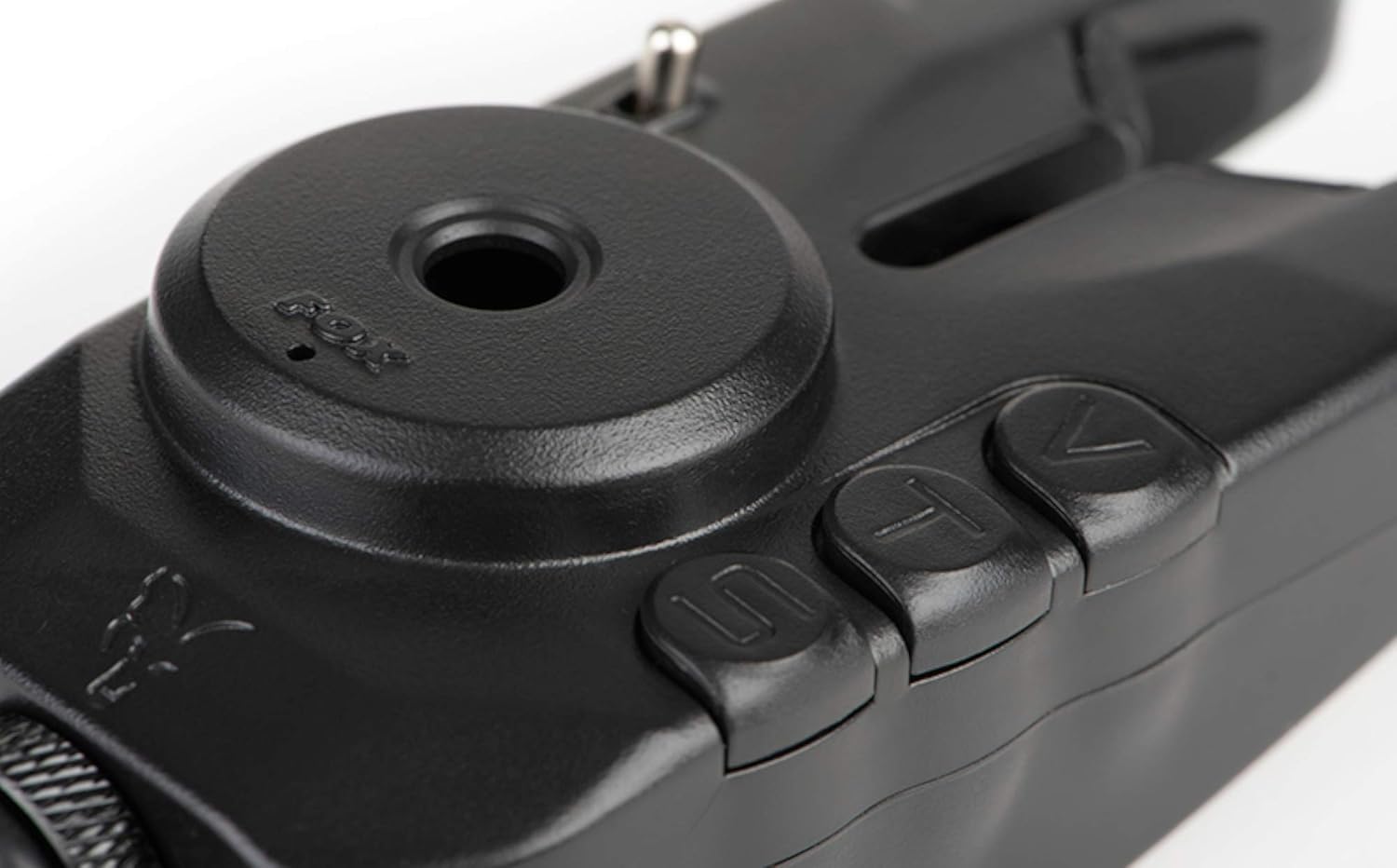
Figure 4.1: Detailed view of the volume (V), tone (T), and sensitivity (S) control buttons on the Fox Mini Micron X alarm.
- Volume (V) Button: Press to cycle through seven volume levels.
- Tone (T) Button: Press to cycle through four different tone settings.
- Sensitivity (S) Button: Press to cycle through four sensitivity levels. Higher sensitivity detects smaller line movements.
- LED Brightness Adjustment: Hold down the Volume button and then press the Tone button to adjust the brightness of the LEDs.
- LED Colour Selection: Hold down the Volume button and then press the Sensitivity button to change the LED colour (Green, Blue, Red, Orange).
- On/Off Toggle Switch: Located on the side of the alarm for easy power control.
4.2. Receiver Operation
The receiver provides remote indication of bites from your alarms.
- Volume Control: Adjust the receiver's volume to your preference.
- Multicolour LEDs: The receiver's LEDs will illuminate in sync with the corresponding alarm's colour, providing clear visual indication.
- Lanyard: Use the removable lanyard for convenient carrying.

Figure 4.2: The Fox Mini Micron X receiver unit, designed to wirelessly communicate with the bite alarms.
4.3. D-Tec Sensing System/Roller Wheel Technology
This advanced system ensures clear and consistent bite detection by accurately monitoring line movement through the roller wheel. Any rotation of the roller wheel triggers the alarm and transmits the signal to the receiver.
4.4. Power Out Socket (2.5mm)
Each alarm is equipped with a 2.5mm power out socket. This allows you to connect illuminated bite indicators, such as the Fox Illuminated Swinger, which will light up in conjunction with the alarm's activation, providing additional visual indication, especially in low light conditions.

Figure 4.3: Detail of the metal 3/8 BSF thread and knurled locking collar, ensuring secure attachment to rod pods or banksticks.
5. Maintenance
5.1. Cleaning
- Wipe the alarms and receiver with a soft, damp cloth after each use to remove dirt and debris.
- Avoid using harsh chemicals or abrasive cleaners, as these can damage the weatherproof casing and electronic components.
- Ensure the roller wheel is free from obstructions for optimal performance.
5.2. Battery Replacement
When the low battery warning activates (LEDs flash red every 2 seconds), replace the batteries promptly to ensure continued operation. Refer to Section 3.2 for battery installation steps.
5.3. Storage
- Store the Mini Micron X Presentation Set in its original hardcase when not in use to protect it from physical damage and environmental elements.
- Store in a cool, dry place, away from direct sunlight and extreme temperatures.
- For prolonged storage, it is recommended to remove the batteries from both the alarms and the receiver to prevent leakage and potential damage to the electronics.
6. Troubleshooting
6.1. Common Issues and Solutions
| Problem | Possible Cause | Solution |
|---|---|---|
| Alarm/Receiver not powering on | Dead or incorrectly inserted batteries. | Check battery polarity; replace with fresh N Type/LR1 batteries. |
| No bite detection | Low sensitivity setting; roller wheel obstructed; faulty line placement. | Increase sensitivity; clean roller wheel; ensure line is correctly seated. |
| Receiver not syncing with alarm | Out of range; interference; pairing issue. | Move closer to alarm; check for strong interference sources; attempt re-pairing if manual option is available. |
| Low battery warning persists after replacement | Incorrect battery type; faulty batteries. | Ensure N Type/LR1 batteries are used; try a different set of new batteries. |
If issues persist after attempting these solutions, please contact Fox customer support for further assistance.
7. Specifications
| Feature | Detail |
|---|---|
| Model | Mini Micron X Presentation Set |
| Colour | Black |
| Material | Metal (Alloy) |
| Thread Type | 3/8 BSF |
| LEDs | Ø5mm High Vis Multi-coloured (Green, Blue, Red, Orange) |
| Power Out Socket | 2.5mm |
| Batteries Required | N Type/LR1 (not included) |
| Package Dimensions | 25.6 x 14.6 x 6.4 cm |
| Item Weight | 580 g |
| First Available Date | 14 Nov. 2020 |
8. Warranty and Support
Fox products are manufactured to high standards and undergo rigorous quality control. For information regarding warranty coverage, terms, and conditions, please refer to the warranty card included with your product or visit the official Fox International website. In case of technical issues, product inquiries, or warranty claims, please contact Fox customer support through their official channels.
For the most up-to-date support information, please visit: www.foxint.com


