
Introduction
Thank you for choosing the FLINQ Premium Cordless Handheld Vacuum Cleaner. This manual provides important information regarding the safe operation, maintenance, and troubleshooting of your device. Please read it thoroughly before use and keep it for future reference.
This compact and powerful handheld vacuum cleaner is designed for quick and efficient cleaning of small spaces, such as car interiors, furniture, and other hard-to-reach areas. Its cordless design and lightweight construction offer maximum convenience and portability.
Package Contents
Verify that all items are present in the package:
- FLINQ Premium Cordless Handheld Vacuum Cleaner
- 2-in-1 Brush Nozzle
- USB Charging Cable
- User Manual

Image: Contents of the FLINQ handheld vacuum cleaner package, showing the main unit, a 2-in-1 brush attachment, a USB charging cable, and the user manual.
Product Overview
Familiarize yourself with the components of your FLINQ handheld vacuum cleaner.
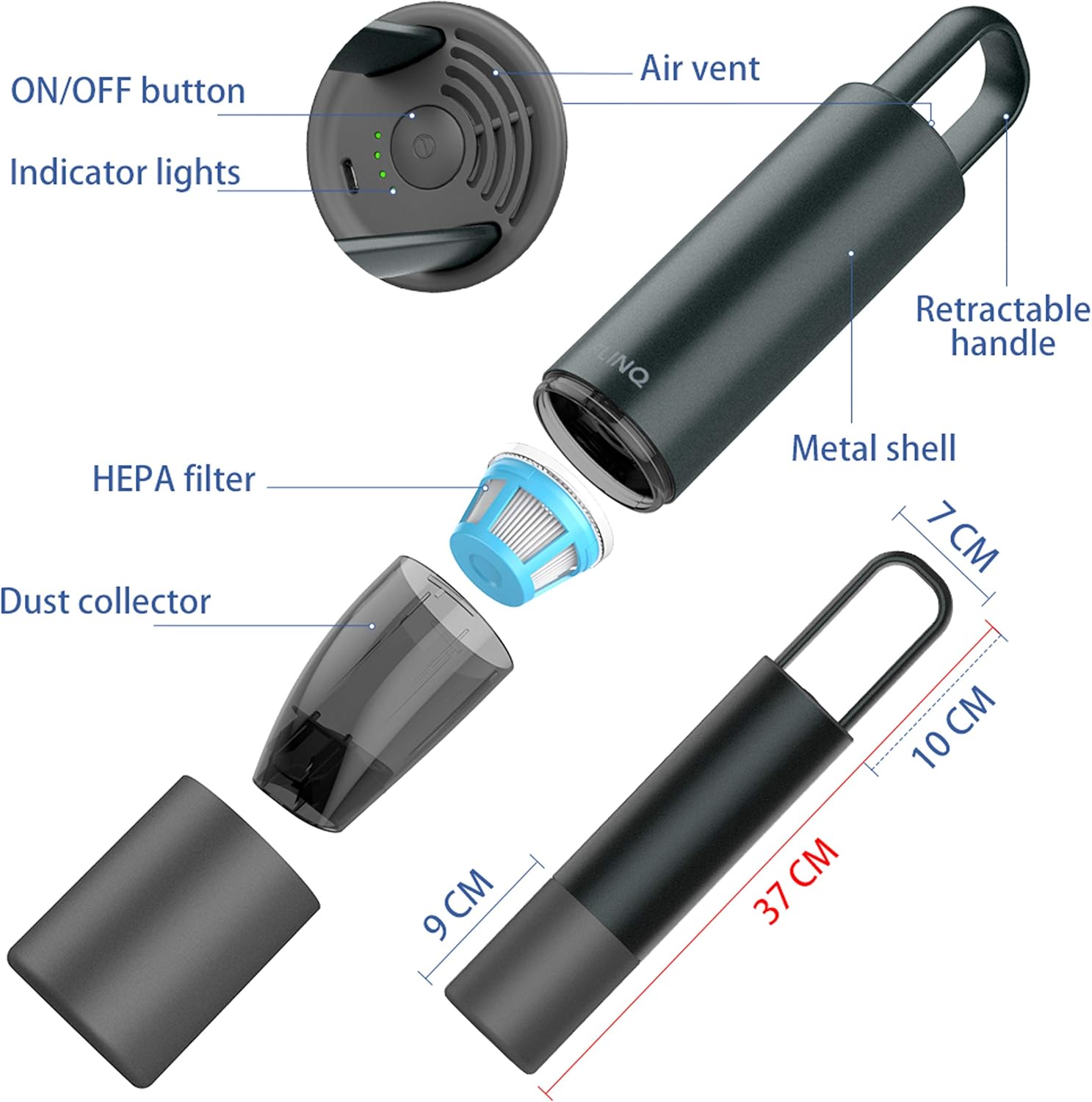
Image: An exploded diagram illustrating the various parts of the FLINQ handheld vacuum cleaner, including the ON/OFF button, LED indicator lights, air vent, retractable handle, metal casing, removable HEPA filter, and dust collector. Key dimensions are also shown.
- ON/OFF Button: Powers the device on and off.
- Indicator Lights: Display charging status and battery level.
- Air Vent: Exhausts air during operation.
- Retractable Handle: For easy carrying and storage.
- Metal Shell: Durable aluminum casing.
- HEPA Filter: Traps fine dust particles.
- Dust Collector: Collects vacuumed debris.
Setup
Charging the Battery
Before first use, fully charge the vacuum cleaner. Use the provided USB charging cable.
- Connect the USB charging cable to the charging port on the vacuum cleaner.
- Connect the other end of the USB cable to a compatible USB power adapter (not included) or a USB port.
- The indicator lights will flash slowly green during normal charging.
- Once fully charged, the indicator lights will remain solid green.

Image: A diagram showing the FLINQ handheld vacuum cleaner connected to a power source via a USB cable for charging. The indicator lights are shown, with text explaining that a slowly flashing green light indicates normal charging, and a solid green light indicates a full charge.
A full charge provides up to 18 minutes of strong suction power. Recharge using USB Quick Charge for faster charging.
Attaching the 2-in-1 Brush Nozzle
The vacuum cleaner comes with a versatile 2-in-1 brush nozzle for different cleaning needs.
- Align the nozzle with the suction opening of the vacuum cleaner.
- Push firmly until it clicks into place.
- To switch between brush and crevice tool, slide the brush part forward or backward on the nozzle.

Image: The FLINQ handheld vacuum cleaner shown alongside its 2-in-1 brush attachment, ready for assembly.
Operating Instructions
Powering On/Off
Press the ON/OFF button located on the top of the vacuum cleaner to turn it on. Press it again to turn it off.
Vacuuming
Use the appropriate nozzle for your cleaning task:
- Crevice Tool: Ideal for narrow gaps, corners, and hard-to-reach areas in your car or home.
- Brush Attachment: Suitable for upholstery, car seats, dashboards, and surfaces requiring gentle cleaning or to dislodge stubborn dirt like pet hair and crumbs.
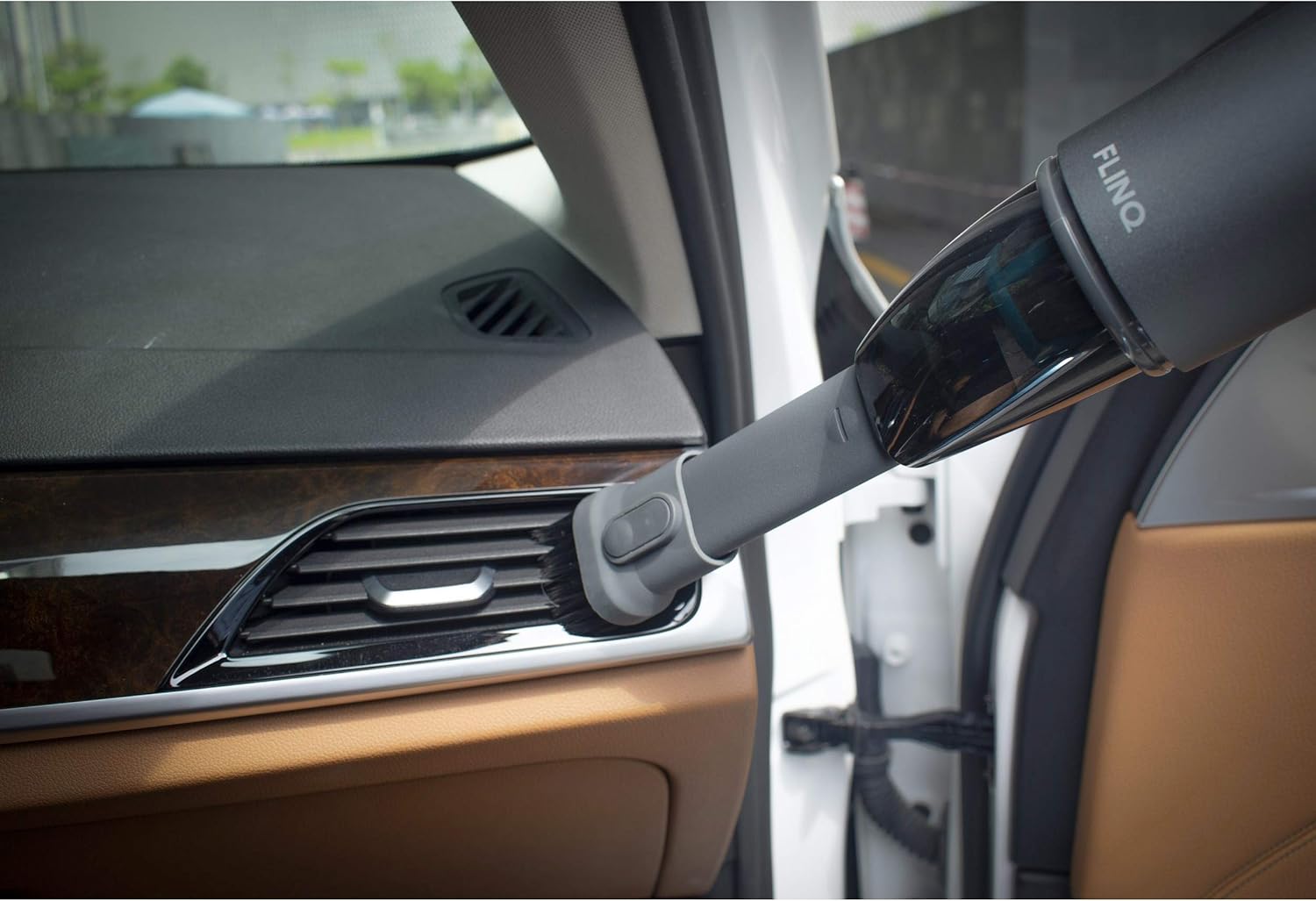
Image: The FLINQ handheld vacuum cleaner with the brush attachment actively cleaning a car's air vent, demonstrating its use for detailed interior cleaning.
The vacuum provides a strong suction power of 5 to 6 kPa, effective for various dry debris.
Maintenance
Emptying the Dust Collector
Empty the dust collector regularly to maintain optimal suction performance. The dust capacity is 100 milliliters.
- Ensure the vacuum cleaner is turned off.
- Twist and detach the dust collector from the main body of the vacuum cleaner.
- Empty the collected debris into a waste bin.
- Reattach the dust collector by twisting it back onto the main body until secure.
Cleaning the HEPA Filter
The HEPA filter should be cleaned periodically to ensure efficient filtration and suction.
- After detaching the dust collector, carefully remove the HEPA filter.
- Tap the filter gently to dislodge dust and debris.
- If necessary, rinse the filter under running water. Ensure it is completely dry before reinserting it into the vacuum cleaner. Do not use the vacuum cleaner with a wet filter.
- Reinsert the clean, dry HEPA filter into the dust collector, then reattach the dust collector to the vacuum cleaner.
Troubleshooting
| Problem | Possible Cause | Solution |
|---|---|---|
| Vacuum does not turn on. | Battery is depleted. | Charge the vacuum cleaner fully. |
| Weak suction power. | Dust collector is full. | Empty the dust collector. |
| Weak suction power. | HEPA filter is clogged. | Clean or replace the HEPA filter. |
| Weak suction power. | Nozzle or suction opening is blocked. | Check and clear any blockages in the nozzle or suction path. |
| Charging indicator lights not working. | Charging cable or adapter faulty. | Ensure the USB cable is properly connected. Try a different USB power adapter or port. |
Specifications
| Brand | FLINQ |
| Model | Premium Cordless Handheld Vacuum Cleaner |
| Color | Grey |
| Dimensions (L x W x H) | 36 x 12 x 7 cm |
| Weight | 900 g |
| Dust Collector Capacity | 100 Milliliters |
| Power/Wattage | 120 Watts |
| Voltage | 220 Volts |
| Battery Type | Li-ion (6000 PA) |
| Runtime | Up to 18 minutes |
| Filter Type | HEPA Filter |
| Special Features | Portable, Cordless |
| Included Components | 2-in-1 Brush Nozzle, USB Charging Cable |
Safety Information
- Do not use the vacuum cleaner to pick up liquids, hot ashes, burning cigarettes, or sharp objects.
- Keep the vacuum cleaner away from water and high humidity.
- Do not operate the vacuum cleaner if it is damaged or malfunctioning.
- Keep hair, loose clothing, fingers, and all body parts away from openings and moving parts.
- Use only the provided USB charging cable.
- This appliance is not intended for use by persons (including children) with reduced physical, sensory or mental capabilities, or lack of experience and knowledge, unless they have been given supervision or instruction concerning use of the appliance by a person responsible for their safety.
Warranty and Support
For warranty information or technical support, please refer to the contact details provided on the product packaging or the official FLINQ website. Keep your purchase receipt as proof of purchase.


